- Installs
- 1.41K
- Measured
- Rating
- —
- Ratings
- —
- Version
- Varies with device
- Updated 5 Nov 2025
- Released
- 20 Nov 2023
- Tracked since 12 May 2026
- Size
- —
Screenshots
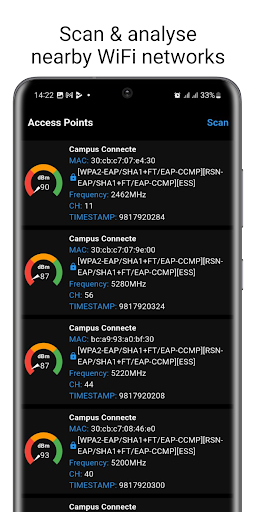

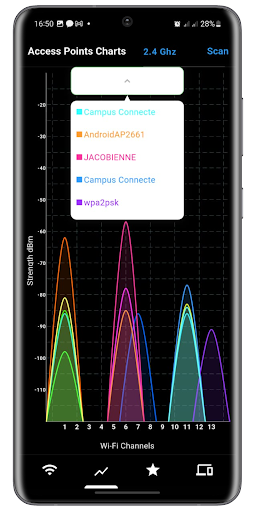


About Wi-Fi Analyzer
The description on the store listing
Unleash the Power of Your Wi-Fi with DrWiFi: Your Ultimate Android Network Guru
Tired of sluggish internet, dropped connections, and battling for bandwidth with countless neighbors? Say goodbye to frustrating Wi-Fi woes and hello to DrWiFi, the all-in-one Android app that empowers you to become the master of your wireless domain.
DrWiFi is more than just a glorified scanner; it's your personal Wi-Fi diagnostician and optimization consultant. With a plethora of powerful features, it gives you a bird's-eye view of the wireless landscape surrounding you, illuminating hidden secrets and empowering informed decisions.
1. Deep Dive into Nearby Networks:
Scan the airwaves: DrWiFi's …
Read the full description
Unleash the Power of Your Wi-Fi with DrWiFi: Your Ultimate Android Network Guru Tired of sluggish internet, dropped connections, and battling for bandwidth with countless neighbors? Say goodbye to frustrating Wi-Fi woes and hello to DrWiFi, the all-in-one Android app that empowers you to become the master of your wireless domain. DrWiFi is more than just a glorified scanner; it's your personal Wi-Fi diagnostician and optimization consultant. With a plethora of powerful features, it gives you a bird's-eye view of the wireless landscape surrounding you, illuminating hidden secrets and empowering informed decisions. 1. Deep Dive into Nearby Networks: Scan the airwaves: DrWiFi's advanced scanner meticulously hunts down every available Wi-Fi network, painting a complete picture of the wireless ecosystem around you. Say goodbye to blind spots and hidden networks! Unmask every access point: Dive deeper than just SSIDs! DrWiFi unveils the technical details of each network, including security protocols, MAC addresses, channel utilization, and even estimated signal strength. Channel Conflict? No Problem: Visualize the Wi-Fi battlefield with stunning channel graphs. See which networks are hogging prime channels and causing interference, enabling you to identify the sweet spot for your own network. 2. Signal Strength: From Bars to Beautiful Charts: Forget the vague bars: DrWiFi replaces them with precise decibel (dBm) readings, giving you a nuanced understanding of your signal strength. Strength in Numbers: Witness your signal's journey through a dynamic graph, plotting strength fluctuations over time. Identify dead zones and optimize AP placement for seamless coverage. See it All at Once: A convenient signal meter keeps you constantly informed about your current connection strength, letting you know instantly if you're roaming into trouble. 3. Channel Rating: Choose the Winning Frequency: Cut through the clutter: DrWiFi analyzes channel congestion and interference, assigning each channel a smart rating based on its performance potential. No More Guessing: Stop the channel-hopping frenzy! DrWiFi recommends the optimal channel for your network, ensuring maximum speed and stability. Future-proof your Network: Get insights into upcoming changes with channel utilization forecasts. Make informed decisions about switching channels ahead of time, staying ahead of the Wi-Fi curve. 4. Secure Your Domain: Know Who's On Your Network: Who's lurking in the shadows? DrWiFi scans your connected devices, revealing their IP addresses, MAC addresses, and even manufacturer names. Kick Unwanted Guests: Easily identify and disconnect unauthorized devices from your network, safeguarding your bandwidth and security. Peace of Mind, Guaranteed: Monitor your network health with real-time notifications for new device connections, keeping you in the loop about any potential intruders. 5. A Toolbox for Tech Mavens: Ping it Like You Mean It: Diagnose network speed and latency issues with precise ping testing. Identify bottlenecks and optimize your connection for smooth sailing. Speed Test Nirvana: Get a clear picture of your actual download and upload speeds with an integrated speed test. No more relying on ISP promises, know your true internet potential! Dive Deeper with Advanced Settings: Unravel the mysteries of your network with expert-level settings for network masks, subnet IDs, and more. Take complete control for the ultimate power user experience. DrWiFi: It's not just an app, it's your personal Wi-Fi guru, empowering you to optimize your connection, troubleshoot problems, and secure your network. Download it today and unleash the full potential of your wireless world!
Installs since 16 Nov 2026 Measured
Exact Google Play install counts, collected daily
Daily history starts once this app is in our daily install sample.
Ratings
- 5 ★0.0%
- 4 ★0.0%
- 3 ★0.0%
- 2 ★0.0%
- 1 ★0.0%
Recent reviews
Latest public reviews from the store
- 9 Sep 2025
smooth
Top chart positions
Latest Google Play chart ranks by country, last 10 days
Not in any tracked top chart in the last 10 days.
Wi-Fi Analyzer history
Release, install milestones, listing and store changes
- Reached 1,000+ installs 5 Nov 2025
- Reached 500+ installs 21 Jan 2024
- Reached 100+ installs 10 Dec 2023
- Reached 50+ installs 27 Nov 2023
- First released on the store 20 Nov 2023
Update frequency
How often Wi-Fi Analyzer ships a new version, month by month
0 updates in the last 12 months. Less often than most similar apps: they shipped a median of 1 updates in the same year.
Recent versions
Current version Varies with device
- Version 2.0.419 Jan 2024
- Version 2.0.07 Dec 2023
Listing keywords
Words and phrases Wi-Fi Analyzer repeats most in its store listing
Top phrases: wi fi (8), signal strength (3), optimize your connection (2), personal wi fi (2), channel utilization (2).
Highlighted words also appear in the title. Counts cover the title, short description and description.
Business model and tech
From the store listing and declared permissions
- Business model
- Free to download
- Sensitive access
- Location
8 permissions
0 special access, 2 sensitive, 6 standard
- Approximate locationSensitive
- Precise locationSensitive
- Run a foreground serviceFOREGROUND_SERVICEStandard
- Connect to and disconnect from Wi-FiStandard
- Full internet accessStandard
- See network connectionsStandard
- See Wi-Fi connectionsStandard
- Internal app permissionDYNAMIC_RECEIVER_NOT_EXPORTED_PERMISSIONStandard
Compliance
What the listing and the app package show
- Store status
- Live
- Upkeep
- Updated 5 Nov 2025
- Privacy policy
- Linked on the listing
- Advertising
- No ads declared
- In-app purchases
- None declared
- Age rating
- Everyone
- Sensitive permissions
- 2 sensitive of 8
- Location access
- Yes, while in use
- Camera and microphone
- Neither
Apps like Wi-Fi Analyzer
Great Clips ConnectGreat Clips19.3K installs★ 4.0
My NotebookArabic alphabet studio14.4K installs★ 5.0
ELECTRICAL CONTRACTOR MagazineELECTRICAL CONTRACTOR Magazine17.2K installs★ 4.5
TicketManagerTicketManager12.2K installs★ 3.5
CrewConneXTA Connections15.1K installs★ 1.32
Unique Business WayPARAM COMPUTER3.3K installs★ 5.0
VeriTread CarrierVeriTread LLC12.5K installs★ 4.31
WealthParkWealthPark株式会社46.8K installs★ 3.6
CloudstreamWorkstream Automation Ltd72.5K installs★ 2.0
Wi-Fi Analyzer: questions and answers
How many downloads does Wi-Fi Analyzer have?
Wi-Fi Analyzer has 1,406 installs on Google Play, measured from the store's own count on 16 Nov 2026.
Who makes Wi-Fi Analyzer?
Wi-Fi Analyzer is published by Creadv.
When was Wi-Fi Analyzer last updated?
The latest version (Varies with device) was released on 5 Nov 2025.
Is Wi-Fi Analyzer free?
Yes. Wi-Fi Analyzer is free to download.
Is Wi-Fi Analyzer still available?
Yes. Wi-Fi Analyzer is live on Google Play as of 16 Nov 2026.
Track Wi-Fi Analyzer and its competitors
Watch any app for new versions, rating drops, chart moves and removals. Free plan, no card.