WiFi FTP Server
Carry a FTP server in your pocket and avoid USB cables for file transfer
- Installs
- 10.58M
- Measured
- Rating
- 4.27
- Ratings
- 31.3K
- 679 reviews
- Version
- 2.4.1
- Updated 28 Oct 2026
- Released
- 29 Jun 2014
- Tracked since 13 May 2026
- Size
- 3 MB
- Needs 4.1
Screenshots



About WiFi FTP Server
The description on the store listing
****
On Android 5.0 & higher, to access external SD card, in app settings, click mount folder, select "custom" and then select the external SD card in the next screen.
https://www.youtube.com/watch?v=Xaqc11qq-Uw
****
Convert your android phone/tablet into a FTP Server! Use this free app to host your own FTP Server on your phone/tablet. Use the FTP Server to transfer files, photos, movies, songs etc...to/from your android device using a FTP client like FileZilla.
Key features:
★Complete FTP server with configurable port number
★Supports FTP over TLS/SSL (FTPS)
★Configurable anonymous access
★Configurable home folder (mount point)
★Configurable user-name/password
★Avoid using …
Read the full description
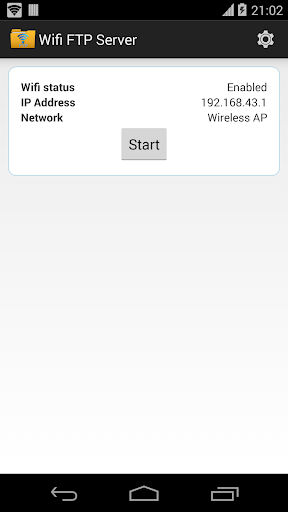
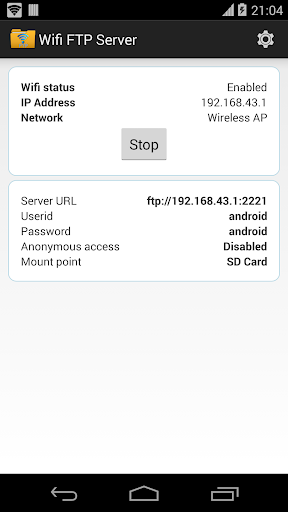
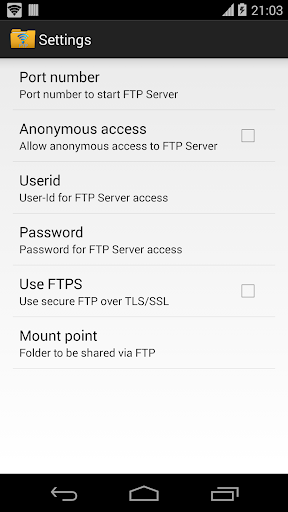
**** On Android 5.0 & higher, to access external SD card, in app settings, click mount folder, select "custom" and then select the external SD card in the next screen. https://www.youtube.com/watch?v=Xaqc11qq-Uw **** Convert your android phone/tablet into a FTP Server! Use this free app to host your own FTP Server on your phone/tablet. Use the FTP Server to transfer files, photos, movies, songs etc...to/from your android device using a FTP client like FileZilla. Key features: ★Complete FTP server with configurable port number ★Supports FTP over TLS/SSL (FTPS) ★Configurable anonymous access ★Configurable home folder (mount point) ★Configurable user-name/password ★Avoid using USB cables for file transfer and copy/backup files over Wifi ★Works over Wifi and Wifi tethering mode (hotspot mode) Steps to use the app: 1. Connect to WiFi network and open app. 2. Click the start button 3. Key in the server URL in a FTP client or windows explorer and transfer files Like this app? Try our <a href="http://play.google.com/store/apps/details?id=com.medhaapps.wififtpserver.pro">ad-free version</a>: http://play.google.com/store/apps/details?id=com.medhaapps.wififtpserver.pro SFTP support will be added soon Please email feedback/bugs to the support email-id. If you want to use FTPS (FTP over TLS/SSL), please note that the server URL would be ftps:// and not ftp:// Please note that FTPS and SFTP are not the same. SFTP is not supported by this app. Port number should be greater than 1024 as binding to ports like 21 will not be possible on non-rooted phones. The default port number is configured to 2221 and can be changed from settings screen. For security reasons, anonymous access is not enabled by default. It can be enabled from settings screen. If you dont have a FTP client, you could download Filezilla from https://filezilla-project.org/download.php?type=client You can also access the ftp server from windows file explorer. Follow us on twitter: https://twitter.com/medhaapps
Installs, last 30 days Measured
Exact Google Play install counts, collected daily
Ratings
31,303 ratings, 679 reviews
- 5 ★77%
- 4 ★3.4%
- 3 ★4.1%
- 2 ★3.4%
- 1 ★12%
Recent reviews
Latest public reviews from the store
No reviews in our sample for this app yet.
Top chart positions
Latest Google Play chart ranks by country, last 10 days
Not in any tracked top chart in the last 10 days.
WiFi FTP Server history
Release, install milestones, listing and store changes
- Reached 5,000,000+ installs 27 May 2024
- Reached 1,000,000+ installs 13 Apr 2020
- Reached 500,000+ installs 9 Dec 2018
- First released on the store 29 Jun 2014
Update frequency
How often WiFi FTP Server ships a new version, month by month
8 updates in the last 12 months. More often than most similar apps: they shipped a median of 3 updates in the same year.
Recent versions
Current version 2.4.1
- Version 2.4.36 Jan 2026
Minor issue fixes
- Version 2.4.229 Dec 2025
- Version 2.4.124 Dec 2025
Fix display issues on Android 16 tablets, added contact developer option
- Version 2.4.023 Dec 2025
Listing keywords
Words and phrases WiFi FTP Server repeats most in its store listing
Top phrases: ftp server (7), ftp client (3), port number (3), cables for file (2), external sd card (2).
Highlighted words also appear in the title. Counts cover the title, short description and description.
Business model and tech
From the store listing, the SDKs in the app package and its declared permissions
- Business model
- Free to downloadShows ads
- Built with
- No cross-platform framework or game engine detected
- Ad networks (1)
- AdMob
- Analytics and crash reports
- Firebase
- Sensitive access
- LocationPhotos, videos and filesAdvertising ID
2 ad, attribution and analytics SDKs detected. SDKs are read from the app package and permissions from the store listing, so code that loads later is not seen.
Technology
17 SDKs found in the app package
Ad networks
Advertising and install-attribution SDKs found in the app package
- AdMob
16 permissions
1 special access, 4 sensitive, 11 standard
- Manage all filesMANAGE_EXTERNAL_STORAGESpecial access
- Change or delete shared storageSensitive
- Read shared storageSensitive
- Precise locationSensitive
- Show notificationsPOST_NOTIFICATIONSSensitive
- Ad attribution (Privacy Sandbox)ACCESS_ADSERVICES_ATTRIBUTIONStandard
- Ad topics (Privacy Sandbox)ACCESS_ADSERVICES_TOPICSStandard
- Read the advertising IDAD_IDStandard
- Read the advertising ID (Privacy Sandbox)ACCESS_ADSERVICES_AD_IDStandard
- Foreground service (data sync)FOREGROUND_SERVICE_DATA_SYNCStandard
- Keep the phone awakeStandard
- Run a foreground serviceFOREGROUND_SERVICEStandard
Compliance
What the listing and the app package show
- Store status
- Live
- Upkeep
- Updated 28 Oct 2026
- Privacy policy
- Linked on the listing
- Advertising
- Shows ads
- In-app purchases
- None declared
- Age rating
- Everyone
- Sensitive permissions
- 4 sensitive, 1 special access of 16
- Location access
- Yes, while in use
- Camera and microphone
- Neither
Apps like WiFi FTP Server
Synology Secure SignInSynology Inc.1.1M installs★ 4.64
Router ChefMohRaouf4.4M installs★ 3.83
Call Voice ChangerTechs Solution1.1M installs★ 4.16
UltData: Photo & Data RecoveryTENORSHARE8.7M installs★ 3.48
MicroscopeCiberdroix Soft8.4M installs★ 4.06
Unfollowers & FollowersSave Share Unfollow1.3M installs★ 4.23
My SingtelSingtel Idea Factory Pte Ltd8.9M installs★ 2.7
GlassWire Data Usage MonitorDomotz Inc3.7M installs★ 4.13
MirrorApp2U2.7M installs★ 4.66
WiFi FTP Server: questions and answers
How many downloads does WiFi FTP Server have?
WiFi FTP Server has 10,584,780 installs on Google Play, measured from the store's own count on 20 Nov 2026.
Who makes WiFi FTP Server?
WiFi FTP Server is published by Medha Apps.
When was WiFi FTP Server last updated?
The latest version (2.4.1) was released on 28 Oct 2026.
Is WiFi FTP Server free?
Yes. WiFi FTP Server is free to download, and it shows ads.
Is WiFi FTP Server still available?
Yes. WiFi FTP Server is live on Google Play as of 20 Nov 2026.
Track WiFi FTP Server and its competitors
Watch any app for new versions, rating drops, chart moves and removals. Free plan, no card.