
WiFi Speed Test
Speed Test & WiFi Analyzer. Test and meter your net and WiFi speed.
- Installs
- 478K
- Measured
- Rating
- 4.25
- Ratings
- 12.1K
- 298 reviews
- Version
- 2.10.2
- Updated 28 Oct 2026
- Released
- 25 Mar 2022
- Tracked since 14 May 2026
- Size
- —
Screenshots
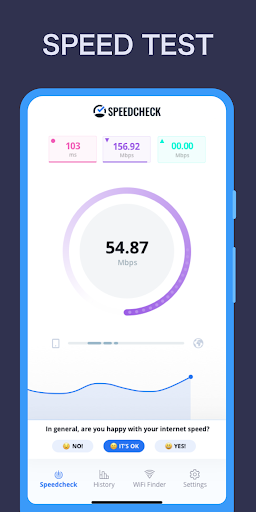

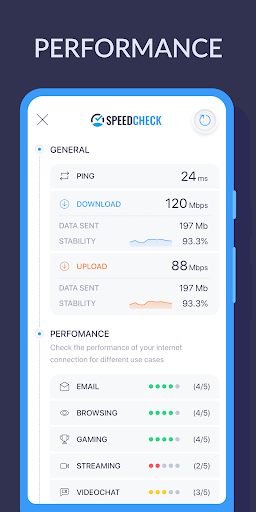

About WiFi Speed Test
The description on the store listing
Use <b>Speedcheck - Internet Speed Test</b> to quickly check your internet connection and measure your internet performance. The most accurate internet test, trusted by millions of users on Android, the web and iOS.
<b>Independent</b>
Trusted by millions of users, we are not affiliated with any internet service provider, making us the ideal tool to check your internet connection without bias. Our export tools allow you to use the test results to hold your internet provider accountable.
<b>Accurate Everywhere in the World</b>
Our internet speed test is reliable everywhere worldwide due to a testing network of high-performance 10Gbps servers. This allows fast and accurate speed …
Read the full description
Use <b>Speedcheck - Internet Speed Test</b> to quickly check your internet connection and measure your internet performance. The most accurate internet test, trusted by millions of users on Android, the web and iOS. <b>Independent</b> Trusted by millions of users, we are not affiliated with any internet service provider, making us the ideal tool to check your internet connection without bias. Our export tools allow you to use the test results to hold your internet provider accountable. <b>Accurate Everywhere in the World</b> Our internet speed test is reliable everywhere worldwide due to a testing network of high-performance 10Gbps servers. This allows fast and accurate speed readings even for the fastest internet connections. Unlike other speed test apps, we are ready for 5G speed tests. <b>Scheduled Speed Tests</b> The automatic check feature even gives you the ability to schedule periodic speed tests to monitor your internet connection and speed continually. <b>Works with Any Type of Connection</b> Speedcheck can be used either as an internet speed meter for your cellular connections ( 5G, LTE, 4G, 3G) or a wifi analyzer to perform a wifi speed test for wifi hotspots. Performing an internet speed test works on 4G, 5G, DSL, ADSL, Fiber or Broadband. Even satellite connections like Starlink work, really any internet connection you can imagine we can test. <b>Advanced Tools when Measuring WiFi Networks</b> If you activate advanced Wi-Fi statistics, the app measures the actual Wi-Fi connection speed in your network. With this, you can check if your WiFi or your internet connection is limiting your internet experience. <b>Diagnose your Network</b> Our advanced tools can help you find the optimal location to place Wi-Fi routers or remove common connection issues. If you experience problems with your internet, our team is also always there to help. Just send us an email. <b>New to Internet Speed Testing? - We have you Covered</b> Even though our speed test is easy to run, simply measuring speed isn't that helpful if you don't know what the results are telling you. To make your internet speed results easier to understand, we give you a simple overview of how important internet services like email, web surfing, gaming, video streaming or chatting will perform for you. <b>Feature Overview</b> * Test your download and upload speed and latency (ping) * 5G and LTE speed test: Check the speed of your mobile carrier, even the fastest connections * WiFi speed test: Analyze the internet speed of your WiFi hotspot, your net, and ISP * Schedule automatic checks to monitor your connection over time. For example, if you are experiencing issues around a certain time of day, you can schedule a speed check to run multiple tests during this particular time window. * Check and verify if your internet service provider is delivering on its service promise * Keep track of all your past speed tests and measurements with an intuitive test history along with detailed overviews for every test taken. * We make it easy for you to share your tests with your friends and followers on social media with a custom image for each speed test If you made it this far, here is a treat for you. You can remove all ads for free forever by going to Settings > Remove Ads > Tap 7x on the picture. Download this free Speedcheck app for the best, easiest and most reliable way to run an internet speed test and monitor network connection quality and performance for all your internet connections. If you experience any issues, have questions or suggestions, we are happy to help. Just send us an email to [email protected]
Installs, last 30 days Measured
Exact Google Play install counts, collected daily
Ratings
12,108 ratings, 298 reviews
- 5 ★69%
- 4 ★13%
- 3 ★4.8%
- 2 ★3.3%
- 1 ★9.6%
Recent reviews
Latest public reviews from the store
- 8 Sep 2025
It's a really good app for cubing but there's just one problem. And that is you can't type in your time if you're using a timer. Wish you can add that feature!
- 28 Aug 2025
It is perfect for cubing and I got a new record of 24
- 7 Apr 2025
Nice but make inspection toggle-able
- 28 Feb 2025
Good my best is 11s I guess I can't beat the world record it slow
What reviewers bring up
Topics mentioned in the latest 12 reviews, by how many reviews mention them
Liked in good reviews (8 reviews)
- cubing 3
- record 2
- add 2
Raised in bad reviews (4 reviews)
- timer 2
Top chart positions
Latest Google Play chart ranks by country, last 10 days
Not in any tracked top chart in the last 10 days.
WiFi Speed Test history
Release, install milestones, listing and store changes
- Reached 100,000+ installs 22 Jun 2022
- Reached 50,000+ installs 8 Jun 2022
- Reached 10,000+ installs 25 May 2022
- Reached 5,000+ installs 23 May 2022
- First released on the store 25 Mar 2022
Update frequency
How often WiFi Speed Test ships a new version, month by month
6 updates in the last 12 months. More often than most similar apps: they shipped a median of 2 updates in the same year.
Recent versions
Current version 2.10.2
- Version 2.10.228 Oct 2026
This is a completely reworked version of Speedcheck. If you encounter any issues (even minor) please let us know so we can fix them as soon as possible. You can contact us at [email protected] Thank you! Changes: [fix] App no longer edge to edge
- Version 2.4.427 Mar 2026
This is a completely reworked version of Speedcheck. If you encounter any issues (even minor) please let us know so we can fix them as soon as possible. You can contact us at [email protected] Thank you! Changes: [fix] App no longer edge to edge
- Version 2.4.29 Mar 2026
- Version 2.4.125 Feb 2026
Listing keywords
Words and phrases WiFi Speed Test repeats most in its store listing
Top phrases: speed test (12), internet speed (8), internet connection (5), internet speed test (4), speed tests (4).
Highlighted words also appear in the title. Counts cover the title, short description and description.
Business model and tech
From the store listing and declared permissions
- Business model
- Free to downloadIn-app purchasesShows ads
- Sensitive access
- No sensitive permission declared
Compliance
What the listing and the app package show
- Store status
- Live
- Upkeep
- Updated 28 Oct 2026
- Registered in
- United States
- Privacy policy
- Linked on the listing
- Advertising
- Shows ads
- In-app purchases
- Offered
- Age rating
- Everyone
Apps like WiFi Speed Test
Dish Install, Pointer & AlignInfoSofty251.5M installs★ 4.16
Tree Capitator ModMaps Mods Addons1M installs★ 3.46
智生活智生活科技股份有限公司1.3M installs★ 3.29
5G 4G FORCE LTE MODERK AppZia4.1M installs★ 3.84
USB OTG CHECKERbubble shooter game2.2M installs★ 4.38
ALFAISAL vpnALFAISALVPN2.1M installs★ 3.45
Simple Auto ClickerXIAOYANG3.7M installs★ 4.04
zFont Tool - Android Font ToolKhun Htetz Naing9.3M installs★ 3.04
Carrier Air ConditionerCentury Carrier Residential Air-conditioning1.9M installs★ 4.52
WiFi Speed Test: questions and answers
How many downloads does WiFi Speed Test have?
WiFi Speed Test has 478,441 installs on Google Play, measured from the store's own count on 20 Nov 2026.
Who makes WiFi Speed Test?
WiFi Speed Test is published by Ookla, a developer based in US.
When was WiFi Speed Test last updated?
The latest version (2.10.2) was released on 28 Oct 2026.
Is WiFi Speed Test free?
Yes. WiFi Speed Test is free to download and offers in-app purchases, and it shows ads.
Is WiFi Speed Test still available?
Yes. WiFi Speed Test is live on Google Play as of 20 Nov 2026.
Track WiFi Speed Test and its competitors
Watch any app for new versions, rating drops, chart moves and removals. Free plan, no card.