
Win XP Simulator
Travel back to 2001 and experience what it's like to own a Windows XP computer.
- Installs
- 666K
- Measured
- Rating
- 3.19
- Ratings
- 5.3K
- 273 reviews
- Version
- 28
- Updated 8 May 2026
- Released
- 18 Feb 2017
- Tracked since 11 May 2026
- Size
- 20 MB
- Needs 4.1
Screenshots




About Win XP Simulator
The description on the store listing
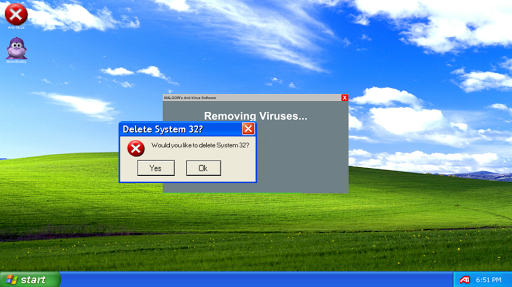
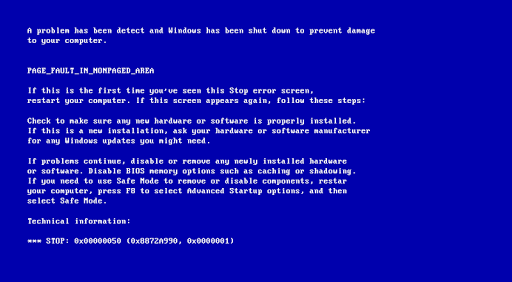
Click the "Yes" or "Ok" button to stop the simulation, you will be greeted with the Blue Screen of Death!
For more help and information, visit: http://malgow.net/WindowsXPSimulator
or, talk to me on discord!: https://discord.com/invite/gdu7dZk
"Feel as if you're using a Windows XP computer with this realistic simulator!" - MALGOW
jk
<h1><b>How To Play:</b></h1>
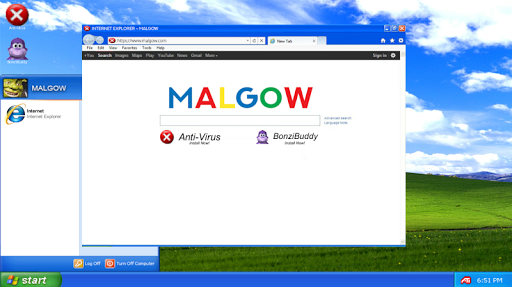
<b>Opening Internet Explorer</b>
STEP 1: Click on the "Start Menu"
STEP 2: Click on "Internet Explorer"
STEP 3: Wait 20 Seconds for Internet Explorer to fully load up
IMPORTANT*: Do not close the start menu during this process!
STEP 4: Internet Explorer will have now opened, you can install your apps from here
STEP …
Read the full description
Click the "Yes" or "Ok" button to stop the simulation, you will be greeted with the Blue Screen of Death! For more help and information, visit: http://malgow.net/WindowsXPSimulator or, talk to me on discord!: https://discord.com/invite/gdu7dZk "Feel as if you're using a Windows XP computer with this realistic simulator!" - MALGOW jk <h1><b>How To Play:</b></h1> <b>Opening Internet Explorer</b> STEP 1: Click on the "Start Menu" STEP 2: Click on "Internet Explorer" STEP 3: Wait 20 Seconds for Internet Explorer to fully load up IMPORTANT*: Do not close the start menu during this process! STEP 4: Internet Explorer will have now opened, you can install your apps from here STEP 5: Done! <b>Removing Viruses</b> STEP 1: Launch "Anti Virus" after installing it from Internet Explorer STEP 2: Wait 30 Seconds* STEP 3: The Anti Virus software will now display "Viruses Successfully Removed" STEP 4: Done! <b>Using Bonzi Buddy</b> STEP 1: Launch "Bonzi Buddy" after installing it from Internet Explorer STEP 2: Bonzi Buddy will begin with a short introduction of himself STEP 3: He will then tell a few (bad) jokes STEP 4: Done! <b>First Easter Egg</b> STEP 1: Click and open the Start Menu STEP 2: Click my profile image or name ten times STEP 3: The first easter egg will now begin STEP 4: Done!
Installs, last 30 days Measured
Exact Google Play install counts, collected daily
Ratings
5,285 ratings, 273 reviews
- 5 ★52%
- 4 ★3.9%
- 3 ★4.9%
- 2 ★5.9%
- 1 ★33%
Recent reviews
Latest public reviews from the store
No reviews in our sample for this app yet.
Top chart positions
Latest Google Play chart ranks by country, last 10 days
Not in any tracked top chart in the last 10 days.
Win XP Simulator history
Release, install milestones, listing and store changes
- Reached 500,000+ installs 27 Dec 2024
- Reached 100,000+ installs 22 Jun 2018
- Reached 50,000+ installs 23 Feb 2018
- Reached 10,000+ installs 10 Jul 2017
- Reached 5,000+ installs 1 May 2017
- Reached 1,000+ installs 25 Mar 2017
- Reached 500+ installs 15 Mar 2017
- Reached 100+ installs 9 Mar 2017
Update frequency
How often Win XP Simulator ships a new version, month by month
1 updates in the last 12 months. About as often as similar apps, which shipped a median of 1 updates in the same year.
Recent versions
Current version 28
- Version 288 May 2026
Google requires me to update my apps to avoid them from being removed.
- Version 2710 Oct 2023
- Version 2216 Feb 2021
- Version 1624 Jun 2019
Listing keywords
Words and phrases Win XP Simulator repeats most in its store listing
Top phrases: internet explorer (6), internet explorer step (4), explorer step (4), step click (4), step done (4).
Highlighted words also appear in the title. Counts cover the title, short description and description.
Business model and tech
From the store listing and declared permissions
- Business model
- Free to downloadShows ads
- Sensitive access
- No sensitive permission declared
2 permissions
0 special access, 0 sensitive, 2 standard
- Full internet accessStandard
- See network connectionsStandard
Compliance
What the listing and the app package show
- Store status
- Live
- Upkeep
- Updated 8 May 2026
- Privacy policy
- Linked on the listing
- Advertising
- Shows ads
- In-app purchases
- None declared
- Age rating
- Everyone
- Sensitive permissions
- 0 sensitive of 2
- Location access
- No
- Camera and microphone
- Neither
Apps like Win XP Simulator
Idle City Builder Sand TycoonFuncell Games Pvt Ltd570K installs★ 4.58
Modern City School Bus SimIslam3602.1M installs★ 3.28
Futsal Goalkeeper - SoccerApplifex1.8M installs★ 3.27
SB Game Hacker SimulatorPoints2Cards395K installs★ 4.32
Euro Uphill Bus Simulator GameBurnout Inc3.8M installs★ 3.78
Police Car Chase : Hot PursuitBLEEDING EDGE STUDIO LTD1.7M installs★ 3.25
Truck Simulator: Frontline WW2Azur Interactive Games Limited3.8M installs★ 4.16
4x4 Offroad Simulator 3Di6 Games2.9M installs★ 3.92
Bus Livery KeralaSooraj Creations1.5M installs★ 3.2
Win XP Simulator: questions and answers
How many downloads does Win XP Simulator have?
Win XP Simulator has 665,655 installs on Google Play, measured from the store's own count on 20 Nov 2026.
Who makes Win XP Simulator?
Win XP Simulator is published by MALGOW.
When was Win XP Simulator last updated?
The latest version (28) was released on 8 May 2026.
Is Win XP Simulator free?
Yes. Win XP Simulator is free to download, and it shows ads.
Is Win XP Simulator still available?
Yes. Win XP Simulator is live on Google Play as of 20 Nov 2026.
Track Win XP Simulator and its competitors
Watch any app for new versions, rating drops, chart moves and removals. Free plan, no card.