Work Log Pro
Quickly and easily keep track of your work shifts
- Installs
- 121K
- Measured
- Rating
- 4.64
- Ratings
- 8.5K
- 2.6K reviews
- Version
- 12
- Updated 31 Oct 2025
- Released
- 14 Jul 2013
- Tracked since 10 May 2026
- Size
- 1 MB
- Needs 4.0
Screenshots




About Work Log Pro
The description on the store listing
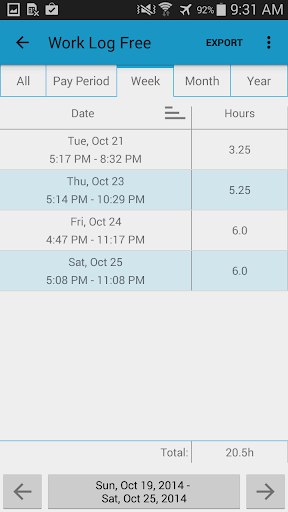
Work Log is a <b>quick</b> and <b>easy</b> way to keep track of your shifts and calculate the number of hours worked and wages paid over your pay period.
<b>Work Log Pro unlocks all of the features of Work Log</b>, including: exporting shifts as a spreadsheet or as a PDF, importing and exporting backups of your shifts, removing ads and support for multiple jobs.
<b>NOTE:</b>
*Work Log Pro unlocks all of the features of Work Log. <b>DO NOT</b> uninstall Work Log Free as it has all of your data. Both Work Log and Work Log Pro must be installed in order to benefit from all of the features available.
<b>BACKUPS:</b>
You can backup and transfer your data by emailing the backup to …
Read the full description
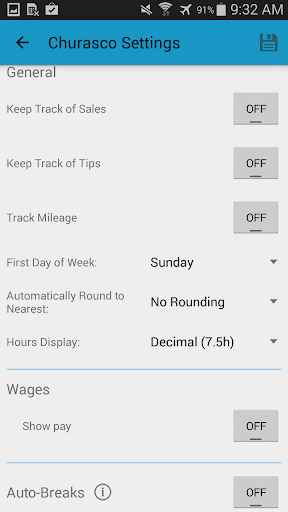
Work Log is a <b>quick</b> and <b>easy</b> way to keep track of your shifts and calculate the number of hours worked and wages paid over your pay period. <b>Work Log Pro unlocks all of the features of Work Log</b>, including: exporting shifts as a spreadsheet or as a PDF, importing and exporting backups of your shifts, removing ads and support for multiple jobs. <b>NOTE:</b> *Work Log Pro unlocks all of the features of Work Log. <b>DO NOT</b> uninstall Work Log Free as it has all of your data. Both Work Log and Work Log Pro must be installed in order to benefit from all of the features available. <b>BACKUPS:</b> You can backup and transfer your data by emailing the backup to yourself from the General Settings using the Backup Database option. You can then open the attachment directly from the email on the device you would like to import the shifts to. • <b>Fast, simple and straightforward way to track work hours</b> • Time saving features like automatic break deduction and pay period settings • Choose between punching in and out or manually entering your shift hours • Easy to update, delete or add past shifts • Keep track of multiple jobs, each with their own settings • Lots of customization options to suit your needs like 24h formatting, selecting when your week starts and a variety of ways to view your past shifts • See how many hours you've worked and earned over a pay period, week, month or year • Set your pay period to automatically calculate how many hours you worked and your wages for each paycheck • Automatically have deductions and/or bonuses calculated for paychecks • Optionally keep track of sales or tips (useful if you make commision or tips. useful for servers or sales people) • Set breaks to be automatically deducted from shifts over a given period of time. (ie. 30 minutes deducted after a 5 hour shift, 45 minutes deducted after an 8 hour shift), or enter breaks manually • Keep track of overtime hours and wages for up to two overtimes • Use widgets to punch in and out quickly, or as a shortcut to add a new shift. (tap on the punch in time to cancel it) • Easily backup and restore all shifts to keep all of your information safe and to easily transition to a new device • Export your recorded shifts as a spreadsheet (.CSV) by week, month, year, pay period or all recorded shifts. • Ad free <b>Customization</b> • Choose between a light and dark theme to suit your style • Display times with am/pm times or with a 24h clock • Display a currency symbol from over 100 countries • Set a backup reminder to remind you to backup your database every week, two weeks, month or two months • Set your pay period to be calculated by weeks, months, days or by half months (1st-15th, 16th-last) • Keep track of sales, optionally add sales to your paycheck, or a percent of sales (ideal for servers of sales staff) • Keep track of tips, optionally add tips to your paycheck • Option to automatically round shifts to 15m, 30m or 60m increments • Display hours in decimal (7.5h) or hours:minutes (7h 30m) format • Have flat rate and/or percentage deductions automatically made to paycheck calculations to account for taxes or any other deductions • Have flat rate and/or percentage bonuses automatically made to paycheck calculations to account for things like vacation pay • Keep track of up to 2 overtimes, such as receive 1.5 times normal pay for a shift over 8h and 2 times normal pay for a shift over 12h. This could also be applied to pay periods, for example, 1.25 times normal pay for pay periods over 40h and 1.5 times normal pay for pay periods over 50h. All hours and pay rates are customizable. <b>Permissions</b> Internet Access and View Network State: • Required for analytics and ads Modify/Delete SD Card Contents: • Required to save database and .CSV files to storage to export
Installs, last 30 days Measured
Exact Google Play install counts, collected daily
Ratings
8,458 ratings, 2,590 reviews
- 5 ★75%
- 4 ★18%
- 3 ★3.7%
- 2 ★1.3%
- 1 ★1.3%
Recent reviews
Latest public reviews from the store
No reviews in our sample for this app yet.
Top chart positions
Latest Google Play chart ranks by country, last 10 days
- Countries ranked
- 3
- Best rank
- #24
- Top 10 placements
- 0
- of 3 chart placements
- Average rank
- #24
Best countries on Google Play
- 🇲🇽 Mexico · Top paid, Productivity#24
- 🇮🇳 India · Top paid, Productivity#24
- 🇮🇩 Indonesia · Top paid, Productivity#24
Work Log Pro history
Release, install milestones, listing and store changes
- Reached 100,000+ installs 22 Mar 2024
- Reached 50,000+ installs 2 Jul 2018
- Reached 10,000+ installs 22 Oct 2015
- Reached 5,000+ installs 13 Jan 2015
- Reached 1,000+ installs 17 Mar 2014
- Reached 500+ installs 8 Jan 2014
- Reached 100+ installs 13 Nov 2013
- Reached 50+ installs 14 Oct 2013
Update frequency
How often Work Log Pro ships a new version, month by month
0 updates in the last 12 months. Less often than most similar apps: they shipped a median of 1 updates in the same year.
Recent versions
Current version 12
- Version 1231 Oct 2025
- Bug fixes and improvements
- Version 113 Sep 2024
- Version 820 Sep 2022
- Version 713 Nov 2019
Listing keywords
Words and phrases Work Log Pro repeats most in its store listing
Top phrases: work log (9), pay period (6), work log pro (4), log pro (4), normal pay (4).
Highlighted words also appear in the title. Counts cover the title, short description and description.
Business model and tech
From the store listing and declared permissions
- Business model
- Paid, $9.99
- Sensitive access
- No sensitive permission declared
Compliance
What the listing and the app package show
- Store status
- Live
- Upkeep
- Updated 31 Oct 2025
- Registered in
- Canada
- Privacy policy
- Linked on the listing
- Advertising
- No ads declared
- In-app purchases
- None declared
- Age rating
- Everyone
Apps like Work Log Pro
Smart Transfer - Copy My DataZamenPlay1.5M installs★ 3.91
MaxClean - Cleaner & ManagerIMPACTSOLTER9.7M installs★ 3.62
Hancom Office ViewerHancom Inc.20.6M installs★ 2.89
Positive Thinking Status PicsSendGroupSMS.com1.2M installs★ 4.86
Recover Deleted Messages AppBattery Stats Saver4.7M installs★ 4.29
WiFi Finder: Hotspot MapInstabridge Sweden AB557K installs★ 4.36
UNJSPF Digital CEUNICC58.4K installs★ 4.61
Proton Drive: Cloud StorageProton AG1.8M installs★ 4.39
WebCode - html, css, js ideALIF Technology2.1M installs★ 4.4
Work Log Pro: questions and answers
How many downloads does Work Log Pro have?
Work Log Pro has 121,179 installs on Google Play, measured from the store's own count on 20 Nov 2026.
Who makes Work Log Pro?
Work Log Pro is published by AR Productions Inc., a developer based in CA.
When was Work Log Pro last updated?
The latest version (12) was released on 31 Oct 2025.
Is Work Log Pro free?
No. Work Log Pro is a paid app priced at $9.99.
Is Work Log Pro still available?
Yes. Work Log Pro is live on Google Play as of 20 Nov 2026.
Track Work Log Pro and its competitors
Watch any app for new versions, rating drops, chart moves and removals. Free plan, no card.