
Working Log
Simple in/out time card you can manage and track your attendance time!
- Installs
- 311K
- Measured
- Rating
- 4.5
- Ratings
- 972
- 71 reviews
- Version
- 1.2.10
- Updated 22 Sep 2026
- Released
- 14 May 2011
- Tracked since 13 May 2026
- Size
- 6 MB
- Needs 6.0
Screenshots


About Working Log
The description on the store listing
Simple in/out time card you can manage and track your attendance time and other information of your daily work!
Create your shifts patterns so it can be used for a person who works shifts as well.
Save your daily working information, it will be displayed in the monthly list of the time card and on the calendar.
Manage and track absence, paid leave, TOIL (time off in lieu )'s total days and support overtime (OVT1), (OVT2) hours,Working Early(EA) hours.
※Pay ver No ads
From "Menu", select "Base Setting" and create your working shifts patterns. Select "Base Setting" → move to Setting screen.
*Setting screen*
1. Input your company's Start day of counting. When you tap this …
Read the full description
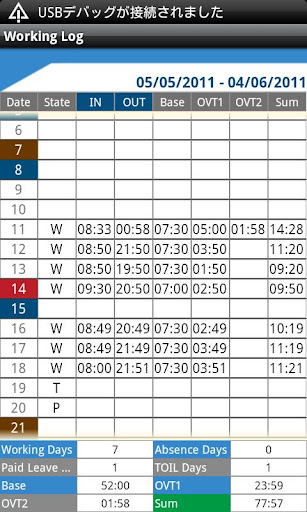
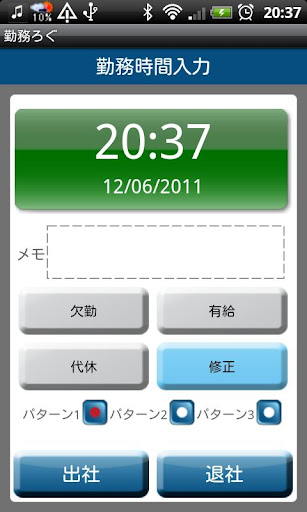
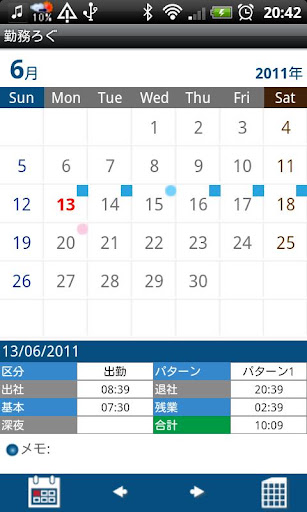
Simple in/out time card you can manage and track your attendance time and other information of your daily work! Create your shifts patterns so it can be used for a person who works shifts as well. Save your daily working information, it will be displayed in the monthly list of the time card and on the calendar. Manage and track absence, paid leave, TOIL (time off in lieu )'s total days and support overtime (OVT1), (OVT2) hours,Working Early(EA) hours. ※Pay ver No ads From "Menu", select "Base Setting" and create your working shifts patterns. Select "Base Setting" → move to Setting screen. *Setting screen* 1. Input your company's Start day of counting. When you tap this button, a calculator will be popup. 2. Create patterns. Tap each pattern, then move to Pattern setting screen. *Pattern Setting screen* 1. Tap "Color" button to select a color for each pattern. There are 10 colors to choose from. *This color will be displayed on the calendar. 2. Input your company's Base working hours, Overtime hours OVT1 and OVT2. 3. How to input break time: For example, you have one hour break. Input "01:00" and tap "OK". 4. When you finish entering all, tap "OK", then move back to Setting screen. 5. Tap "Ok" again in the Setting screen to save the data. 6. You can create 3 different patterns with the same way and can be also changed pattern name. *Calendar* Buttons from the left-bottom of the calendar; "Today" button: Tap this button to go back to today's date. "Left" and "Right" buttons: You can move the date to right and left. "Time Card" button: Move to Time Card screen. You can see here the monthly attendance record. *How to enter attendance time and other information of your daily work.* 1. Tap "Touch here to enter" of the lower part of the calendar. 2. Then move to Working Hours screen. *Working Hours screen* From top; 1. Time&Day display 2. Memo: You can save notes here. 3. There are 3 buttons; Work absence Paid leave TOIL ( time off in lieu ) Select one for your day. *When tap these buttons, move to the calendar automatically. 4. When you want to edit the data you have entered, tap "Edit" button, then move to Edit screen. 5. Select a pattern. 6. When you tap "IN" ( arriving time at work ) button, the time will be automatically saved. 7. When you tap "OUT" ( leaving time from work ) button, the time will be automatically saved. 8. When you want to edit arriving time and leaving time, tap "Edit" button. *Time Card screen* 1. Tap "Time Card" button on the calendar, then move to the Time Card screen. Working Days, Absence Days, Paid Leave Days, TOIL Days, Base, Overtime (OVT1 & OVT2), and Sum will be displayed in the list so you can track the attendance records at one view. 2. Press "Menu" button, then select "Email" button to send the time card records by email. *Menu Buttons* 1. Base Setting: Create your working shift patterns and start day of counting here. 2. Mark: Tap "Mark" or "Mark2" button → Select one mark you want to add on the calendar → Tap the date you want to add the mark. The mark will be displayed on the date you selected. *Mark can be deleted by selecting the same mark and tap twice. 3. Setting: You can select start a day of the week for the calendar etc… 4. Password: Set password. 5. Backup: You can save the data to SD card.
Installs since 29 Aug 2026 Measured
Exact Google Play install counts, collected daily
Ratings
972 ratings, 71 reviews
- 5 ★33%
- 4 ★67%
- 3 ★0.0%
- 2 ★0.0%
- 1 ★0.0%
Recent reviews
Latest public reviews from the store
- 15 Oct 2024
Like a lot, accurate and easy to set up.
- 21 Oct 2018
Really want to love this but I can't... I always work 30 minutes for TOIL before my official shift starts and every time I enter my shift it will only show my basic hours and not the overtime. I'm really struggling to understand how I can get this to work. I can get overtime to show up if that is the only input I put for the day however I want to be able to record my whole shift not just one or the other.
- 8 Dec 2017
Please add weekly and annually report to make it complete 5 star
- 24 Apr 2017
I like this app but now it's not calculating my time or amount of made in a day pkease fix it
What reviewers bring up
Topics mentioned in the latest 50 reviews, by how many reviews mention them
Liked in good reviews (32 reviews)
- hours 5
- track 4
- add 4
- application 3
- needed 3
- log 3
- calculate 2
- complete 2
Raised in bad reviews (9 reviews)
- option 2
Top chart positions
Latest Google Play chart ranks by country, last 10 days
Not in any tracked top chart in the last 10 days.
Working Log history
Release, install milestones, listing and store changes
- Reached 100,000+ installs 17 Nov 2012
- First released on the store 14 May 2011
Update frequency
How often Working Log ships a new version, month by month
1 updates in the last 12 months. Less often than most similar apps: they shipped a median of 2 updates in the same year.
Recent versions
Current version 1.2.10
- Version 1.2.1022 Sep 2026
Bugfix
- Version 1.2.030 Aug 2025
Android15
- Version 1.1.8812 Feb 2021
- Version 1.1.858 Jan 2020
Listing keywords
Words and phrases Working Log repeats most in its store listing
Top phrases: setting screen (6), manage and track (3), base setting (3), card screen (3), paid leave (3).
Highlighted words also appear in the title. Counts cover the title, short description and description.
Business model and tech
From the store listing, the SDKs in the app package and its declared permissions
- Business model
- Free to downloadShows ads
- Built with
- No cross-platform framework or game engine detected
- Ad networks (2)
- AdMobNend
- Analytics and crash reports
- Firebase
- Sensitive access
- No sensitive permission declared
3 ad, attribution and analytics SDKs detected. SDKs are read from the app package and permissions from the store listing, so code that loads later is not seen.
Technology
32 SDKs found in the app package
Ad networks
Advertising and install-attribution SDKs found in the app package
- AdMob
- Nend
Compliance
What the listing and the app package show
- Store status
- Live
- Upkeep
- Updated 22 Sep 2026
- Registered in
- Japan
- Privacy policy
- Linked on the listing
- Advertising
- Shows ads
- In-app purchases
- None declared
- Age rating
- Everyone
Apps like Working Log
LootParrot: Earn RewardsLootably607K installs★ 2.88
কারবার অ্যাপ - ডিজিটাল খাতাBizSphere308K installs★ 4.13
Cat® InspectCaterpillar Inc.155K installs★ 3.71
Fourthwall for CreatorsFW Creators33.7K installs★ 4.66
ScreenConnectConnectWise631K installs★ 2.04
OTRIM OFFICIALONPASSIVE TECHNOLOGIES L.L.C15.2K installs★ 5.0
IBM MaaS360 BrowserIBM MaaS360596K installs★ 2.86
Altametrics DARAltametrics80.2K installs★ 4.79
ESS MobileAttendance on Demand, Inc.378K installs★ 2.98
Working Log: questions and answers
How many downloads does Working Log have?
Working Log has 311,441 installs on Google Play, measured from the store's own count on 14 Nov 2026.
Who makes Working Log?
Working Log is published by 株式会社GalleryApp, a developer based in JP.
When was Working Log last updated?
The latest version (1.2.10) was released on 22 Sep 2026.
Is Working Log free?
Yes. Working Log is free to download, and it shows ads.
Is Working Log still available?
Yes. Working Log is live on Google Play as of 14 Nov 2026.
Track Working Log and its competitors
Watch any app for new versions, rating drops, chart moves and removals. Free plan, no card.