
WorkingHours Time Tracker
Timesheet, employee time clock, billable hours, overtime & Excel export
- Installs
- 508K
- Measured
- Rating
- 4.92
- Ratings
- 4K
- 284 reviews
- Version
- 2.19.3
- Updated 24 Oct 2026
- Released
- 20 Sep 2017
- Tracked since 14 May 2026
- Size
- 34 MB
- Needs 6.0
Screenshots




About WorkingHours Time Tracker
The description on the store listing
Track work hours without turning your day into admin work. WorkingHours is a time tracker, timesheet, employee time clock and work log for freelancers, hourly workers, employees, contractors and consultants who need clear records of time, earnings and billable hours.
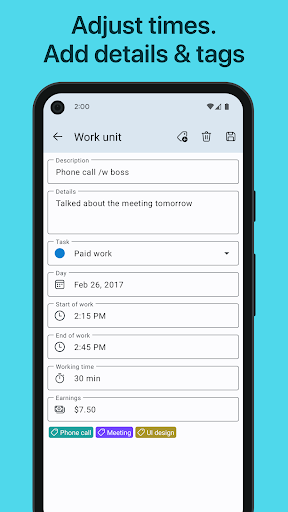
Start a timer, pause for breaks, stop when you are done, or add and edit time entries manually. Organize your work time by project, task, tag, note and hourly rate so your timesheet is ready when you need to review, export or invoice it.
What you can do with WorkingHours:
• Track work time with start, pause and stop timer controls
• Pause and resume breaks, or subtract breaks automatically
• Add, edit and correct …
Read the full description
Track work hours without turning your day into admin work. WorkingHours is a time tracker, timesheet, employee time clock and work log for freelancers, hourly workers, employees, contractors and consultants who need clear records of time, earnings and billable hours. Start a timer, pause for breaks, stop when you are done, or add and edit time entries manually. Organize your work time by project, task, tag, note and hourly rate so your timesheet is ready when you need to review, export or invoice it. What you can do with WorkingHours: • Track work time with start, pause and stop timer controls • Pause and resume breaks, or subtract breaks automatically • Add, edit and correct manual time entries anytime • Automatically split work sessions that run across midnight • Use it as a work hours tracker, work log or time sheet • Organize entries by tasks, projects, tags and notes • Track billable hours, hourly rates, fixed fees and earnings • Use overtime tracking to understand extra hours worked • Adjust time or earnings with tag rules when needed • Filter and search your entries by task, tag or date • View charts for work time, revenue and productivity patterns • Export timesheets to Excel or CSV • Customize export columns and group by day, week, month, task or tag • Create PDF invoices from tracked time via SubTotal • Import appointments from your system or Outlook calendar • Use Pomodoro focus sessions when you want a productivity timer • Sync across devices with your own cloud storage, if you choose Built for personal time tracking WorkingHours is useful as a freelance time tracker, project time tracker, task timer, invoice time tracker, hours worked calculator, shift tracker or personal time clock. It helps you record when you worked, what you worked on and how much time or money each entry represents. Use the timer like a simple punch clock or time clock app for your own workday, then review totals like a time card calculator when it is time to check hours, overtime, billable work or project costs. Android features for faster tracking Start and manage your timer from widgets and notifications, use geofencing to start or stop tracking when you arrive at or leave a workplace, and control the timer with NFC tags where supported. Reports, exports and billing support Review your work log in clear charts, switch reports between duration and revenue, and filter entries to understand how your time is spent. Export your timesheet to Excel or CSV, choose the columns you need, and group entries by day, week, month, task or tag. When you need invoices, SubTotal can create PDF invoices from your WorkingHours data. Your data, your choice No WorkingHours account or registration is required for the app itself. Optional sync uses your own cloud storage, including OneDrive, Google Drive, Dropbox, iCloud or WebDAV, so you can keep your work log available across supported Android, Windows, iOS and macOS versions. That means you can track time on your phone or tablet, then continue reviewing or editing your timesheet on a laptop or desktop through the app’s sync model. Free to use, optional Pro WorkingHours is free to use. Some advanced features require WorkingHours Pro, which can be tested with a 7-day trial after installing the app. On Android, Pro removes ads and includes advanced features such as cloud sync, Excel/CSV export, focus sessions, unlimited tasks, widget and notification timer control, and geofencing. Pro is available as either a one-time purchase or a monthly subscription with the same features. Your Android Pro purchase or subscription is linked to your Google Play account and unlocks Pro for the Android version. Other platform versions may require a separate purchase. Whether you need a clean timesheet, a reliable hours tracker, overtime records, Excel export or invoice-ready billable hours, WorkingHours helps you track and understand where your work time goes.
Installs, last 30 days Measured
Exact Google Play install counts, collected daily
Ratings
4,005 ratings, 284 reviews
- 5 ★85%
- 4 ★12%
- 3 ★1.9%
- 2 ★0.0%
- 1 ★0.9%
Recent reviews
Latest public reviews from the store
- 9 Apr 2026
After testing lots of Invoice app that charge a lot I find this one, one that I decided to pay, and to the ongoing costs I just use a free online sync service. Quick question: Any way to update Google Drive sync API/way of sync? Right now I can log-in only using the email and all that, can you also add the option to just use the account on the device? (However, don't remove the actual one of popping the request of manual email, if only one must be selected leave the actual way that you have).
- 9 Mar 2026
I have been using this App from last 2 years now and it has made my buisiness handling lot simpler, professional and accountable.. I used it from India , althought it's still not GST complaint as per local format here but quotation making ,PO , PI and final invoicing all are fabulous. need to learn how to use this the best suited way for ones buisiness. moreover it's lot cheap compared to other related software. when you have any queries , you can either search in faq or post your queries
- 28 Feb 2026
what an amazing and simple to use app, its free, its easy and it works. 5 stars
- 23 Nov 2025
I wanted to buy the pro version on both Windows and Android but find it difficult because there is only one currency format. If only you can fix this.
What reviewers bring up
Topics mentioned in the latest 26 reviews, by how many reviews mention them
Liked in good reviews (25 reviews)
- invoice 4
- useful 3
- practical 2
- business 2
- option 2
- format 2
- quick 2
- find 2
Raised in bad reviews (0 reviews)
No topic comes up twice.
Top chart positions
Latest Google Play chart ranks by country, last 10 days
- Countries ranked
- 4
- Best rank
- #24
- Top 10 placements
- 0
- of 5 chart placements
- Average rank
- #133.8
Best countries on Google Play
- 🇩🇪 Germany · Top grossing, Business#24
- 🇮🇳 India · Top grossing, Business#170
- 🇮🇩 Indonesia · Top grossing, Business#186
- 🇲🇽 Mexico · Top grossing, Business#195
| Country | Chart | Category | Rank | Best (10 days) | Date |
|---|---|---|---|---|---|
| 🇩🇪 Germany | Top grossing | Business | #24 | #21 | 19 Nov 2026 |
| 🇩🇪 Germany | Top free | Business | #94 | #84 | 19 Nov 2026 |
| 🇮🇳 India | Top grossing | Business | #170 | #154 | 19 Nov 2026 |
| 🇮🇩 Indonesia | Top grossing | Business | #186 | #169 | 19 Nov 2026 |
| 🇲🇽 Mexico | Top grossing | Business | #195 | #175 | 19 Nov 2026 |
WorkingHours Time Tracker history
Release, install milestones, listing and store changes
- First released on the store 20 Sep 2017
Update frequency
How often WorkingHours Time Tracker ships a new version, month by month
7 updates in the last 12 months. More often than most similar apps: they shipped a median of 4 updates in the same year.
Recent versions
Current version 2.19.3
- Version 2.19.324 Oct 2026
• Workplace detection now supports up to 5 locations, each with its own task • Improved database, analytics and export performance • Improved Cloud Sync reliability
- Version 2.17.425 Jul 2026
• Fixed tag inheritance when continuing work entries • Improved sync sign-in reliability with browser-based authentication • Refined settings and color picker screens for a more consistent experience • Improved file handling for exports and database/settings imports • Added performance and reliability improvements for timelines, sync, and exports
- Version 2.17.330 Jun 2026
• Fixed tag inheritance when continuing work entries • Improved sync sign-in reliability with browser-based authentication • Refined settings and color picker screens for a more consistent experience • Improved file handling for exports and database/settings imports • Added performance and reliability improvements for timelines, sync, and exports
- Version 2.16.322 Jun 2026
• Refreshed Android design with bottom navigation, updated dialogs and new theme colors • Export is now easier to access from time tracking and analytics • Improved filters, analytics controls and timeline action menus • Added Arabic, Hebrew, Indonesian and Ukrainian translations • Improved sync, calendar, import and backup reliability • Several small bugfixes and performance improvements
Listing keywords
Words and phrases WorkingHours Time Tracker repeats most in its store listing
Top phrases: billable hours (4), work log (4), create pdf invoices (2), employee time clock (2), excel or csv (2).
Highlighted words also appear in the title. Counts cover the title, short description and description.
Business model and tech
From the store listing and declared permissions
- Business model
- Free to downloadIn-app purchasesShows ads
- Sensitive access
- No sensitive permission declared
Compliance
What the listing and the app package show
- Store status
- Live
- Upkeep
- Updated 24 Oct 2026
- Registered in
- Germany
- Privacy policy
- Linked on the listing
- Advertising
- Shows ads
- In-app purchases
- Offered
- Age rating
- Everyone
Apps like WorkingHours Time Tracker
Lycamobile USALyca Digital424K installs★ 2.87
CreditLog: Udhar Khata BookVisionary Labs416K installs★ 4.62
Count This: AI Object CounterUmair Khalid Siddique46K installs★ 3.97
EMX ExpressEmirates Post694K installs★ 4.08
Resume Builder & Cover LetterDmitrii Solovev119K installs★ 4.54
BEES South AfricaBEES Global AG155K installs★ 4.44
Coca-Cola a Un ClickApplicate IT Solutions74.8K installs★ 4.5
Check Point Capsule VPNCheck Point Software Technologies, Ltd.1.1M installs★ 3.82
QMóvilQuálitas Compañia de Seguros1.1M installs★ 1.52
WorkingHours Time Tracker: questions and answers
How many downloads does WorkingHours Time Tracker have?
WorkingHours Time Tracker has 507,807 installs on Google Play, measured from the store's own count on 18 Nov 2026.
Who makes WorkingHours Time Tracker?
WorkingHours Time Tracker is published by Timo Partl, a developer based in DE.
When was WorkingHours Time Tracker last updated?
The latest version (2.19.3) was released on 24 Oct 2026.
Is WorkingHours Time Tracker free?
Yes. WorkingHours Time Tracker is free to download and offers in-app purchases, and it shows ads.
Is WorkingHours Time Tracker still available?
Yes. WorkingHours Time Tracker is live on Google Play as of 18 Nov 2026.
Track WorkingHours Time Tracker and its competitors
Watch any app for new versions, rating drops, chart moves and removals. Free plan, no card.