
XCANVehicle
You can enter an app or URL address that runs automatically on the XCAN Car Wireless Charger. Available on both Android and IOS.
- Installs
- 1.45K
- Measured
- Rating
- —
- Ratings
- —
- Version
- Varies with device
- Updated 12 Jan 2026
- Released
- 12 Nov 2019
- Tracked since 12 May 2026
- Size
- —
Screenshots
About XCANVehicle
The description on the store listing
[XCAN Vehicle Usage]
{How to set up your application}
1) Install XCAN Vehicle.
2) Activate the NFC function of the mobile phone (basic mode-Write / Read).
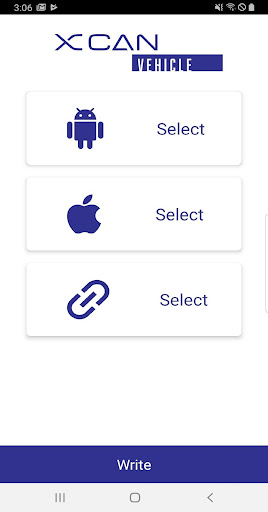
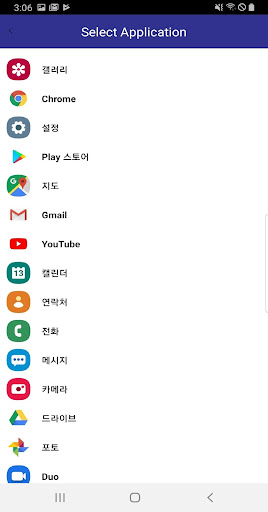
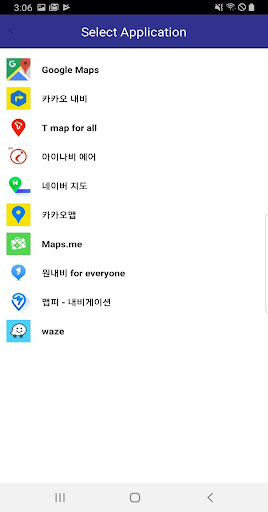
3) After selecting the menu suitable for Android and Apple models, select the desired application.
(If you use both your Android phone and iPhone at the same time, you can select both Android and IOS applications. Depending on the model, each application will run.)
4) Press the bottom WRITE button on the XCAN.
5) A pop-up window called Approach an NFC Tag will appear on the screen.
6) Put the smartphone on the device, the application to run automatically is input to NFC.
(If you set both Android and IOS in step 3, you only …
Read the full description
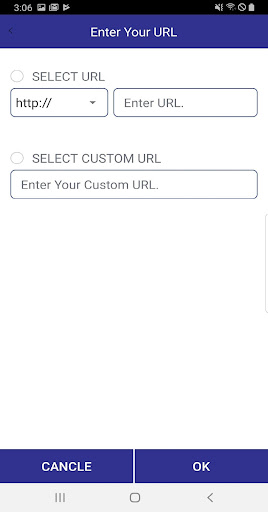
[XCAN Vehicle Usage] {How to set up your application} 1) Install XCAN Vehicle. 2) Activate the NFC function of the mobile phone (basic mode-Write / Read). 3) After selecting the menu suitable for Android and Apple models, select the desired application. (If you use both your Android phone and iPhone at the same time, you can select both Android and IOS applications. Depending on the model, each application will run.) 4) Press the bottom WRITE button on the XCAN. 5) A pop-up window called Approach an NFC Tag will appear on the screen. 6) Put the smartphone on the device, the application to run automatically is input to NFC. (If you set both Android and IOS in step 3, you only need to enter it once.) 7) Remove the smartphone from the device for a while and put it back to run the application automatically set. 8) When changing the auto-run application, just run it again from step 1. {URL input method} 1) Install XCAN Vehicle. 2) Activate the NFC function of the mobile phone (basic mode-Write / Read). 3) Select the URL button. 4) Enter the address to be executed automatically and press the OK button. 5) Press the bottom WRITE button on the XCAN. 6) A pop-up window called Approach an NFC Tag will appear on the screen. 7) If you put your smartphone on the device, the URL address to run automatically is entered into NFC. 8) Remove the smartphone from the device for a while and put it back to run the set URL. 9) When changing the URL, run it again from number 1. [ main function ] You can enter any application and URL you want in XCAN. Available for both Android & Apple devices. Set up and auto-launch your Android and Apple devices at the same time in one car fast wireless charger. [Important] Your phone must provide NFC. Please turn on NFC for autorun NFC is the default mode-Write / Read mode. In card mode, the set application will not run. Wireless charging is only possible if your device is capable of wireless charging. Drive smart with XCAN
Installs since 17 Nov 2026 Measured
Exact Google Play install counts, collected daily
Daily history starts once this app is in our daily install sample.
Ratings
- 5 ★0.0%
- 4 ★0.0%
- 3 ★0.0%
- 2 ★0.0%
- 1 ★0.0%
Recent reviews
Latest public reviews from the store
No reviews in our sample for this app yet.
Top chart positions
Latest Google Play chart ranks by country, last 10 days
Not in any tracked top chart in the last 10 days.
XCANVehicle history
Release, install milestones, listing and store changes
- Reached 1,000+ installs 16 Sep 2023
- Reached 500+ installs 25 Mar 2022
- Reached 100+ installs 30 Jun 2020
- Reached 10+ installs 2 Jan 2020
- Reached 1+ installs 3 Dec 2019
- First released on the store 12 Nov 2019
Update frequency
How often XCANVehicle ships a new version, month by month
1 updates in the last 12 months. More often than most similar apps: they shipped a median of 0 updates in the same year.
Recent versions
Current version Varies with device
- Version 0.912 Jan 2026
- Version 0.830 Jul 2025
- Version 0.528 Mar 2023
- Version 0.315 Mar 2023
Listing keywords
Words and phrases XCANVehicle repeats most in its store listing
Top phrases: android and ios (3), mode write read (3), mode write (3), write read (3), xcan vehicle (3).
Highlighted words also appear in the title. Counts cover the title, short description and description.
Business model and tech
From the store listing and declared permissions
- Business model
- Free to download
- Sensitive access
- No sensitive permission declared
Compliance
What the listing and the app package show
- Store status
- Live
- Upkeep
- Updated 12 Jan 2026
- Registered in
- South Korea
- Privacy policy
- Linked on the listing
- Advertising
- No ads declared
- In-app purchases
- None declared
- Age rating
- Everyone
Apps like XCANVehicle
들어서 화면켜기Won3.5K installs★ 4.0
Height PredictionEcliptic App Ventures45.9K installs★ 2.4
Speicers`Pro VPNEldiablolucifer202021.2K installs★ 4.14
Lightning Tracker with AlertsYaksh Software4.3K installs★ 3.0
Mana Pathi (Unit Converter)Shirish Koirala2.2K installs★ 4.6
Multi-tab Calc - A simple app.Naoyuki Rikiji1.3K installs★ 5.0
Photo Recovery PlusBillApps7.1K installs★ 4.53
Just Silence. Scheduled.Akid Soft1.6K installs★ 5.0
- WoWp AssistantВиталий Робиновский2K installs★ 4.2
XCANVehicle: questions and answers
How many downloads does XCANVehicle have?
XCANVehicle has 1,450 installs on Google Play, measured from the store's own count on 17 Nov 2026.
Who makes XCANVehicle?
XCANVehicle is published by B LIFE, a developer based in KR.
When was XCANVehicle last updated?
The latest version (Varies with device) was released on 12 Jan 2026.
Is XCANVehicle free?
Yes. XCANVehicle is free to download.
Is XCANVehicle still available?
Yes. XCANVehicle is live on Google Play as of 17 Nov 2026.
Track XCANVehicle and its competitors
Watch any app for new versions, rating drops, chart moves and removals. Free plan, no card.