
XTerm - SSH Terminal Client
Securely manage and connect to your Linux servers via SSH/Mosh anywhere.
- Installs
- 293
- Measured
- Rating
- —
- Ratings
- —
- Version
- Varies with device
- Released
- 30 Jun 2026
- Tracked since 5 Jul 2026
- Size
- —
Also on App Store: XTerm - SSH Terminal Client
Screenshots

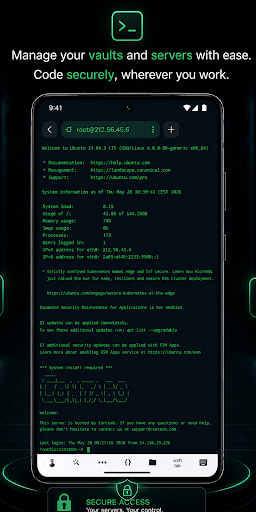


About XTerm - SSH Terminal Client
The description on the store listing
Manage your Linux and Unix servers securely, efficiently, and effortlessly from anywhere. XTerm - SSH Terminal Client provides a lightning-fast, reliable, and modern terminal environments to access remote hosts, execute commands, and maintain your infrastructure directly from your mobile device.
Whether you are a system administrator, DevOps engineer, developer, or network specialist, XTerm gives you full command-line control over your remote servers with a sleek, intuitive UI.
Key Features Built for Professionals:
• Professional SSH Terminal Client
Open fast, responsive terminal sessions. Execute shell commands, monitor system resources, manage background scripts, and interact …
Read the full description
Manage your Linux and Unix servers securely, efficiently, and effortlessly from anywhere. XTerm - SSH Terminal Client provides a lightning-fast, reliable, and modern terminal environments to access remote hosts, execute commands, and maintain your infrastructure directly from your mobile device. Whether you are a system administrator, DevOps engineer, developer, or network specialist, XTerm gives you full command-line control over your remote servers with a sleek, intuitive UI. Key Features Built for Professionals: • Professional SSH Terminal Client Open fast, responsive terminal sessions. Execute shell commands, monitor system resources, manage background scripts, and interact with your remote servers natively. Includes built-in support for standard special keys. • Military-Grade Security Vaults Your server credentials, saved passwords, and SSH keys (Private Keys, Certificates, FIDO2) are heavily encrypted and stored safely inside your local Vaults. Access your configurations instantly without re-typing credentials. • Powerful Host & Group Management Keep large infrastructures organized. Create custom hosts, group servers by projects or environments (e.g., Production, Staging, VPN-Server), and assign color-coded tags for rapid searching and filtering. • Proxy, Jump Hosts & Advanced Routing Easily connect to isolated private network environments. XTerm supports robust proxy configurations, SSH proxies, jump hosts, and complex host chaining when direct server access is unavailable. • Instant Connection History Never lose track of your workspaces. Reconnect to your recently accessed Linux instances or active servers with a single tap through the interactive connection panel. • Hybrid SSH & Mosh Protocol Support Stay connected even on unstable cellular networks. XTerm is fully optimized to keep active sessions alive, providing a smooth command-line experience under any network conditions. Optimize your remote server workflows today. Download XTerm - SSH Terminal Client and carry your entire cloud infrastructure inside your pocket!
Installs since 14 Nov 2026 Measured
Exact Google Play install counts, collected daily
Daily history starts once this app is in our daily install sample.
Ratings
- 5 ★0.0%
- 4 ★0.0%
- 3 ★0.0%
- 2 ★0.0%
- 1 ★0.0%
Recent reviews
Latest public reviews from the store
No reviews in our sample for this app yet.
Top chart positions
Latest Google Play chart ranks by country, last 10 days
Not in any tracked top chart in the last 10 days.
XTerm - SSH Terminal Client history
Release, install milestones, listing and store changes
- First released on the store 30 Jun 2026
Listing keywords
Words and phrases XTerm - SSH Terminal Client repeats most in its store listing
Top phrases: ssh terminal client (4), ssh terminal (4), terminal client (4), xterm ssh terminal (3), xterm ssh (3).
Highlighted words also appear in the title. Counts cover the title, short description and description.
Business model and tech
From the store listing and declared permissions
- Business model
- Free to downloadShows ads
- Sensitive access
- No sensitive permission declared
Compliance
What the listing and the app package show
- Store status
- Live
- Privacy policy
- Linked on the listing
- Advertising
- Shows ads
- In-app purchases
- None declared
- Age rating
- Everyone
Apps like XTerm - SSH Terminal Client
들어서 화면켜기Won3.5K installs★ 4.0
Height PredictionEcliptic App Ventures45.9K installs★ 2.4
Speicers`Pro VPNEldiablolucifer202021.2K installs★ 4.14
Lightning Tracker with AlertsYaksh Software4.3K installs★ 3.0
Mana Pathi (Unit Converter)Shirish Koirala2.2K installs★ 4.6
Multi-tab Calc - A simple app.Naoyuki Rikiji1.3K installs★ 5.0
Photo Recovery PlusBillApps7.1K installs★ 4.53
Just Silence. Scheduled.Akid Soft1.6K installs★ 5.0
- WoWp AssistantВиталий Робиновский2K installs★ 4.2
XTerm - SSH Terminal Client: questions and answers
How many downloads does XTerm - SSH Terminal Client have?
XTerm - SSH Terminal Client has 293 installs on Google Play, measured from the store's own count on 14 Nov 2026.
Who makes XTerm - SSH Terminal Client?
XTerm - SSH Terminal Client is published by Mobile Clean System Lab.
Is XTerm - SSH Terminal Client free?
Yes. XTerm - SSH Terminal Client is free to download, and it shows ads.
Is XTerm - SSH Terminal Client still available?
Yes. XTerm - SSH Terminal Client is live on Google Play as of 14 Nov 2026.
Track XTerm - SSH Terminal Client and its competitors
Watch any app for new versions, rating drops, chart moves and removals. Free plan, no card.