
ZenCrypt - Securely Encrypt
Easy and secure way to encrypt what's more important to you.
- Installs
- 28.91K
- Measured
- Rating
- 3.21
- Ratings
- 268
- 30 reviews
- Version
- 5.1
- Updated 16 Oct 2026
- Released
- 27 Oct 2018
- Tracked since 13 May 2026
- Size
- 2 MB
- Needs 5.0
Screenshots
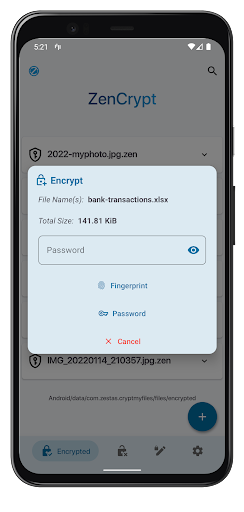
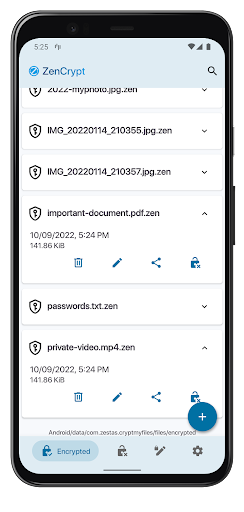
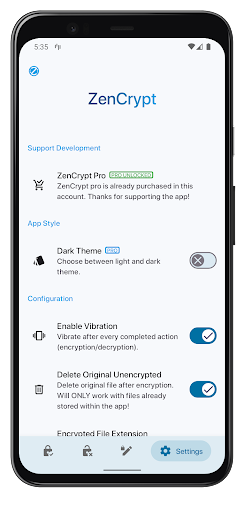


About ZenCrypt - Securely Encrypt
The description on the store listing
🔸<b>ZenCrypt</b> is an all-in-one encryption app, which allows you to encrypt and decrypt files with one click. Protect your private data without hassle!
🔸<b>Algorithm and mode</b> : AES-256, CBC, block padding with PKCS7.
🔸<b>IV Handling</b> : Random IV generation on each encryption (16 bytes).
🔸<b>Key generation</b> : Random key generation with the updated generation code recommended for Android.
🔸<b>Salt and Password</b> : Computationally secure random salt (of cipher block size) and password stretching with PBKDF2 supported.
Additionally, ZenCrypt offers a password analysis tool for strength, crack times, weakness, etc using nulab\'s zxcvbn4j library.
🔸<b>Source Code</b> : …
Read the full description
🔸<b>ZenCrypt</b> is an all-in-one encryption app, which allows you to encrypt and decrypt files with one click. Protect your private data without hassle! 🔸<b>Algorithm and mode</b> : AES-256, CBC, block padding with PKCS7. 🔸<b>IV Handling</b> : Random IV generation on each encryption (16 bytes). 🔸<b>Key generation</b> : Random key generation with the updated generation code recommended for Android. 🔸<b>Salt and Password</b> : Computationally secure random salt (of cipher block size) and password stretching with PBKDF2 supported. Additionally, ZenCrypt offers a password analysis tool for strength, crack times, weakness, etc using nulab\'s zxcvbn4j library. 🔸<b>Source Code</b> : ZenCrypt is now fully open-source. You can view the code on GitLab! https://gitlab.com/o.zestas/zencrypt 🔸<b>Pro Version Features:</b> -Dark theme. -Fingerprint Encryption. 🔸From version 3.0 onwards, ZenCrypt offers FREE unlimited encryptions! <b>Made with</b> 💙 Please check out the FAQ below: <b>Q: What Files Can I Encrypt With This App?</b> A: You can encrypt any file type you want. That includes Pictures, Videos, Text, APKs, documents, PDFs etc. As long as it's in your device, it can be encrypted. <b>Q: How Do I Encrypt?</b> A: ZenCrypt supports encrypting using an alphanumerical password, or using a fingerprint, if your device supports it. <b>Q: How Robust Is ZenCrypt?</b> A: Although ZenCrypt is a very powerful tool and the encrypted files are very well protected against attacks, I can not guarantee the robustness of this app. What I can guarantee, is that I put a lot of effort to provide a more secure option for storing your files. <b>Q: Can Other Devices Decrypt?</b> A: As long as they have ZenCrypt installed, and the same password is used (either plain or in fingerprint configuration), absolutely. <b>Q: Can I Share The Encrypted Files?</b> A: Yes. You can share them just like any other file, without worrying for your personal data. <b>Q: Can I Encrypt From External Storage?</b> A: Yes you can. ZenCrypt supports both internal and external storage, such as micro sd cards, usb, hard drives. You can also encrypt from cloud providers such as Google Drive. <b>Q: Is My Password That I Used For Encryption Stored?</b> A: No, and it never will be. ZenCrypt will never have an Internet permission, so your password and files will never be sent anywhere. Huge thanks to Priyank Vasa (EasyCrypt) on github! Contact me if you have any problems with ZenCrypt. I'll be happy to help. Copyright @Zestas Orestis
Installs since 29 Aug 2026 Measured
Exact Google Play install counts, collected daily
Ratings
268 ratings, 30 reviews
- 5 ★44%
- 4 ★5.1%
- 3 ★7.5%
- 2 ★7.5%
- 1 ★36%
Recent reviews
Latest public reviews from the store
- 29 Oct 2025
working perfectly
Top chart positions
Latest Google Play chart ranks by country, last 10 days
Not in any tracked top chart in the last 10 days.
ZenCrypt - Securely Encrypt history
Release, install milestones, listing and store changes
- Reached 10,000+ installs 12 Dec 2023
- Reached 5,000+ installs 5 Jul 2020
- Reached 1,000+ installs 31 Jan 2019
- Reached 500+ installs 3 Jan 2019
- Reached 100+ installs 6 Dec 2018
- First released on the store 27 Oct 2018
Update frequency
How often ZenCrypt - Securely Encrypt ships a new version, month by month
1 updates in the last 12 months. About as often as similar apps, which shipped a median of 1 updates in the same year.
Recent versions
Current version 5.1
- Version 5.116 Oct 2026
You can now make fingerprint the default method for encryption and decryption, while keeping the choice to use a password. Long file names are easier to read, with an option to view the full name. Redesigned the changelog to make updates and older versions easier to browse. Revamped the ZenCrypt Pro screen, which now clearly shows everything Pro includes.
- Version 4.9.125 Jul 2025
Changed the way the automatic deletion of unencrypted files works. Now, it will delete all unencrypted files each time the app loses focus, instead of only when the app is closed. Added pull down to refresh functionality in the file list. Fixed an issue where ZenCrypt's navigation bar would overlap with the device's navigation bar on newer Android versions. Removed some deprecated theme attributes. Removed wrongly set and unused permissions by third-party libraries.
- Version 4.728 May 2024
- Version 4.625 Feb 2024
Listing keywords
Words and phrases ZenCrypt - Securely Encrypt repeats most in its store listing
Top phrases: encrypted files (2), external storage (2), key generation (2), zencrypt offers (2), zencrypt supports (2).
Highlighted words also appear in the title. Counts cover the title, short description and description.
Business model and tech
From the store listing, the SDKs in the app package and its declared permissions
- Business model
- Free to downloadIn-app purchases
- Built with
- No cross-platform framework or game engine detected
- Ad networks (0)
- None detected
- Subscriptions and payments
- Google Play billing
- Sensitive access
- Photos, videos and files
0 ad, attribution and analytics SDKs detected. SDKs are read from the app package and permissions from the store listing, so code that loads later is not seen.
Technology
5 SDKs found in the app package
15 permissions
0 special access, 3 sensitive, 12 standard
- Change or delete shared storageSensitive
- Read shared storageSensitive
- Show notificationsPOST_NOTIFICATIONSSensitive
- Control vibrationStandard
- Keep the phone awakeStandard
- Start when the phone turns onStandard
- Use fingerprint or face unlockUSE_BIOMETRICStandard
- Use the fingerprint readerUSE_FINGERPRINTStandard
- See network connectionsStandard
- Access fingerprint managerACCESS_FINGERPRINT_MANAGERStandard
- Access soter keystoreACCESS_SOTER_KEYSTOREStandard
- Internal app permissionDYNAMIC_RECEIVER_NOT_EXPORTED_PERMISSIONStandard
Compliance
What the listing and the app package show
- Store status
- Live
- Upkeep
- Updated 16 Oct 2026
- Privacy policy
- Linked on the listing
- Advertising
- No ads declared
- In-app purchases
- Offered
- Age rating
- Everyone
- Sensitive permissions
- 3 sensitive of 15
- Location access
- No
- Camera and microphone
- Neither
Apps like ZenCrypt - Securely Encrypt
Fit Tolerance ISOYaşar Yücel Yeşilbağ151K installs★ 4.83
ADL DMX CalculatorKirill Trofimov62K installs★ 5.0
Screenshot Expert: Markup ToolTasakiApps12.2K installs★ 4.25
TV Remote - Control Roku & AllLyra mob110K installs★ 4.03
Battery barABC.21.1K installs★ 3.18
Bubble LevelCrydata13.2K installs★ 4.85
M Calendar(calendar, schedule)Sunguy257K installs★ 3.56
Easy Homescreen LauncherSimple Palace studio69.2K installs★ 3.94
Battery AlarmRHS.Dev25.3K installs★ 3.61
ZenCrypt - Securely Encrypt: questions and answers
How many downloads does ZenCrypt - Securely Encrypt have?
ZenCrypt - Securely Encrypt has 28,909 installs on Google Play, measured from the store's own count on 14 Nov 2026.
Who makes ZenCrypt - Securely Encrypt?
ZenCrypt - Securely Encrypt is published by Zestas.
When was ZenCrypt - Securely Encrypt last updated?
The latest version (5.1) was released on 16 Oct 2026.
Is ZenCrypt - Securely Encrypt free?
Yes. ZenCrypt - Securely Encrypt is free to download and offers in-app purchases.
Is ZenCrypt - Securely Encrypt still available?
Yes. ZenCrypt - Securely Encrypt is live on Google Play as of 14 Nov 2026.
Track ZenCrypt - Securely Encrypt and its competitors
Watch any app for new versions, rating drops, chart moves and removals. Free plan, no card.