
ZIP File Extractor - PDF, DOC
View and Read Word, Excel, PowerPoint, PDF, CSV and ZIP file extractor
- Installs
- 4.57M
- Measured
- Rating
- 4.11
- Ratings
- 30.1K
- 94 reviews
- Version
- 48.0
- Updated 2 Nov 2026
- Released
- 13 Sep 2021
- Tracked since 13 May 2026
- Size
- —
Also on App Store: ZIP File Extractor - PDF, DOC
Screenshots


About ZIP File Extractor - PDF, DOC
The description on the store listing
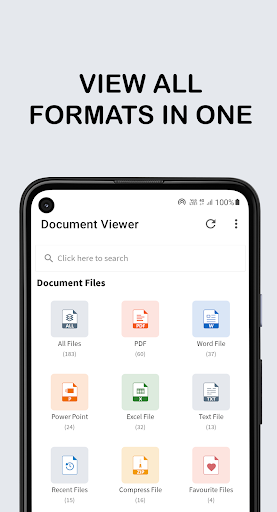
Document Viewer app can read, share & view all Document file easily. PDF, Word, Excel, Sheet, Text, and ZIP, a good office tools for your device. This Document Viewer is a simple but powerful tool to view All PDF + Office file in one place.
Document Viewer - PDF, DOC, XLS, PPT, ZIP, TXT is offering features of reading multiple Documents including PDF Reader, Docs & Docx Reader, ppt reader, xls reader, txt, excel, zip file extractor for android & other document reader read all document files.
<b>➕ Supported formats</b>
- Word docs: DOC, DOCX
- Excel Sheet : XLS, XLSX
- PowerPoint Slide for Presentation : PPT, PPTX, PPS, PPSX
- files : PDF, TXT, Compress ( ZIP, RAR ), CSV …
Read the full description
Document Viewer app can read, share & view all Document file easily. PDF, Word, Excel, Sheet, Text, and ZIP, a good office tools for your device. This Document Viewer is a simple but powerful tool to view All PDF + Office file in one place. Document Viewer - PDF, DOC, XLS, PPT, ZIP, TXT is offering features of reading multiple Documents including PDF Reader, Docs & Docx Reader, ppt reader, xls reader, txt, excel, zip file extractor for android & other document reader read all document files. <b>➕ Supported formats</b> - Word docs: DOC, DOCX - Excel Sheet : XLS, XLSX - PowerPoint Slide for Presentation : PPT, PPTX, PPS, PPSX - files : PDF, TXT, Compress ( ZIP, RAR ), CSV <b>📃 Document Viewer App Highlights</b> 📚 All documents in a single place: In the home screen of the app, all PDF, DOC, XLS, PPT, ZIP, RAR and TXT files on your device are listed so that you can quickly find and open any document. 📱 Full screen mode: The Word, Excel, Sheet, Text, and ZIP documents can be read in full screen mode for best user experience. 📜 Recent file: Open the last opened PDF + Office file without wasting time searching for them. 🎯 Smooth navigation: You can scrolling page horizontally or vertically depend of file requirement. And with the scrollbar, you can smoothly navigate between the pages. 🔍 Search the List: A simple search option is provided for you to fastly find the file you need. 📁 Browse all PDF: The app lists all the PDF, DOC, XLS, PPT, ZIP, TXT files in your device in a single place so that you can easily scroll through it. #️⃣ Sort options: Sorting the files can be base on Size, Name or Date With Ascending or Descending Order. 🦘 Go to Page: Go to the page number directly and see the page count and total pages of the file. 🔑 Open Password Protected PDF files: You can open a password protected PDF by entering the password With the inbuild decryption tool. 📑 Bookmark File: Bookmark PDF, DOC, XLS, PPT, ZIP, TXT File for future reference. 🛠️ Delete/Rename: You can delete, rename files, and view details Info of your files easily with simple operations. 🚀 Share: If you view a PDF, Word, Excel, Sheet, Text, and ZIP file or want to share it, it is a great feature that will help you broadcast to your friends via email, Bluetooth, upload to drive. 🖨️ Print PDF, Word, PPT: Just click on the printer button to print files directly from your mobile phone. 📇 File Office Viewer: Document viewer - Office reader for android lets you easily view Word, Excel, PowerPoint, Text, and PDF files, supports multiple compatibilities with office formats including DOC, DOCX, XLS, TXT, XLSX, PPT, PPTX, ZIP, RAR, and PDF. 🗄️ Convert to PDF : During file view time you can change file formats. It supports Word to PDF and PowerPoint to pdf ★ PDF Viewer - PDF Reader is a professional and free that helps you open and read pdf in the most convenient way. ★ Word file reader - Docx reader to read any Docx file with a simple and elegant reader screen which has the essential controls. ★ xls, xlsx file reader spreadsheet reader give amazing features to users. You can view and read your xlsx file quickly and easily. You can manage your chart, data analyses and more ★ PPT File reader is a simple and fast tool for viewing presentation files on your device. ★ Open ZIP files on Android to create and extract ZIP files easily. If you don't have time to sit in front of your computer to manage your files, you can use Document Viewer. It allows you to read documents on your phone anywhere, anytime. All formats supported! Download the ZIP file opener app for android today. Enjoy reading with the app 📚 :) Your feedback is important to us. Write us on [email protected] Please share the app with others too :)
Installs, last 30 days Measured
Exact Google Play install counts, collected daily
Ratings
30,086 ratings, 94 reviews
- 5 ★69%
- 4 ★9.0%
- 3 ★2.8%
- 2 ★0.0%
- 1 ★19%
Recent reviews
Latest public reviews from the store
- 3 Sep 2025
good
Top chart positions
Latest Google Play chart ranks by country, last 10 days
- Countries ranked
- 2
- Best rank
- #46
- Top 10 placements
- 0
- of 2 chart placements
- Average rank
- #118.5
Best countries on Google Play
- 🇲🇽 Mexico · Top free, Productivity#46
- 🇮🇩 Indonesia · Top free, Productivity#191
ZIP File Extractor - PDF, DOC history
Release, install milestones, listing and store changes
- Reached 1,000,000+ installs 5 Sep 2023
- Reached 500,000+ installs 17 Jan 2023
- Reached 100,000+ installs 15 Mar 2022
- Reached 50,000+ installs 4 Jan 2022
- Reached 10,000+ installs 12 Oct 2021
- Reached 5,000+ installs 30 Sep 2021
- First released on the store 13 Sep 2021
Update frequency
How often ZIP File Extractor - PDF, DOC ships a new version, month by month
4 updates in the last 12 months. Less often than most similar apps: they shipped a median of 5 updates in the same year.
Recent versions
Current version 48.0
- Version 48.02 Nov 2026
✨ Brand-new UI for a better Document Viewer experience 📁 Manage all your documents in one place with Document Viewer 🔐 Unlock Encrypted Files: Enter a password to open Word, Excel, PPT, TXT, and more formats 🐞 Fixed known issues and bugs ⚡ Improved overall app performance and stability
- Version 43.017 Jul 2026
✨ Brand-new UI for a better Document Viewer experience 📁 Manage all your documents in one place with Document Viewer 🐞 Fixed known issues and bugs ⚡ Improved overall app performance and stability
- Version 42.09 Jun 2026
🌙 Added Dark Mode functionality 🚀 Improved app performance 🔧 Fixed minor bugs and enhanced app stability
- Version 41.023 May 2026
- Improve app performance - Fix minor bugs
Listing keywords
Words and phrases ZIP File Extractor - PDF, DOC repeats most in its store listing
Top phrases: document viewer (6), pdf doc (5), word excel (5), zip file (5), doc xls ppt (4).
Highlighted words also appear in the title. Counts cover the title, short description and description.
Business model and tech
From the store listing, the SDKs in the app package and its declared permissions
- Business model
- Free to downloadIn-app purchasesShows ads
- Built with
- No cross-platform framework or game engine detected
- Ad networks (1)
- AdMob
- Subscriptions and payments
- Google Play billing
- Sensitive access
- Photos, videos and filesAdvertising ID
1 ad, attribution and analytics SDKs detected. SDKs are read from the app package and permissions from the store listing, so code that loads later is not seen.
Technology
18 SDKs found in the app package
Ad networks
Advertising and install-attribution SDKs found in the app package
- AdMob
16 permissions
1 special access, 2 sensitive, 13 standard
- Manage all filesMANAGE_EXTERNAL_STORAGESpecial access
- Change or delete shared storageSensitive
- Read shared storageSensitive
- Ad attribution (Privacy Sandbox)ACCESS_ADSERVICES_ATTRIBUTIONStandard
- Ad topics (Privacy Sandbox)ACCESS_ADSERVICES_TOPICSStandard
- Read how it was installed (install referrer)BIND_GET_INSTALL_REFERRER_SERVICEStandard
- Read the advertising IDAD_IDStandard
- Read the advertising ID (Privacy Sandbox)ACCESS_ADSERVICES_AD_IDStandard
- Control vibrationStandard
- Keep the phone awakeStandard
- Run a foreground serviceFOREGROUND_SERVICEStandard
- Full internet accessStandard
Compliance
What the listing and the app package show
- Store status
- Live
- Upkeep
- Updated 2 Nov 2026
- Registered in
- India
- Privacy policy
- Linked on the listing
- Advertising
- Shows ads
- In-app purchases
- Offered
- Age rating
- Everyone
- Sensitive permissions
- 2 sensitive, 1 special access of 16
- Location access
- No
- Camera and microphone
- Neither
Apps like ZIP File Extractor - PDF, DOC
Sticky Note Widget: SunaoArtsPlanet1.1M installs★ 4.77
eDO AppPWPW S.A.3.6M installs★ 4.05
Xploree AI KeyboardKeyPoint Technologies17.7M installs★ 4.16
App Permission Managero16i Apps8.7M installs★ 4.09
VPN Pro - Fast & Secure VPNBean Studio HQ15M installs★ 4.45
Google AdminGoogle LLC8.5M installs★ 3.55
PeopleFirst(Only RIL Group)Reliance Enterprise Mobility1.4M installs★ 5.0
AnyList: Grocery Shopping ListAnyList1.8M installs★ 4.86
Launcher OS27: Liquid GlassHK Crafted1.5M installs★ 4.46
ZIP File Extractor - PDF, DOC: questions and answers
How many downloads does ZIP File Extractor - PDF, DOC have?
ZIP File Extractor - PDF, DOC has 4,568,664 installs on Google Play, measured from the store's own count on 19 Nov 2026.
Who makes ZIP File Extractor - PDF, DOC?
ZIP File Extractor - PDF, DOC is published by TrionApp, a developer based in IN.
When was ZIP File Extractor - PDF, DOC last updated?
The latest version (48.0) was released on 2 Nov 2026.
Is ZIP File Extractor - PDF, DOC free?
Yes. ZIP File Extractor - PDF, DOC is free to download and offers in-app purchases, and it shows ads.
Is ZIP File Extractor - PDF, DOC still available?
Yes. ZIP File Extractor - PDF, DOC is live on Google Play as of 19 Nov 2026.
Track ZIP File Extractor - PDF, DOC and its competitors
Watch any app for new versions, rating drops, chart moves and removals. Free plan, no card.