
- Installs
- —
- Apple does not publish download counts
- Rating
- 4.69
- Ratings
- 3.7K
- 3.7K reviews
- Version
- 3.90
- Updated 21 Jul 2026
- Released
- 15 Oct 2009
- Tracked since 10 May 2026
- Size
- 84 MB
- Needs 17.6
Screenshots

About 2Do - Todo List, Tasks & Notes
The description on the store listing
"2Do adapts to my needs, not the other way around. 2Do gets me."- Macstories
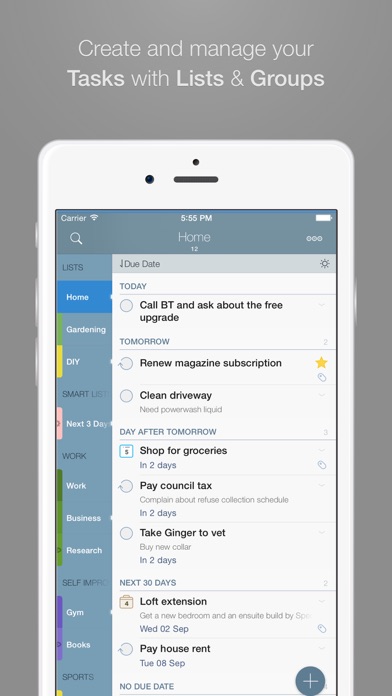
2Do lets you take a completely different approach to managing your tasks. With its extremely simple-to-use interface and a comprehensive and flexible set of powerful features, it lets you focus on what's most important to you: your life. There is no wrong way of using 2Do, and unlike other to-do apps, it won't force you in adhering to a particular task management methodology.
AWARDS
• Macstories: App of the Year 2015
• Apple - App of the week, June 2015
• Apple - Mac App Store “Best of 2013”
• “Best App Ever Awards” Winner
• Cult Of Mac - 5/5
• Gizmodo "Best app for forgetful people" - Gold Medal
PLUGINS: …
Read the full description
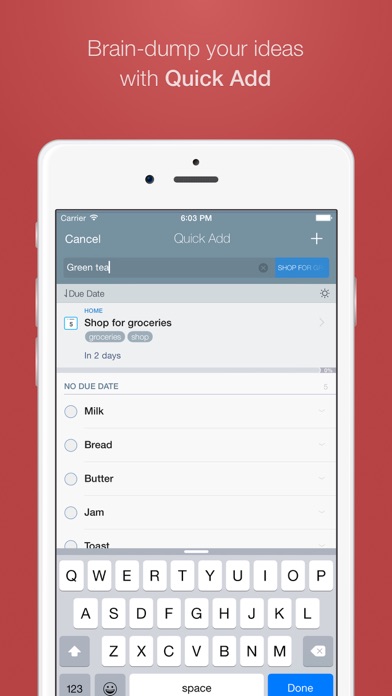
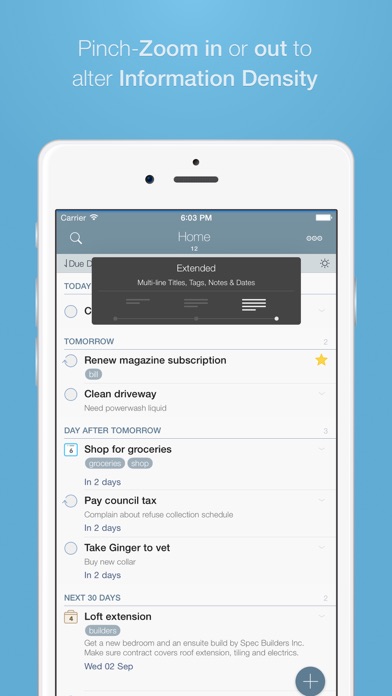
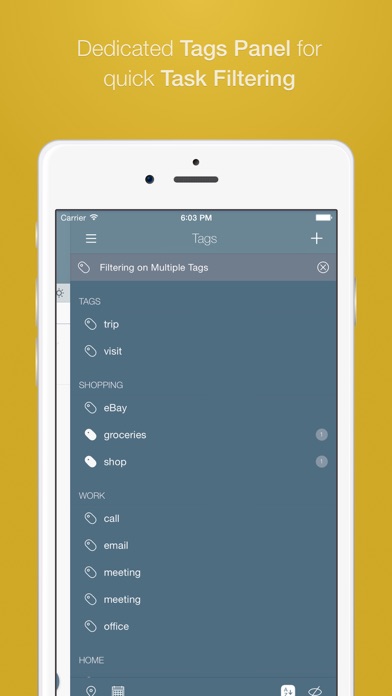
"2Do adapts to my needs, not the other way around. 2Do gets me."- Macstories 2Do lets you take a completely different approach to managing your tasks. With its extremely simple-to-use interface and a comprehensive and flexible set of powerful features, it lets you focus on what's most important to you: your life. There is no wrong way of using 2Do, and unlike other to-do apps, it won't force you in adhering to a particular task management methodology. AWARDS • Macstories: App of the Year 2015 • Apple - App of the week, June 2015 • Apple - Mac App Store “Best of 2013” • “Best App Ever Awards” Winner • Cult Of Mac - 5/5 • Gizmodo "Best app for forgetful people" - Gold Medal PLUGINS: Email to 2Do: Optional plugin that allows you to integrate your email address directly with 2Do, thus allowing you to email yourself tasks from anywhere. You can even use automation, such as IFTTT, to add reminders to your list. SYNC • Stay in sync using one of the following: Dropbox, Reminders (CalDAV), Toodledo, Fruux (CalDAV), Calendar Server (CalDAV), ownCloud (CalDAV), SabreDAV (CalDAV) or a 3rd party CalDAV Server of choice. • Using Reminders CalDAV sync enables Siri • Periodic automatic backups are created for you (compatible with 2Do for Mac) for a rainy day. • Automatic Push sync between devices SIMPLE TASKS, CHECKLISTS & PROJECTS • Create simple tasks, or checklists and projects with sub-tasks. Tasks can have notes, attachments and multiple alarms. • Set any task to repeat using a flexible set of options. • Assign multiple alerts / reminders PASSWORD PROTECTION • Set a lock to the whole app or individual lists LIST GROUPS, LISTS, INBOX & SMART LISTS • In addition to built-in Focus lists that allow you to conveniently view upcoming, starred or scheduled tasks, you can create multiple lists to manage and organize your tasks. • Built-in support for GTD Inbox • Smart lists let you harness the true potential of 2Do using a number of search options, filters and search pre-sets. Using Smart Lists, you can create custom views of your tasks and use them to focus-in or find frequently managed tasks. PINCH ZOOMING • Control the amount of information you wish to see with a simple pinch-to-zoom gesture, from single line titles to multiple lines of titles, notes and tags. BATCH EDITING & SHARING • Drag & Drop support to move tasks between lists or drop on calendar to defer • Batch tagging, starring, marking tasks done and more • Task Sharing via AirDrop, iMessage and Email REIMAGINED TASK EDITOR & QUICK ADD • With focus on switching between editors effortlessly using a single tap only, you’ll save dozens of taps and swipes when editing your tasks. • Save your thoughts as they come to you, by using Quick Add (Tap-hold on [+]) • X-callback-url support TAGS • Manage tags from a dedicated Tags Panel • Organize your tags within groups • Leverage the powerful integration of Tags & Smart Lists to filter on frequently managed tasks. • Find Used vs. Unused tags YOUR TASKS UNLIMITED • Set a Start Date to hide tasks from a list before they're relevant and add Duration to put an estimate on the amount of time you’ll be spending on your task • Add an action to call, write an email or trigger a URL Scheme right from 2Do • Attach an image or a voice note to your tasks • Customizations for time management • Use as an events / party planner, or an effective birthday reminder • Desktop-class Task Manager ALERTS • Attach multiple alerts to each task • Attach locations to tasks and get nearby alerts as you approach assigned locations DESKTOP-CLASS IPAD APP • Everything from Tasks to Calendar Events - all managed from the same screen. • Manage calendar events and schedules • Split-screen support • Keyboard shortcuts EXTRAS • TextExpander support Follow us: Twitter: @2DoApp Facebook.com/The2DoApp Youtube.com/user/The2DoApp
Installs, last 30 days
Apple does not publish download counts. Estimates are in testing.
Estimated store revenue Estimated Beta
App Store, worldwide, monthly rate from the last 13 chart days to 20 Nov 2026
Below the top 100 grossing apps in the markets we calibrate. In the United States that usually means under about $6.4M a month. App Store purchases and subscriptions only, before Apple's 15 to 30% fee. Ads and web payments are not included.
Ratings
3,717 ratings, 3,717 reviews
No rating breakdown published for this app.
Recent reviews
Latest public reviews from the store
- 20 Apr 2023
Excellent App - Have a request!
I want to start out by saying I love this app. I have many tasks to manage on a daily basis and this app helps me to keep things organized and to complete things on time. I have a request however. I have the app set up to do automatic backups, and I also email myself backups daily. When I do an email backup, I first permanently delete the items in the deleted list. This works great unless I am distracted. Twice now, I have accidentally deleted my entire list instead of the deleted list. I know I can restore the list, but if I have added things to the list after the last backup, those changes won’t be restored and I am left racking my brain trying to recall all the things I have added since the last backup. So, my request is to either have an “undo” option after deleting, or to have a big red warning appear if you are about to permanently delete all of the items not already in the list. This is just a suggestion, but I feel I am not the only one who has experienced this problem. Thank you.
- 7 Apr 2020
After many attempts, I finally found the best
I’ve searched for a task and project management solution for many years. I’ve tried nearly everything, including Apple’s editor winners. I’ve spent a fair amount of money over that time to find something that actually works, that doesn’t try too hard to do everything and focuses on a pragmatic approach to task management. Only this one has met and (even exceeded) my needs. I’ve used 2Do nearly two years now and I don’t know how I could manage it without it. Yes—it really works. 2Do gives me easy task and project creation via my computer, phone, and even voice entry on my watch. I can add a task via my watch while I’m on a run. I can add or manage tasks from my phone while I’m out running errands. The UI on all devices is outstanding. It provides easily customizable organization of tasks into projects and categories. It perfectly syncs between devices without the myriad problems I encountered in other tools that claim to sync. It sends notifications on all my devices to keep me on track when all other options, including Apple calendar and Reminders failed me. I have even been able to incorporate the GTD approach into the tool. Well worth the price. Choose thi
- 28 Feb 2020
An underrated and powerful task app
2Do is packed with advanced functionality and is extremely flexible in terms of how you can manage your tasks. Tags, rich attachments, checklists, projects, list groupings, start dates, due dates, custom alerts, it’s all there. Just about any power user feature is available, and you can ignore the ones you don’t need. Combined with smart lists, which allow you to create many different perspectives on your tasks, you can essentially bend 2Do into an app that works exactly the way you want it to, which might be completely different from how someone else uses it. One missing feature that I would like to see is the ability to sync smart lists, list groups, list visibility settings, etc., when using a CalDAV server. Obviously these are extra features outside of the scope of CalDAV, but without a way of syncing these extra features between devices running 2Do, I have to recreate my smart lists and groups on every device and update them all manually when I make a change. It makes using 2Do on two devices difficult, and it gets worse with every additional one.
- 13 Jun 2019
Possibly the best out there
I’m not sure I’ve ever reviewed an app before, but I feel strongly about this one. Why it works for me — I wanted just two specific features that proved elusive: 1) the ability to create, *update* and mark complete tasks in my calendar, and 2) for those changes to sync back to the task app. I highlight update because that’s where things like IFTTT and Zapier didn’t work well as a hack, and tasks change, or I reword them or whatever all the time. It depends, of course, on how you work. Some say to do lists/tasks shouldn’t be scheduled in a calendar, only appointments. But if I don’t schedule tasks, they don’t get done. So although I loved Todoist, for example, its integration with calendars is very limited. I spent several months and a lot of money trying at least five or six task apps combined with project management apps. What I love about 2Do is it has the super robust features of the best to do apps like tags, location, duration, start time, notes. You can get as OCD as you like. But the game changer was its integration with my calendar. I hold back a star purely for the lack of integration with anything other than reminders. I do wish I could create tasks in
What reviewers bring up
Topics mentioned in the latest 8 reviews, by how many reviews mention them
Liked in good reviews (8 reviews)
- tasks 7
- features 5
- ability 5
- projects 4
- manage 4
- start 4
- other 4
- lists 4
Raised in bad reviews (0 reviews)
No topic comes up twice.
Top chart positions
Latest App Store chart ranks by country, last 10 days
Not in any tracked top chart in the last 10 days.
2Do - Todo List, Tasks & Notes history
Release, install milestones, listing and store changes
- First released on the store 15 Oct 2009
Update frequency
How often 2Do - Todo List, Tasks & Notes ships a new version, month by month
2 updates in the last 12 months. About as often as similar apps, which shipped a median of 2 updates in the same year.
Recent versions
Current version 3.90
- Version 3.9021 Jul 2026
· Fixed 429 Dropbox errors · Ongoing stability related improvements
- Version 3.8915 Apr 2026
· Improvements to auto-backup reliability · Improved third party CalDAV sync support · Non-matching projects are no longer shown in search results when Show Sub-Tasks Separately is enabled · Fixed a bug with search inheritance failing to work for checklists · Ongoing stability related improvements
Listing keywords
Words and phrases 2Do - Todo List, Tasks & Notes repeats most in its store listing
Top phrases: smart lists (4), frequently managed tasks (2), inbox smart lists (2), calendar events (2), desktop class (2).
Highlighted words also appear in the title. Counts cover the title, short description and description.
Compliance
What the listing and the app package show
- Store status
- Live
- Upkeep
- Updated 21 Jul 2026
- Age rating
- 4+
Apps like 2Do - Todo List, Tasks & Notes
 ShineDay: Habit Tracker俊航 何★ 4.72
 ESET HOMEESET, spol. s r.o.★ 4.74
 Volunteer ConnectionDigital Cheetah Solutions, Inc.★ 4.66
 Reminder & Countdown ProSergey Astakhov★ 4.79
 To Do List - Reminders & TasksMonelyze Inc.★ 4.69
 My Measures + AR MeasureTOP APP d.o.o.★ 4.35
 Epson iProjectionSeiko Epson Corporation★ 4.33
 Goal Tracker & Daily PlannerSuccess Wizard, Inc.★ 4.72
 Pen & Paper - Digital journalMartin Diz★ 4.73
2Do - Todo List, Tasks & Notes: questions and answers
Who makes 2Do - Todo List, Tasks & Notes?
2Do - Todo List, Tasks & Notes is published by Beehive Innovations Services.
When was 2Do - Todo List, Tasks & Notes last updated?
The latest version (3.90) was released on 21 Jul 2026.
Is 2Do - Todo List, Tasks & Notes free?
No. 2Do - Todo List, Tasks & Notes is a paid app priced at $9.99.
Is 2Do - Todo List, Tasks & Notes still available?
Yes. 2Do - Todo List, Tasks & Notes is live on App Store as of 20 Nov 2026.
Track 2Do - Todo List, Tasks & Notes and its competitors
Watch any app for new versions, rating drops, chart moves and removals. Free plan, no card.