
- Installs
- —
- Apple does not publish download counts
- Rating
- 4.33
- Ratings
- 3.2K
- Version
- 4.2.0
- Updated 31 Oct 2025
- Released
- 5 Jan 2012
- Tracked since 10 May 2026
- Size
- 27 MB
- Needs 15.0
Also on Google Play: Epson iProjection (18.5K ratings)
Screenshots
About Epson iProjection
The description on the store listing
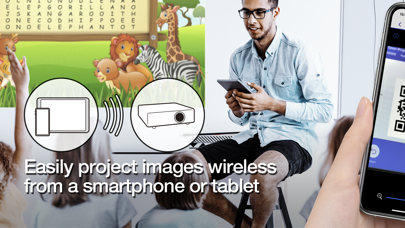
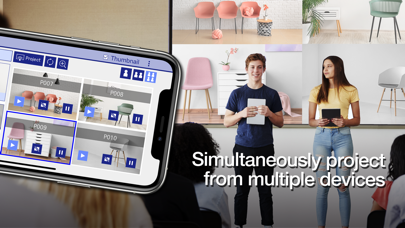
Epson iProjection is a wireless projection app for iPhone®, iPad®, or iPod® touch. This app makes it easy to mirror your device's screen, and project documents and photos wirelessly to a supported Epson projector.
[Key Features]
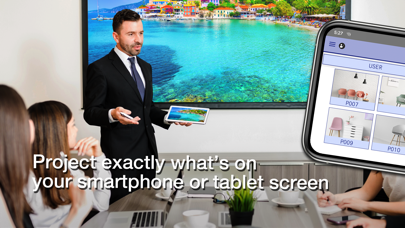
1. Mirror your device’s screen and output your device’s audio from the projector.
2. Project your photos in the "Photos" app, project documents loaded in this app, and project in real-time video from your device's camera.
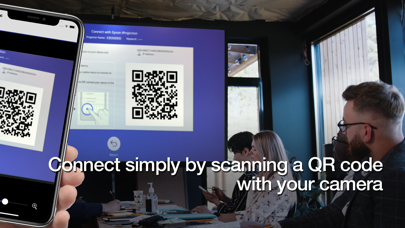
3. Easily connect your device by scanning a projected QR code.
4. Connect up to 50 devices to the projector, display up to four screens simultaneously, and share your projected image with the other connected devices.
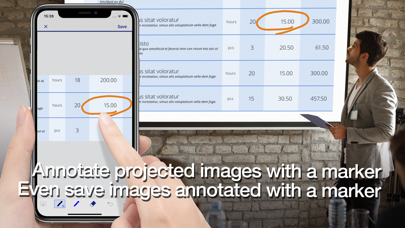
5. Annotate projected images …
Read the full description
Epson iProjection is a wireless projection app for iPhone®, iPad®, or iPod® touch. This app makes it easy to mirror your device's screen, and project documents and photos wirelessly to a supported Epson projector. [Key Features] 1. Mirror your device’s screen and output your device’s audio from the projector. 2. Project your photos in the "Photos" app, project documents loaded in this app, and project in real-time video from your device's camera. 3. Easily connect your device by scanning a projected QR code. 4. Connect up to 50 devices to the projector, display up to four screens simultaneously, and share your projected image with the other connected devices. 5. Annotate projected images with a pen tool and save the edited images on your device. 6. Control the projector like a remote control. [Notes] • For supported projectors, visit https://support.epson.net/projector_appinfo/iprojection/en/. You can also check "Supported Projectors" in the app's support menu. • While mirroring your device’s screen, video and audio may be delayed depending on the device and network specifications. Only unprotected content can be projected. • Use the mirroring feature to project videos in the "Photos" app. [About Projecting Documents] • The following file types are supported when projecting using "Documents". - Microsoft® Word - Microsoft® Excel - Microsoft® PowerPoint - Keynote - PDF - JPG - PNG - The file types mentioned above are also supported when stored in cloud file services • Depending on the document, the projected image may differ from the image on the computer or at the time of creation, for example, some characters may not be projected correctly. If this occurs, use the mirroring feature ("Mirror device screen") instead. • Animations and screen transition effects, videos, and audio are not played. Use the mirroring feature to play them. • We recommend testing the projection in advance when using this app for presentations. [Using the App] Make sure that the network settings for the projector have been completed. 1. Switch the input source on the projector to "LAN". Network information is displayed. 2. Connect to the same network as the projector from "Settings" > "Wi-Fi" on your iPhone/iPad/iPod touch. 3. Start Epson iProjection and connect to the projector. 4. Select and project from "Mirror device screen", "Photos", "Documents", "Web Page", or "Camera". [App permissions] The app requires the following permissions for specific features. 【Required】 Local Network - Search for and connect to the projector. 【Optional】] Photo - Project selected photos from the device to the projector. * You can use the app without granting the optional permissions, but some features may not work. All images are examples and may differ from the actual screens.
Installs
Apple does not publish download counts. Estimates are in testing.
We publish iOS estimates only after they pass a back-test against real numbers. Chart history below is measured.
Estimated store revenue Estimated Beta
App Store, worldwide, monthly rate from the last 12 chart days to 19 Nov 2026
Below the top 100 grossing apps in the markets we calibrate. In the United States that usually means under about $6.4M a month. App Store purchases and subscriptions only, before Apple's 15 to 30% fee. Ads and web payments are not included.
Ratings
3,248 ratings
- 5 ★76%
- 4 ★6.4%
- 3 ★3.6%
- 2 ★2.7%
- 1 ★11%
Recent reviews
Latest public reviews from the store
- 24 Feb 2025
Lastly update is buggy
Since the last major update, I’ve been having a hard time loading my photos. Now I have to “add” them?
- 27 May 2024
Could be so much better
I gave the app 3 stars because it works pretty well when it works. There has been several times that it’s taken me over 45 minutes to even get the app to read the projector (or however it works). Then there are the times that it shuts off in the middle of using it. This becomes very problematic when projecting a design for a mural for example (which is how I use the app). I think it’s a great projector but the app has a few glitches which I feel could be fixed pretty easily. If this is the only projector I use with the app I feel like it shouldn’t be so difficult to connect to every time.
- 9 Aug 2022
Great App!
I have a Fitbit Premium Subscription and it comes with all these different options for workout videos. Even though I can watch them on my phone, it’s definitely nice being able to have them projected from my phone screen onto a bigger screen with the help of an epson projector that one of the group fitness class studios located at my local Recreation Center has. I admit I was unsure about this app because a lot of the reviews said it won’t project videos but it actually does! It’s super easy to use and has helped me enjoy trying different workout videos a lot more! My only complaint is that there were a few times throughout some of the videos I watched where it froze but otherwise it works perfectly!
- 7 Jan 2022
It’s very fun
This app lets me connect to every projector in my school because they are all connected to the same IP and I can screw around around with my teachers
What reviewers bring up
Topics mentioned in the latest 8 reviews, by how many reviews mention them
Liked in good reviews (3 reviews)
No topic comes up twice.
Raised in bad reviews (3 reviews)
- iphone 3
- presentation 2
- animations 2
- wireless 2
- project 2
- slides 2
Top chart positions
Latest App Store chart ranks by country, last 10 days
- Countries ranked
- 2 of 50
- Best rank
- #61
- Top 10 placements
- 0
- of 2 chart placements
- Average rank
- #74.5
Best countries on App Store
- 🇵🇹 Portugal · Top free, Productivity#61
- 🇸🇦 Saudi Arabia · Top free, Productivity#88
Epson iProjection history
Release, install milestones, listing and store changes
- First released on the store 5 Jan 2012
Update frequency
How often Epson iProjection ships a new version, month by month
0 updates in the last 12 months. Less often than most similar apps: they shipped a median of 3 updates in the same year.
Recent versions
Current version 4.2.0
- Version 4.2.031 Oct 2025
- Added support for French, German, Traditional Chinese, and Arabic.
Listing keywords
Words and phrases Epson iProjection repeats most in its store listing
Top phrases: epson iprojection (3), mirroring feature (3), mirror device screen (2), device screen (2), device’s screen (2).
Highlighted words also appear in the title. Counts cover the title, short description and description.
Compliance
What the listing and the app package show
- Store status
- Live
- Upkeep
- Updated 31 Oct 2025
- Age rating
- 4+
Apps like Epson iProjection
 Goal Tracker & Daily PlannerSuccess Wizard, Inc.★ 4.72
 Notes Writer Pro 2026Kairoos Solutions SL★ 4.6
 Pen & Paper - Digital journalMartin Diz★ 4.73
 Focus Hero: Achieve your GoalsFocus Hero Ltd★ 4.53
 My Measures + AR MeasureTOP APP d.o.o.★ 4.35
 To Do List - Reminders & TasksMonelyze Inc.★ 4.69
 Ooma Home PhoneOoma Inc.★ 4.63
 Reminder & Countdown ProSergey Astakhov★ 4.79
 Folderly - Academic OrganizerRaethan Christian Supatan★ 4.83
Epson iProjection: questions and answers
Who makes Epson iProjection?
Epson iProjection is published by Seiko Epson Corporation.
When was Epson iProjection last updated?
The latest version (4.2.0) was released on 31 Oct 2025.
Is Epson iProjection free?
Yes. Epson iProjection is free to download.
Is Epson iProjection still available?
Yes. Epson iProjection is live on App Store as of 10 May 2026.
Track Epson iProjection and its competitors
Watch any app for new versions, rating drops, chart moves and removals. Free plan, no card.