
- Installs
- —
- Apple does not publish download counts
- Rating
- 4.75
- Ratings
- 32
- Version
- 7.3.1
- Updated 6 Nov 2026
- Released
- 17 Jun 2026
- Tracked since 10 Nov 2026
- Size
- 279 MB
- Needs 17
Also on Google Play: Aria – Music Notation Editor (14 ratings)
Screenshots


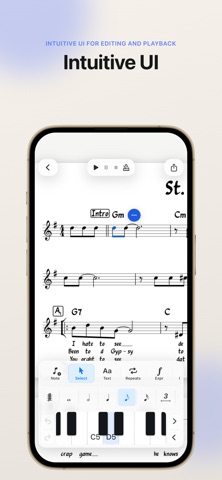

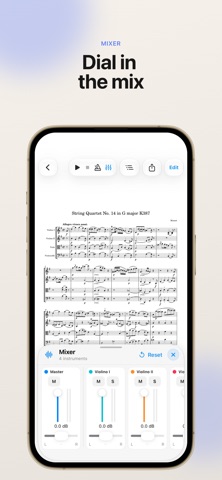


About Aria – Music Notation Editor
The description on the store listing
Aria is a notation editor for iPhone and iPad that lets you create, edit, and play back MuseScore files on the go.
Open existing MuseScore and MusicXML files, make changes with intuitive touch-based notation controls, play back your score, organize your library, manage individual parts, and export your music when you’re ready to share.
Built for musicians who want a lightweight, mobile-friendly way to review, create, and revise scores wherever they are.
Features:
* Open MSCZ and MusicXML score files
* Create new scores from templates
* Edit and enter notes with touch controls, Apple Pencil, or a MIDI controller
* Play back scores locally
* View and manage individual parts
* Export and …
Read the full description
Aria is a notation editor for iPhone and iPad that lets you create, edit, and play back MuseScore files on the go. Open existing MuseScore and MusicXML files, make changes with intuitive touch-based notation controls, play back your score, organize your library, manage individual parts, and export your music when you’re ready to share. Built for musicians who want a lightweight, mobile-friendly way to review, create, and revise scores wherever they are. Features: * Open MSCZ and MusicXML score files * Create new scores from templates * Edit and enter notes with touch controls, Apple Pencil, or a MIDI controller * Play back scores locally * View and manage individual parts * Export and share your work as MSCZ, PDF, MusicXML, audio, and more. Aria is an independent app and is not affiliated with or endorsed by MuseScore, Muse Group, or any related project. Aria is open-source software licensed under the GNU GPLv3. Source code, license notices, and build instructions are available here: https://github.com/hdi200/aria
Installs
Apple does not publish download counts. Estimates are in testing.
We publish iOS estimates only after they pass a back-test against real numbers. Chart history below is measured.
Estimated store revenue Estimated Beta
App Store, worldwide, monthly rate from the last 14 chart days to 21 Nov 2026
Below the top 100 grossing apps in the markets we calibrate. In the United States that usually means under about $6.4M a month. App Store purchases and subscriptions only, before Apple's 15 to 30% fee. Ads and web payments are not included.
Ratings
32 ratings
No rating breakdown published for this app.
Recent reviews
Latest public reviews from the store
- 24 Oct 2026
Awesome
Just needs percussion editing Four regardless, I think this is the easiest and fastest note entry app I've used on any platform. Just add working w percussion and five stars.
- 13 Sep 2026
Works very well
I haven’t tried anything complicated yet, but note entry is quite easy - no need for a tutorial or help, it works quite naturally.
- 8 Aug 2026
My new favorite sheet music app
Love the recent updates. Can’t wait to see how this app will turn out. It’s already my preferred app for musescore file playback.
- 18 Jul 2026
iPad or iPhone?
I’ve been using this for a few days now and am thrilled to finally have a “portable” MuseScore file editor! Originally I thought the iPad version would make a nice addition to my existing desktop workflow, but after using the iPhone, it’s clear this suits me much better. Waiting in line, for an appointment, whatever, the iPhone is always there and great for working on a melodic transition, tweaking an existing score, or if there’s a simple tune stuck in my head… Anyway, nothing beats the desktop version of MuseScore on a large screen, but this is very nice for work on the go. As for the four stars, the app is a great start but could use a little more UI polish here and there. Response to Developer: Thanks for the response! I don’t mind the smallness of the iPhone version, I actually find it refreshing. Thoughts/ideas - the Select option seems to show the same “sub menu” as the Note option. It would be helpful if the Select option’s sub menu would allow actions like - Select System, Select Similar, Select Multi, etc… Thanks again!
What reviewers bring up
Topics mentioned in the latest 5 reviews, by how many reviews mention them
Liked in good reviews (5 reviews)
- musescore 3
- note 3
- finally 2
- entry 2
- four 2
- file 2
- yet 2
Raised in bad reviews (0 reviews)
No topic comes up twice.
Top chart positions
Latest App Store chart ranks by country, last 10 days
- Countries ranked
- 1 of 50
- Best rank
- #89
- Top 10 placements
- 0
- of 1 chart placements
- Average rank
- #89
Best countries on App Store
- 🇨🇱 Chile · Top grossing, Music#89
| Country | Chart | Category | Rank | Best (10 days) | Date |
|---|---|---|---|---|---|
| 🇨🇱 Chile | Top grossing | Music | #89 | #89 | 19 Nov 2026 |
Aria – Music Notation Editor history
Release, install milestones, listing and store changes
- First released on the store 17 Jun 2026
Update frequency
How often Aria – Music Notation Editor ships a new version, month by month
1 updates in the last 12 months. About as often as similar apps, which shipped a median of 1 updates in the same year.
Recent versions
Current version 7.3.1
- Version 7.3.16 Nov 2026
More Note Tools, Finger Numbers & iPhone Duo Support! This update adds more note entry tools, finger numbers and a redesigned way to enter chord symbols. It also redesigns Aria for iPhone Duo. New: - More note entry tools. Tap the arrow at the end of the note-entry toolbar for 32nd and 64th notes, double dots, grace notes, trills, mordents, turns, arpeggios, tremolos, beaming, and double sharps and flats. - Finger numbers. Add finger numbers to your score. Choose Text > Fingering and tap 1 to 5. Aria moves to the next note for you and skips rests. - Duplicate scores. Touch and hold a score in the library, then choose Duplicate. - Redesigned chord entry. Build chord symbols with buttons for the root, quality, extension, alterations and bass. Previous and Enter step through the score, and existing chords fill in so you can change them. - Tempo text. Add words to a tempo marking, such as Allegro at 112 BPM. Playback still follows the number. - Split View and Stage Manager (iPad). In a narrow window, Aria switches to its iPhone layout so everything fits. - MuseScore Studio 4.7.6. Aria now uses the same engine as MuseScore Studio 4.7.6 on desktop. - Redesigned for The iPhone Duo. Read two pages side by side like a book, or keep your tools on one page while you edit on the other. Partly fold your phone to play and enter notes on a virtual piano, or control playback. Fixed: - The playback cursor no longer covers tab numbers or notes at the edges of the bar. - Opening a score from Files or another app while a score is open now saves the current score and opens the new one. - Highlighter marks keep their shape after you edit the score (iPad). - The Transpose sheet now starts at the top instead of leaving a gap. - Various bug fixes and improvements.
Listing keywords
Words and phrases Aria – Music Notation Editor repeats most in its store listing
Top phrases: manage individual parts (2), individual parts (2), manage individual (2), notation editor (2).
Highlighted words also appear in the title. Counts cover the title, short description and description.
Compliance
What the listing and the app package show
- Store status
- Live
- Upkeep
- Updated 6 Nov 2026
- Age rating
- 4+
Apps like Aria – Music Notation Editor
 Pyware 3D ViewerPygraphics, Inc.★ 2.86
 WNGC Your Georgia CountryCox Media Group★ 4.54
 Rhythm Necklace - Geometric SequencerSam Tarakajian★ 4.64
 DigiStix 2 AUv3 Plugin4Pockets.com★ 4.54
 JPLAYMarcin Ostapowicz★ 4.3
 MS Vinyl - Music WidgetDinh Dong Nguyen★ 4.26
 Radio TEDDYIR MediaAd GmbH★ 4.56
 Arpeggionome Pro | matrix arpeggiatorAlexandernaut★ 4.56
 Guitar & Ukulele Tuner 2025Aleksandr Kulaga★ 4.44
Aria – Music Notation Editor: questions and answers
Who makes Aria – Music Notation Editor?
Aria – Music Notation Editor is published by Jack Gruber.
When was Aria – Music Notation Editor last updated?
The latest version (7.3.1) was released on 6 Nov 2026.
Is Aria – Music Notation Editor free?
Yes. Aria – Music Notation Editor is free to download.
Is Aria – Music Notation Editor still available?
Yes. Aria – Music Notation Editor is live on App Store as of 10 Nov 2026.
Track Aria – Music Notation Editor and its competitors
Watch any app for new versions, rating drops, chart moves and removals. Free plan, no card.