
- Installs
- —
- Apple does not publish download counts
- Rating
- —
- Ratings
- —
- Version
- 2.7.1
- Updated 8 Jan 2013
- Released
- 3 May 2011
- Tracked since 10 May 2026
- Size
- 7 MB
- Needs 10.6
Screenshots

About Binder 2
The description on the store listing
Music sheets organizer and iTunes player
Retrieve ANY song in only 1 second !!!
- The fastest way to find a song : Simply type 3 or 4 characters and Voilà!
Features (version 2.0):
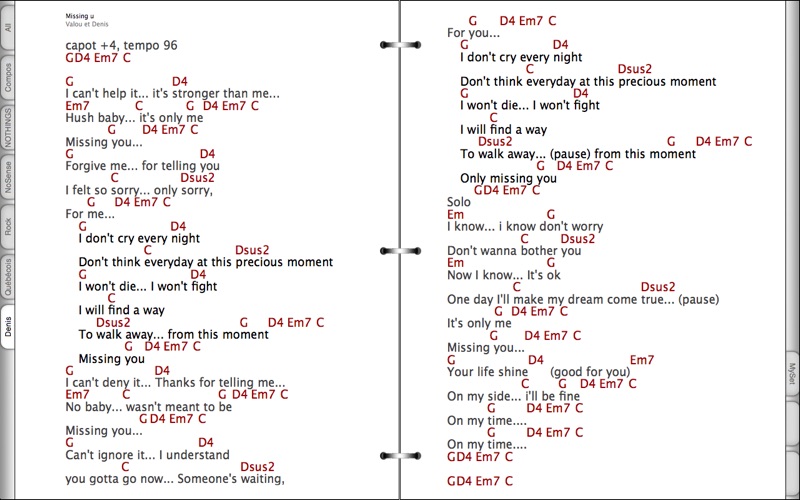
View your PDF files as sheets in a Binder.
- No need to deal with multiple screens.
- PDF files of a given folder becomes sheets of a single binder.
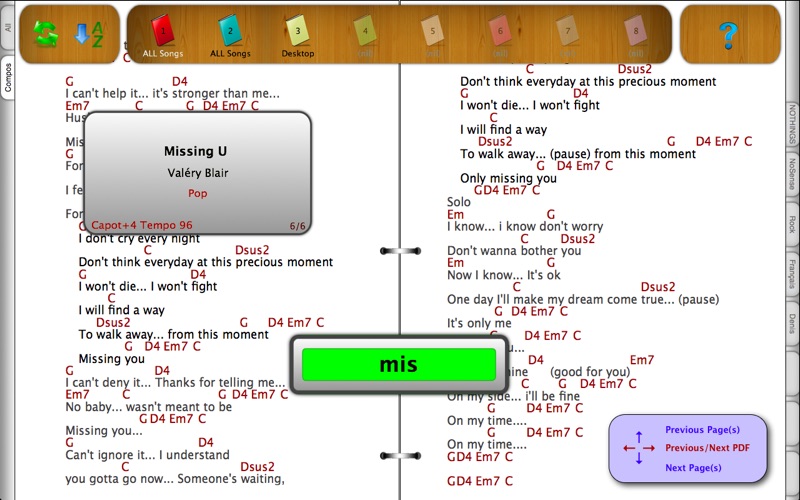
- Assign up to 8 binders to 8 folders of your choice.
- Manage up to 9 tabs for each binder.
* Use tabs to group songs or to create sets
Quickly retrieve your songs.
- Binder is always in «Search» mode.
- Type few characters or use arrow keys to find a sheet.
- No need to activate a search field. Binder is always ready.
- The search is always performed …
Read the full description
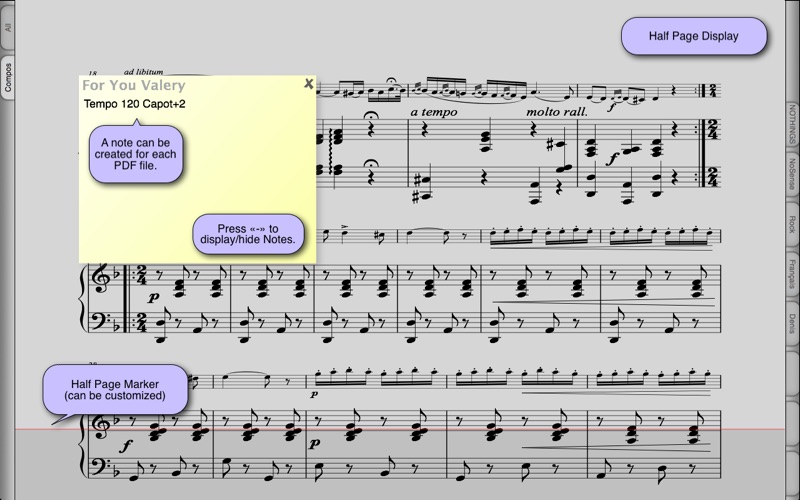
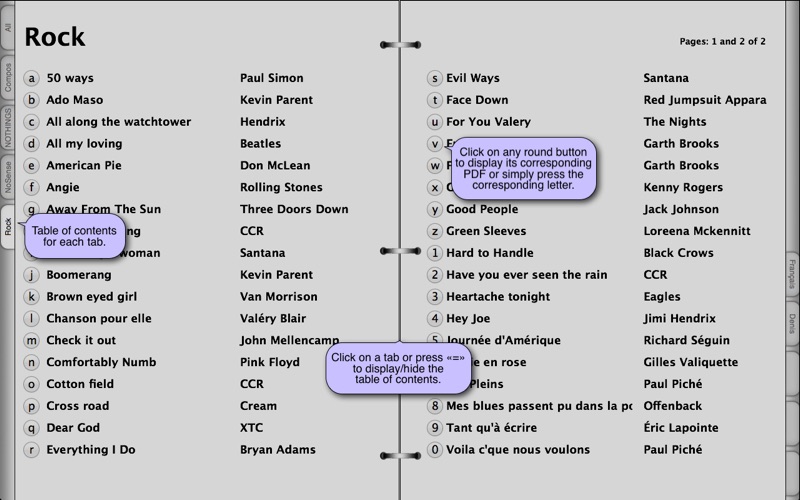
Music sheets organizer and iTunes player Retrieve ANY song in only 1 second !!! - The fastest way to find a song : Simply type 3 or 4 characters and Voilà! Features (version 2.0): View your PDF files as sheets in a Binder. - No need to deal with multiple screens. - PDF files of a given folder becomes sheets of a single binder. - Assign up to 8 binders to 8 folders of your choice. - Manage up to 9 tabs for each binder. * Use tabs to group songs or to create sets Quickly retrieve your songs. - Binder is always in «Search» mode. - Type few characters or use arrow keys to find a sheet. - No need to activate a search field. Binder is always ready. - The search is always performed on all PDF even if a tab is selected. * This allows you to do a special request and go back to your set right after. Control iTunes. - Binder automatically match the corresponding songs in iTunes when you use the integrated remote control. Sort your song by title or author. - Simply click on the «Sort» button or press on the «Tab» key to switch to a different sort order (Tite or Author). No library to maintain. - Binder build its own indexes according to the name of your PDF files. - Please read the user manual to get more information about the suggested naming conventions. Complete integration with your favorite applications. - Print, Mail, Preview your files directly from Binder. - All these features are integrated to the main menu of Binder. Features (version 2.1): 1) Table of contents for each tab 2) The main window of Binder now contains 4 invisibles zones that can be used to scroll PDF (previous/next PDF) and to scroll pages (previous/next 2 pages). Features (version 2.2): 1) Half Page Zooming. 2) Screen Dimmer (to reduce brightness of PDF). 3) Menu : Preferences added. 4) Bug Fixed : PDF are now automatically enlarge to maximum when the screen resolution is greater than 1280 x 800. 5) User's manual has been updated. Features (version 2.3): 1) Easily manage your own user lists. 2) Press CMD-ENTER (or CMD-Click on any tab) to Edit user list of current tab (or to Manage tabs if the current tab is not a user list). 3) Bug Fixed : CTRL-Click on a given binder now works when the dimmer is on. 4) Change : If you click on a tab that is already selected, Binder will not select the previous tab. Features (version 2.3.2): 1) Support of full screen under OSX Lion. Features (version 2.3.3): 1) Animation added to the toolbar. 2) Hide the toolbar when Binder is not active. 3) Continuous Play : Stop Playback when the last song of a user tab (set list) has been played. Features (version 2.4): 1) Create Notes for each PDF: A note can be created for each PDF file. When you create a new note, Binder saves this note in a text file (.TXT) using the same filename as the current PDF. This way, you can easily grab all your notes to share them or for backup. If you rename a PDF file, be sure to rename it’s corresponding .TXT file too. "-" (dash) key can be used to display / hide notes. You can also click in the middle of the screen, between the two upper rings to display / hide notes. * Please, read user manual for more information. Binder is a must for all musicians who must carry binders of music sheets.
Installs
Apple does not publish download counts. Estimates are in testing.
We publish iOS estimates only after they pass a back-test against real numbers. Chart history below is measured.
Estimated store revenue Estimated Beta
App Store, worldwide, monthly rate from the last 15 chart days to 22 Nov 2026
Below the top 100 grossing apps in the markets we calibrate. In the United States that usually means under about $6.4M a month. App Store purchases and subscriptions only, before Apple's 15 to 30% fee. Ads and web payments are not included.
Ratings
No rating breakdown published for this app.
Recent reviews
Latest public reviews from the store
No reviews in our sample for this app yet.
Top chart positions
Latest App Store chart ranks by country, last 10 days
Not in any tracked top chart in the last 10 days.
Binder 2 history
Release, install milestones, listing and store changes
- First released on the store 3 May 2011
Update frequency
How often Binder 2 ships a new version, month by month
0 updates in the last 12 months. Less often than most similar apps: they shipped a median of 1 updates in the same year.
Recent versions
Current version 2.7.1
- Version 2.7.18 Jan 2013
PLEASE NOTE: If you are running OSX 10.11 (El Capitan) or later, you should consider MUSIC BINDER PRO which provides much more features. Binder 2 will no longer be updated. Special note when upgrading from version 2.5: New security features in OSX means that Binder no longer has access to folders that were previously assigned to colored binders. Not to worry. You can quickly re-enable your PDF folder by re-selecting it from a Dialog box that Binder will display for you. You only need to do this one time for each colored binder that has an assigned folder. New in version 2.7.1: - Bug fix for OSX Lion Mountain New in version 2.7: - Bug fix (sometimes app was crashing when running on OSX 10.6) New in version 2.6: - Trackpad Support (gestures can be customized from Trackpad Preferences menu). - Functions (Zoom, Play) are done on the active PDF when 2 PDF of one page are displayed at the same time. In this case, the inactive PDF is dimmed (amout can be set in Preferences menu). - User Manual updated.
Listing keywords
Words and phrases Binder 2 repeats most in its store listing
Top phrases: features version (7), pdf files (3), binder is always (2), display hide notes (2), bug fixed (2).
Highlighted words also appear in the title. Counts cover the title, short description and description.
Compliance
What the listing and the app package show
- Store status
- Live
- Upkeep
- No update since 8 Jan 2013
- Age rating
- 4+
Apps like Binder 2
 Pyware 3D ViewerPygraphics, Inc.★ 2.86
 WNGC Your Georgia CountryCox Media Group★ 4.54
 Rhythm Necklace - Geometric SequencerSam Tarakajian★ 4.64
 DigiStix 2 AUv3 Plugin4Pockets.com★ 4.54
 JPLAYMarcin Ostapowicz★ 4.3
 MS Vinyl - Music WidgetDinh Dong Nguyen★ 4.26
 Radio TEDDYIR MediaAd GmbH★ 4.56
 Arpeggionome Pro | matrix arpeggiatorAlexandernaut★ 4.56
 Guitar & Ukulele Tuner 2025Aleksandr Kulaga★ 4.44
Binder 2: questions and answers
Who makes Binder 2?
Binder 2 is published by VadeCreation.
When was Binder 2 last updated?
The latest version (2.7.1) was released on 8 Jan 2013.
Is Binder 2 free?
No. Binder 2 is a paid app priced at $0.99.
Is Binder 2 still available?
Yes. Binder 2 is live on App Store as of 10 May 2026.
Track Binder 2 and its competitors
Watch any app for new versions, rating drops, chart moves and removals. Free plan, no card.