
- Installs
- —
- Apple does not publish download counts
- Rating
- 4.62
- Ratings
- 13.4K
- Version
- 8.10
- Updated 20 Apr 2026
- Released
- 6 Jul 2011
- Tracked since 10 May 2026
- Size
- 274 MB
- Needs 16.0
Also on Google Play: BlueDriver OBD2 Scan Tool (17.2K ratings)
Screenshots
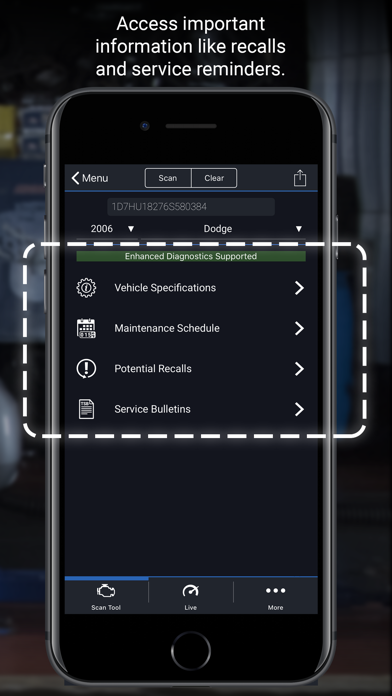
About BlueDriver OBD2 Scan Tool
The description on the store listing
BlueDriver® transforms your iPhone or iPad into a powerful OBD2 scan tool – trusted by over 1 million drivers, from professional mechanics to DIYers. Paired with the BlueDriver Bluetooth® Sensor (sold separately), it lets you read codes, diagnose issues, and fix your car with confidence—no wires, no guesswork.
Whether you're checking a check engine light, running a smog test, or diving into enhanced diagnostics like ABS or transmission codes, BlueDriver gives you the tools you need to understand your vehicle and make smarter repair decisions – with clear, easy-to-understand information.
What You Can Do with BlueDriver
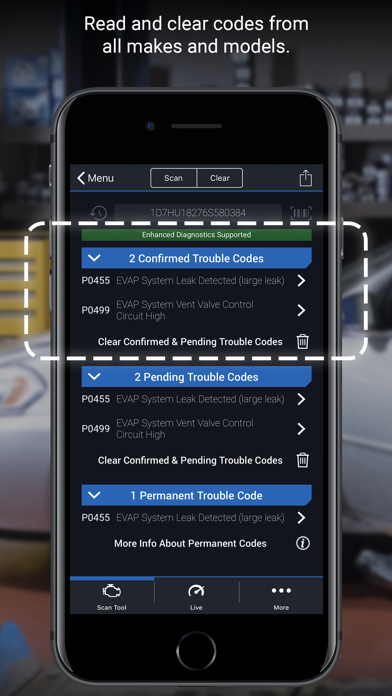
· Read and clear trouble codes - including check engine, ABS, airbag, …
Read the full description
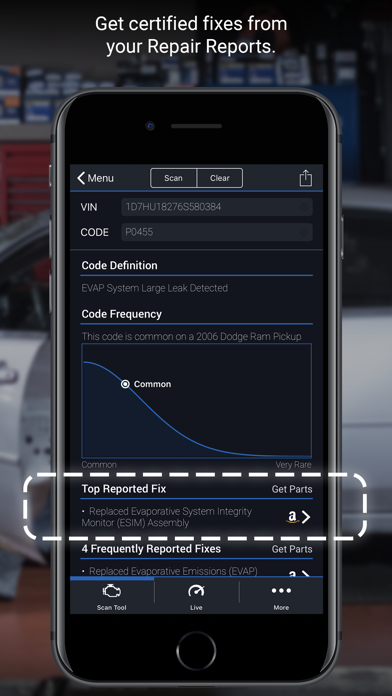
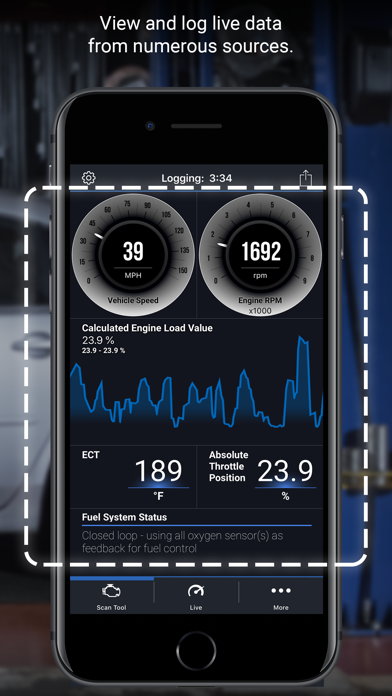
BlueDriver® transforms your iPhone or iPad into a powerful OBD2 scan tool – trusted by over 1 million drivers, from professional mechanics to DIYers. Paired with the BlueDriver Bluetooth® Sensor (sold separately), it lets you read codes, diagnose issues, and fix your car with confidence—no wires, no guesswork. Whether you're checking a check engine light, running a smog test, or diving into enhanced diagnostics like ABS or transmission codes, BlueDriver gives you the tools you need to understand your vehicle and make smarter repair decisions – with clear, easy-to-understand information. What You Can Do with BlueDriver · Read and clear trouble codes - including check engine, ABS, airbag, transmission, and more · Generate, save, and share professional-grade Repair Reports based on your exact vehicle and trouble code · Access Mode 6 on-board monitoring test results · Check smog readiness and freeze frame data · View live data with multi-PID interactive graphing · Scan your vehicle wirelessly with Bluetooth—no cables required · Choose between metric and imperial settings · Get likely fixes for your vehicle’s issues, explained in plain language Enhanced Diagnostics Coverage · GM, Ford, Chrysler, Toyota, Nissan, Mazda, Mercedes (2005+ models) · Mitsubishi (2008+), Hyundai/Kia (2012+) – available worldwide · BMW/Mini, Honda/Acura, Volkswagen/Audi – available in North America · Subaru – available in the United States What Makes BlueDriver Different? · No subscription required · Backed by a database of millions real-world fixes · Repair Reports are specific to your vehicle’s year, make, and model · Works globally with the BlueDriver Sensor · App is free to install—just pair with the Sensor to start scanning You can even preview a Repair Report without a Sensor by entering your VIN and a trouble code. Account Setup Made Easy You’ll create a BlueDriver account during setup—it’s quick and easy, and gives you secure access to all your scans, reports, and new features across any device. Important Info The BlueDriver Sensor plugs into your vehicle’s data port (found in every car built since 1996). It connects to the app via Bluetooth® to deliver full diagnostic functionality. Sensor sold separately in-app or at www.BlueDriver.com
Installs
Apple does not publish download counts. Estimates are in testing.
We publish iOS estimates only after they pass a back-test against real numbers. Chart history below is measured.
Estimated store revenue Estimated Beta
App Store, worldwide, monthly rate from the last 12 chart days to 19 Nov 2026
Below the top 100 grossing apps in the markets we calibrate. In the United States that usually means under about $6.4M a month. App Store purchases and subscriptions only, before Apple's 15 to 30% fee. Ads and web payments are not included.
Ratings
13,424 ratings
No rating breakdown published for this app.
Recent reviews
Latest public reviews from the store
- 15 Mar 2025
Warranted vehicles that move into unwarranted vehicle ownership
Lengthy but please stay tuned in because there is more good than I can relay in this one message, suffice it to say if you go no further and are questioning if the acquisition of the BlueDriver OBD2 is worth it? Absolutely yes, by all means grab it asap. So… In general, vehicles purchased with manufacturers warranty is a convenience soon outlived. As in uncertain times, the frugal, well thought out individual’s ability of affording the necessities of daily family life must include tools that supersede impulsive decisions. No new vehicle purchases. That said, I have discovered the BlueDriver OBD 2 scanner. I have vehicles with just recently expired extended manufacture and dealerships warranties. Recently having shelled out hundreds for regular maintenance I decidedly invested in this, one of the highest recommended tools available. For the price and somewhat wary of everything these days I accepted the high reviews and purchased the BlueDriver. Downloaded the accompanying app. That thought process proves correct, purchase BlueDriver OBD 2 with its absolute 100% proven automotive solutions, repairs etc as promised meanwhile not purchasing exorbitantly expensive post manufactur
- 18 Oct 2024
Easy to use, intuitive, and works well.
I bought this tool to try and reset a hybrid drive malfunction message, that I created when unplugging the hybrid battery and then not getting the disconnect seated properly when I plugged it back in. I got the hybrid system malfunction message to go away after driving for about 10 miles, but the permanent message had to be removed by the Dealer. I bought the Blue Driver tool in the hopes that it would remove the fault, even though it didn’t see it, as it was no longer present. I did a total scan and it removed the fault. I didn’t know it, as there was no indication of the fault via BlueDriver, but when I pulled up my Toyota app, the Permanent message, encouraging me to visit the dealer was gone, and no faults were recorded any longer. This tool is awesome! I created the problem and I knew for sure that there wasn’t any hybrid system failure, but a visit to the dealership, to hook it up to the large diagnostic tool to analyse the system and remove the fault, was not something I wanted to do, or felt was necessary. Thank you BllueDriver! Excellent tool, and very easy to use. idiot proof!
- 7 Oct 2024
Top choice for
For a DIY mechanic, or car enthusiast….having a GOOD OBDII scanning tool that allows for multiple testing, diagnostic functions, and general maintenance procedures is a GREAT THING to have at home, and even if a pro shop; as a backup if for some reason the usual scanner is down. Now, is this for pro shops working on autos 24/7, I’m saying no, but doesn’t mean not useful and shouldn’t be disregarded out of hand. For the homeowner or home mechanic, this would be your go to, especially if on the road or out checking autos that are buying, selling, or working on. From all my time using, which been long as made first run (yep still have my first old gen/run model, and works great as STILL SUPPORTED), I’ve only had 1 issue that found w/ UI that was a bug and when reached out to Company, we had phone call and found bug and why, and wishing 7 days an update was pushed to everyone to fix the issue (that black screen along w/ no press/tap that thought evince froze, but didn’t, lol), but anyway…..great SUPPORT from both devs, company CS, and supporting the devices still be used, old or new, and to me….that makes a company GREAT, as we the people use the products and need the
- 22 Dec 2023
Amazing
As a car enthusiast and someone who does their own maintenance and has for years, this tool is absolutely invaluable, you can't put a price on it. Not only does it have the capability to read and clear check engine codes, as well as every other diagnosable module on most models, but it will also provide recommended fixes for common codes and will track live data while you're driving. Don't have a temperature gauge? No problem. Open the live menu and select the engine temperature gauge as an option and it will data log the engine temperature the entire time the live log is active. You can add five or six data points to log at once (if my memory serves me correctly). All of this is viewed and controlled via the app on your phone. And no need to buy multiple scanner devices (unless you're like me and may do so to have one dedicated to each of your cars) because the scanner automatically recognizes the VIN number and identification information of the car you're diagnosing simply by plugging the scanner into the OBDII diagnostic port. I'm more than satisfied with this product and will continue to tell anyone who will listen that it is more than worth the investment.
What reviewers bring up
Topics mentioned in the latest 8 reviews, by how many reviews mention them
Liked in good reviews (8 reviews)
- maintenance 6
- tool 6
- scanner 5
- problem 5
- check 5
- tell 5
- diagnostic 4
- getting 4
Raised in bad reviews (0 reviews)
No topic comes up twice.
Top chart positions
Latest App Store chart ranks by country, last 10 days
Not in any tracked top chart in the last 10 days.
BlueDriver OBD2 Scan Tool history
Release, install milestones, listing and store changes
- First released on the store 6 Jul 2011
Update frequency
How often BlueDriver OBD2 Scan Tool ships a new version, month by month
1 updates in the last 12 months. About as often as similar apps, which shipped a median of 1 updates in the same year.
Recent versions
Current version 8.10
- Version 8.1020 Apr 2026
- GM Coverage Update
Listing keywords
Words and phrases BlueDriver OBD2 Scan Tool repeats most in its store listing
Top phrases: obd2 scan tool (2), sensor sold separately (2), bluedriver sensor (2), check engine (2), enhanced diagnostics (2).
Highlighted words also appear in the title. Counts cover the title, short description and description.
Compliance
What the listing and the app package show
- Store status
- Live
- Upkeep
- Updated 20 Apr 2026
- Age rating
- 4+
Apps like BlueDriver OBD2 Scan Tool
 Password Manager - Safe LockApp Rover★ 4.5
 Rocket Lawyer Legal & Law HelpRocket Lawyer Incorporated★ 4.88
 Talview CandidateTalview Inc★ 4.7
 Yandex Mail: Email & CloudDirect Cursus Computer Systems Trading★ 4.74
 Reminder & CountdownSergey Astakhov★ 4.76
 The Image Converter □Float Tech, LLC★ 4.65
 RoboAI - Chat & Ask AI ChatbotSense Yazilim★ 4.58
 Fax From iPhone - Receive FaxFree AI Utility Apps LLC★ 4.78
 Password Manager'广栋 莫★ 4.37
BlueDriver OBD2 Scan Tool: questions and answers
Who makes BlueDriver OBD2 Scan Tool?
BlueDriver OBD2 Scan Tool is published by Lemur Vehicle Monitors.
When was BlueDriver OBD2 Scan Tool last updated?
The latest version (8.10) was released on 20 Apr 2026.
Is BlueDriver OBD2 Scan Tool free?
Yes. BlueDriver OBD2 Scan Tool is free to download.
Is BlueDriver OBD2 Scan Tool still available?
Yes. BlueDriver OBD2 Scan Tool is live on App Store as of 10 May 2026.
Track BlueDriver OBD2 Scan Tool and its competitors
Watch any app for new versions, rating drops, chart moves and removals. Free plan, no card.