
- Installs
- —
- Apple does not publish download counts
- Rating
- 4.39
- Ratings
- 289
- 289 reviews
- Version
- 2026.10
- Updated 14 Oct 2026
- Released
- 24 Oct 2023
- Tracked since 10 May 2026
- Size
- 76 MB
- Needs 17.0
Screenshots
About Clic for Sonos
The description on the store listing
Experience unparalleled control over your Sonos sound system with Clic. Seamlessly pair your Apple Watch or smartphone and immerse yourself in a world where sound control is literally at your fingertips.
Effortless Connectivity, Unmatched Convenience
Easy Integration: Ensure smooth control by keeping your device and speakers on the same network.
Simple Setup: Launch Clic for a hassle-free initial setup, granting network access in seconds.
Every Sonos, One App
Apple Watch Sync: Directly manage your sound system from your wrist.
Tailored Scenes: Personalize volume settings and speaker groups with ease.
Quick Shortcuts: Instantly access your preferred settings.
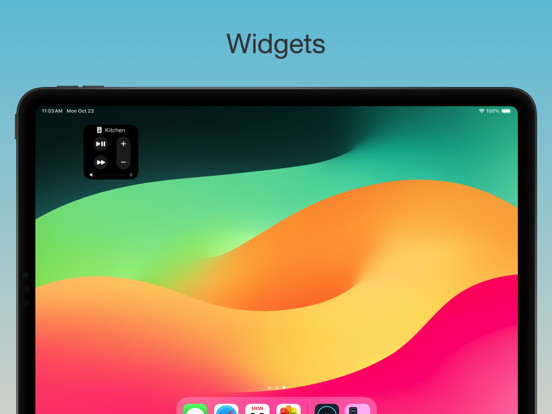
Dynamic Widgets: Interact …
Read the full description
Experience unparalleled control over your Sonos sound system with Clic. Seamlessly pair your Apple Watch or smartphone and immerse yourself in a world where sound control is literally at your fingertips. Effortless Connectivity, Unmatched Convenience Easy Integration: Ensure smooth control by keeping your device and speakers on the same network. Simple Setup: Launch Clic for a hassle-free initial setup, granting network access in seconds. Every Sonos, One App Apple Watch Sync: Directly manage your sound system from your wrist. Tailored Scenes: Personalize volume settings and speaker groups with ease. Quick Shortcuts: Instantly access your preferred settings. Dynamic Widgets: Interact with your Sonos system in exciting new ways. Independent and Innovative Clic is independently developed and not affiliated with Sonos Inc. It's an unofficial, innovative app for Sonos product enthusiasts. Sonos is a registered trademark of Sonos Inc. Privacy & Trust Your privacy matters: https://clic.dance/privacy Terms you can understand: https://clic.dance/terms Proudly designed and crafted in Seattle. Join our community and elevate your Sonos experience with Clic!
Installs since 29 Aug 2026
Apple does not publish download counts. Estimates are in testing.
Estimated store revenue Estimated Beta
App Store, worldwide, monthly rate from the last 13 chart days to 20 Nov 2026
Below the top 100 grossing apps in the markets we calibrate. In the United States that usually means under about $6.4M a month. App Store purchases and subscriptions only, before Apple's 15 to 30% fee. Ads and web payments are not included.
Ratings
289 ratings, 289 reviews
No rating breakdown published for this app.
Recent reviews
Latest public reviews from the store
- 27 Apr 2026
Great Sonos Add-on!
I appreciate this tool for giving me Sonos controls from my Mac and Apple TV. One suggestion for the Mac would be to allow the arrow keys to be used to control volume, next and previous.
- 15 Mar 2026
Finally! Everything SONOS used to do and more!
We have3 SONOS systems and I no longer have to figure out which SONOS APP to open. Clic acts as my preferred “universal” app and it does a clean intuitive job of bringing out all the elements I need and use most. The Apple Watch integration actually works and it works well! Mac version installs without asking for prior versions to be removed or security conflicts. Thank You so much for cleaning up my SONOS world. I Love the SCENES and use several daily.
- 1 Feb 2026
Never going back
Masterful blend of original functionality and intuitive innovations. Works across S1 and S2 and interfaces perfectly with my Apple Watch. Refinements keep coming swiftly. 5 STARS+
- 24 Jan 2026
Responsiveness is king
I feel like Clic is so responsive. That probably comes from some smart programming and a lightweight, focused set of objectives. It doesn’t have to do everything the standard Sonos app has to do. Now, if I could only get a sleep timer to be measured in number of songs instead of number of minutes…
What reviewers bring up
Topics mentioned in the latest 50 reviews, by how many reviews mention them
Liked in good reviews (27 reviews)
- sonos 22
- clic 10
- better 7
- alternative 6
- apple 6
- official 5
- control 5
- worth 5
Raised in bad reviews (20 reviews)
- subscription 5
- tried 3
- buy 3
- pay 3
- already 2
- search 2
- bought 2
- waste 2
Top chart positions
Latest App Store chart ranks by country, last 10 days
Not in any tracked top chart in the last 10 days.
Clic for Sonos history
Release, install milestones, listing and store changes
- First released on the store 24 Oct 2023
Update frequency
How often Clic for Sonos ships a new version, month by month
5 updates in the last 12 months. More often than most similar apps: they shipped a median of 2 updates in the same year.
Recent versions
Current version 2026.10
- Version 2026.1014 Oct 2026
–– New Features –– - iPhone Duo Support - Lyrics: Tap the speech bubble on the player to follow along with the words of the song your speakers are playing. Clic shows your Plex and Subsonic songs' own lyrics and finds the rest on LRCLIB, Apple Music, Spotify and the rest included. On iPhone they fill the screen like Apple Music, each line lighting up as it's sung; tap a line to jump there, scroll away and Back to Now brings you back, and the controls tuck away while you sing along. Turn off the online lookup in Settings ▸ Playback ▸ Look Up Lyrics Online - Line In from any speaker: Play the line-in of any speaker on any room or group, say the turntable on your Living Room Port in the Kitchen. Switch to Line In in the player's ••• menu lists every speaker with a line-in and checks the one playing, and the player shows which speaker the sound comes from –– Bug Fixes & Improvements –– - Fixed Switch to Line In missing from the player's menu while the speaker with the line-in was grouped under another room - Moved the Audible library's list/grid button before the service switcher, matching the Apple Music library - Fixed Apple Music library artists playing every album the artist has released instead of the ones in your library. Their page shows your albums again, and tapping the artist's underlined name opens their full Apple Music page
- Version 2026.717 Aug 2026
–– New Features –– - Sonos Radio: Search Sonos Radio stations and browse them by genre, then play any station on any room or group — the SONOS badge appears on the artwork, and the station's artwork is shown during ad breaks - Smarter Services settings: the Services screen now shows what's actually on your Sonos — services you've authorized get show/hide toggles, ones you haven't set up yet link straight to the Sonos app to sign in, and services Clic doesn't support yet are listed too. Pull down to refresh after adding one - Pandora: Browse your Pandora stations, search for new ones, and play any station on any room or group — sign in through the Sonos app and it works in Clic automatically - Pandora Thumbs: Thumb a song up or down right from the player to tune what the station plays next — and set any Pandora station as an alarm –– Bug Fixes & Improvements –– - Fixed album artwork stuttering the player during song changes — the crossfade is now one smooth dissolve - Services you remove in the Sonos app no longer linger in Clic — they're hidden from search and browse automatically - Plex sign-in now lives right on its row in Services — tap the row to manage your account - Clic Mini and Apple Watch now follow the speaker you pick on the Connectivity screen, instead of whichever speaker happened to answer first - Redesigned the Connectivity screen around a single choice — which speaker Clic connects through. It's set to Automatic out of the box, or tap any speaker to use that one instead; a LAN badge marks the speakers wired to your router, and a tick shows what's in use - Fixed the speaker you pick on the Connectivity screen not sticking — the tick would flash onto it and jump back to another speaker. Your choice now persists, and Clic genuinely uses that speaker for album artwork, your library and favorites - Clic's automatic speaker pick now prefers a speaker wired to your router, as it always said it did — previously the wired preference was applied and then discarded, so it could settle on a speaker over Wi-Fi - Refreshed the bottom controls on the player and the speaker list with a glass toolbar look — earlier iOS versions get a matching frosted style - Fixed the queue button's ring briefly showing as full when opening or closing the queue - Scenes now play on the speakers that are available — if a speaker is unplugged or offline, the scene runs on the rest instead of doing nothing - Redesigned the empty queue and Up Next screens — instead of a bare "Nothing up next", they now show your recent play history so you can tap to start something playing right away - Playing a long playlist no longer feels like the tap was dropped — if Sonos needs more than a moment, the banner shows a spinner with what's loading, then confirms once it's ready - The play button now pulses while your speaker is getting a song ready — in the mini player, the player, the speaker list, and on Apple TV - Fixed the Live Activity vanishing when you set the volume from it while in another app — and a speaker that's briefly unreachable no longer dismisses your other rooms' Live Activities along with it - Your volume buttons and the Lock Screen slider now control the speaker by default while Lock Screen ▸ Now Playing is on — Use iPhone Volume Buttons has moved to Preferences ▸ Lock Screen to sit with the setting it belongs to, and it now covers the sliders as well as the buttons. Previously the switch had no effect on the Lock Screen at all. If you'd turned it off, it stays off ... and more.
- Version 2026.523 Jun 2026
–– New Features –– - Deezer: Full Deezer integration — search tracks, albums, artists, and playlists, browse Deezer charts, view album and artist pages, start a Mix from any track or artist, and open content directly in the Deezer app - Listen with Clic: A second share sheet action that appears in the Actions row — share any song, album, or playlist link and queue it to any room without leaving your current app - Queue Position: Choose how a shared link is queued — Play Now, Play Next, Add to Last, or Replace Queue — right from the share sheet; playlists default to Replace - TV Mode Controls: Night mode, speech enhancement, and mute buttons now appear in the mini player when a Sonos soundbar is in TV mode — artwork swaps to a TV icon and the audio input format is shown in place of the track name - Favorite Albums: Save a Spotify album or love an Apple Music album directly from search results or the album detail page - Plex Track Ratings: Rate Plex tracks with a heart from the player or the track menu — the heart fills based on your 1–5 star rating and a badge appears on rated tracks in your library - Popular Tracks: Artist pages for Plex and library artists now show a Popular Tracks section ordered by global popularity, sourced from Last.fm and powered by Audioscrobbler - Start Live Activity Shortcut: New shortcut and Control Center widget (iOS 18+) to start a Live Activity for any speaker — configure a speaker once and tap to get Now Playing on your Lock Screen instantly –– Bug Fixes & Improvements –– - Fixed speaker discovery incorrectly reporting "On Cellular" and refusing to connect when Wi-Fi Assist is enabled — the app now connects whenever Wi-Fi or Ethernet is available - Apple Music artwork now loads as a square crop instead of a letterboxed image with white padding - Play Folder: Playing an Apple Music playlist folder now queues all playlists in order — first replaces the queue, the rest append automatically - Fixed a crash that could occur when play history or queue data stored by a different app version contained an unrecognized music service - Fixed artwork flickering when skipping between tracks on the same Spotify album, including albums with featured artists - Right-clicking or long-pressing a single queue track now offers the full set of actions — Add to Playlist, View Album, View Artist, and Play Next — in both Up Next and Full Queue on iPhone, iPad, and Mac - Fixed the music service icon in the search and library menus being hard to tap on iOS 26, and restored its brand color and size - Search and library results now lay out in a two-column grid, so you see more at a glance - SoundCloud Library: Liked Songs and Playlists now lay out in a two-column grid with a filter button to reorder or hide sections, matching the Apple Music and Spotify libraries
- Version 2026.41 Jun 2026
Share to Sonos from anywhere. New Dock menu. New Control Center widget for playback. –– Bug Fixes & Improvements –– - Restored Live Activity to its former glory with 5 volume steps - Dock Menu: Volume Up / Down now adjusts by 2% by default; hold Option for a 5% jump - Clic Mini: Menu bar window now smoothly grows and shrinks when expanding a group's per-speaker volume controls - Fixed Custom Sleep Timer not showing - Fixed Apple Music links without a slug failing to open - Fixed Apple Music station links not parsing in the share sheet, Shortcuts, or "Open in Clic" — station name is now derived from the URL when richer metadata isn't available - Open in Clic now falls back gracefully when the share extension can't resolve a link, letting the main app handle lookup - New "View in Clic" routes auto-detect artist vs album/playlist content and open the right detail screen; stations open the room picker since they have no detail page - Spotify Library: Playlists now navigate to playlist detail instead of playing immediately - Spotify Library: Albums and Liked Songs lists no longer show unnecessary alphabetical section index - Spotify Library: "See All" for Playlists now navigates to the full playlist browser - Improved list pagination: next page loads earlier as you scroll, instead of waiting until the very last item - Removed loading overlay on playable lists for smoother, faster navigation - Plex Search: Playlists now appear in search results when a library filter is active - Fixed a rare crash that could occur when adjusting room volume, using filters, or deleting alarms - Fixed a long-standing crash that could occur during background speaker updates, especially when groups changed while the app was loading status - Fixed Song Radio and Artist Radio not starting - Fixed Clic Mini reordering on playback buffering. - Fixed sleeping speakers (like Move and Move 2) not appearing in the room list, which also prevented them from being woken automatically - Speaker row now always shows the battery icon with the right level glyph, plus a warmer tint when low or charging — not just when plugged in - Sleeping/off speakers now display the sleep icon, status, and a relative "last seen" time on the row - Local Network permission is now requested only after you start onboarding, not on first launch - Speaker Settings list now uses the speaker icon and shows the model name as a subtitle - Queue header now shows the count inline as "Queue (50)"; Up Next reports how many tracks are left instead of the full queue size - Clic Mini: Redesigned the keyboard-shortcut notification — a cleaner now-playing card with larger artwork, song, and artist, plus a brief skip indicator when you change tracks - Clic Mini: Volume and track-skip notifications now appear instantly when you press the shortcut instead of lagging behind - Clic Mini: Tap the notification to dismiss it - Fixed the Clic Mini notification sometimes disappearing abruptly instead of fading out
Listing keywords
Words and phrases Clic for Sonos repeats most in its store listing
Top phrases: apple watch (2), sonos inc (2), sound system (2).
Highlighted words also appear in the title. Counts cover the title, short description and description.
Compliance
What the listing and the app package show
- Store status
- Live
- Upkeep
- Updated 14 Oct 2026
- Age rating
- 4+
Apps like Clic for Sonos
 101.5 WPDHTownsquare Media, LLC★ 4.39
 WETA ClassicalGREATER WASHINGTON EDUCATIONAL TELECOMMUNICATIONS ASSOCIATION, INC★ 4.56
 Jazz24: World Class Jazz RadioPacific Public Media★ 4.85
 Fiji Radio - All FIji Live FMJasmin Agravat★ 4.59
 Musixmatch PromusiXmatch srl★ 4.04
 Orangetheory RadioSocial Study Media, LLC.★ 4.8
 MultiTrack DAWHarmonicdog★ 4.54
 Radio Germany : german radiosSebastien Rousseau★ 4.73
 Acoustic TunerFredrik Blank★ 3.93
Clic for Sonos: questions and answers
Who makes Clic for Sonos?
Clic for Sonos is published by Nick Hayward.
When was Clic for Sonos last updated?
The latest version (2026.10) was released on 14 Oct 2026.
Is Clic for Sonos free?
Yes. Clic for Sonos is free to download.
Is Clic for Sonos still available?
Yes. Clic for Sonos is live on App Store as of 14 Nov 2026.
Track Clic for Sonos and its competitors
Watch any app for new versions, rating drops, chart moves and removals. Free plan, no card.