
- Installs
- —
- Apple does not publish download counts
- Rating
- 1.0
- Ratings
- 1
- 1 reviews
- Version
- 2.0
- Updated 24 May 2023
- Released
- 2 Dec 2019
- Tracked since 11 May 2026
- Size
- 1 MB
- Needs 16.1
Screenshots


About Cones Calculator Pro
The description on the store listing
Cones Calculator App is used to calculates flat Pattern layouts developments of Full Cone, Half Cone , Truncated Cone,Concentric Cone, Eccentric Cone, Tori Cone, Multi-level Concentric Cones, Multi-level eccentric Cones, Cone with Knuckle, Cones with Knuckle at top, Cone with knuckle at bottom.
Cones Calculator Best for Solution of All types of Cone and Conical Shape used in Fabrication Pressure Vessels, Heat Ex-changers and storage Tank.
It is Recommended to use Mean Dimensions of Cones to get Ready to use fabrication layouts.
Cones Calculator App has Following Option of Cone Layouts or Flat Pattern :
1. Truncated Cone.
2. Multi-level Truncated Cone
3. Eccentric Cone
4. Multi-Level …
Read the full description
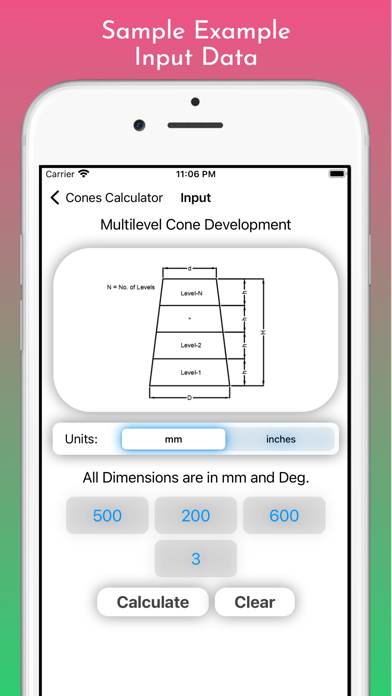
Cones Calculator App is used to calculates flat Pattern layouts developments of Full Cone, Half Cone , Truncated Cone,Concentric Cone, Eccentric Cone, Tori Cone, Multi-level Concentric Cones, Multi-level eccentric Cones, Cone with Knuckle, Cones with Knuckle at top, Cone with knuckle at bottom. Cones Calculator Best for Solution of All types of Cone and Conical Shape used in Fabrication Pressure Vessels, Heat Ex-changers and storage Tank. It is Recommended to use Mean Dimensions of Cones to get Ready to use fabrication layouts. Cones Calculator App has Following Option of Cone Layouts or Flat Pattern : 1. Truncated Cone. 2. Multi-level Truncated Cone 3. Eccentric Cone 4. Multi-Level eccentric Cone 5. Tori Cone with Knuckle at large side 6. Tori Cone with Knuckle at Both Sides. Truncated Cone : This type of cone is also called as Half Cone. You can calculate Flat Pattern Layout for Concentric Full Cone, Half Cone or Truncated Cone. For Lay outing Full Cone put zero in small diameter. This option required input as Cone small Diameter, Cone Large Diameter and Heights. It is also used for Concentric Conical Hopper Flat pattern layout Development. In Result page you will get Development Radius, development angle, development Cord Lengths. Multi-Level Cone: Multi level Cone option is used layout cone with 8 no of levels that cone is divided height wise and layout of the same is done in this app. You can take layout of the each part by selecting in level page. This is helpful when we have limitation in Sheet size to Fit Big size Cone so we can divide in to parts and after cutting parts in no of levels join it by welding. In this Cone you required to input as Large Diameter, Small Diameter, Cone Height and No. of Levels or No of Parts you have to make it. Eccentric Cone: Eccentric Cone layout Calculator is also widely used in Fabrication. For Lay outing eccentric Cone You has to give input as large Diameter, Small Diameter and Height of Cone. In this Calculator Eccentric Cone is developed by using 24 parts Methods. For Development you also need Bottom side cone markings and top side cone Markings. By using this all markings you can generate layouts. In this tool is very helpful for Fabrication. Multi-Level Eccentric Cone: Multi level Eccentric Cone layout Calculator is also used in Fabrication. For Lay outing Multi-level eccentric Cone You has to give input as large Diameter, Small Diameter, Height of Cone and No of levels or No of Parts. In this Calculator Eccentric Cone is developed by using 24 parts Methods and Cone is Divided in to 8 Nos. of levels and by selecting required level you can get layout. For Development you also need Bottom side cone markings and top side cone Markings. By using this all markings you can generate layouts. In this tool is very helpful for Fabrication. Tori Cone Layout: In this Cone Calculator you had Given Two option of Tori cone that is Tori cone with Knuckle at large end and Tori cone Layout with Knuckle at Both Ends. For lay outing Tori cone You needs Tori Cone large Diameter, Tori Cone small Diameter, Tori cone Knuckle radius at both ends and Straight face of Fabrication. And this tool gives you Flatt pattern for this Tori Cone. This app is very useful in daily fabrication activity for lay outing cones. This app helps to Fabrication Engineer, Fabrication Fitter, Production Engineer, Quality Engineer, Design Engineer, Costing and Estimating Engineer, Fabrication Contractor, Workshop Supervisor, Fabrication shop, Piping Engineer, Process Equipment manufacturers, Pressure Vessels Fabricators, Heat Ex-changer Manufacturers, Storage tank Manufacturers.
Installs
Apple does not publish download counts. Estimates are in testing.
We publish iOS estimates only after they pass a back-test against real numbers. Chart history below is measured.
Estimated store revenue Estimated Beta
App Store, worldwide, monthly rate from the last 13 chart days to 20 Nov 2026
Below the top 100 grossing apps in the markets we calibrate. In the United States that usually means under about $6.4M a month. App Store purchases and subscriptions only, before Apple's 15 to 30% fee. Ads and web payments are not included.
Ratings
1 ratings, 1 reviews
No rating breakdown published for this app.
Recent reviews
Latest public reviews from the store
No reviews in our sample for this app yet.
Top chart positions
Latest App Store chart ranks by country, last 10 days
- Countries ranked
- 1 of 50
- Best rank
- #41
- Top 10 placements
- 0
- of 1 chart placements
- Average rank
- #41
Best countries on App Store
- 🇮🇩 Indonesia · Top paid, Utilities#41
| Country | Chart | Category | Rank | Best (10 days) | Date |
|---|---|---|---|---|---|
| 🇮🇩 Indonesia | Top paid | Utilities | #41 | #14 | 16 Nov 2026 |
Cones Calculator Pro history
Release, install milestones, listing and store changes
- First released on the store 2 Dec 2019
Update frequency
How often Cones Calculator Pro ships a new version, month by month
0 updates in the last 12 months. Less often than most similar apps: they shipped a median of 1 updates in the same year.
Recent versions
Current version 2.0
- Version 2.024 May 2023
App Upadet for Higher SDK Level for latest version support. App Theme Changed. App UI Design Changed App Navigation Changed. Unit Setting Option for mm/inches added. decimal fraction chart added. keyboard dismiss issue resolved. fix app stability and performance issue. improve user experience fix minor bugs.
Listing keywords
Words and phrases Cones Calculator Pro repeats most in its store listing
Top phrases: tori cone (12), eccentric cone (11), multi level (9), small diameter (6), cone multi level (5).
Highlighted words also appear in the title. Counts cover the title, short description and description.
Compliance
What the listing and the app package show
- Store status
- Live
- Upkeep
- No update since 24 May 2023
- Age rating
- 4+
Apps like Cones Calculator Pro
 Library of AviationNazmi Yavuz★ 4.82
 MyNOVECNorthern Virginia Electric Cooperative★ 2.28
 打工人小组件光翔 卓★ 4.96
 TruckbaysTruckbays LLC★ 4.3
 Tornado PRO PlayerMohammed Altam★ 4.44
 VDX - Video ManagerARISEPEAK LP★ 1.74
 TV CastingZeasn Info Technology Co., Ltd.★ 1.86
 Mil-Dot BallisticsTom Holsten★ 3.82
 MySontiqSontiq, Inc.★ 2.4
Cones Calculator Pro: questions and answers
Who makes Cones Calculator Pro?
Cones Calculator Pro is published by Imran Pinjara.
When was Cones Calculator Pro last updated?
The latest version (2.0) was released on 24 May 2023.
Is Cones Calculator Pro free?
No. Cones Calculator Pro is a paid app priced at $3.99.
Is Cones Calculator Pro still available?
Yes. Cones Calculator Pro is live on App Store as of 1 Jul 2026.
Track Cones Calculator Pro and its competitors
Watch any app for new versions, rating drops, chart moves and removals. Free plan, no card.