- Installs
- —
- Apple does not publish download counts
- Rating
- —
- Ratings
- —
- Version
- 4.0
- Updated 17 Jan 2026
- Released
- 27 Feb 2015
- Tracked since 10 May 2026
- Size
- 124 MB
- Needs 11.5
Also on Google Play: Document Converter (376 ratings), Document Converter
Screenshots
About Document Converter
The description on the store listing
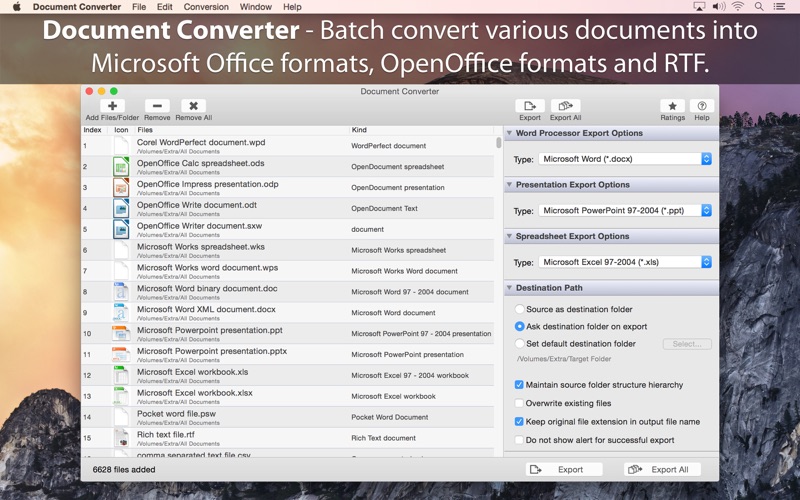
Document Converter offers to batch convert various document file formats into Microsoft Office formats, OpenOffice formats and RTF. Easy to use and robust Document Converter is very helpful to convert old or unsupported document formats on Mac OS into newer well known supported document formats.
Do you receive old or unsupported documents as email attachments on you mac? Are you switched from Windows to Mac and found plenty of files not opening on your Mac? Do you have lots of old format files and wants to migrate all to newer formats? The easiest way to circumvent these problems is to convert all such files to either Microsoft Office documents (.doc, .docx, .ppt, .pptx, xls, xlsx), …
Read the full description
Document Converter offers to batch convert various document file formats into Microsoft Office formats, OpenOffice formats and RTF. Easy to use and robust Document Converter is very helpful to convert old or unsupported document formats on Mac OS into newer well known supported document formats. Do you receive old or unsupported documents as email attachments on you mac? Are you switched from Windows to Mac and found plenty of files not opening on your Mac? Do you have lots of old format files and wants to migrate all to newer formats? The easiest way to circumvent these problems is to convert all such files to either Microsoft Office documents (.doc, .docx, .ppt, .pptx, xls, xlsx), OpenOffice documents (.odt, .odp, .ods) or RTF files using Document Converter. FEATURES • Converts following word processor document formats into Microsoft Word document (.doc, .docx), OpenOffice document (.odt) and RTF. - Microsoft Word Document (.doc, .docx) - Microsoft Works Word (.wps) - OpenOffice Write Document (.odt, .ott, .fodt, .sxw, .stw, .sxg) - Plain text files (.txt, .text, .log, .xml, to name a few) - Source code files (.m, .mm, .c, .cpp, .h, .java, to name a few) - Script code text files (.sh, csh, .py, .php, to name a few) - Rich Text Format (.rtf) - WordPerfect 1-11 (.wpd, .wp) - Lotus Word document - ClarisWorks/AppleWorks document (.cwk) - AbiWord document - Hangul 97 word processor document - HanMac Word-K/J - LightWayText for Mac 4.5 - WriteNow document and more • Converts following presentation formats into Microsoft PowerPoint presentation (.ppt, .pptx) and OpenOffice Impress presentation (.odp) - Microsoft PowerPoint Presentation (.ppt, .pptx) - OpenOffice Impress Presentation (.odp, .otp, . fodp, .sdd, .sti, .sxi) and more • Converts following spreadsheet formats into Microsoft Excel workbook (.xls, .xlsx) and OpenOffice Calc worksheet (.odt). - Microsoft Excel Workbook (.xls, .xlsx) - OpenOffice Calc Spreadsheet (.ods, .ots, .sxc, .stc, .uos) - Lotus 1-2-3 Worksheet file (.wk1, .wk2, .123) - Microsoft Works Spreadsheet (.wks) - Quattro Pro 6 - OpenOffice Formula file (.odf) - ClarisWorks/AppleWorks spreadsheet and database document (.cwk) - Comma Separated Values text file (.csv) and more • Retains complete layout, images and graphics into converted target format. • Very flexible options to add files into conversion list. Simply Drag & Drop into list or Right click Open With in Finder or Drop on "Document Converter" application to add files for export beside direct Add File/Folder buttons. • An advance option to maintain source directory hierarchy at destination with converted files in respective folders. While conversion Document Converter automatically creates intermediate directories of source file path in target folder with converted formats. • Source as destination folder to output documents beside original document in same folder on your computer. • Options to keep original file creation and modification date in converted files. Note: The “Document Converter" is a standalone application running natively to convert documents into targeted format securely right on your computer, you don’t need internet connection or to install any third party application or plugin to convert a document.
Installs
Apple does not publish download counts. Estimates are in testing.
We publish iOS estimates only after they pass a back-test against real numbers. Chart history below is measured.
Estimated store revenue Estimated Beta
App Store, worldwide, monthly rate from the last 12 chart days to 19 Nov 2026
Below the top 100 grossing apps in the markets we calibrate. In the United States that usually means under about $6.4M a month. App Store purchases and subscriptions only, before Apple's 15 to 30% fee. Ads and web payments are not included.
Ratings
No rating breakdown published for this app.
Recent reviews
Latest public reviews from the store
No reviews in our sample for this app yet.
Top chart positions
Latest App Store chart ranks by country, last 10 days
Not in any tracked top chart in the last 10 days.
Document Converter history
Release, install milestones, listing and store changes
- First released on the store 27 Feb 2015
Update frequency
How often Document Converter ships a new version, month by month
1 updates in the last 12 months. About as often as similar apps, which shipped a median of 1 updates in the same year.
Recent versions
Current version 4.0
- Version 4.017 Jan 2026
- Bug fixes and UI improvements to streamline with latest macOS. We are thankful to all users for their valuable feedback :)
Listing keywords
Words and phrases Document Converter repeats most in its store listing
Top phrases: document converter (7), formats into microsoft (4), converts following (3), doc docx (3), document formats (3).
Highlighted words also appear in the title. Counts cover the title, short description and description.
Compliance
What the listing and the app package show
- Store status
- Live
- Upkeep
- Updated 17 Jan 2026
- Age rating
- 4+
Apps like Document Converter
 Robin - Mobile AppRobin Powered, Inc★ 3.32
 Bright AisleMedia Solutions Corp★ 2.52
 Rhingie: phone call 2nd numberDating onlain, ooo★ 3.96
 PayClockLathem Time Corporation★ 2.08
 云电话-网络电话虚拟隐私小号国辉 李★ 4.74
 QuicklynQuicklyn★ 4.86
 Diligent BoardsDiligent Corporation★ 3.32
 DATABASICSDATABASICS★ 3.8
 vMEyeSuperGuangzhou Kedi Intelligence Technology Co., Ltd.★ 3.14
Document Converter: questions and answers
Who makes Document Converter?
Document Converter is published by RootRise Technologies Pvt. Ltd..
When was Document Converter last updated?
The latest version (4.0) was released on 17 Jan 2026.
Is Document Converter free?
No. Document Converter is a paid app priced at $14.99.
Is Document Converter still available?
Yes. Document Converter is live on App Store as of 10 May 2026.
Track Document Converter and its competitors
Watch any app for new versions, rating drops, chart moves and removals. Free plan, no card.