
- Installs
- —
- Apple does not publish download counts
- Rating
- —
- Ratings
- —
- Version
- 1.8.10
- Updated 2 Dec 2024
- Released
- 17 Feb 2014
- Tracked since 10 May 2026
- Size
- 9 MB
- Needs 12.0
Also on App Store: Drafts (10.9K ratings), Drafts (116 ratings), drafts
Screenshots


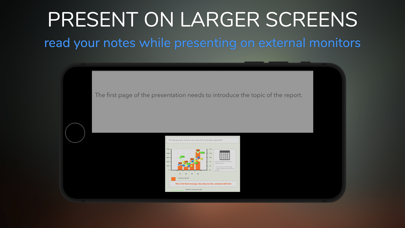
About Drafts+
The description on the store listing
Create blueprints of presentations in no time.
Prepare pages to be shared and discussed with colleagues.
Work in parallel with others (even remotely) leveraging the sharing functionalities.
Paste text or graphics from the web or other documents to enrich your content.
Unleash your creativity with tables and graphs and provide guidelines for drafting the final version!
This application will help you to organize your ideas efficiently:
> Reuse the previous formats and themes, significantly increasing your productivity.
> Work with your team wherever you are.
You will be surprised to see how flexible and easy it is to design a slide deck.
To publish professional-looking presentations means …
Read the full description
Create blueprints of presentations in no time. Prepare pages to be shared and discussed with colleagues. Work in parallel with others (even remotely) leveraging the sharing functionalities. Paste text or graphics from the web or other documents to enrich your content. Unleash your creativity with tables and graphs and provide guidelines for drafting the final version! This application will help you to organize your ideas efficiently: > Reuse the previous formats and themes, significantly increasing your productivity. > Work with your team wherever you are. You will be surprised to see how flexible and easy it is to design a slide deck. To publish professional-looking presentations means to start from a well-defined draft. Some typical scenarios: > You need your team to prepare a proposal for a presentation. > You have been asked to create a slide deck, and you would like to share it with your team for more comments. > You have to prepare a presentation in pdf quickly. Let's take a look at the main features... Stickers: You can add content to the page, such as images, text, tables, and graphs. Each sticker can be customized. If you know HTML, you can also format the content using standard HTML constructs. Each table can be displayed as a graph simply with a gesture. Themes: Once you've found the colors and the font you want to use, set them as default, and each new presentation will have the same format and appearance. Auto-Layout: Items added to the page, reorganize accordingly to the orientation of the device. You can print the same document/page in two different versions (horizontal or vertical) with a simple movement. Add external content: Using the device's copy functionality, you can paste the content (image or text) on any page, directly from the web or other documents that allow the copy function. Creating storyboard: You can assign a name to each page together with a note. Build your story, assigns an order to the pages, add comments. Export your project: The entire project can be exported and sent by e-mail to others that have this application. Export Draft Outline: Once you are ready to export, you can choose to publish the page in symbolic format. The page is rendered in HTML format. Export Pdf Project: You export what you see on the screen. Export Snapshots: You can also take snapshots of your pages and send them with additional comments by e-mail or export them in the Gallery of photos of the iPad. Organize projects by topics: Whenever you create a new set of pages, you can assign them to a group. A group has attributes that you can use to better archive projects based on themes, descriptions, authors, etc. Share with secure encryption: All publishing functionalities have a secure-share option. You can share projects and snapshots with friends and colleagues with a simple gesture. The information is encrypted and can be accessed if the recipient knows the password. Working remotely with the team everywhere: Any project can be shared with other people using the same application. So you can work with groups by simply editing your presentation, sending it via secure e-mail, and receiving back the new version. Anywhere.
Installs
Apple does not publish download counts. Estimates are in testing.
We publish iOS estimates only after they pass a back-test against real numbers. Chart history below is measured.
Estimated store revenue Estimated Beta
App Store, worldwide, monthly rate from the last 12 chart days to 19 Nov 2026
Below the top 100 grossing apps in the markets we calibrate. In the United States that usually means under about $6.4M a month. App Store purchases and subscriptions only, before Apple's 15 to 30% fee. Ads and web payments are not included.
Ratings
No rating breakdown published for this app.
Recent reviews
Latest public reviews from the store
No reviews in our sample for this app yet.
Top chart positions
Latest App Store chart ranks by country, last 10 days
Not in any tracked top chart in the last 10 days.
Drafts+ history
Release, install milestones, listing and store changes
- First released on the store 17 Feb 2014
Recent versions
Current version 1.8.10
- Version 1.8.102 Dec 2024
We regularly update this app to offer the best user experience on all the supported devices. The latest version includes improvements in the user experience and translations. To request new features, additional tutorials or report issues, write to: [email protected]
Listing keywords
Words and phrases Drafts+ repeats most in its store listing
Top phrases: tables and graphs (2), slide deck (2).
Highlighted words also appear in the title. Counts cover the title, short description and description.
Compliance
What the listing and the app package show
- Store status
- Live
- Upkeep
- Updated 2 Dec 2024
- Age rating
- 4+
Apps like Drafts+
 Super VPN: Fast Private ProxyGeek Incorporated★ 4.4
 Hubtel RetailerHubtel Limited★ 4.32
 Monthly Calendar 2022 - CalistOmoboto LLC★ 4.38
 Firstly: To-Do List & PlannerfocusCove LLC★ 4.7
 CBUS 311City of Columbus, Ohio★ 1.8
 Themes for Powerpoint - DesiGNGraphic Node★ 4.22
 iSiloDC & Co.★ 3.82
 Flashlight Pro [Multipurpose LED light]KAVAPOINT★ 3.88
 WiPryOscium LLC★ 2.68
Drafts+: questions and answers
Who makes Drafts+?
Drafts+ is published by morePaths.com.
When was Drafts+ last updated?
The latest version (1.8.10) was released on 2 Dec 2024.
Is Drafts+ free?
No. Drafts+ is a paid app priced at $8.99.
Is Drafts+ still available?
Yes. Drafts+ is live on App Store as of 10 May 2026.
Track Drafts+ and its competitors
Watch any app for new versions, rating drops, chart moves and removals. Free plan, no card.