
- Installs
- —
- Apple does not publish download counts
- Rating
- 1.0
- Ratings
- 1
- 1 reviews
- Version
- 1.5.10
- Updated 2 Dec 2024
- Released
- 4 Feb 2015
- Tracked since 10 May 2026
- Size
- 15 MB
- Needs 12.0
Screenshots
About Perfect+ for Presentations
The description on the store listing
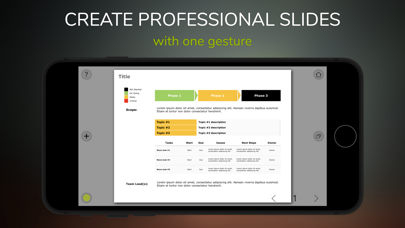
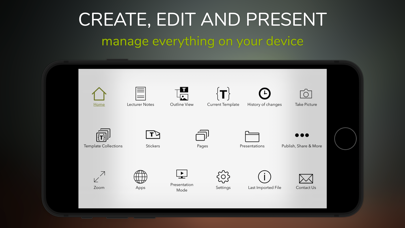
Create, edit, present, and share anywhere, business slides, and more...
PerfectPlus is the new app for business slides, specifically designed for mobile devices.
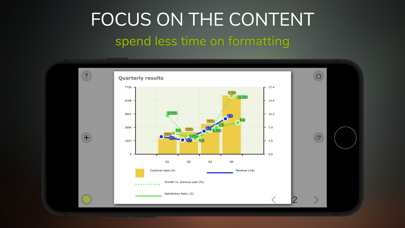
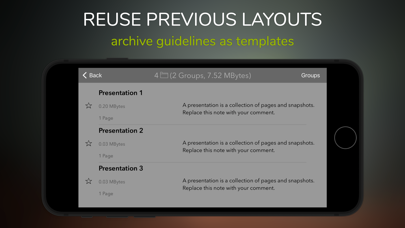
You add the content, and we will take care of the formatting. Create professional presentations in no time with predefined (customizable) templates.
Examples:
> Propose your ideas to an audience.
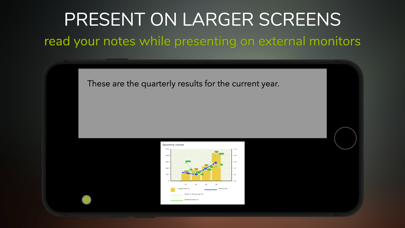
> Present an executive summary to your team or on an external screen.
> Publish a newsletter.
> Present a report or a project status.
> Introduce a product portfolio or describe a roadmap.
> Review projects proposal.
> Create just any business slide.
Creating presentations on a mobile device can sometimes be problematic. Particularly …
Read the full description
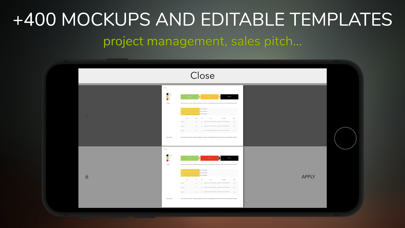
Create, edit, present, and share anywhere, business slides, and more... PerfectPlus is the new app for business slides, specifically designed for mobile devices. You add the content, and we will take care of the formatting. Create professional presentations in no time with predefined (customizable) templates. Examples: > Propose your ideas to an audience. > Present an executive summary to your team or on an external screen. > Publish a newsletter. > Present a report or a project status. > Introduce a product portfolio or describe a roadmap. > Review projects proposal. > Create just any business slide. Creating presentations on a mobile device can sometimes be problematic. Particularly during transits (on a train, during flights, etc.). This app solves the issue with slides already tuned for a professional meeting. Select which one fits the best, and add additional content if needed. To release professional presentations usually means to spend at least 60% - 80% of the time formatting the content. Sometimes a finger is not precise enough to position items precisely… and precision is always required if you need to present to executives or high-level management. This app can help with that! The app comes with pre-built professional slide templates created by experts in the field. If you have to present about a project status (SWOT analysis, roadmaps, etc.) or have a meeting for a sales pitch, you will find what you need in an instant. Not just a presentation maker but also an app to create and share effective professional slides, using the knowledge of people who translated the business-as-usual into beautiful business presentations. Collections of predefined templates: There are more than 400 models to create reports, executive summaries for meetings, or sales pitches. Stickers: Stickers are extra information that you can add to the slide. If you need more than the default templates, you can create your slides by choosing among the many stickers available. You can customize each sticker (fonts, color, layout, etc.) and save it in the project library for later use. Formatting groups: Use always your favorite template font and colors for your presentations. Automatic page layout: Items added to the page are re-positioned automatically depending on the orientation iPad. You can print the same document in two different versions (portrait and landscape) with just a flip. Add external content: Paste images and texts that are taken from the web to the slide. Storyboard: You can assign to each slide a name and a note. Build your story by reordering the slides and adding comments. Lecturer mode: Use this feature to present on an external screen the slide meanwhile you are reading the notes. Export: Each project can be shared with other users or shared as a PDF. You can secure your content using encryption and a personal password. Export snapshots and versioning: You can always take an instant picture of your slide to share it with colleagues for comments or create a photo album. Versioning is available to keep track of your changes. Working remotely with your team anywhere: Any project can be shared securely (with a password) with other people using the same application.
Installs
Apple does not publish download counts. Estimates are in testing.
We publish iOS estimates only after they pass a back-test against real numbers. Chart history below is measured.
Estimated store revenue Estimated Beta
App Store, worldwide, monthly rate from the last 12 chart days to 19 Nov 2026
Below the top 100 grossing apps in the markets we calibrate. In the United States that usually means under about $6.4M a month. App Store purchases and subscriptions only, before Apple's 15 to 30% fee. Ads and web payments are not included.
Ratings
1 ratings, 1 reviews
No rating breakdown published for this app.
Recent reviews
Latest public reviews from the store
No reviews in our sample for this app yet.
Top chart positions
Latest App Store chart ranks by country, last 10 days
Not in any tracked top chart in the last 10 days.
Perfect+ for Presentations history
Release, install milestones, listing and store changes
- First released on the store 4 Feb 2015
Recent versions
Current version 1.5.10
- Version 1.5.102 Dec 2024
We regularly update this app to offer the best user experience on all the supported devices. The latest version includes improvements in the user experience and translations. To request new features, additional tutorials or report issues, write to: [email protected]
Listing keywords
Words and phrases Perfect+ for Presentations repeats most in its store listing
Top phrases: business slides (2), external screen (2), professional presentations (2), project status (2).
Highlighted words also appear in the title. Counts cover the title, short description and description.
Compliance
What the listing and the app package show
- Store status
- Live
- Upkeep
- Updated 2 Dec 2024
- Age rating
- 4+
Apps like Perfect+ for Presentations
 Super VPN: Fast Private ProxyGeek Incorporated★ 4.4
 Hubtel RetailerHubtel Limited★ 4.32
 Monthly Calendar 2022 - CalistOmoboto LLC★ 4.38
 Firstly: To-Do List & PlannerfocusCove LLC★ 4.7
 CBUS 311City of Columbus, Ohio★ 1.8
 Themes for Powerpoint - DesiGNGraphic Node★ 4.22
 iSiloDC & Co.★ 3.82
 Flashlight Pro [Multipurpose LED light]KAVAPOINT★ 3.88
 WiPryOscium LLC★ 2.68
Perfect+ for Presentations: questions and answers
Who makes Perfect+ for Presentations?
Perfect+ for Presentations is published by morePaths.com.
When was Perfect+ for Presentations last updated?
The latest version (1.5.10) was released on 2 Dec 2024.
Is Perfect+ for Presentations free?
No. Perfect+ for Presentations is a paid app priced at $8.99.
Is Perfect+ for Presentations still available?
Yes. Perfect+ for Presentations is live on App Store as of 1 Jul 2026.
Track Perfect+ for Presentations and its competitors
Watch any app for new versions, rating drops, chart moves and removals. Free plan, no card.