
- Installs
- —
- Apple does not publish download counts
- Rating
- —
- Ratings
- —
- Version
- 2.3
- Updated 21 Oct 2017
- Released
- 16 Apr 2016
- Tracked since 10 May 2026
- Size
- 2 MB
- Needs 10.10
Screenshots


About DuLoad for OneDrive
The description on the store listing
Download and upload OneDrive's files and folders to your MacBook efficiently. Easy to use.
(Only “for personal accounts” now! It doesn’t work with OneDrive for Business now!)
* Download speed is three times faster than MicroSoft !
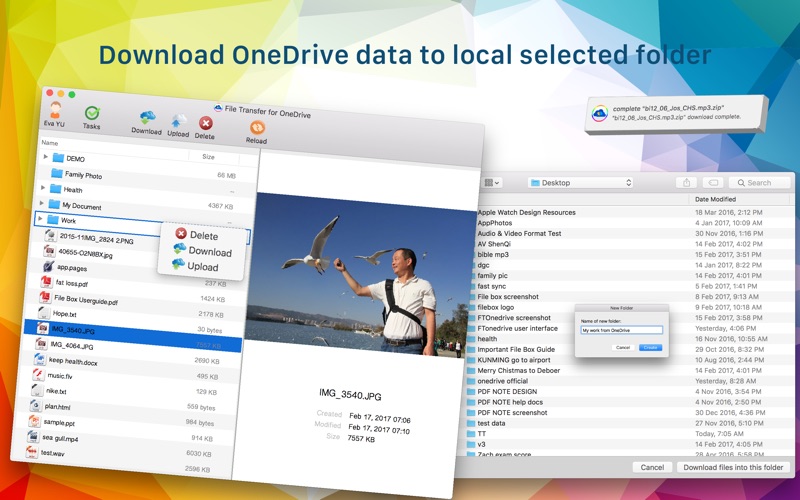
* Download OneDrive data to local selected folder !
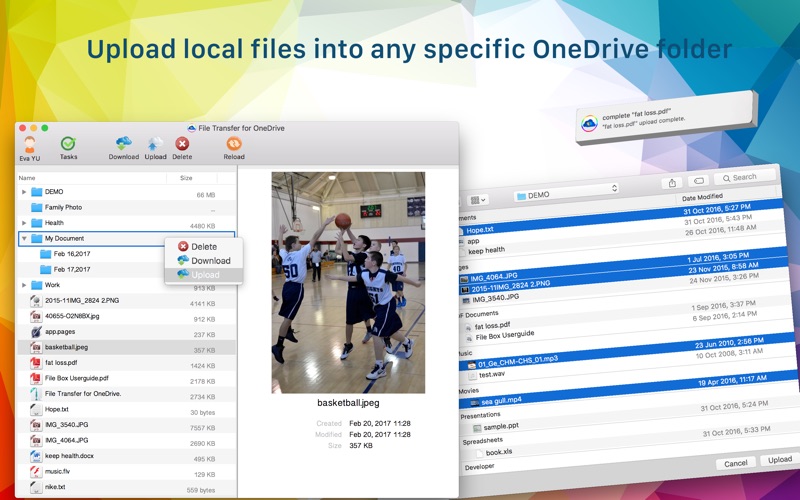
* Upload local files into any specific OneDrive folder !
PROMINENT FEATURE
• Use "DuLoad for OneDrive", you can download any selected files or folders on OneDrive to your Mac. Meanwhile these downloaded files or folders can be saved in any folder selected in your Mac.
• Also you can upload any selected files or folders on your Mac to OneDrive. Meanwhile these uploaded files or folders can be saved in any …
Read the full description
Download and upload OneDrive's files and folders to your MacBook efficiently. Easy to use. (Only “for personal accounts” now! It doesn’t work with OneDrive for Business now!) * Download speed is three times faster than MicroSoft ! * Download OneDrive data to local selected folder ! * Upload local files into any specific OneDrive folder ! PROMINENT FEATURE • Use "DuLoad for OneDrive", you can download any selected files or folders on OneDrive to your Mac. Meanwhile these downloaded files or folders can be saved in any folder selected in your Mac. • Also you can upload any selected files or folders on your Mac to OneDrive. Meanwhile these uploaded files or folders can be saved in any folder selected in your OneDrive. • After login, it will appear your all files and folders on OneDrive. Right-click on the folder, there are three options:Upload,Download,Delete. 1) Choose Upload option:The files or folder on your Mac will be uploaded to this selected folder. 2) Choose Download option:The folder on OneDrive will be downloaded to any selected folder on your Mac. 3) Choose Delete option:Delete the OneDrive folder. • Dragging the files from "Finder" to every folder on OneDrive you want. Easily upload your Mac's files to OneDrive. • Support select multiple files or folders to download or upload. • Support folders or files upload or download. • Support cancel when downloading or uploading • Prompt window and sound during upload and download. Such as, complete uploaded files, downloaded files, recovery files, continue downloading or uploading files. • Display the progress rate number on the dock.You can see the transfer process timely. • The log of the downloading or uploading files. • The log of the finished download or upload files. • Support change OneDrive's account . • Transfer may continue from the point of interruption. (eg.When the network condition is bad, or restart your Mac) • Support File preview function: Date Created,Date Modified,Size,Name,Content,Picture preview,Kind... • Support upload or download a huge size file efficiently (Passed a file size 3G+ test). • Using multithreading for transmission. Save more time. Download speed is three times faster than MicroSoft ! • Support upload empty folders or empty files. • Little CPU and memory use.Save your computer resources and memory footprint. • Super easy to use: clean and intuitive interface. • Support for changing the windows size. OTHER • Difference between "DuLoad for OneDrive" and “MicroSoft OneDrive" "MicroSoft OneDrive" Sync files. "DuLoad for OneDrive" download or upload files. Easy to use. "MicroSoft OneDrive" need you create one folder in your Mac to sync files. Your OneDrive's files and Mac's files will sync only in this folder. Use "DuLoad for OneDrive", you can download any appointed files or folders on OneDrive to your Mac. Meanwhile these downloaded files or folders can be saved in any folder appointed in your Mac. Also you can upload any appointed files or folders on your Mac to OneDrive. Meanwhile these uploaded files or folders can be saved in any folder appointed in your OneDrive. • Compared to MicroSoft, "DuLoad for OneDrive" has more advantages: 1. Download speed is thirty percent faster than MicroSoft. 2. You can upload the local files by dragging the files from "Finder" . 3. Support selected files or folders to upload or download 4. Cancel when downloading or uploading. 5. Prompt window and sound during upload and download. 6. Display the progress rate number on the dock. 7. File preview function. SUPPORT • If you have any inquiries or questions, regarding this application, please contact us: [email protected]. This app will continue to be upgraded and improved to achieve the 100% customer satisfaction.
Installs
Apple does not publish download counts. Estimates are in testing.
We publish iOS estimates only after they pass a back-test against real numbers. Chart history below is measured.
Estimated store revenue Estimated Beta
App Store, worldwide, monthly rate from the last 13 chart days to 20 Nov 2026
Below the top 100 grossing apps in the markets we calibrate. In the United States that usually means under about $6.4M a month. App Store purchases and subscriptions only, before Apple's 15 to 30% fee. Ads and web payments are not included.
Ratings
No rating breakdown published for this app.
Recent reviews
Latest public reviews from the store
No reviews in our sample for this app yet.
Top chart positions
Latest App Store chart ranks by country, last 10 days
Not in any tracked top chart in the last 10 days.
DuLoad for OneDrive history
Release, install milestones, listing and store changes
- First released on the store 16 Apr 2016
Recent versions
Current version 2.3
- Version 2.321 Oct 2017
Reduce the dosage of CPU when downloading. Fixed some bugs.
Listing keywords
Words and phrases DuLoad for OneDrive repeats most in its store listing
Top phrases: files or folders (10), duload for onedrive (6), downloading or uploading (4), download or upload (3), faster than microsoft (3).
Highlighted words also appear in the title. Counts cover the title, short description and description.
Compliance
What the listing and the app package show
- Store status
- Live
- Upkeep
- No update since 21 Oct 2017
- Age rating
- 4+
Apps like DuLoad for OneDrive
 Super VPN: Fast Private ProxyGeek Incorporated★ 4.4
 Hubtel RetailerHubtel Limited★ 4.32
 Monthly Calendar 2022 - CalistOmoboto LLC★ 4.38
 Firstly: To-Do List & PlannerfocusCove LLC★ 4.7
 CBUS 311City of Columbus, Ohio★ 1.8
 Themes for Powerpoint - DesiGNGraphic Node★ 4.22
 iSiloDC & Co.★ 3.82
 Flashlight Pro [Multipurpose LED light]KAVAPOINT★ 3.88
 WiPryOscium LLC★ 2.68
DuLoad for OneDrive: questions and answers
Who makes DuLoad for OneDrive?
DuLoad for OneDrive is published by 韩 明洁.
When was DuLoad for OneDrive last updated?
The latest version (2.3) was released on 21 Oct 2017.
Is DuLoad for OneDrive free?
No. DuLoad for OneDrive is a paid app priced at $1.99.
Is DuLoad for OneDrive still available?
Yes. DuLoad for OneDrive is live on App Store as of 10 May 2026.
Track DuLoad for OneDrive and its competitors
Watch any app for new versions, rating drops, chart moves and removals. Free plan, no card.