
- Installs
- —
- Apple does not publish download counts
- Rating
- 4.85
- Ratings
- 418K
- 418K reviews
- Version
- 3.2.4
- Updated 19 Dec 2024
- Released
- 8 Jan 2015
- Tracked since 11 May 2026
- Size
- 44 MB
- Needs 16.0
Screenshots

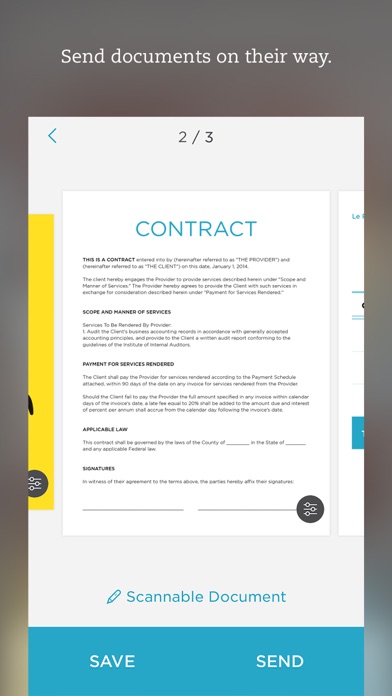

About Evernote Scannable
The description on the store listing
Scannable moves paper forward. Scan contracts, receipts, business cards, and any paper that comes your way. Save or share documents instantly and move on.
Automatically capture high-quality scans anywhere
- Scan fast: Point your camera at documents, expense receipts, or whiteboards. Scannable immediately captures them.
- Save time: Scannable automatically rotates, crops, and adjusts images so your scans are clear and easy to read.
- Share or save: Send documents to colleagues via email or text, or export them as PDF and JPG files to Evernote and other apps.
Deal with paper professionally
- Turn business cards into contacts: Pull information from business cards and save it all to your …
Read the full description
Scannable moves paper forward. Scan contracts, receipts, business cards, and any paper that comes your way. Save or share documents instantly and move on. Automatically capture high-quality scans anywhere - Scan fast: Point your camera at documents, expense receipts, or whiteboards. Scannable immediately captures them. - Save time: Scannable automatically rotates, crops, and adjusts images so your scans are clear and easy to read. - Share or save: Send documents to colleagues via email or text, or export them as PDF and JPG files to Evernote and other apps. Deal with paper professionally - Turn business cards into contacts: Pull information from business cards and save it all to your contacts list. - Go paperless: Scannable works seamlessly with the ScanSnap Evernote Edition Scanner to get multi-page documents where they need to go. - A scanner for everyone: With Scannable, your whole team can control a ScanSnap Evernote Edition Scanner from their own devices and send paper on its way. Scannable is free to download and use.
Installs, last 30 days
Apple does not publish download counts. Estimates are in testing.
Estimated store revenue Estimated Beta
App Store, worldwide, monthly rate from the last 13 chart days to 20 Nov 2026
Below the top 100 grossing apps in the markets we calibrate. In the United States that usually means under about $6.4M a month. App Store purchases and subscriptions only, before Apple's 15 to 30% fee. Ads and web payments are not included.
Ratings
417,869 ratings, 417,869 reviews
- 5 ★91%
- 4 ★6.3%
- 3 ★1.5%
- 2 ★0.4%
- 1 ★1.1%
Recent reviews
Latest public reviews from the store
- 21 Jul 2023
A true time saver for scanning things on the go!
This app has truly been a blessing, as I own and operate an IT managed services/consulting business, and am often visiting clients or managing projects onsite. Unlike the plethora of other PDF-generating scan apps out there, this one creates the cleanest and clearest images, especially if the document or photo has folds or other imperfections. I also find the ability to easily switch output format between PDF and Image file type to be extremely convenient. Last but certainly not least, once I have all my scans ready to go, I usually need to email or text them to someone quickly. This app seamlessly flows into the Apple’s native Mail app, invokes a new message, and automatically attaches the file(s). I work with many different applications and software, especially mobile versions, so if you are a “road warrior” like myself, I strongly recommend this app. Time is money, and Scannable has saved me quite a lot of both! Thank you to the developers, and please keep up the great work!
- 13 May 2020
The Must-Have Student Scanner
As a student, and especially during remote learning, I find Scannable to be exactly what I need. It works well and efficiently and allows me to give my teachers PDFs made of multiple pages instead of taking a picture of every page. This is the ONLY scanning app I have found on the Store that is able to recognize spiral bound pages. Microsoft Lens, Genius Scan, and others simply cannot ‘find’ the page. As long as there is nothing in the background, Scannable can. I also love the integration with Evernote and the ability to organize scans so easily. I can go back in my many notebooks and find whatever I’m looking for. Not to mention, you can import Scannable documents from Evernote directly into Google Classroom! What a life saver. I will ask, however, that the Google Classroom integration be fixed a bit. There is an option to export documents to the app but it is extremely buggy and rarely works. Usually, I have to save the document to my Files from within Evernote and then submit it to Classroom manually. If you could fix up this feature, I’d give 5 stars in a heartbeat!
- 5 Jul 2019
Great product, but still some problems
I honestly like this scanning app a lot; the scans are super fast, the auto detected borders are fairly accurate, and the end product is a great balance between quality and file size. That said, there are some problems I’d like to see fixed. I use this app predominantly for scanning books for research, but the app gets overwhelmed and is liable to crash the larger the file size gets. I’ve lost so many scanned books this way. It also stops being able to detect borders as the scanning continues. A simple fix could be to automatically save after a certain number of pages and start a new file. Also, having an adjustable colored border option would remove the need to auto detect borders every time a page is turned; the user would just need to fit the text within the confines of border (as a bonus, it would cut out any background - including fingers - that would fall within that frame). I’d like to see more options for adjusting size and quality as well. All that aside, Scannable is still one of the best scanning apps I’ve found so far, and having these few added improvements (even as a paid add-on) would make it ideal.
- 2 Nov 2017
Goodbye scanners and fax machines
Love this app. Use it a few times a week to "scan" my documents, receipts, book excerpts - whatever I want to keep as a digital file. Then I "share" to my Google Drive to store in the cloud, "share" to iBooks or GoodReader to have on my phone, "share" to CudaSign if I need to sign it first, and/or "send" as an email attachment, and I love that I can do all of the above. It would be nice to be able to select all the options you want to do from one screen, rather than go back and select a new option each time. It does sometimes (rarely) crash, but I have never lost any images. I like that it keeps copies of prior scans in case I need to go back. The cropping is pretty good, especially if you put a dark background behind what you are scanning. I like the "enhance" feature to optimize the printed text, and the ability to toggle easily between the enhanced version and the original. The quick toggle between PDF and image is also great. One minor annoyance is that, for some reason, the app will occasionally show the tutorial even when I haven't updated it and have been using it for months. All in all, a must-have app for me. I used to carry around docs, waiting for a time I was near a sc
What reviewers bring up
Topics mentioned in the latest 8 reviews, by how many reviews mention them
Liked in good reviews (4 reviews)
- scanning 4
- scans 4
- especially 3
- background 3
- scannable 3
- ability 3
- between 3
- easily 3
Raised in bad reviews (4 reviews)
- evernote 4
- scan 4
- subscription 3
- document 3
- account 3
- through 3
- email 3
- without 2
Top chart positions
Latest App Store chart ranks by country, last 10 days
- Countries ranked
- 29 of 50
- Best rank
- #57
- Top 10 placements
- 0
- of 29 chart placements
- Average rank
- #88.7
Best countries on App Store
- 🇳🇱 Netherlands · Top grossing, Productivity#57
- 🇷🇺 Russia · Top grossing, Productivity#71
- 🇧🇪 Belgium · Top grossing, Productivity#73
- 🇫🇮 Finland · Top grossing, Productivity#75
- 🇨🇭 Switzerland · Top grossing, Productivity#78
- 🇸🇬 Singapore · Top grossing, Productivity#79
| Country | Chart | Category | Rank | Best (10 days) | Date |
|---|---|---|---|---|---|
| 🇳🇱 Netherlands | Top grossing | Productivity | #57 | #46 | 20 Nov 2026 |
| 🇷🇺 Russia | Top grossing | Productivity | #71 | #51 | 20 Nov 2026 |
| 🇧🇪 Belgium | Top grossing | Productivity | #73 | #53 | 20 Nov 2026 |
| 🇫🇮 Finland | Top grossing | Productivity | #75 | #51 | 19 Nov 2026 |
| 🇨🇭 Switzerland | Top grossing | Productivity | #78 | #71 | 20 Nov 2026 |
| 🇸🇬 Singapore | Top grossing | Productivity | #79 | #74 | 20 Nov 2026 |
| 🇲🇾 Malaysia | Top grossing | Productivity | #85 | #85 | 15 Nov 2026 |
| 🇬🇷 Greece | Top grossing | Productivity | #86 | #77 | 20 Nov 2026 |
| 🇵🇱 Poland | Top grossing | Productivity | #86 | #40 | 20 Nov 2026 |
| 🇬🇧 United Kingdom | Top grossing | Productivity | #88 | #88 | 19 Nov 2026 |
Evernote Scannable history
Release, install milestones, listing and store changes
- First released on the store 8 Jan 2015
Update frequency
How often Evernote Scannable ships a new version, month by month
0 updates in the last 12 months. Less often than most similar apps: they shipped a median of 10 updates in the same year.
Recent versions
Current version 3.2.4
- Version 3.2.419 Dec 2024
Bug fixes and performance improvements
Listing keywords
Words and phrases Evernote Scannable repeats most in its store listing
Top phrases: business cards (3), evernote edition scanner (2), scansnap evernote edition (2), edition scanner (2), evernote edition (2).
Highlighted words also appear in the title. Counts cover the title, short description and description.
Compliance
What the listing and the app package show
- Store status
- Live
- Upkeep
- Updated 19 Dec 2024
- Age rating
- 4+
Apps like Evernote Scannable
 Google SlidesGoogle★ 4.68
 Microsoft CopilotMicrosoft Corporation★ 4.84
 Cozi Family OrganizerCozi★ 4.81
 Kia AccessKia America, Inc.★ 4.73
 FreeformApple★ 4.55
 Ringtones Maker - the ring app苏娟 陈★ 4.67
 Notability: AI Notes & PDF appGinger Labs★ 4.76
 VPN - Fast VPN Super ™TOPAPPS TECH PTE LTD★ 4.67
 Goodnotes: AI Notes, Docs, PDFGoodnotes Limited★ 4.72
Evernote Scannable: questions and answers
Who makes Evernote Scannable?
Evernote Scannable is published by Evernote Corporation.
When was Evernote Scannable last updated?
The latest version (3.2.4) was released on 19 Dec 2024.
Is Evernote Scannable free?
Yes. Evernote Scannable is free to download.
Is Evernote Scannable still available?
Yes. Evernote Scannable is live on App Store as of 20 Nov 2026.
Track Evernote Scannable and its competitors
Watch any app for new versions, rating drops, chart moves and removals. Free plan, no card.