
- Installs
- —
- Apple does not publish download counts
- Rating
- 4.16
- Ratings
- 349
- 349 reviews
- Version
- 1.0.7
- Updated 15 May 2026
- Released
- 14 Dec 2012
- Tracked since 10 May 2026
- Size
- 36 MB
- Needs 8.0
Also on Google Play: Finger Timer (13.7K ratings)
Screenshots

About Finger Timer
The description on the store listing
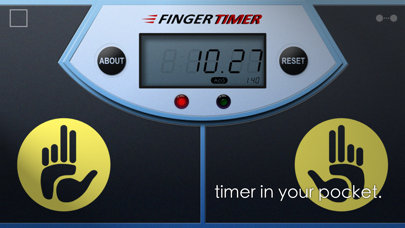
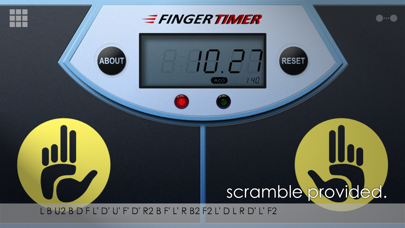
Finger Timer is a speedcubing/speedstacking timer in your pocket!
It's a simple and elegant timer app that you must have!
[HOW TO USE]
1. Put your fingers on the left and right pads, and hold.
2. When the red and green lights are both on, the timer is ready, and then you can release your fingers to start the timer.
3. When you want to stop the timer, put your fingers back on the left and right pads.
4. If you want to restart the timer, press "RESET" and do the steps 1 to 3.
[DISPLAY CONNECTION]
1. Connect your Timer device (with this app) and Display device (any computer or mobile device with a web browser) to the same Wi-Fi network. (Sometimes Internet also works.)
2. In Timer device, …
Read the full description
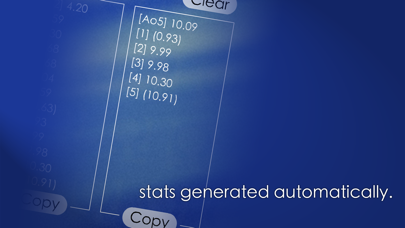
Finger Timer is a speedcubing/speedstacking timer in your pocket! It's a simple and elegant timer app that you must have! [HOW TO USE] 1. Put your fingers on the left and right pads, and hold. 2. When the red and green lights are both on, the timer is ready, and then you can release your fingers to start the timer. 3. When you want to stop the timer, put your fingers back on the left and right pads. 4. If you want to restart the timer, press "RESET" and do the steps 1 to 3. [DISPLAY CONNECTION] 1. Connect your Timer device (with this app) and Display device (any computer or mobile device with a web browser) to the same Wi-Fi network. (Sometimes Internet also works.) 2. In Timer device, tap the top-right icon, and check "Allow display connection" checkbox. 3. In Display device, enter the Timer address into the address bar of your browser, and then press "START". 4. Enjoy it! [Stats] When you using the timer, stats are generated automatically. The average time, Ao5 and Ao12 (full version only), are displaying the summary in the LED panel, and you can also get the details in About page. In About page, you can clear the stats or copy them to show off! Free version: > The maximum time is 10 minutes. > Display connection. (max 10 mins) > Scramble for only cube 2x2x2 and 3x3x3. > Showing Ao5 (average of 5) only. > With ads Full version: > The maximum time is 60 minutes. > Display connection. (max 60 mins) > Scramble for cube 2x2x2, 3x3x3, 4x4x4, and 5x5x5. > Showing both Ao5 (average of 5) and Ao12 (average of 12). > No ads, no distractions! Subscribe our YouTube channel to watch the latest cubing videos: https://www.youtube.com/user/huskyomega Like us on Facebook for the latest news: https://facebook.com/omegastudiopage
Installs since 29 Aug 2026
Apple does not publish download counts. Estimates are in testing.
Estimated store revenue Estimated Beta
App Store, worldwide, monthly rate from the last 15 chart days to 22 Nov 2026
Below the top 100 grossing apps in the markets we calibrate. In the United States that usually means under about $6.4M a month. App Store purchases and subscriptions only, before Apple's 15 to 30% fee. Ads and web payments are not included.
Ratings
349 ratings, 349 reviews
No rating breakdown published for this app.
Recent reviews
Latest public reviews from the store
- 19 Aug 2025
Great app been using it for years!
I like this app because I am a speed cuber but I am broke so I got this app because it was just like a normal speed timer. The only thing I would change is if there was an inspect countdown but other wise this is an amazing app for cubers!
- 2 Mar 2024
You should DEFINITELY get this app!
This is an amazing app for people who are very experienced with the Rubik’s cube and people who are just starting. You have a timer on you at all times and you don’t even have to buy an actually timer that isn’t free. This game has no adds and is super fun. I totally recommend it for any person who wants to time themselves!
- 28 Apr 2023
Very good and useful
So I have a moyu rsxm and I was like I need to get better with cubing so I used the apple timer app and it was so weird it was always be a second longer so when I got this app it changed everything another thing is if you don’t no I’m just a fifth grader so I just started cubing and if max park sees this hi
- 3 Oct 2022
Great App! Love It!! 💪🙏
So I recently Started speed cubing and I bought this app and it is Awesome Sauce!! And I use the App With A Gan 11 air And a IPhone 13 . I Recommend this app Very Good But sometimes it resets your stats to 0. And that is all I Guess. Hope you enjoy the app! (P.s; You can get the finger timer full version for only 99 cents! And the full version allows stats that are up to 12 try’s instead of five on this app.)
What reviewers bring up
Topics mentioned in the latest 8 reviews, by how many reviews mention them
Liked in good reviews (6 reviews)
- timer 6
- recommend 2
- sometimes 2
- started 2
- cubers 2
- cubing 2
- speed 2
- other 2
Raised in bad reviews (0 reviews)
No topic comes up twice.
Top chart positions
Latest App Store chart ranks by country, last 10 days
- Countries ranked
- 4 of 50
- Best rank
- #10
- Top 10 placements
- 1
- of 4 chart placements
- Average rank
- #33.5
Best countries on App Store
- 🇻🇳 Vietnam · Top free, Utilities#10
- 🇵🇭 Philippines · Top free, Utilities#20
- 🇹🇭 Thailand · Top free, Utilities#49
- 🇸🇬 Singapore · Top free, Utilities#55
Finger Timer history
Release, install milestones, listing and store changes
- First released on the store 14 Dec 2012
Update frequency
How often Finger Timer ships a new version, month by month
1 updates in the last 12 months. About as often as similar apps, which shipped a median of 1 updates in the same year.
Recent versions
Current version 1.0.7
- Version 1.0.715 May 2026
Improved timer precision with an extra decimal place Updated to high-resolution graphics Fixed Display Connection reconnection issue Minor bug fixes
- Version 1.0.611 Dec 2018
Displaying Ao5 (average of 5). Compatible with iPhone X, Xs, Xs Max, Xr.
Listing keywords
Words and phrases Finger Timer repeats most in its store listing
Top phrases: display connection (4), connection max mins (2), display connection max (2), max mins scramble (2), minutes display connection (2).
Highlighted words also appear in the title. Counts cover the title, short description and description.
Compliance
What the listing and the app package show
- Store status
- Live
- Upkeep
- Updated 15 May 2026
- Age rating
- 4+
Apps like Finger Timer
 K-Keyboard 5 RowLin Bunchan★ 3.77
 givestar - Fundraising AppTapSimple★ 4.75
 Petra: Aptos Crypto WalletAptos Labs★ 4.76
 Roam: A Better Remote for RokuScott Driggers★ 4.72
 Angle Gradient InclinometerSHIGETO TAKAGI★ 4.34
 Anti-breach security & PrivacyWokita GmbH★ 4.78
 Statistics Calculator--Dogahe★ 4.44
 VeroSMSTanmay Sonawane★ 3.61
 Prayer Times & QiblaYahya Alzahrani★ 4.68
Finger Timer: questions and answers
Who makes Finger Timer?
Finger Timer is published by Yu-Mao Feng.
When was Finger Timer last updated?
The latest version (1.0.7) was released on 15 May 2026.
Is Finger Timer free?
Yes. Finger Timer is free to download.
Is Finger Timer still available?
Yes. Finger Timer is live on App Store as of 21 Nov 2026.
Track Finger Timer and its competitors
Watch any app for new versions, rating drops, chart moves and removals. Free plan, no card.