
- Installs
- —
- Apple does not publish download counts
- Rating
- 4.72
- Ratings
- 18
- 18 reviews
- Version
- 1.0.7
- Updated 15 May 2026
- Released
- 14 Dec 2012
- Tracked since 10 May 2026
- Size
- 36 MB
- Needs 8.0
Also on Google Play: Finger Timer Full (156 ratings)
Screenshots
About Finger Timer Full
The description on the store listing
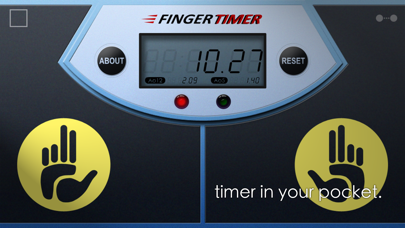
Finger Timer is a speedcubing/speedstacking timer in your pocket!
It's a simple and elegant timer app that you must have!
[HOW TO USE]
1. Put your fingers on the left and right pads, and hold.
2. When the red and green lights are both on, the timer is ready, and then you can release your fingers to start the timer.
3. When you want to stop the timer, put your fingers back on the left and right pads.
4. If you want to restart the timer, press "RESET" and do the steps 1 to 3.
[DISPLAY CONNECTION]
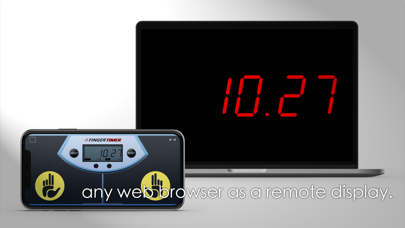
1. Connect your Timer device (with this app) and Display device (any computer or mobile device with a web browser) to the same Wi-Fi network. (Sometimes Internet also works.)
2. In Timer device, …
Read the full description
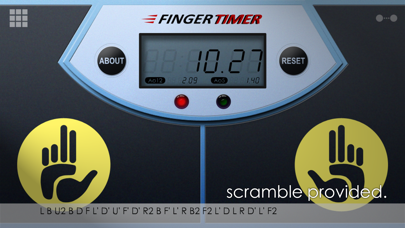
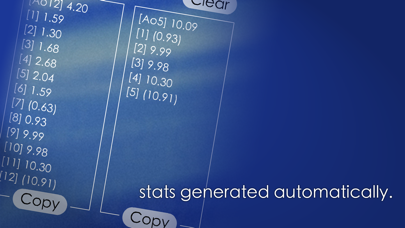
Finger Timer is a speedcubing/speedstacking timer in your pocket! It's a simple and elegant timer app that you must have! [HOW TO USE] 1. Put your fingers on the left and right pads, and hold. 2. When the red and green lights are both on, the timer is ready, and then you can release your fingers to start the timer. 3. When you want to stop the timer, put your fingers back on the left and right pads. 4. If you want to restart the timer, press "RESET" and do the steps 1 to 3. [DISPLAY CONNECTION] 1. Connect your Timer device (with this app) and Display device (any computer or mobile device with a web browser) to the same Wi-Fi network. (Sometimes Internet also works.) 2. In Timer device, tap the top-right icon, and check "Allow display connection" checkbox. 3. In Display device, enter the Timer address into the address bar of your browser, and then press "START". 4. Enjoy it! [Stats] When you using the timer, stats are generated automatically. The average time, Ao5 and Ao12 (full version only), are displaying the summary in the LED panel, and you can also get the details in About page. In About page, you can clear the stats or copy them to show off! Full version: > The maximum time is 60 minutes. > Display connection. (max 60 mins) > Scramble for cube 2x2x2, 3x3x3, 4x4x4, and 5x5x5. > Showing both Ao5 (average of 5) and Ao12 (average of 12). > No ads, no distractions! Subscribe our YouTube channel to watch the latest cubing videos: https://www.youtube.com/user/huskyomega Like us on Facebook for the latest news: https://facebook.com/omegastudiopage
Installs
Apple does not publish download counts. Estimates are in testing.
We publish iOS estimates only after they pass a back-test against real numbers. Chart history below is measured.
Estimated store revenue Estimated Beta
App Store, worldwide, monthly rate from the last 15 chart days to 22 Nov 2026
Below the top 100 grossing apps in the markets we calibrate. In the United States that usually means under about $6.4M a month. App Store purchases and subscriptions only, before Apple's 15 to 30% fee. Ads and web payments are not included.
Ratings
18 ratings, 18 reviews
No rating breakdown published for this app.
Recent reviews
Latest public reviews from the store
No reviews in our sample for this app yet.
Top chart positions
Latest App Store chart ranks by country, last 10 days
- Countries ranked
- 7 of 50
- Best rank
- #33
- Top 10 placements
- 0
- of 8 chart placements
- Average rank
- #54.6
Best countries on App Store
- 🇻🇳 Vietnam · Top paid, Utilities#33
- 🇲🇾 Malaysia · Top paid, Utilities#36
- 🇹🇭 Thailand · Top paid, Utilities#37
- 🇵🇭 Philippines · Top paid, Utilities#52
- 🇯🇵 Japan · Top paid, Utilities#53
- 🇩🇪 Germany · Top paid, Utilities#56
| Country | Chart | Category | Rank | Best (10 days) | Date |
|---|---|---|---|---|---|
| 🇻🇳 Vietnam | Top paid | Utilities | #33 | #9 | 22 Nov 2026 |
| 🇲🇾 Malaysia | Top paid | Utilities | #36 | #6 | 19 Nov 2026 |
| 🇹🇭 Thailand | Top paid | Utilities | #37 | #6 | 22 Nov 2026 |
| 🇵🇭 Philippines | Top paid | Utilities | #52 | #33 | 15 Nov 2026 |
| 🇯🇵 Japan | Top paid | Utilities | #53 | #53 | 22 Nov 2026 |
| 🇩🇪 Germany | Top paid | Utilities | #56 | #56 | 21 Nov 2026 |
| 🇹🇭 Thailand | Top paid | All apps | #84 | #84 | 20 Nov 2026 |
| 🇧🇷 Brazil | Top paid | Utilities | #86 | #86 | 13 Nov 2026 |
Finger Timer Full history
Release, install milestones, listing and store changes
- First released on the store 14 Dec 2012
Update frequency
How often Finger Timer Full ships a new version, month by month
1 updates in the last 12 months. About as often as similar apps, which shipped a median of 1 updates in the same year.
Recent versions
Current version 1.0.7
- Version 1.0.715 May 2026
Improved timer precision with an extra decimal place Updated to high-resolution graphics Fixed Display Connection reconnection issue Minor bug fixes
- Version 1.0.611 Dec 2018
Displaying Ao5 (average of 5) and Ao12 (average of 12). Compatible with iPhone X, Xs, Xs Max, Xr.
Listing keywords
Words and phrases Finger Timer Full repeats most in its store listing
Top phrases: display connection (3), put your fingers (2), about page (2), display device (2), finger timer (2).
Highlighted words also appear in the title. Counts cover the title, short description and description.
Compliance
What the listing and the app package show
- Store status
- Live
- Upkeep
- Updated 15 May 2026
- Age rating
- 4+
Apps like Finger Timer Full
 Library of AviationNazmi Yavuz★ 4.82
 MyNOVECNorthern Virginia Electric Cooperative★ 2.28
 打工人小组件光翔 卓★ 4.96
 TruckbaysTruckbays LLC★ 4.3
 Tornado PRO PlayerMohammed Altam★ 4.44
 VDX - Video ManagerARISEPEAK LP★ 1.74
 TV CastingZeasn Info Technology Co., Ltd.★ 1.86
 MySontiqSontiq, Inc.★ 2.4
 Laboratory TimerShazino★ 4.66
Finger Timer Full: questions and answers
Who makes Finger Timer Full?
Finger Timer Full is published by Yu-Mao Feng.
When was Finger Timer Full last updated?
The latest version (1.0.7) was released on 15 May 2026.
Is Finger Timer Full free?
No. Finger Timer Full is a paid app priced at $0.99.
Is Finger Timer Full still available?
Yes. Finger Timer Full is live on App Store as of 1 Jul 2026.
Track Finger Timer Full and its competitors
Watch any app for new versions, rating drops, chart moves and removals. Free plan, no card.