
- Installs
- —
- Apple does not publish download counts
- Rating
- —
- Ratings
- —
- Version
- 2026.1.1
- Updated 3 Mar 2026
- Released
- 19 Dec 2013
- Tracked since 10 May 2026
- Size
- 48 MB
- Needs 14.0
Also on Google Play: Focus+ Productivity Timer
Screenshots
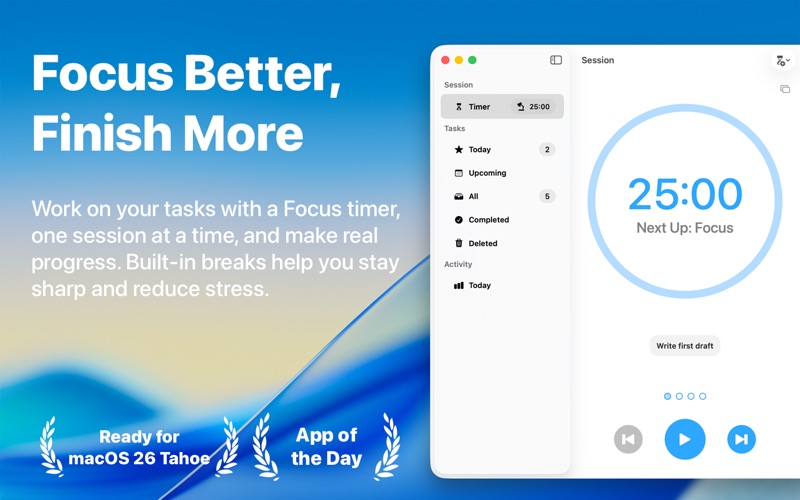

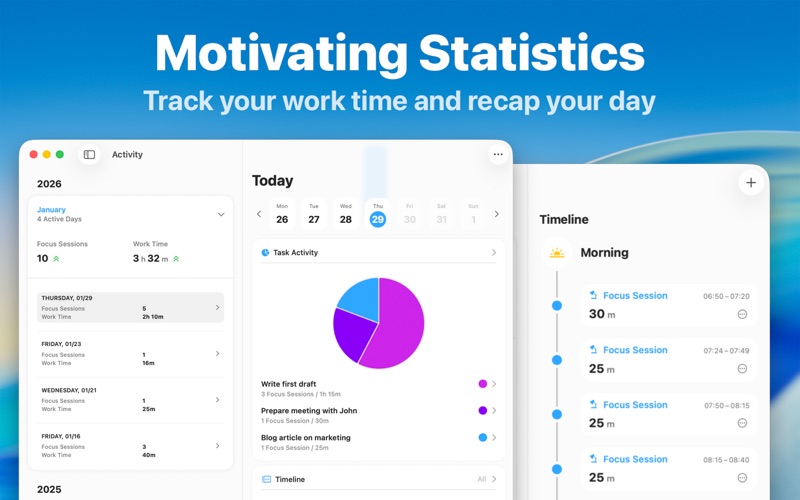


About Focus – Productivity Timer
The description on the store listing
Join hundreds of thousands of happy users who stay focused and productive with Focus – a beautifully simple yet powerful Pomodoro productivity timer for all your Apple devices.
Focus helps you actually get your work done by breaking it into Focus Sessions – short, structured intervals that keep you focused and on track. This proven technique boosts concentration, reduces stress, and keeps you motivated throughout the day. Regular breaks help you recharge, so you can stay sharp and avoid burnout.
Give it a try: Just add your tasks, start your timer, and make steady progress – one session at a time!
“[…] a tool that can genuinely make people more productive" – MacStories.net
“[…] a …
Read the full description
Join hundreds of thousands of happy users who stay focused and productive with Focus – a beautifully simple yet powerful Pomodoro productivity timer for all your Apple devices. Focus helps you actually get your work done by breaking it into Focus Sessions – short, structured intervals that keep you focused and on track. This proven technique boosts concentration, reduces stress, and keeps you motivated throughout the day. Regular breaks help you recharge, so you can stay sharp and avoid burnout. Give it a try: Just add your tasks, start your timer, and make steady progress – one session at a time! “[…] a tool that can genuinely make people more productive" – MacStories.net “[…] a must-have for anyone who finds themselves easily getting distracted or forgetting to take occasional breaks." – iDownloadBlog.com ====================== FEATURES ====================== FOCUS TIMER Focus comes with a fully customizable productivity timer that supports you in working efficiently. Focus for 25 minutes, then get reminded to take a short break to relax your mind. After four sessions, take a longer, 15 to 20 minute break. This method maximizes energy, stimulates creativity, and promotes a sense of achievement. TO-DO LISTS Create unlimited tasks and track your time on each task. By working on one task at a time, you reduce distractions and can put all your attention toward completing your goals. That way you’ll be perfectly organized on your path to success. IN-DEPTH STATISTICS Check in with your progress! Focus keeps track of your focused time and offers in-depth and motivating statistics. See your daily, weekly and monthly activity, discover productivity patterns and build a habit of concentration – with daily goals and focus trends. FOCUS EVERYWHERE Sync Focus across your iPhone, iPad, Apple Watch, Apple Vision Pro, and Mac for a seamless experience. With built-in iCloud sync, your sessions and tasks are always up to date, where and when you need them! WIDGETS Start your Focus timer right from your Lock Screen, Home Screen, or Control Center. Widgets make it easy to see your most important info at a glance, while Live Activities show your session’s progress in real time, so you’re always in the loop and never miss a break. FOCUS ON APPLE WATCH Using Focus on your wrist is a natural fit. The independent Apple Watch app is made for easy and lightweight interactions letting you control sessions and track your progress throughout the day. CLEAN DESIGN The name says it all: Focus draws your attention to the most important things. It’s designed to be unobtrusive, accessible and easy-to-use. You’ll intuitively master its collection of features in no time. ===================================== SUBSCRIPTION PRICING - ALL PLATFORMS, ONE PRICE ===================================== Focus requires a subscription that unlocks all features on iPhone, iPad, Apple Watch, Apple Vision Pro, and Mac. Subscriptions can be shared with Family Sharing. $39.99/ year (USD) $4.99/ month (USD) TRY IT FOR FREE Try everything free for 7 days with the yearly plan. If you cancel before the end of the trial, you can still access the app for 7 days, but you will not be charged for the subscription. SUBSCRIPTION TERMS Payment will be charged to your Apple ID account at the confirmation of purchase or after the free trial period if offered. Your subscription will automatically renew unless it is canceled at least 24 hours before the end of the current period. Your account will be charged 24 hours prior to the end of the current period. You can manage and cancel your subscriptions by navigating to your account settings in the App Store after purchase. ====================== CONTACT ====================== If you have any questions or suggestions, please write us at [email protected] https://meaningful-things.com/ Privacy Policy: https://meaningful-things.com/privacy Terms of Service: https://meaningful-things.com/terms
Installs
Apple does not publish download counts. Estimates are in testing.
We publish iOS estimates only after they pass a back-test against real numbers. Chart history below is measured.
Estimated store revenue Estimated Beta
App Store, worldwide, monthly rate from the last 12 chart days to 19 Nov 2026
Below the top 100 grossing apps in the markets we calibrate. In the United States that usually means under about $6.4M a month. App Store purchases and subscriptions only, before Apple's 15 to 30% fee. Ads and web payments are not included.
Ratings
No rating breakdown published for this app.
Recent reviews
Latest public reviews from the store
No reviews in our sample for this app yet.
Top chart positions
Latest App Store chart ranks by country, last 10 days
Not in any tracked top chart in the last 10 days.
Focus – Productivity Timer history
Release, install milestones, listing and store changes
- First released on the store 19 Dec 2013
Update frequency
How often Focus – Productivity Timer ships a new version, month by month
1 updates in the last 12 months. More often than most similar apps: they shipped a median of 0 updates in the same year.
Recent versions
Current version 2026.1.1
- Version 2026.1.13 Mar 2026
Stay focused and productive – and discover a new, fresh design for the Mac! This update includes: - A design refresh with a modern look and feel on Mac - Updated app icon - New onboarding experience - A full set of new accessibility features As always, if you have any feedback, suggestions, or questions, please reach out to us at [email protected] – we’d love to hear from you! And if you like our work and want to support us, please consider leaving a review in the App Store. Thank you!
Listing keywords
Words and phrases Focus – Productivity Timer repeats most in its store listing
Top phrases: apple watch (4), productivity timer (3), apple vision pro (2), apple watch apple (2), before the end (2).
Highlighted words also appear in the title. Counts cover the title, short description and description.
Compliance
What the listing and the app package show
- Store status
- Live
- Upkeep
- Updated 3 Mar 2026
- Age rating
- 4+
Apps like Focus – Productivity Timer
 Super VPN: Fast Private ProxyGeek Incorporated★ 4.4
 Hubtel RetailerHubtel Limited★ 4.32
 Monthly Calendar 2022 - CalistOmoboto LLC★ 4.38
 Firstly: To-Do List & PlannerfocusCove LLC★ 4.7
 CBUS 311City of Columbus, Ohio★ 1.8
 Themes for Powerpoint - DesiGNGraphic Node★ 4.22
 iSiloDC & Co.★ 3.82
 Flashlight Pro [Multipurpose LED light]KAVAPOINT★ 3.88
 WiPryOscium LLC★ 2.68
Focus – Productivity Timer: questions and answers
Who makes Focus – Productivity Timer?
Focus – Productivity Timer is published by Meaningful Things GmbH & Co. KG.
When was Focus – Productivity Timer last updated?
The latest version (2026.1.1) was released on 3 Mar 2026.
Is Focus – Productivity Timer free?
Yes. Focus – Productivity Timer is free to download.
Is Focus – Productivity Timer still available?
Yes. Focus – Productivity Timer is live on App Store as of 10 May 2026.
Track Focus – Productivity Timer and its competitors
Watch any app for new versions, rating drops, chart moves and removals. Free plan, no card.