
- Installs
- —
- Apple does not publish download counts
- Rating
- 4.45
- Ratings
- 1.8K
- 1.8K reviews
- Version
- 2027.1.2
- Updated 22 Oct 2026
- Released
- 14 Apr 2015
- Tracked since 10 May 2026
- Size
- 222 MB
- Needs 17.0
Also on Google Play: Focus Timer for Productivity
Screenshots



About Focus - Timer for Productivity
The description on the store listing
Join hundreds of thousands of happy users who stay focused and productive with Focus – a beautifully simple yet powerful Pomodoro productivity timer for all your Apple devices.
Focus helps you actually get your work done by breaking it into Focus Sessions – short, structured intervals that keep you focused and on track. This proven technique boosts concentration, reduces stress, and keeps you motivated throughout the day. Regular breaks help you recharge, so you can stay sharp and avoid burnout.
Give it a try: Just add your tasks, start your timer, and make steady progress – one session at a time!
“[…] a tool that can genuinely make people more productive" – MacStories.net
“[…] a …
Read the full description
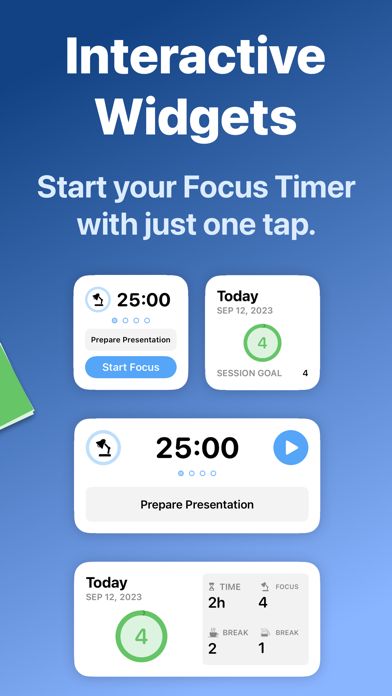
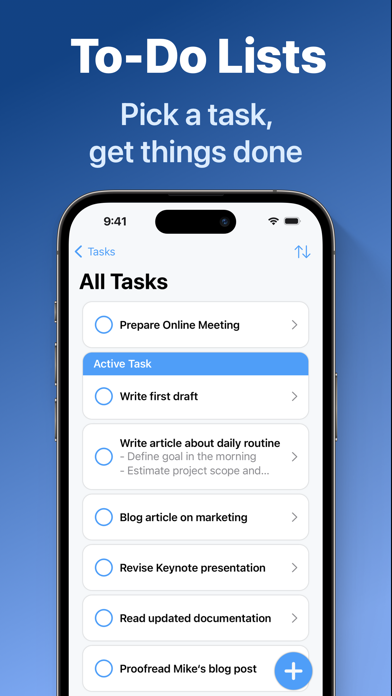
Join hundreds of thousands of happy users who stay focused and productive with Focus – a beautifully simple yet powerful Pomodoro productivity timer for all your Apple devices. Focus helps you actually get your work done by breaking it into Focus Sessions – short, structured intervals that keep you focused and on track. This proven technique boosts concentration, reduces stress, and keeps you motivated throughout the day. Regular breaks help you recharge, so you can stay sharp and avoid burnout. Give it a try: Just add your tasks, start your timer, and make steady progress – one session at a time! “[…] a tool that can genuinely make people more productive" – MacStories.net “[…] a must-have for anyone who finds themselves easily getting distracted or forgetting to take occasional breaks." – iDownloadBlog.com ====================== FEATURES ====================== FOCUS TIMER Focus comes with a fully customizable productivity timer that supports you in working efficiently. Focus for 25 minutes, then get reminded to take a short break to relax your mind. After four sessions, take a longer, 15 to 20 minute break. This method maximizes energy, stimulates creativity, and promotes a sense of achievement. TO-DO LISTS Create unlimited tasks and track your time on each task. By working on one task at a time, you reduce distractions and can put all your attention toward completing your goals. That way you’ll be perfectly organized on your path to success. IN-DEPTH STATISTICS Check in with your progress! Focus keeps track of your focused time and offers in-depth and motivating statistics. See your daily, weekly and monthly activity, discover productivity patterns and build a habit of concentration – with daily goals and focus trends. FOCUS EVERYWHERE Sync Focus across your iPhone, iPad, Apple Watch, Apple Vision Pro, and Mac for a seamless experience. With built-in iCloud sync, your sessions and tasks are always up to date, where and when you need them! WIDGETS Start your Focus timer right from your Lock Screen, Home Screen, or Control Center. Widgets make it easy to see your most important info at a glance, while Live Activities show your session’s progress in real time, so you’re always in the loop and never miss a break. FOCUS ON APPLE WATCH Using Focus on your wrist is a natural fit. The independent Apple Watch app is made for easy and lightweight interactions letting you control sessions and track your progress throughout the day. CLEAN DESIGN The name says it all: Focus draws your attention to the most important things. It’s designed to be unobtrusive, accessible and easy-to-use. You’ll intuitively master its collection of features in no time. ===================================== SUBSCRIPTION PRICING - ALL PLATFORMS, ONE PRICE ===================================== Focus requires a subscription that unlocks all features on iPhone, iPad, Apple Watch, Apple Vision Pro, and Mac. Subscriptions can be shared with Family Sharing. $39.99/ year (USD) $4.99/ month (USD) TRY IT FOR FREE Try everything free for 7 days with the yearly plan. If you cancel before the end of the trial, you can still access the app for 7 days, but you will not be charged for the subscription. SUBSCRIPTION TERMS Payment will be charged to your Apple ID account at the confirmation of purchase or after the free trial period if offered. Your subscription will automatically renew unless it is canceled at least 24 hours before the end of the current period. Your account will be charged 24 hours prior to the end of the current period. You can manage and cancel your subscriptions by navigating to your account settings in the App Store after purchase. ====================== CONTACT ====================== If you have any questions or suggestions, please write us at [email protected] https://meaningful-things.com/ Privacy Policy: https://meaningful-things.com/privacy Terms of Service: https://meaningful-things.com/terms
Installs, last 30 days
Apple does not publish download counts. Estimates are in testing.
Estimated store revenue Estimated Beta
App Store, worldwide, monthly rate from the last 12 chart days to 19 Nov 2026
Below the top 100 grossing apps in the markets we calibrate. In the United States that usually means under about $6.4M a month. App Store purchases and subscriptions only, before Apple's 15 to 30% fee. Ads and web payments are not included.
Ratings
1,849 ratings, 1,849 reviews
- 5 ★77%
- 4 ★8.8%
- 3 ★2.9%
- 2 ★1.8%
- 1 ★9.0%
Recent reviews
Latest public reviews from the store
- 12 Jun 2023
New update is fantastic, hope for more to come!
I have been an off and on user of Focus for a long time. The latest update adds much needed UI love, and works so much better, especially on my iPad. Great work! One area I think could use some love is the Apple Shortcuts. I can only speak for myself here but being able to add new tasks using Apple shortcuts would vastly improve my workflow. For example, it would allow me to create a shortcut to import all my daily tasks from Reminders. If I had a wishlist the two shortcuts would be “Create task with title and date” and “Filter/find existing tasks” to complete the “search and sync” features using shortcuts. Additionally, a game changing feature would be the ability to automatically trigger the app to change the OS level Focus modes when starting/stopping sessions (or maybe just trigger shortcuts instead). For now I use Apple shortcuts to start DND at the same time as starting a Focus timer in the app, but I would love to be able to exit DND during breaks and automatically resume DND when my break is over. Overall this is a great update and I love seeing it! The simplicity of this app makes it one of the best, and with some of the features above I think it would sta
- 3 Jun 2023
Best App to stay balanced with work and family!!!
Can’t say enough good things about this app! I’m studying for a promotional exam currently and this app has helped me know when to take breaks but not for too long. There are plenty of options to customize and very helpful to have it on many platforms to use on the go or while at a desk. Keep up the great work with the app! If I could give one suggestion, which is actually more of a request, I would like to see a kid mode or kid options in the app that could help them see a timer for brushing their teeth or bed time reading of some sort. I also have some kids that are close to being teenagers and as they use the app it would be cool for them to be able to customize the background timer as a cool image of choice. Anyway, something to consider and explore for the future. It was just a thought during my study break. I need to get back to the books. Great app, studying is rough but much better when you have something that just tells you when to do it! Thanks again!!
- 24 May 2023
The only focus timer you'll want!
I have loved Focus and been a fan of its design and function since 2016. I remember thinking that I didn't need a Pomodoro timer, but that I wanted to try out the app. I'm glad I did. If you find yourself needing to focus without distraction, and want to allow your self. Some breaks in between focused sets of work, look no further. This application has a great watch app, iPhone, iPad, and Mac counterparts. The Team has really done a great job with this update! You can drag OmniFocus task right into it, or use their "Add to Focus" Share Sheet feature in Things, for example. This way you can set aside time to focus on your important tasks for the day. Keep up the great work.
- 30 Sep 2020
Great app!
I am a too lazy of a person to write any review, but I like this app and wanted to share some information and suggestion about the app. As a law student, I have been feeling anxious, uncertain if I am putting in enough hours for my school work, and this app does a great job letting me track how long I did the work each day. I like that I can adjust a number of minutes for each session In because most of apps only provide pomodoro style 25 minutes as an option. Also, I love that I could have the app fill the whole screen so I could start it again. Before using this function, I always missed hitting the start button again that I ended up deleting similar types of apps because of imprecise hours tracked. If I may make some suggestions- it would be nice if I could label how many hours I spent on each task. Just a chunk of hours logged only gives me an idea that I did something, but looking back, j don't know on which task I spent my time. Also, a stick or pie graph that shows how many hours I focused on each different task would make this app the greatest. I have been looking for one but there's none that has those functions. Thank you for this app and please keep up the great
What reviewers bring up
Topics mentioned in the latest 8 reviews, by how many reviews mention them
Liked in good reviews (7 reviews)
- focus 5
- timer 5
- pomodoro 4
- sessions 3
- example 3
- better 3
- during 3
- breaks 3
Raised in bad reviews (0 reviews)
No topic comes up twice.
Top chart positions
Latest App Store chart ranks by country, last 10 days
- Countries ranked
- 2 of 50
- Best rank
- #97
- Top 10 placements
- 0
- of 2 chart placements
- Average rank
- #98.5
Best countries on App Store
- 🇫🇮 Finland · Top grossing, Productivity#97
- 🇬🇷 Greece · Top grossing, Productivity#100
| Country | Chart | Category | Rank | Best (10 days) | Date |
|---|---|---|---|---|---|
| 🇫🇮 Finland | Top grossing | Productivity | #97 | #97 | 17 Nov 2026 |
| 🇬🇷 Greece | Top grossing | Productivity | #100 | #100 | 18 Nov 2026 |
Focus - Timer for Productivity history
Release, install milestones, listing and store changes
- First released on the store 14 Apr 2015
Update frequency
How often Focus - Timer for Productivity ships a new version, month by month
4 updates in the last 12 months. More often than most similar apps: they shipped a median of 2 updates in the same year.
Recent versions
Current version 2027.1.2
- Version 2027.1.122 Oct 2026
Focus for iPhone Duo This update brings Focus to iPhone Duo: discover a well-thought-out design with lots of small and big refinements to make Focus feel at home on this new class of iPhone. Focus adapts seamlessly to all the different ways you can hold and use your iPhone Duo: From a familiar iPhone experience when closed to a spacious, iPad-like layout when opened, or seeing your timer prominently in tent mode – Focus flexibly adapts to the way you use your device. Have fun exploring! And if you have any feedback on how we can make Focus better for you – whether on iPhone Duo or any other device – please let us know! Jan & Kerstin You can reach us at [email protected]. And if you like our work, make sure to leave us a review in the App Store. That’s always a huge help! :)
- Version 2026.2.15 Jul 2026
A more powerful, more polished Focus. NEW LEARNING SECTION A brand-new Learning section brings short, friendly guides on focus, breaks, and time tracking right into the app — adjust key settings live as you read, synced across all your devices. REDESIGNED SETTINGS Settings is redesigned from the ground up, with refreshed controls and new options to tune your sessions, notifications, and appearance exactly how you like. FASTER AND MORE RELIABLE Our biggest foundation update yet: we rebuilt Focus on a modern Swift 6 codebase, so it's faster, smoother, and more reliable on the latest devices. If you have any questions or feedback, please get in touch with us: [email protected] Thanks for doing your best work with us! Kerstin & Jan
- Version 2026.230 Jun 2026
A more powerful, more polished Focus. NEW LEARNING SECTION A brand-new Learning section brings short, friendly guides on focus, breaks, and time tracking right into the app — adjust key settings live as you read, synced across all your devices. REDESIGNED SETTINGS Settings is redesigned from the ground up, with refreshed controls and new options to tune your sessions, notifications, and appearance exactly how you like. FASTER AND MORE RELIABLE Our biggest foundation update yet: we rebuilt Focus on a modern Swift 6 codebase, so it's faster, smoother, and more reliable on the latest devices. If you have any questions or feedback, please get in touch with us: [email protected] Thanks for doing your best work with us! Kerstin & Jan
- Version 2026.12 Feb 2026
NEW: Accessibility Features - Discover a full set of new accessibility features, including Voice Over, Larger Text, Sufficient Contrast and more. - Major design refresh for the Focus for Mac app - New onboarding experience As always, if you have any feedback, suggestions, or questions, please reach out to us at [email protected] – we’d love to hear from you! And if you like our work and want to support us, please consider leaving a review in the App Store. Thank you!
Listing keywords
Words and phrases Focus - Timer for Productivity repeats most in its store listing
Top phrases: apple watch (4), focus timer (3), apple vision pro (2), apple watch apple (2), before the end (2).
Highlighted words also appear in the title. Counts cover the title, short description and description.
Compliance
What the listing and the app package show
- Store status
- Live
- Upkeep
- Updated 22 Oct 2026
- Age rating
- 4+
Apps like Focus - Timer for Productivity
 immowelt – Real EstateAVIV Germany GmbH★ 4.69
 f3 vpn - Unlimited VPNSkyline Quantum Data Systems Limited★ 4.27
 Vantage CalendarFortyfour AB★ 4.31
 Phone Drive: File StorageEightythree Technology★ 4.68
 Authenticator App - 2FA Auth +Appshub Bilgi Teknolojileri Limited Sirketi★ 4.5
 Find Bluetooth Device TrackerWergames OU★ 4.36
 Safetunnel VPN & Fast ProxyHOME BUYER SYSTEMS LTD★ 4.55
 VPN for iPhone:Super VPN ProxyVPN PROXY MASTER★ 4.64
 Green VPN - TunnelingTHREE PANDA DIGITAL LIMITED★ 4.48
Focus - Timer for Productivity: questions and answers
Who makes Focus - Timer for Productivity?
Focus - Timer for Productivity is published by Meaningful Things GmbH & Co. KG.
When was Focus - Timer for Productivity last updated?
The latest version (2027.1.2) was released on 22 Oct 2026.
Is Focus - Timer for Productivity free?
Yes. Focus - Timer for Productivity is free to download.
Is Focus - Timer for Productivity still available?
Yes. Focus - Timer for Productivity is live on App Store as of 19 Nov 2026.
Track Focus - Timer for Productivity and its competitors
Watch any app for new versions, rating drops, chart moves and removals. Free plan, no card.