
- Installs
- —
- Apple does not publish download counts
- Rating
- 3.92
- Ratings
- 157
- 157 reviews
- Version
- 1.16
- Updated 12 Oct 2026
- Released
- 29 Jul 2010
- Tracked since 10 May 2026
- Size
- 126 MB
- Needs 12.2
Also on Google Play: Icircuit (37 ratings)
Screenshots

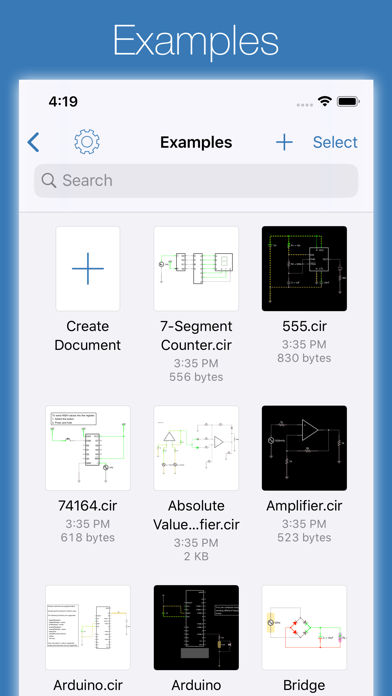
About iCircuit
The description on the store listing
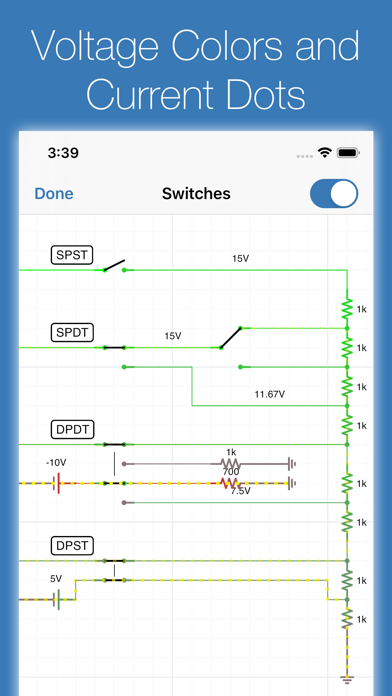
iCircuit is the premier iPhone and iPad app for designing, simulating, and learning analog and digital electronics. Its advanced simulation engine provides real-time, always-on analysis so your circuits stay powered and live, just like working with real components.
Use it like a CAD tool: add components, wire them up, and set their properties. But iCircuit is unlike typical CAD apps because it is always simulating. You do not stop to take a measurement or spend time configuring reports. Instead, you just play with the circuit as you normally would, with the power on.
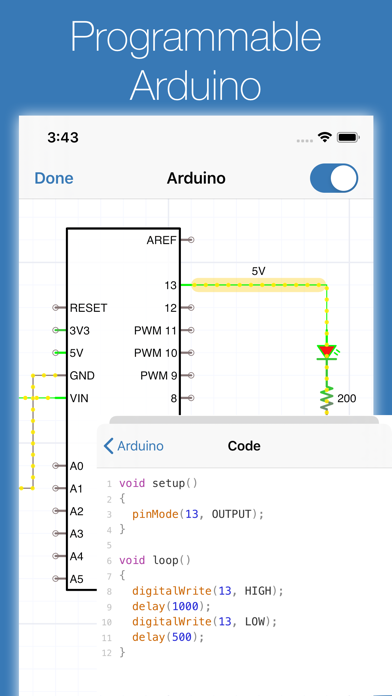
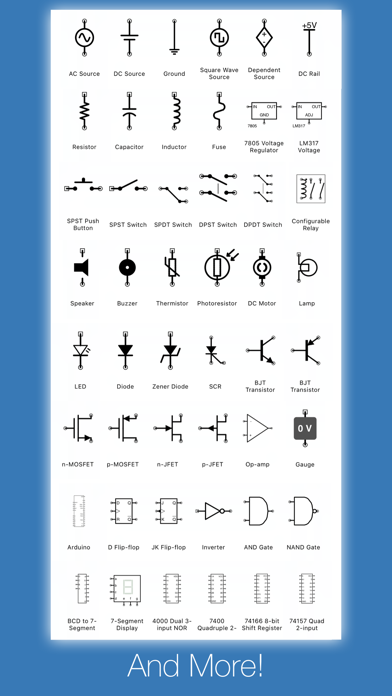
Build circuits with over 300 components, from simple resistors and LEDs to programmable Arduinos (Uno, Nano, Mega, ESP8266, …
Read the full description
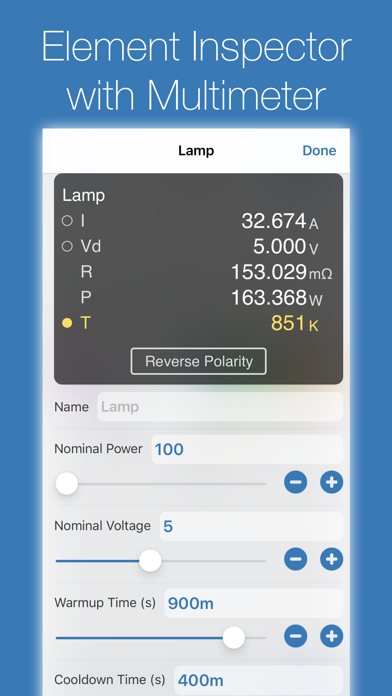
iCircuit is the premier iPhone and iPad app for designing, simulating, and learning analog and digital electronics. Its advanced simulation engine provides real-time, always-on analysis so your circuits stay powered and live, just like working with real components. Use it like a CAD tool: add components, wire them up, and set their properties. But iCircuit is unlike typical CAD apps because it is always simulating. You do not stop to take a measurement or spend time configuring reports. Instead, you just play with the circuit as you normally would, with the power on. Build circuits with over 300 components, from simple resistors and LEDs to programmable Arduinos (Uno, Nano, Mega, ESP8266, ESP32), PIC microcontrollers, and 60 4000/7400-series digital ICs (more available with Pro). Connect elements, adjust values, and instantly see the results. BUILT-IN TEST EQUIPMENT • Multimeter: Probe any point to read voltage, current, and power • Oscilloscope: Track multiple signals with touch-controlled time scale, stacked/unstacked views, FFT analysis, and Bode plots • Gauges: Visualize voltages, currents, and frequencies directly in your circuit • Signal generators and configurable sources EXTENSIVE COMPONENT LIBRARY • Programmable Arduinos (Uno, Nano, Mega, ESP8266, ESP32) • Programmable PIC microcontrollers (assembly and HEX files, more available with Pro) • Power: Voltage regulators (78xx, LM317), sources, dependent sources, power jacks, and simulated antennas • Analog: Resistors, capacitors, inductors, diodes, BJTs, MOSFETs, thermistors, triodes, and tetrodes • Digital: Logic gates (AND, OR, NAND, NOR, XOR), JK and D flip-flops, and 60 4000/7400-series ICs (180+ available with Pro) • ADCs and DACs • Sensors and displays: LEDs, 7-segment, NeoPixels, matrix displays, thermistors • Electromechanical: Motors, servos, SPST/SPDT and DPST/DPDT switches, push buttons, relays, and speakers CREATE CUSTOM ELEMENTS Build sub-circuits and custom elements to componentize your designs and create reusable modules. Share your custom elements with others via the iCircuit Gallery. AUDIO SIMULATION Hear your circuits. Speakers, buzzers, and microphones produce real audio output. Perfect for students learning electronics, hobbyists prototyping projects, and engineers validating designs, all without burning out a single component. ABOUT ICIRCUIT PRO (OPTIONAL) iCircuit is a complete app with a one-time purchase. iCircuit Pro is optional and adds extra components (including more PICs and a larger 4000/7400 IC library) and helps fund ongoing development. Pro is not required for core simulation or everyday circuit design. Terms of Use: https://www.apple.com/legal/internet-services/itunes/dev/stdeula/
Installs since 29 Aug 2026
Apple does not publish download counts. Estimates are in testing.
Estimated store revenue Estimated Beta
App Store, worldwide, monthly rate from the last 12 chart days to 19 Nov 2026
Below the top 100 grossing apps in the markets we calibrate. In the United States that usually means under about $6.4M a month. App Store purchases and subscriptions only, before Apple's 15 to 30% fee. Ads and web payments are not included.
Ratings
157 ratings, 157 reviews
No rating breakdown published for this app.
Recent reviews
Latest public reviews from the store
- 14 Oct 2023
I heart this app
I am no electrician, but I love to tinker. I know enough to be “the one in the family/group” to go to. I last used this app to help me create a simple LED driver for an array of grow lamps of different frequency and intensity with potentiometers (I love to over do my projects with options). Some plants like full sun, some don’t. Some respond better to more ultraviolet, some other frequencies. Now, go online and find a decent set of grow lamps with the same features and watch your wallet disappear. Always DIY when you can. This app can help with such things!
- 19 Jan 2023
Fantastic design prototyping and simulating on the go
If you are into rapid prototyping your circuits and on the go, this app is for you. I’ve saved countless hours not only designing but easily simulating my circuits. Don’t understand people that say this app isn’t professional grade. It’s clearly meant for the enthusiast and pro who is mobile and needs to rapidly test out and prove that their designs will work. Also a great teaching tool. The biggest complaint I and others have had is that the developer is way too busy and that the updates have literally taken years to push out. But the January 2023 release is chock full of new components and goodies and long overdue. There’s simply nothing else that comes close for iOS. Well done and 5 stars. Thank you!!
- 11 Jan 2021
Beats expensive alternatives in many ways
I’ve gone through a number of simulators and this seems to hit the sweet spot between ease of use and the number of features. It’s nice to get an immediate response in the simulator to circuit changes. Keep developing this great app and continue to add more components!
- 26 Nov 2020
Seems excellent, Few things missing
First off, fantastic app. The features work well, and overall i think the UI is handled very well. The app has all the basic parts that are needed to do most of what I would want to do. I recommend this app overall. That being said, there’s some limitations i’ve noticed from playing with the app (hopefully eventually to be addressed). One: no built in non-ideal op-amps. At the very least having control/modeling some basic things like slew rate adjustments and output capabilities without using a subcircuit model would be great. Another thing missing is vacuum tubes, along with triacs and diacs. People have requested it but the author has said looking into it since 2014, without much update, at the very least copying the models from the source of Falstad’s site would work if that’s the holdup. TVS devices (both single and bidirectional) and MOVs would be nice too. Along with spark gaps. SCRs do exist already though, and fairly powerful dependent sources and subcircuit support means it’s likely possible to manually implement common models of these components somewhat, but it’s not an ideal path. A huge feature would be supporting some sort of bode plot setup, even j
What reviewers bring up
Topics mentioned in the latest 8 reviews, by how many reviews mention them
Liked in good reviews (6 reviews)
- components 3
- features 3
- fantastic 2
- designing 2
- developer 2
- simulator 2
- hopefully 2
- circuit 2
Raised in bad reviews (2 reviews)
- instead 2
- minutes 2
- rotate 2
- making 2
- design 2
- undo 2
Top chart positions
Latest App Store chart ranks by country, last 10 days
- Countries ranked
- 28 of 50
- Best rank
- #32
- Top 10 placements
- 0
- of 28 chart placements
- Average rank
- #68.3
Best countries on App Store
- 🇨🇴 Colombia · Top paid, Education#32
- 🇦🇷 Argentina · Top paid, Education#37
- 🇨🇱 Chile · Top paid, Education#38
- 🇬🇷 Greece · Top paid, Education#40
- 🇵🇭 Philippines · Top paid, Education#43
- 🇵🇹 Portugal · Top paid, Education#50
| Country | Chart | Category | Rank | Best (10 days) | Date |
|---|---|---|---|---|---|
| 🇨🇴 Colombia | Top paid | Education | #32 | #7 | 19 Nov 2026 |
| 🇦🇷 Argentina | Top paid | Education | #37 | #37 | 19 Nov 2026 |
| 🇨🇱 Chile | Top paid | Education | #38 | #36 | 19 Nov 2026 |
| 🇬🇷 Greece | Top paid | Education | #40 | #6 | 19 Nov 2026 |
| 🇵🇭 Philippines | Top paid | Education | #43 | #7 | 18 Nov 2026 |
| 🇵🇹 Portugal | Top paid | Education | #50 | #46 | 19 Nov 2026 |
| 🇭🇺 Hungary | Top paid | Education | #51 | #46 | 19 Nov 2026 |
| 🇫🇮 Finland | Top paid | Education | #53 | #52 | 19 Nov 2026 |
| 🇨🇦 Canada | Top paid | Education | #58 | #13 | 14 Nov 2026 |
| 🇩🇪 Germany | Top paid | Education | #60 | #60 | 19 Nov 2026 |
iCircuit history
Release, install milestones, listing and store changes
- First released on the store 29 Jul 2010
Update frequency
How often iCircuit ships a new version, month by month
2 updates in the last 12 months. About as often as similar apps, which shipped a median of 2 updates in the same year.
Recent versions
Current version 1.16
- Version 1.1612 Oct 2026
iCircuit 1.16 is the biggest update in years: real SPICE subcircuits, Verilog and VHDL simulation, and fully emulated Raspberry Pi Pico boards running genuine MicroPython and CircuitPython, all in the same real-time simulator you already know. RASPBERRY PI PICO & PICO 2, FULLY EMULATED Drop a Raspberry Pi Pico or Pico 2 into your circuit and write Python! iCircuit boots real MicroPython 1.28 and CircuitPython 10.2 firmware on machine-level emulations of the RP2040 and RP2350 processors, your choice of firmware per board. • Write Python right in the app: syntax-highlighted editor with edit-time error checking and multi-file projects • Interactive serial console with a Serial Plotter running alongside • Real tracebacks with actual file and line numbers, just like on hardware • GPIO, PWM, ADC, and I2C/SPI/UART buses interact with the rest of your circuit in real time • Labeled pin roles, on-board LED, and effective emulated clock speed in the info panel SPICE SUBCIRCUITS Import industry-standard SPICE models and use them as first-class circuit elements: • Transistors and diodes with .MODEL cards: BJTs, MOSFETs, and multi-emitter BJTs • All dependent sources (E, F, G, H) and independent V/I sources with standard waveforms • Nested subcircuits with parameters • Coupled inductors (K mutual inductance) • .INCLUDE, .IC, and .TEMP directives, with graceful handling of analysis commands • Robust, case-insensitive parsing with clear error messages Grab a vendor's SPICE model off the web and simulate it right in iCircuit. VERILOG AND VHDL The new HDL element compiles and simulates synthesizable Verilog and VHDL in real time. Design a counter, a state machine, or glue logic in the language you use at work or school, wire it to LEDs, switches, and the rest of your analog circuit, and watch it run. NEW ELEMENTS • I2C sensors: HDC1080 humidity, MLX90614 IR thermometer, DS1307/DS3231 real-time clocks, ADS1115 16-bit ADC, readable straight from Python • AC Current Source, On-Off-On Switch, multiple-emitter BJTs, and OB2512RN offline PSR power switch • 74138, 74139, 7483, 74107, and 74245 added to the Standard set • Better power jacks and TRS jacks ARDUINO • Drive SSD1306 OLED displays with the Adafruit_SSD1306 and Adafruit_GFX libraries • Keep sketches in external script files and share them between circuits • Export sketches to use on real hardware • Configurable console size and plotting from your sketch EDITOR AND ANALYSIS (iPhone, iPad, and Mac) • Rectangular selection • Disconnect an element without deleting wires by hand • The canvas grows automatically when you drop elements near the edge • Color-code wires and elements • Help text for every property in the Inspector • Assign keys to momentary switches and play your circuit like an instrument • XY scope mode for Lissajous figures and I/V curves • FFT export • Parts List (BOM) export as CSV, compatible with EasyEDA/JLCPCB part search BUG FIXES • Fixed inverter values when exporting, a crash in net labeling, and custom IC drawing clipping • More accurate component power warnings • More realistic I2C and SPI bus behavior • Many SPICE, HDL, and simulation correctness fixes, validated by 775 automated circuit tests SMOOTHER EDITING • Redo is one long-press away: just hold the Undo button • Apple Pencil now works everywhere your finger does Thank you for your continued support! Whether you're learning electronics, teaching a class, prototyping a product, or just having fun, we hope v1.16 makes iCircuit more useful than ever.
- Version 1.15.218 Mar 2026
This small update fixes signing into the iCircuit Gallery to upload custom elements and fixes the link to the iCircuit Manual. 1.15.1: Fixes the lasso selection tool, fixes crashes on iOS 12 devices, fixes thumbnail generation, and it fixes the D12 port label on Arduino Nanos # Version 1.5 Updates This major update brings powerful new analysis tools, expanded microcontroller support, and numerous improvements. ## Bode Plot Analysis Unlock frequency response analysis with new Bode plot capabilities! Visualize how your circuits respond across frequencies with magnitude and phase plots. Perfect for analyzing filters, amplifiers, and frequency-dependent circuits. See cutoff frequencies, gain characteristics, and phase relationships at a glance. ## Expanded Microcontroller Support - **Arduino Mega** - Build bigger projects with 54 digital I/O pins and 16 analog inputs - **Arduino Nano** - Compact board ideal for small-scale applications - **ESP32 and ESP8266** - Enhanced support for popular IoT microcontrollers ## New Circuit Elements - **AC Motor** - Single phase AC induction motor - **Barrel Connector** - Professional DC power jack for your circuits with configurable shunt terminal - **Improved Power Supply Jack** with better connection handling ## Quick Search Find circuit elements faster than ever! New search bar lets you instantly locate components without scrolling through categories. Just start typing and get to building. ## Voltage Monitoring Protect your circuits with automatic under-voltage and over-voltage warnings. Get notified when components are operating outside their safe voltage ranges, helping prevent damage to sensitive ICs and ensuring reliable operation. ## Element Library Organization - New Microcontroller category for better organization - Improved element filtering options - Elements sorted by Pro availability for easier discovery ## Bug Fixes - Fixed photodiode and photoresistor light source selection - Removed false capacitor loop errors that prevented valid circuits from running - Added input voltage tolerance for digital ICs to prevent spurious warnings from minor voltage fluctuations - Better handling of Arduino EEPROM and multiple board types Thank you for your continued support! Whether you're learning electronics, prototyping professional designs, or just having fun building circuits, we hope v1.15 makes your experience even better.
Listing keywords
Words and phrases iCircuit repeats most in its store listing
Top phrases: available with pro (3), custom elements (3), arduinos uno nano (2), mega esp8266 esp32 (2), nano mega esp8266 (2).
Highlighted words also appear in the title. Counts cover the title, short description and description.
Compliance
What the listing and the app package show
- Store status
- Live
- Upkeep
- Updated 12 Oct 2026
- Age rating
- 4+
Apps like iCircuit
 CV+ Resume MakerMajed Hariri★ 4.66
 2 factor - Authenticator App25 Degrees Apps LLC★ 4.44
 Chore Chart: Family Rewards舜 吕★ 4.69
 HouwiyetiAGENCE NATIONALE DU REGISTRE DES POPULATIONS ET DES TITRES SECURISES★ 4.15
 TheBrain: Smart Notes & LinksTheBrain Technologies LP★ 4.82
 CalamariHubert Lisek★ 4.53
 Coin Pic IdentifierTech Consolidated Inc★ 4.07
 Clippit: AI Text To SpeechSpencer Yen★ 4.59
 Ai humanizer humanize ai textABDELHAFID BASAFOU★ 4.61
iCircuit: questions and answers
Who makes iCircuit?
iCircuit is published by Krueger Systems, Inc..
When was iCircuit last updated?
The latest version (1.16) was released on 12 Oct 2026.
Is iCircuit free?
No. iCircuit is a paid app priced at $12.99.
Is iCircuit still available?
Yes. iCircuit is live on App Store as of 14 Nov 2026.
Track iCircuit and its competitors
Watch any app for new versions, rating drops, chart moves and removals. Free plan, no card.