
- Installs
- —
- Apple does not publish download counts
- Rating
- 2.07
- Ratings
- 1K
- Version
- 3.4.6
- Updated 24 Jun 2024
- Released
- 6 Jan 2014
- Tracked since 11 May 2026
- Size
- 60 MB
- Needs 11.0
Also on Google Play: instax SHARE (5.5K ratings)
Screenshots

About instax SHARE
The description on the store listing
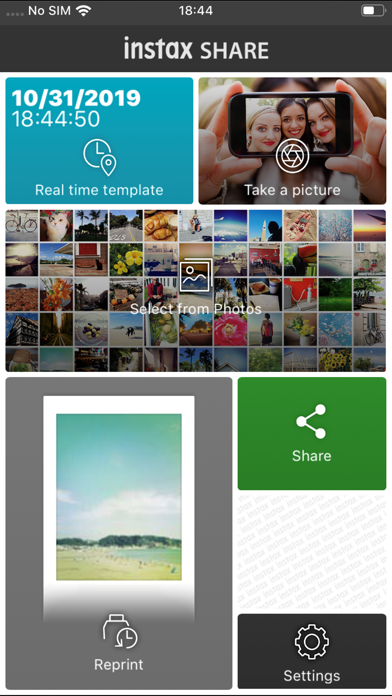
The "instax SHARE" is FUJIFILM official application that can be used to print images from smartphones to instax SHARE smartphone printer.
[Select Your Best Shot!]
"instax SHARE" is an app to print images from your smartphone with the smartphone printer instax SHARE SP-1/SP-2/SP-3(FUJIFILM). You can enjoy beautiful instax print by simply selecting best shots in your smartphone or tablet within less than a minute.
[Supported Printer]
FUJIFILM instax SHARE Smartphone Printer SP-1/SP-2/SP-3
* Not support to old model printers.
[Caution]
(1)iCloud
If you want to print a picture stored in iCloud, save it to your device first and then print it.
(2) Permissions setting of "instax SHARE" …
Read the full description
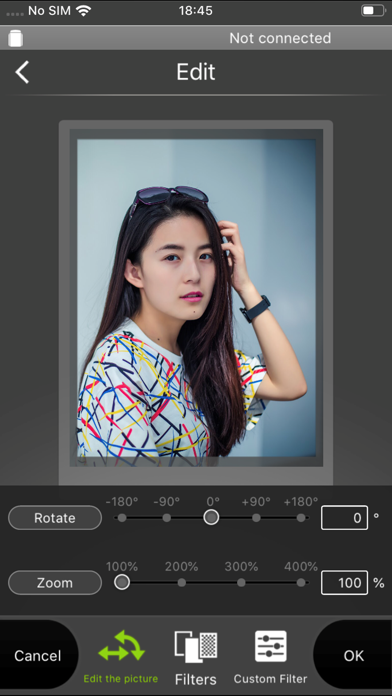
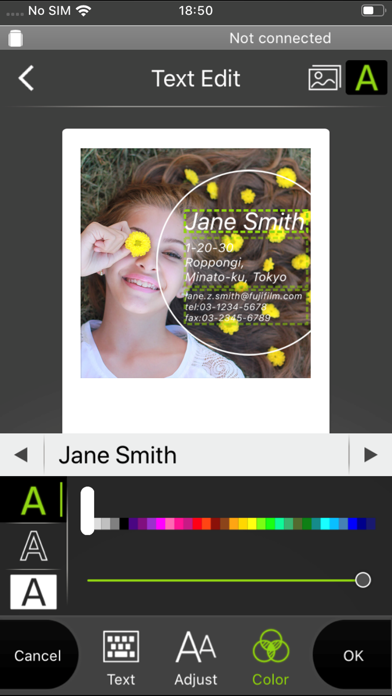
The "instax SHARE" is FUJIFILM official application that can be used to print images from smartphones to instax SHARE smartphone printer. [Select Your Best Shot!] "instax SHARE" is an app to print images from your smartphone with the smartphone printer instax SHARE SP-1/SP-2/SP-3(FUJIFILM). You can enjoy beautiful instax print by simply selecting best shots in your smartphone or tablet within less than a minute. [Supported Printer] FUJIFILM instax SHARE Smartphone Printer SP-1/SP-2/SP-3 * Not support to old model printers. [Caution] (1)iCloud If you want to print a picture stored in iCloud, save it to your device first and then print it. (2) Permissions setting of "instax SHARE" application. Some or all of the functions can not be used unless you enable the following permissions of "instax SHARE" application. Please enable the authority by referring to the following procedure. After installation, you will be asked for permission when using the following functions for the first time, please enable it. The "Take a picture" function need the "Camera" permission. The "Real time template" function need the "Camera" permission and the "Location" permission. "Selection from Photos" function need the "Photos" permission. If the authority is set to invalid, please enable it with the following operation. --Example of operation on iPhone 6s (iOS 10.3.3)-- 1.Tap "Settings" 2.Tap "instax SHARE" 3."ALLOW INSTAX SHARE TO ACCESS" Please enable all of "Camera" "Photo" "Location". Note: If you have not used the following functions ,these permission settings wil not be displayed. The "Camera" permission has required by the "Take a picture" function and the "Real time template" function. "Location" permission has required by the "Real time template" function. The "Photos" permission has required by the "Selection from Photos" function. [How to print] Print photos taken with smartphones. 1. Turn on the printer. 2. **Important** By "Settings" app on your smartphone device, Choose "Wi-Fi", turn on the Wi-Fi, and choose and connect the printer SSID (INSTAX-xxxxxxxx, wrote at printer bottom) from the "CHOOSE A NETWORK..." list. (Excute once, will be connected automatically from the next time.) 3. Launch the instax SHARE app. 4. Select image from Photos or SNS, or take photo with a smartphone camera. 5. Once image is selected, press Edit and edit the image (scaling, rotate, filter and template). 6. Post message on a template if template which accepts text is selected. 7. Press "Connect and print." when editting is completed. 8. When you print for the first time, will be asked password for the printer, please enter initial password that is wrote in User's Guide of the printer. [When you can not update in AppStore] Phenomenon: On the AppStore update screen, the instaxSHARE application is displayed in "Available Updates" However ,Sometimes "Update button" has been changed to "open button",and con not be updated. Workaround: Please uninstall the instaxSHARE application and reinstall it. (When reinstalling, "Reprint image" saved in the application will be cleared.)
Installs
Apple does not publish download counts. Estimates are in testing.
We publish iOS estimates only after they pass a back-test against real numbers. Chart history below is measured.
Estimated store revenue Estimated Beta
App Store, worldwide, monthly rate from the last 12 chart days to 19 Nov 2026
Below the top 100 grossing apps in the markets we calibrate. In the United States that usually means under about $6.4M a month. App Store purchases and subscriptions only, before Apple's 15 to 30% fee. Ads and web payments are not included.
Ratings
1,029 ratings
- 5 ★16%
- 4 ★6.6%
- 3 ★5.6%
- 2 ★12%
- 1 ★59%
Recent reviews
Latest public reviews from the store
- 19 Oct 2019
Terrible for iOS updates
UPDATE: After following the new instructions in the developers response the app works again, yay! I’ve always been very impressed with the quality of this printer and now the app is working again! The app worked until my phone updated to iOS 13 and now even when I connect to the printer’s wifi network the app won’t connect to the printer. After reading through some reviews I tried looking to see if I could enable location services on the app because that’s what the developers said was necessary to make it work. Go figure - there’s not even an option to turn location services on or off in the app settings. Even leaving a review/comment online was impossible because the website asks you to select the product and it was impossible to actually find the printer. Overall I’m just super disappointed I can’t use the printer anymore - I loved it when it was working but now it’s basically useless.
- 3 Oct 2019
Back to 5 stars!
Edit: I have since updated my phone to iOS 13.1.2 and it finally works! I tried to print more pictures again today and now my phone connects to my SP-2! I was able to print out the pictures on my phone without any issues. I read another review on here and she said to allow the app to access your location via the real time template on the app. I tried to do it, but was unable to since I was already connected to the printer. However, even without it selected the connection went through and my instax printed everything perfectly. Glad I took some time tonight to give it another chance! For those who had issues before try this method out! I am so sad that this app no longer works with iOS 13! I just upgraded to the iPhone 11 Pro and with iOS 13 already automatically installed I had NO idea that this app would not work. I tried many times to restart the printer and my phone with no success. However, I tried it on my boyfriend’s phone who still has iOS 12 running and it was able to detect the printer perfectly. I am not sure what I will do once his phone updates... please find a way to make this compatible with the newest iOS. I love using this app to print from my instax SHARE SP-2 a
What reviewers bring up
Topics mentioned in the latest 8 reviews, by how many reviews mention them
Liked in good reviews (2 reviews)
- location 2
- said 2
Raised in bad reviews (6 reviews)
- printer 6
- connect 5
- photos 4
- instax 3
- iphone 3
- latest 3
- issue 3
- think 3
Top chart positions
Latest App Store chart ranks by country, last 10 days
Not in any tracked top chart in the last 10 days.
instax SHARE history
Release, install milestones, listing and store changes
- First released on the store 6 Jan 2014
Recent versions
Current version 3.4.6
- Version 3.4.624 Jun 2024
Fixed minor bugs.
Listing keywords
Words and phrases instax SHARE repeats most in its store listing
Top phrases: instax share (11), please enable (4), sp sp (4), permission has required (3), real time template (3).
Highlighted words also appear in the title. Counts cover the title, short description and description.
Compliance
What the listing and the app package show
- Store status
- Live
- Upkeep
- No update since 24 Jun 2024
- Age rating
- 4+
Apps like instax SHARE
 Photo Background Changer ..Pankaj Kumar★ 3.99
 ArtismaArtisma Inc.★ 3.48
 AquaColorFix - Photo & VideoScott Phillips★ 4.83
 Timer Auto Camera - Set SecondRV AppStudios LLC★ 4.69
 PixelLab: Text Photo EditorApp Holdings★ 4.43
 Vintage Camera: Analog FilmNET Sigma★ 4.63
 Love Photo Frames - 2024Patel Gaurav★ 4.71
 Birthday Photo CollagePatel Ravjibhai★ 4.45
 Photo Slideshow - Video MakerTOH CO.,LTD★ 4.28
instax SHARE: questions and answers
Who makes instax SHARE?
instax SHARE is published by FUJIFILM Corporation.
When was instax SHARE last updated?
The latest version (3.4.6) was released on 24 Jun 2024.
Is instax SHARE free?
Yes. instax SHARE is free to download.
Is instax SHARE still available?
Yes. instax SHARE is live on App Store as of 11 May 2026.
Track instax SHARE and its competitors
Watch any app for new versions, rating drops, chart moves and removals. Free plan, no card.