
- Installs
- —
- Apple does not publish download counts
- Rating
- 2.0
- Ratings
- 2
- 2 reviews
- Version
- 4.2
- Updated 4 Jul 2025
- Released
- 23 Apr 2010
- Tracked since 10 May 2026
- Size
- 21 MB
- Needs 16.6
Screenshots

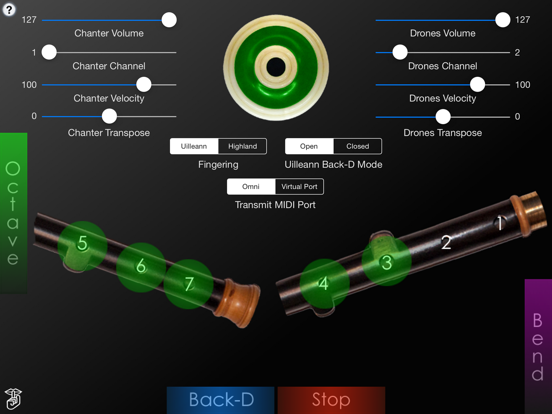
About MIDI Bagpipes Control Surface
The description on the store listing
This app is a Irish/Scottish Bagpipes fingering based MIDI control surface for the iPad that can be used to play your hardware MIDI synthesizer/sampler modules or other MIDI apps.
The chanter fingerings are based on either those used for the Irish Uilleann or Scottish Highland bagpipes.
The app doesn't produce any sound on its own, it is designed for playing hardware and software VST-style MIDI synthesizers via a CoreMIDI compatible interface connected to the dock connector or virtual MIDI instruments like Roland Sound Canvas for iOS, Universal Piper, or Sonosaurus ThumbJam running on your iPad.
The app supports sending data on two independent MIDI channels, one for the chanter and the …
Read the full description
This app is a Irish/Scottish Bagpipes fingering based MIDI control surface for the iPad that can be used to play your hardware MIDI synthesizer/sampler modules or other MIDI apps. The chanter fingerings are based on either those used for the Irish Uilleann or Scottish Highland bagpipes. The app doesn't produce any sound on its own, it is designed for playing hardware and software VST-style MIDI synthesizers via a CoreMIDI compatible interface connected to the dock connector or virtual MIDI instruments like Roland Sound Canvas for iOS, Universal Piper, or Sonosaurus ThumbJam running on your iPad. The app supports sending data on two independent MIDI channels, one for the chanter and the other for the drones. IMPORTANT: Since this app requires as many as 9 fingers on the screen at the same time, before playing, disable "Multitasking Gestures" on your iPad (in the iPad Settings app, under the General section, turn the Multitasking Gestures switch to the off position). Choose between Uilleann and Highland chanter fingerings using the selector below the drone puck. Touch the '?' on the upper left corner for the on-screen help labels. For Uilleann fingerings, you can choose whether the back-D note plays when the Back-D switch is touched (Open mode) or released (Closed mode). Closed mode matches the real Uilleann chanter. Touch the drone puck to start/stop the drones. For the Highland pipes, you'll want to set the drone transposition two semitones higher than the chanter Using Uilleann Chanter Fingering To play the chanter, touch the three holes of the left side of the chanter starting with the tips of your left index, middle, and ring fingers. Next, touch the four holes on the right side of the chanter with the tips of your right index, middle, ring, and little fingers. Touch the green "Octave" bar on the left side with your left little finger to play the notes one octave higher. Optional finger vibrato may be done by touching holes below the main closed holes used for a note. Using Highland Chanter Fingering Touch the bar at the bottom of the screen with your left thumb. It represents the hole on the back of the chanter for the highest note and must be covered for other lower notes to play. The app uses chanter fingerings based on those for the Highland pipes. Next, touch the left half of the chanter starting with the tips of your left index, middle, and ring fingers. Finally, touch the right half of the chanter with the tips of your right index, middle, ring, and little fingers. Touch the blue "Back-D" bar at the bottom left center with your left thumb to play the second octave "Back-D" selectable on either a press or release. (Uilleann chanter mode only) Touch the red "Stop" bar at the bottom right center with your right thumb to stop the chanter sound for staccato techniques. (Uilleann chanter mode only) Touch the purple "Bend" bar on the lower right with your right little finger to bend the pitch or play finger vibrato. (Uilleann chanter mode only) You may select the MIDI channel, attack velocity and volume for the chanter and drones independently using the sliders at the top of the screen. The entire range may be transposed up or down up to one octaves (zero transpose is "C") in semitone increments using the chanter and drone transpose sliders. Use the "Transmit MIDI Port" switch to choose between "Omni" sending MIDI data to all CoreMIDI apps or "Virtual Port" sending to a named CoreMIDI virtual output port. When the "Virtual Port option is selected, MIDIPIpes will show up as an input option in apps that support virtual ports like Universal Piper, and Sonosaurus ThumbJam. "Omni" mode is selected by default. All MIDI settings are saved when the app quits and restored the next time it is run. Touch the 'Shhh' icon at the lower left to quiet any "stuck" notes if they occur. Be sure to visit the AppCordions.com website for MIDI setup information and demo videos!
Installs
Apple does not publish download counts. Estimates are in testing.
We publish iOS estimates only after they pass a back-test against real numbers. Chart history below is measured.
Estimated store revenue Estimated Beta
App Store, worldwide, monthly rate from the last 15 chart days to 22 Nov 2026
Below the top 100 grossing apps in the markets we calibrate. In the United States that usually means under about $6.4M a month. App Store purchases and subscriptions only, before Apple's 15 to 30% fee. Ads and web payments are not included.
Ratings
2 ratings, 2 reviews
No rating breakdown published for this app.
Recent reviews
Latest public reviews from the store
No reviews in our sample for this app yet.
Top chart positions
Latest App Store chart ranks by country, last 10 days
Not in any tracked top chart in the last 10 days.
MIDI Bagpipes Control Surface history
Release, install milestones, listing and store changes
- First released on the store 23 Apr 2010
Update frequency
How often MIDI Bagpipes Control Surface ships a new version, month by month
0 updates in the last 12 months. Less often than most similar apps: they shipped a median of 1 updates in the same year.
Recent versions
Current version 4.2
- Version 4.24 Jul 2025
Bug fixes
Listing keywords
Words and phrases MIDI Bagpipes Control Surface repeats most in its store listing
Top phrases: uilleann chanter (5), index middle (4), uilleann chanter mode (3), chanter fingerings (3), chanter mode (3).
Highlighted words also appear in the title. Counts cover the title, short description and description.
Compliance
What the listing and the app package show
- Store status
- Live
- Upkeep
- Updated 4 Jul 2025
- Registered in
- United States
- Age rating
- 4+
Apps like MIDI Bagpipes Control Surface
 Pyware 3D ViewerPygraphics, Inc.★ 2.86
 WNGC Your Georgia CountryCox Media Group★ 4.54
 Rhythm Necklace - Geometric SequencerSam Tarakajian★ 4.64
 DigiStix 2 AUv3 Plugin4Pockets.com★ 4.54
 JPLAYMarcin Ostapowicz★ 4.3
 MS Vinyl - Music WidgetDinh Dong Nguyen★ 4.26
 Radio TEDDYIR MediaAd GmbH★ 4.56
 Arpeggionome Pro | matrix arpeggiatorAlexandernaut★ 4.56
 Guitar & Ukulele Tuner 2025Aleksandr Kulaga★ 4.44
MIDI Bagpipes Control Surface: questions and answers
Who makes MIDI Bagpipes Control Surface?
MIDI Bagpipes Control Surface is published by Michael Eskin, a developer based in US.
When was MIDI Bagpipes Control Surface last updated?
The latest version (4.2) was released on 4 Jul 2025.
Is MIDI Bagpipes Control Surface free?
No. MIDI Bagpipes Control Surface is a paid app priced at $4.99.
Is MIDI Bagpipes Control Surface still available?
Yes. MIDI Bagpipes Control Surface is live on App Store as of 1 Jul 2026.
Track MIDI Bagpipes Control Surface and its competitors
Watch any app for new versions, rating drops, chart moves and removals. Free plan, no card.