
- Installs
- —
- Apple does not publish download counts
- Rating
- 4.0
- Ratings
- 2
- Version
- 5.0
- Updated 16 Jan 2023
- Released
- 22 Nov 2012
- Tracked since 10 May 2026
- Size
- 21 MB
- Needs 13.0
Screenshots
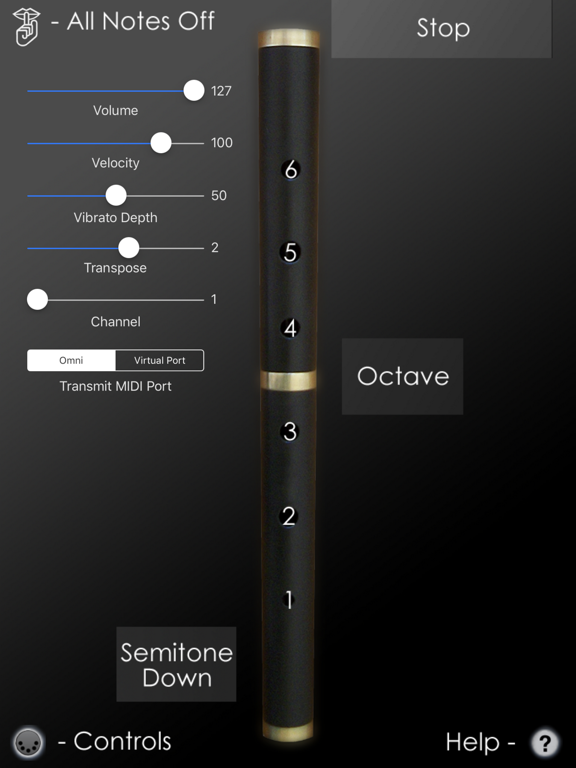
About MIDIFlute MIDI Controller
The description on the store listing
MIDIFlute is an Irish Flute/Whistle MIDI controller for the iPad.
The fingerings are based on those used for the 6-hole keyless Irish flute or whistle.
MIDIFlute doesn't produce any sound on its own, it is designed for playing hardware and software VST-style MIDI synthesizers via a CoreMIDI compatible interface connected to the dock connector or virtual MIDI instruments like Roland Sound Canvas for iOS, IK Multimedia SampleTank®, or Sonosaurus ThumbJam running on your iPad.
IMPORTANT: Since this app requires as many as 8 fingers on the screen at the same time, before playing, disable "Multitasking Gestures" on your iPad (in the iPad Settings app, under the General section, turn the …
Read the full description
MIDIFlute is an Irish Flute/Whistle MIDI controller for the iPad. The fingerings are based on those used for the 6-hole keyless Irish flute or whistle. MIDIFlute doesn't produce any sound on its own, it is designed for playing hardware and software VST-style MIDI synthesizers via a CoreMIDI compatible interface connected to the dock connector or virtual MIDI instruments like Roland Sound Canvas for iOS, IK Multimedia SampleTank®, or Sonosaurus ThumbJam running on your iPad. IMPORTANT: Since this app requires as many as 8 fingers on the screen at the same time, before playing, disable "Multitasking Gestures" on your iPad (in the iPad Settings app, under the General section, turn the Multitasking Gestures switch to the off position). Please visit the app support website to see some live demo videos and for the settings you will need to enable in the synth app you are using to have it work with the control surface. To get started playing, first show the on-screen hole labels by touching the '?' icon at the lower right corner of the screen. Start by touching the top half of the flute starting with the tips of your left index, middle, and ring fingers on holes #6, 5, and 4. The holes light up when touched. Next touch the bottom half of the flute with the tips of your right index, middle, and ring fingers, on holes #3, 2, and 1. To play the second octave, touch the "Octave" bar next to the flute with your left little finger while using the same fingerings as the first octave. Touch the "Stop" bar at the top of the screen with your left thumb to stop the sound while fingering a note. This can be used for repeated notes in the place of doing a cut or tap. Finger vibrato may be done with the middle finger of the right hand on many notes. The amount of vibrato is adjustable using the MIDI control sliders. Touch the "Semitone Down" bar next the flute with the right little finger to lower the pitch one semitone. This may be used to play the notes F-natural, G#, D#, and Bb. Touch the MIDI icon at the bottom left corner of the screen to show/hide the MIDI controls. All settings are saved and restored the next time the app is run. You may select the volume, attack velocity, vibrato depth and MIDI chanel using the sliders. The entire range may be transposed up or down up to one octaves (zero transpose is "C") in semitone increments using the transpose slider. Use the "Transmit MIDI Port" switch to choose between "Omni" sending MIDI data to all CoreMIDI apps (matches previous versions of MIDIFlute) or "Virtual Port" sending to a named CoreMIDI virtual output port. When the "Virtual Port option is selected, MIDIFlute will show up as an input option in apps that support virtual ports like Sonosaurus ThumbJam and MidiBridge. "Omni" mode is selected by default. All MIDI settings are saved when the app quits and restored the next time it is run. Touch the 'Shhh' icon at the top left to send a MIDI "All Notes Off" message quiet any "stuck" notes if they occur. Settings for use with other MIDI synthesizer apps: Sonosaurus ThumbJam: - In "Preferences", under "Options", enabled "Background Audio". If using the "Virtual Port" transmit port option, enable the input port under Preferences / MIDI Control / MIDI Input Connections. IK Multimedia SampleTank: - In Settings (touch the gear icon), enable "Background Audio". IK Multimedia iRig MIDI Hardware MIDI Interface: - For simple direct connection, in MIDIFlute, set the "Transmit MIDI Port" option to "Omni" . - If using a MIDI filtering app like MidiBridge to modify the data stream, in MIDIFlute, set the "Transmit MIDI Port" option to "Virtual Port". Other CoreMIDI compatible synth apps will have similar settings. Be sure to visit the AppCordions.com website for MIDI setup and demo videos!
Installs
Apple does not publish download counts. Estimates are in testing.
We publish iOS estimates only after they pass a back-test against real numbers. Chart history below is measured.
Estimated store revenue Estimated Beta
App Store, worldwide, monthly rate from the last 14 chart days to 21 Nov 2026
Below the top 100 grossing apps in the markets we calibrate. In the United States that usually means under about $6.4M a month. App Store purchases and subscriptions only, before Apple's 15 to 30% fee. Ads and web payments are not included.
Ratings
2 ratings
No rating breakdown published for this app.
Recent reviews
Latest public reviews from the store
No reviews in our sample for this app yet.
Top chart positions
Latest App Store chart ranks by country, last 10 days
Not in any tracked top chart in the last 10 days.
MIDIFlute MIDI Controller history
Release, install milestones, listing and store changes
- First released on the store 22 Nov 2012
Update frequency
How often MIDIFlute MIDI Controller ships a new version, month by month
0 updates in the last 12 months. Less often than most similar apps: they shipped a median of 1 updates in the same year.
Recent versions
Current version 5.0
- Version 5.016 Jan 2023
Updated for new iOS versions
Listing keywords
Words and phrases MIDIFlute MIDI Controller repeats most in its store listing
Top phrases: port option (4), virtual port (4), transmit midi port (3), ik multimedia (3), midi port (3).
Highlighted words also appear in the title. Counts cover the title, short description and description.
Compliance
What the listing and the app package show
- Store status
- Live
- Upkeep
- No update since 16 Jan 2023
- Registered in
- United States
- Age rating
- 4+
Apps like MIDIFlute MIDI Controller
 Pyware 3D ViewerPygraphics, Inc.★ 2.86
 WNGC Your Georgia CountryCox Media Group★ 4.54
 Rhythm Necklace - Geometric SequencerSam Tarakajian★ 4.64
 DigiStix 2 AUv3 Plugin4Pockets.com★ 4.54
 JPLAYMarcin Ostapowicz★ 4.3
 MS Vinyl - Music WidgetDinh Dong Nguyen★ 4.26
 Radio TEDDYIR MediaAd GmbH★ 4.56
 Arpeggionome Pro | matrix arpeggiatorAlexandernaut★ 4.56
 Guitar & Ukulele Tuner 2025Aleksandr Kulaga★ 4.44
MIDIFlute MIDI Controller: questions and answers
Who makes MIDIFlute MIDI Controller?
MIDIFlute MIDI Controller is published by Michael Eskin, a developer based in US.
When was MIDIFlute MIDI Controller last updated?
The latest version (5.0) was released on 16 Jan 2023.
Is MIDIFlute MIDI Controller free?
No. MIDIFlute MIDI Controller is a paid app priced at $4.99.
Is MIDIFlute MIDI Controller still available?
Yes. MIDIFlute MIDI Controller is live on App Store as of 1 Jul 2026.
Track MIDIFlute MIDI Controller and its competitors
Watch any app for new versions, rating drops, chart moves and removals. Free plan, no card.