
- Installs
- —
- Apple does not publish download counts
- Rating
- 4.11
- Ratings
- 9
- 9 reviews
- Version
- 4.03
- Updated 14 Oct 2025
- Released
- 23 Jun 2017
- Tracked since 11 May 2026
- Size
- 133 MB
- Needs 18.0
Screenshots

About Motion Graphix Animator
The description on the store listing
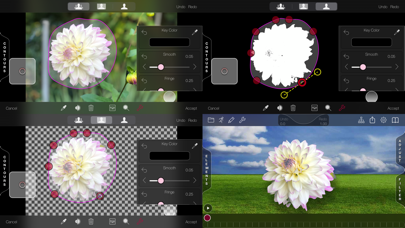
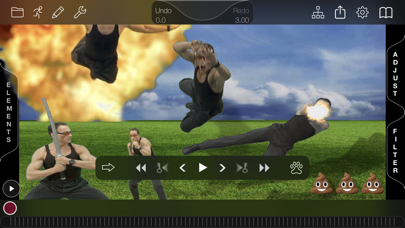
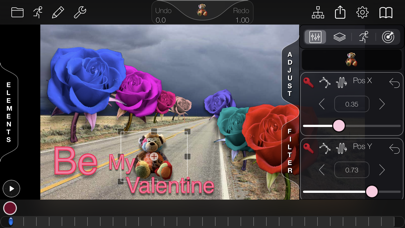
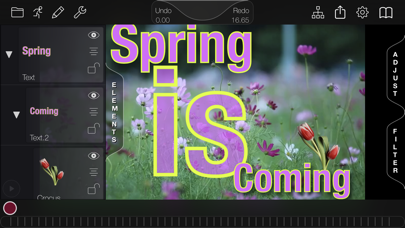
This feature-rich 2.5D animation app lets you create anything from Ken-Burns-style photo montages to animated GIF 'memes', from instructional videos to spatial or stereoscopic film titles. Start by loading a photo or movie background, or create a colored background gradient. You can add animated color correction, zoom, pan or blur to the background at any time. Next add layers using your own media or one of the many included 'sprite' images. Now animate your layers with a powerful but simple keyframe animation system - just set the time and move the layer. You animate the size, rotation, transparency, and everything else the same way. And because Motion Graphix is a 2.5D animation system, …
Read the full description
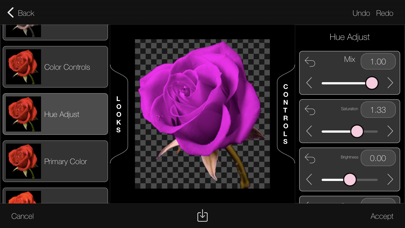
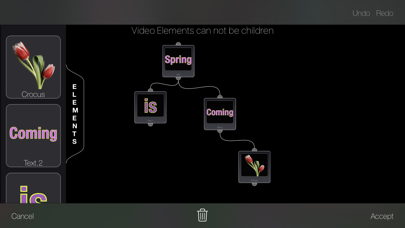
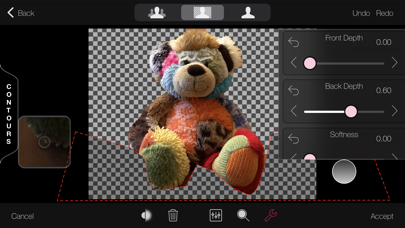
This feature-rich 2.5D animation app lets you create anything from Ken-Burns-style photo montages to animated GIF 'memes', from instructional videos to spatial or stereoscopic film titles. Start by loading a photo or movie background, or create a colored background gradient. You can add animated color correction, zoom, pan or blur to the background at any time. Next add layers using your own media or one of the many included 'sprite' images. Now animate your layers with a powerful but simple keyframe animation system - just set the time and move the layer. You animate the size, rotation, transparency, and everything else the same way. And because Motion Graphix is a 2.5D animation system, you can also change the Z-position, or depth, of a layer, and it will shrink or move behind other layers as if it were moving farther from the 'camera'. Motion Graphix lets you add as many layers as you like, and animate them. Layers can be made not just from still pictures, but also from videos and animated GIFs. You can create your own text elements with outlines and shadows, or define your own basic shapes using standard Bezier curves and color gradient fills. And Motion Graphix includes a built-in sprite cutter, making it easy to cut elements out of your own photos by tracing a Bezier curve around them, or by using Apple’s AI background removal And once you cut an element out, it is added to your library, to reuse in future projects. You can also animate hand-drawn elements. Sketch a line or letter, and Motion Graphix will draw it on as the animation plays. This is really great for making underlines or circles to highlight parts or places in your background picture. You can also add particle-system layers, like snow, fireworks, bubbles, and more. And because advanced keyframe animation controls underlie the quick and intuitive process of simply setting the time and moving the element. You can dig in for precise control of your motion when needed, or let Motion Graphix do the work with built-in motions like spiral, jitter, bounce and more. For matching graphics to a moving background, try the revolutionary 'Digital Tracking' system: use your digit to follow the motion while the video plays, then apply that motion to a layer. When you're done, share a picture or movie to Photos or any app that accepts sharing, including Mail, Messages, YouTube, Dropbox and many more. If you have set depths on your layers, you can even save out stereoscopic renders in standard split-screen formats, red-blue anaglyph 3d format, or VR format suitable for viewing with Google Cardboard type viewers. Features: Easy-to-use keyframe-based animation system, just set the time and adjust the layer Animated filtering on background picture or movie: Color correction, blurring, still photo position and zoom Large built-in sprite library including animated character and visual effects elements Cut out your own sprites from any picture manually or with AI Create and animate text elements with font, fill and outline control Create your own basic shape and Bezier curves with fill and outline controls Animate colored, transparent, soft shadows and glows for any layer Import animated GIF images to use as sprites Dope sheet - View and adjust keyframes for all your elements side-by-side in one place. Particle generator with presets - Snow, Smoke, Fire, Fireworks, Starfield, Bubbles, Sparkler Digital tracking - Use your digit to follow features on moving video, track any sprite to follow the motion Animated drawing - Handwriting, arrows, annotations draw themselves over time 2.5D Animation: elements scale up and down as they move into or out of the screen, above or below other layers Stereoscopic output of 2.5D animation in anaglyph (red/blue), side-by-side, top-and-bottom and spatial formats Export MP4 h264, HDR, ProRes, MV-HEVC and GIF video, HEIC, PNG and JPG stills Export to 4k, Full HD, HD(720), half HD and SD resolutions Unlimited undo, redo.
Installs
Apple does not publish download counts. Estimates are in testing.
We publish iOS estimates only after they pass a back-test against real numbers. Chart history below is measured.
Estimated store revenue Estimated Beta
App Store, worldwide, monthly rate from the last 13 chart days to 20 Nov 2026
Below the top 100 grossing apps in the markets we calibrate. In the United States that usually means under about $6.4M a month. App Store purchases and subscriptions only, before Apple's 15 to 30% fee. Ads and web payments are not included.
Ratings
9 ratings, 9 reviews
No rating breakdown published for this app.
Recent reviews
Latest public reviews from the store
No reviews in our sample for this app yet.
Top chart positions
Latest App Store chart ranks by country, last 10 days
- Countries ranked
- 1 of 50
- Best rank
- #96
- Top 10 placements
- 0
- of 1 chart placements
- Average rank
- #96
Best countries on App Store
- 🇦🇺 Australia · Top paid, Photo & Video#96
| Country | Chart | Category | Rank | Best (10 days) | Date |
|---|---|---|---|---|---|
| 🇦🇺 Australia | Top paid | Photo & Video | #96 | #40 | 19 Nov 2026 |
Motion Graphix Animator history
Release, install milestones, listing and store changes
- First released on the store 23 Jun 2017
Recent versions
Current version 4.03
- Version 4.0314 Oct 2025
V 4.0.3 Bug fixes and stability improvements V 4.0.1 Bug fixes and stability improvements V 4.0 Spatial Stereo, import and export New Stereo Setup View Improved Text Element Editor Improved Render Controller with built in Preview Improved Procedural Element Editor, added custom particles Improved Video Element New Elements: Paint, Foreground Mask, No-Op Improved contextual help Improved Render Controller with embedded preview New Looks New background filters Improved keyframe, timeline and camera editors Non-proportional Scale editor 3D rotation to elements: tilt and turn Stretch keyframes in Keyframe Editor Added scene duration editing Bug fixes and stability improvements V 3.3 Added Quality setting to H264 render Added HDR and ProRes export Fixed issues with GIF transparent background rendering Fixed paused player jumping frame issue while editing background filters and looks Added timecode display during play Bug fixes and stability improvements V 3.2 Improvements to GIF handling Improvements to missing image handling Fixed Cancel render Updated metal kernels Fixed anaglyph rendering Fixed camera view zpos editing Pixiedust procedural element Bug fixes and stability improvements Updated for ios15 v3.1 Various bug fixes and stability improvements v3.0 Parenting - Connect elements as children to move with parent Forward Kinematics - Animate element chains with motion hierarchy Video Elements - Use movies as image sources SVG Elements - Vector graphics as image sources Depth Key Element - But people from backgrounds in Apple Portrait mode photos with depth Clip, Add and Subtract Mattes - Powerful mattes for cleaning up Green Screen and Depth keys Look Filters - Process image-based elements with artistic filters. Edit Manager - A table of undo and redo options New Shape Elements - Speech Bubble, Heart, Starburst, and more New Element Attributes - Background Color, Border Color, Border Width and Corner Radius for all element types Project Import and Export - Save and share projects as bundles Tips and Tricks Help Document - Built-in hints and help Curve-type Visualization in Keyframe Editor Files App Support - Import media, share projects Non-proportional Element Scaling Negative Element Scaling - For flipping elements Collapsible element list Marker menu - Element options at your finger tip Context-sensitive Layer Ordering Menu Reworked Dedicated Element Editor Reworked Timeline Editor Reworked Text Editor - Direct editing, font size control All-Metal Image Processing - Leverages the GPU for great performance Bug Fixes, Performance and Stability Improvements - Fixed issues with color picking, network image loading, upside-down video, GIF elements, pivot representation v2.0 Updated for iOS12, iPhoneX and new device variations Added curve-based clip, holdout and boundary mattes into green screen element Extended animation reset capabilities: reset current frame, reset whole channel Added color picker access to all color parameters Added support for slo-mo movie playback Play control has been changed to accommodate new switch app gestures which compete with the time scroller. Removed cover-flow project picker Improved accessibility and UX Bug fixes and stability improvements v1.5 Draw-on Motions: Add motion paths with a few taps Stability and performance improvements.
Listing keywords
Words and phrases Motion Graphix Animator repeats most in its store listing
Top phrases: motion graphix (6), 5d animation (4), animation system (3), built in sprite (2), digit to follow (2).
Highlighted words also appear in the title. Counts cover the title, short description and description.
Compliance
What the listing and the app package show
- Store status
- Live
- Upkeep
- Updated 14 Oct 2025
- Age rating
- 4+
Apps like Motion Graphix Animator
 Video CollageaZeR DiLLs★ 4.08
 Vee for VideoMedious★ 2.98
 Beauty Camera -Selfie, StickerBhuvan Gupta★ 4.5
 FinalCamXShenzhen Xiaozhen Technology Co.,Ltd.★ 4.44
 Magic Studio - AI Photo EditorMagicStudio.com★ 4.62
 Foto Impresiones: 1 Hr PhotoSoftwareX★ 4.98
 SnapGeo - AI Location FinderRECEP ASLAN★ 4.24
 Family Photo Maker - AIRick-y Media★ 4.12
 BeautifAI: AI Try OnJAI UYGULAMA VE YAPAY ZEKA TEKNOLOJILERI ANONIM SIRKETI★ 4.36
Motion Graphix Animator: questions and answers
Who makes Motion Graphix Animator?
Motion Graphix Animator is published by PixelSplincher.
When was Motion Graphix Animator last updated?
The latest version (4.03) was released on 14 Oct 2025.
Is Motion Graphix Animator free?
No. Motion Graphix Animator is a paid app priced at $6.99.
Is Motion Graphix Animator still available?
Yes. Motion Graphix Animator is live on App Store as of 1 Jul 2026.
Track Motion Graphix Animator and its competitors
Watch any app for new versions, rating drops, chart moves and removals. Free plan, no card.