
- Installs
- —
- Apple does not publish download counts
- Rating
- 3.5
- Ratings
- 4
- 4 reviews
- Version
- 1.0.2
- Updated 29 Nov 2025
- Released
- 25 Sep 2023
- Tracked since 10 May 2026
- Size
- 19 MB
- Needs 16.1
Screenshots

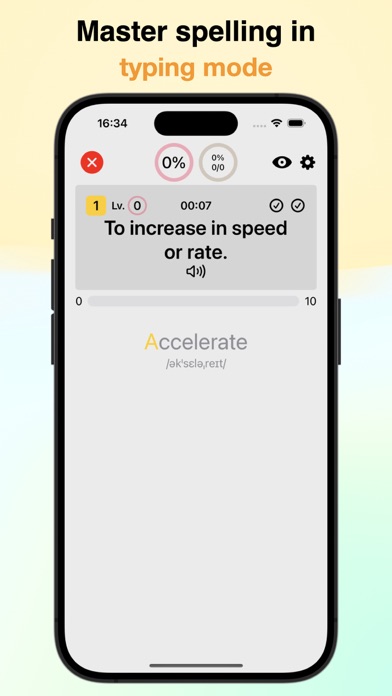
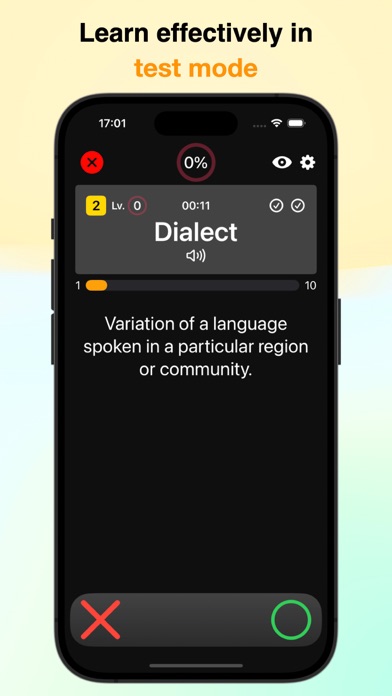


About MyFlasher
The description on the store listing
Create your own original question sets and efficiently study with a spaced repetition schedule tailored to the forgetting curve.
◆ Creating Question Sets ◆
● In addition to questions and answers, you can also add explanations and pronunciation.
In addition to the basic question-answer format of flashcards, you can also add explanations and pronunciations. You can toggle their visibility based on the situation.
● Images can also be added.
By adding images, you can create questions that cannot be expressed in words alone. It's also useful for visual memorization.
● Supports adding multiple answers
Unlike the typical flashcard one-question-one-answer format, you can add multiple answers to …
Read the full description
Create your own original question sets and efficiently study with a spaced repetition schedule tailored to the forgetting curve. ◆ Creating Question Sets ◆ ● In addition to questions and answers, you can also add explanations and pronunciation. In addition to the basic question-answer format of flashcards, you can also add explanations and pronunciations. You can toggle their visibility based on the situation. ● Images can also be added. By adding images, you can create questions that cannot be expressed in words alone. It's also useful for visual memorization. ● Supports adding multiple answers Unlike the typical flashcard one-question-one-answer format, you can add multiple answers to a single question. This is convenient when a single word has multiple meanings. ● Supports automatic voice reading If you want to have items read aloud automatically, you can select a language, and it will read aloud the questions during the presentation. This can be useful for listening practice and more. ◆ Enhancing Learning Efficiency ◆ ● Three learning modes There are three modes: Choice Mode, Typing Mode, and Test Mode. You can change them according to your learning progress and preferences. ● Learning management by mode Instead of having one schedule per item, learning progress is managed separately based on question orientation and presentation method. This ensures more effective memorization. ● Customizable question scope You can set the range and number of questions to be presented from your flashcards. You can also change the order and orientation of presentation. ● Automatic learning progress tracking Learning progress is automatically tracked just by solving problems. It can avoid presenting items that you already know to some extent. In review mode, you can also schedule reviews according to the forgetting curve for longer-term retention. ● Manual learning progress management You can manually mark cards you want to check individually. Of course, you can use this information to set the items to be presented during the quiz. ● Setting spaced repetition schedules according to the forgetting curve Shortly after learning, forgetting tends to happen relatively quickly. However, through review, you can correct the forgetting curve. After a certain period, the rate of forgetting slows down. It is said that reviewing around the time when you are about to forget is the most effective for memory consolidation. In this app, the review items in review mode are automatically scheduled for appropriate review dates and times. ● View your learning records You can view your weekly and monthly study time in graphs, as well as your total study time. ◆ Other Features ◆ ● Compatible with Mac, allowing editing and viewing on any device Since it is also compatible with Mac, you can use it on your favorite device according to your convenience. ● Changeable theme colors You can change the theme colors to your liking. ● Backup via iCloud and sync between devices You can back up your data with iCloud, so you don't have to worry about data loss. You can also share data between devices. ● Automatic backup feature You can automatically back up all your data every time you start the app. ● Lock the app with a password You can lock the app with a password to securely store your data. ● Data import and export feature You can freely import and export data. This allows you to exchange data with others or use your data in different apps. ● Import in CSV format It also supports importing in CSV format, so you can create question sets in your preferred app or import question sets you've created in the past.
Installs
Apple does not publish download counts. Estimates are in testing.
We publish iOS estimates only after they pass a back-test against real numbers. Chart history below is measured.
Estimated store revenue Estimated Beta
App Store, worldwide, monthly rate from the last 14 chart days to 21 Nov 2026
Below the top 100 grossing apps in the markets we calibrate. In the United States that usually means under about $6.4M a month. App Store purchases and subscriptions only, before Apple's 15 to 30% fee. Ads and web payments are not included.
Ratings
4 ratings, 4 reviews
No rating breakdown published for this app.
Recent reviews
Latest public reviews from the store
No reviews in our sample for this app yet.
Top chart positions
Latest App Store chart ranks by country, last 10 days
Not in any tracked top chart in the last 10 days.
MyFlasher history
Release, install milestones, listing and store changes
- First released on the store 25 Sep 2023
Update frequency
How often MyFlasher ships a new version, month by month
1 updates in the last 12 months. More often than most similar apps: they shipped a median of 0 updates in the same year.
Recent versions
Current version 1.0.2
- Version 1.0.229 Nov 2025
Bug fixes and performance improvements.
Listing keywords
Words and phrases MyFlasher repeats most in its store listing
Top phrases: learning progress (5), forgetting curve (4), question sets (4), compatible with mac (2), import and export (2).
Highlighted words also appear in the title. Counts cover the title, short description and description.
Compliance
What the listing and the app package show
- Store status
- Live
- Upkeep
- Updated 29 Nov 2025
- Age rating
- 4+
Apps like MyFlasher
 Populations and Resources SimAmplify Education, Inc.★ 2.38
 Rune WriterPaul Burlov★ 4.34
 Being Moroccan ( Darija )Yasir TIRAK★ 4.56
 方格单词²上海译动智能科技有限公司★ 4.68
 Handwriting Tracing PracticeVladimir Zavada★ 4.02
 Oklahoma Learners Permit TestNilu Rathod★ 4.72
 SU CampusCharles Robinson★ 4.76
 NC CDL Permit Test PracticeNilu Rathod★ 4.82
 Mjølnir NorwegianMjølnir Learning Apps★ 4.92
MyFlasher: questions and answers
Who makes MyFlasher?
MyFlasher is published by Daichi Kato.
When was MyFlasher last updated?
The latest version (1.0.2) was released on 29 Nov 2025.
Is MyFlasher free?
Yes. MyFlasher is free to download.
Is MyFlasher still available?
Yes. MyFlasher is live on App Store as of 1 Jul 2026.
Track MyFlasher and its competitors
Watch any app for new versions, rating drops, chart moves and removals. Free plan, no card.