
- Installs
- —
- Apple does not publish download counts
- Rating
- 5.0
- Ratings
- 4
- 4 reviews
- Version
- 2.0.1
- Updated 20 Jan 2026
- Released
- 11 May 2023
- Tracked since 10 May 2026
- Size
- 9 MB
- Needs 26.0
Screenshots


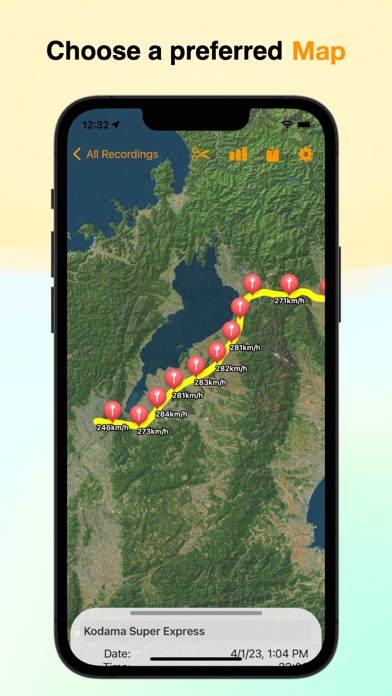


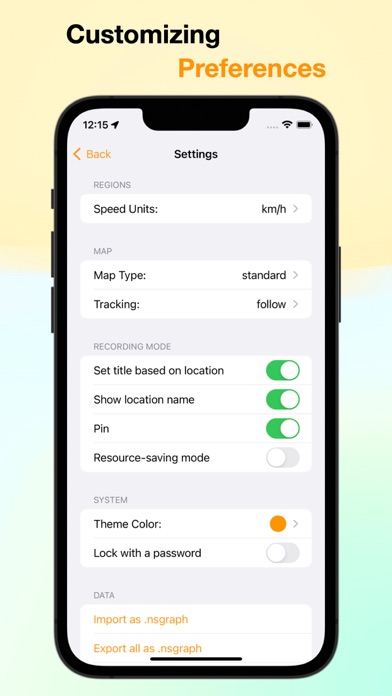
About NSMeter
The description on the store listing
This speedometer and route recording app has been developed to make your outdoor activities such as walking, running, cycling, driving, hiking, and train rides more enjoyable and memorable.
With the speedometer feature, you can easily check your current speed and altitude. Additionally, the route recording feature allows you to display your movement history on a map and record where you've been.
■ Display and visualize measured information on charts for easy viewing.
The graphs can display speed and altitude, helping you understand and analyze the relationship between speed and altitude.
■ Measure altitude as well.
You can also check the altitude in addition to speed. This allows you to …
Read the full description
This speedometer and route recording app has been developed to make your outdoor activities such as walking, running, cycling, driving, hiking, and train rides more enjoyable and memorable. With the speedometer feature, you can easily check your current speed and altitude. Additionally, the route recording feature allows you to display your movement history on a map and record where you've been. ■ Display and visualize measured information on charts for easy viewing. The graphs can display speed and altitude, helping you understand and analyze the relationship between speed and altitude. ■ Measure altitude as well. You can also check the altitude in addition to speed. This allows you to observe altitude changes that you may not notice during your regular movement. ■ Draw lines on the route you traveled to visualize your movement path. You can visually represent the route you traveled. This helps you explain the route to others and review it later. ■ Place speed pins at regular intervals. Speed is displayed on the pins, making it easy to see the speed at different locations on the map. ■ Analysis screen. After measurement, you can view the minimum, maximum, and average speed and altitude recorded during that period. You can also see the total distance traveled. ■ Support for multiple units. Units supported include mph, m/s, kn, km/h, and fps. ■ Battery-saving mode. There is a battery-saving mode to minimize battery consumption during recording. It provides a comfortable recording environment even on older devices, with reduced resource usage. ■ Data import and export functionality. You can freely import and export data, allowing you to share data with others or share your recording information with others. ■ Export in GPX format. It supports exporting data in GPX format, enabling you to utilize the recorded data in other applications. ■ Trimming feature. There is a trimming feature that allows you to cut out the necessary parts from long recordings. ■ iCloud sync and backup support. Data is stored using iCloud, enabling data synchronization across devices. You can access the data from other devices, eliminating the risk of data loss. ■ Password protection with Face ID and Passcode. There is a feature to lock the app with Face ID and Passcode, ensuring the security of your data.
Installs
Apple does not publish download counts. Estimates are in testing.
We publish iOS estimates only after they pass a back-test against real numbers. Chart history below is measured.
Estimated store revenue Estimated Beta
App Store, worldwide, monthly rate from the last 14 chart days to 21 Nov 2026
Below the top 100 grossing apps in the markets we calibrate. In the United States that usually means under about $6.4M a month. App Store purchases and subscriptions only, before Apple's 15 to 30% fee. Ads and web payments are not included.
Ratings
4 ratings, 4 reviews
No rating breakdown published for this app.
Recent reviews
Latest public reviews from the store
No reviews in our sample for this app yet.
Top chart positions
Latest App Store chart ranks by country, last 10 days
Not in any tracked top chart in the last 10 days.
NSMeter history
Release, install milestones, listing and store changes
- First released on the store 11 May 2023
Update frequency
How often NSMeter ships a new version, month by month
1 updates in the last 12 months. About as often as similar apps, which shipped a median of 1 updates in the same year.
Recent versions
Current version 2.0.1
- Version 2.0.120 Jan 2026
Bug fixes and performance improvements.
Listing keywords
Words and phrases NSMeter repeats most in its store listing
Top phrases: speed and altitude (4), battery saving mode (2), id and passcode (2), import and export (2), route you traveled (2).
Highlighted words also appear in the title. Counts cover the title, short description and description.
Compliance
What the listing and the app package show
- Store status
- Live
- Upkeep
- Updated 20 Jan 2026
- Age rating
- 4+
Apps like NSMeter
 Library of AviationNazmi Yavuz★ 4.82
 MyNOVECNorthern Virginia Electric Cooperative★ 2.28
 打工人小组件光翔 卓★ 4.96
 TruckbaysTruckbays LLC★ 4.3
 Tornado PRO PlayerMohammed Altam★ 4.44
 VDX - Video ManagerARISEPEAK LP★ 1.74
 TV CastingZeasn Info Technology Co., Ltd.★ 1.86
 MySontiqSontiq, Inc.★ 2.4
 Laboratory TimerShazino★ 4.66
NSMeter: questions and answers
Who makes NSMeter?
NSMeter is published by Daichi Kato.
When was NSMeter last updated?
The latest version (2.0.1) was released on 20 Jan 2026.
Is NSMeter free?
Yes. NSMeter is free to download.
Is NSMeter still available?
Yes. NSMeter is live on App Store as of 1 Jul 2026.
Track NSMeter and its competitors
Watch any app for new versions, rating drops, chart moves and removals. Free plan, no card.