
- Installs
- —
- Apple does not publish download counts
- Rating
- —
- Ratings
- —
- Version
- 1.0.8
- Updated 28 Oct 2026
- Released
- 19 Sep 2026
- Tracked since 10 Nov 2026
- Size
- 22 MB
- Needs 18.0
Screenshots

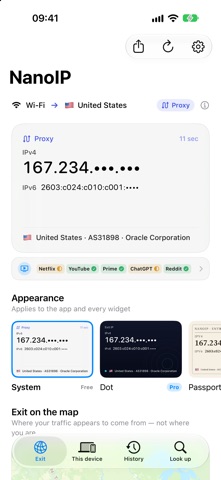


About NanoIP
The description on the store listing
NanoIP shows the public IP address your iPhone is actually using — IPv4 and IPv6 together — and says plainly how your traffic is reaching the internet.
EVERY APPLE DEVICE
NanoIP runs on iPhone, iPad, Mac and Apple TV, with a free Apple Watch app. The appearances are one purchase that unlocks on all of them, and your exit history follows you through your own iCloud.
ON THE MAP
See where your exit surfaces. A soft disc over the country when that is all the on-device database knows; a point when you switch city lookup on. Both address families, and a line between them when they surface in different places. Positions come from the address, never from Location Services.
HISTORY
Every change …
Read the full description
NanoIP shows the public IP address your iPhone is actually using — IPv4 and IPv6 together — and says plainly how your traffic is reaching the internet. EVERY APPLE DEVICE NanoIP runs on iPhone, iPad, Mac and Apple TV, with a free Apple Watch app. The appearances are one purchase that unlocks on all of them, and your exit history follows you through your own iCloud. ON THE MAP See where your exit surfaces. A soft disc over the country when that is all the on-device database knows; a point when you switch city lookup on. Both address families, and a line between them when they surface in different places. Positions come from the address, never from Location Services. HISTORY Every change of exit is kept — a new network, a VPN coming up or going down — as a timeline, a map of every place your exits have been, and a “Passport”: countries, networks, time spent on VPN. Stored on your iPhone and, if you like, in your own iCloud private database, which nobody else can read. Delete a row or clear it all at any time. THIS DEVICE Your side of the connection, drawn as a path: device — interface — tunnel, if there is one — gateway — DNS — exit. Then every interface that has an address, with each address labelled global, private or link-local, and the path's own flags: IPv4, IPv6, expensive, Low Data Mode. No permission asked; nothing here leaves the device. LOOK UP ANY ADDRESS Type an IP address or a domain: country, network, reverse DNS, whether it answers on port 443, and its place on the map — against the same offline databases. SHARE IT One tap turns the exit into a card made for a chat: the address large, the country and network, a map of where it surfaces, the time, and the app’s name. Privacy mode masks the address and drops the map before anything leaves. TOLD WHEN IT CHANGES Turn on alerts and NanoIP notifies you when it notices a different exit — best effort, whenever iOS lets it check. APPLE WATCH Your exit on the wrist: the address, where it surfaces and the latest changes, sent from your iPhone. Four complications and a Control Center control. Free, like every widget. WIDGETS, EVERY SIZE, FREE Small, medium and large on the Home Screen. Circular, rectangular and inline on the Lock Screen. StandBy on the nightstand. A one-tap control in Control Centre. Every size is free, and stays free. RESOLVED ON THE DEVICE Country and network are looked up in a database that ships inside the app. Your address is not sent anywhere to be identified. No account, no ads, no tracking, no subscription. IPv4 AND IPv6, SIDE BY SIDE Most tools show one of them. NanoIP shows both — and when one is missing it says which is true: that this network does not carry it, or that nothing answered. Those are different facts and they deserve different words. KNOW YOUR EXIT NanoIP reads the local network path to tell whether this device is going out through a VPN or a proxy, and labels an exit that belongs to a hosting network. It describes what it sees. It never tells you that you are “safe” or “at risk”. PRIVACY MODE Mask the second half of every address — everywhere, or only where a screen can be read over your shoulder. Copying still gives you the whole address. SIX APPEARANCES System is free. Dot, Passport, Boarding Pass, Terminal and Aurora are one optional purchase. Each is a different layout and typeface, not just a different colour, so they stay recognisable even where the system flattens colour away. You can try them for 24 hours before deciding. One purchase unlocks them on iPhone, iPad, Mac and Apple TV; Apple Watch has its own design. CITY LOOKUP, IF YOU WANT IT Off unless you turn it on. When on, NanoIP asks its own server for the city, time zone and network type behind your address. It is the only request that ever carries your address off the device, and it is yours to switch on. One purchase, no subscription. Questions or ideas are welcome — the address is in Settings.
Installs
Apple does not publish download counts. Estimates are in testing.
We publish iOS estimates only after they pass a back-test against real numbers. Chart history below is measured.
Estimated store revenue Estimated Beta
App Store, worldwide, monthly rate from the last 13 chart days to 20 Nov 2026
Below the top 100 grossing apps in the markets we calibrate. In the United States that usually means under about $6.4M a month. App Store purchases and subscriptions only, before Apple's 15 to 30% fee. Ads and web payments are not included.
Ratings
No rating breakdown published for this app.
Recent reviews
Latest public reviews from the store
No reviews in our sample for this app yet.
Top chart positions
Latest App Store chart ranks by country, last 10 days
- Countries ranked
- 2 of 50
- Best rank
- #36
- Top 10 placements
- 0
- of 56 chart placements
- Average rank
- #42
Best countries on App Store
- 🇪🇸 Spain · Chart, Productivity#36
- 🇨🇱 Chile · Chart, Food & Drink#48
| Country | Chart | Category | Rank | Best (10 days) | Date |
|---|---|---|---|---|---|
| 🇪🇸 Spain | newpaidapplications | Productivity | #36 | #36 | 20 Nov 2026 |
| 🇪🇸 Spain | newpaidapplications | Reference | #36 | #36 | 20 Nov 2026 |
| 🇪🇸 Spain | newpaidapplications | Sports | #36 | #36 | 20 Nov 2026 |
| 🇪🇸 Spain | newpaidapplications | Weather | #36 | #36 | 20 Nov 2026 |
| 🇪🇸 Spain | newpaidapplications | Developer Tools | #36 | #36 | 20 Nov 2026 |
| 🇪🇸 Spain | newpaidapplications | Utilities | #36 | #36 | 20 Nov 2026 |
| 🇪🇸 Spain | newpaidapplications | Stickers | #36 | #36 | 20 Nov 2026 |
| 🇪🇸 Spain | newpaidapplications | Navigation | #36 | #36 | 20 Nov 2026 |
| 🇪🇸 Spain | newpaidapplications | Education | #36 | #36 | 20 Nov 2026 |
| 🇪🇸 Spain | newpaidapplications | News | #36 | #36 | 20 Nov 2026 |
NanoIP history
Release, install milestones, listing and store changes
- First released on the store 19 Sep 2026
Update frequency
How often NanoIP ships a new version, month by month
1 updates in the last 12 months. More often than most similar apps: they shipped a median of 0 updates in the same year.
Recent versions
Current version 1.0.8
- Version 1.0.828 Oct 2026
New • Optimized for iPhone Duo: on the inner display, Exit, This device, History and Look up show two columns, one on each side of the fold. Improved • Service availability on the Exit page now shows every service and its result at a glance. • The status line and the connection chain in This device now show the network you are actually using, such as Wi-Fi or Cellular. • Now available in Korean. • Fixed several display issues.
Listing keywords
Words and phrases NanoIP repeats most in its store listing
Top phrases: apple watch (3), country and network (2), iphone ipad mac (2), ipv4 and ipv6 (2), mac and apple (2).
Highlighted words also appear in the title. Counts cover the title, short description and description.
Compliance
What the listing and the app package show
- Store status
- Live
- Upkeep
- Updated 28 Oct 2026
- Age rating
- 4+
Apps like NanoIP
 iProxy - Sys admin toolsN-Lab★ 4.06
 WA Virtual Number - WANoMarkakod Reklam Tasarim ve Yazilim Hizmetleri Ticaret Limited★ 4.44
 C/C++ LLVM Clang小文 黄★ 4.32
 StoreView: App Screenshot ToolElshan Aliyev★ 4.53
 Yomo: Docker & Portainer春晖 杜★ 4.79
 Termux -TERMUX LIMITED LIABILITY COMPANY★ 4.4
 Debug Anywhere浩鑫 庄★ 4.62
 Easy SSHArgsment Limited★ 4.55
 SSL CheckerOrave Technologies★ 4.61
NanoIP: questions and answers
Who makes NanoIP?
NanoIP is published by 恒俭 董.
When was NanoIP last updated?
The latest version (1.0.8) was released on 28 Oct 2026.
Is NanoIP free?
Yes. NanoIP is free to download.
Is NanoIP still available?
Yes. NanoIP is live on App Store as of 10 Nov 2026.
Track NanoIP and its competitors
Watch any app for new versions, rating drops, chart moves and removals. Free plan, no card.