
- Installs
- —
- Apple does not publish download counts
- Rating
- 4.58
- Ratings
- 3.4K
- 3.4K reviews
- Version
- 16.7
- Updated 16 Dec 2024
- Released
- 12 Jun 2013
- Tracked since 10 May 2026
- Size
- 152 MB
- Needs 13.0
Screenshots

About Network Toolbox Net security
The description on the store listing
*** THE ORIGINAL - NetworkToolbox ***
Read the Manual at: https://www.networktoolbox.de/ios-manual/
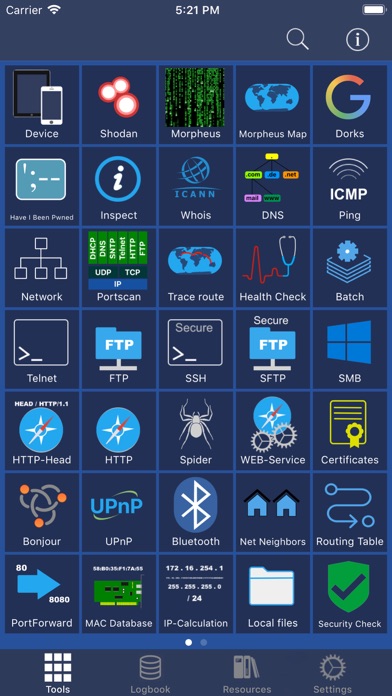
This App with its 50+ individual Tools helps to analyse local or public networks for security issues or wrong configurations.
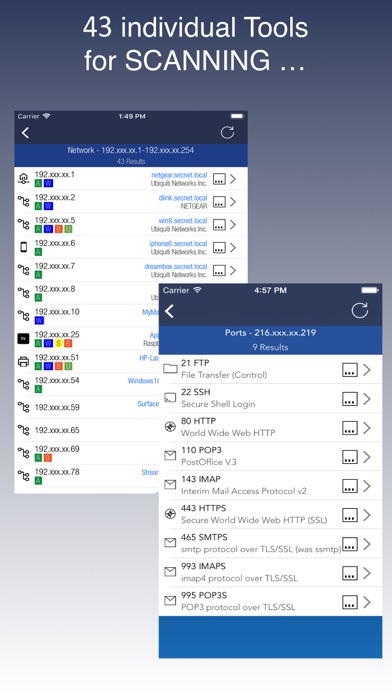
It provides various scanning options such as WiFi Network IP scanning, Port scanning and integrates the SHODAN scan engine, Security exploit tests and more.
Feature summary:
DEVICE INFORMATION
■ Device and public IP Address
■ Network interfaces (WiFi, 3G/4G)
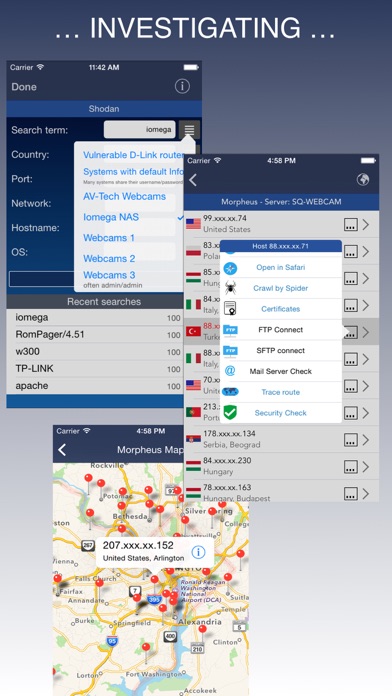
SHODAN AND MORPHEUS SEARCH
■ Expose online devices
■ Search by keyword, country, port, network, hostname
MAP SEARCH
■ Search and expose online devices for on a given location
NS-LOOKUP with DOMAIN INFORMATION …
Read the full description
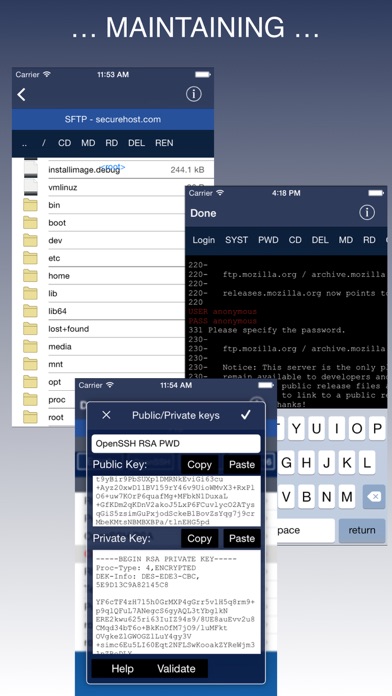
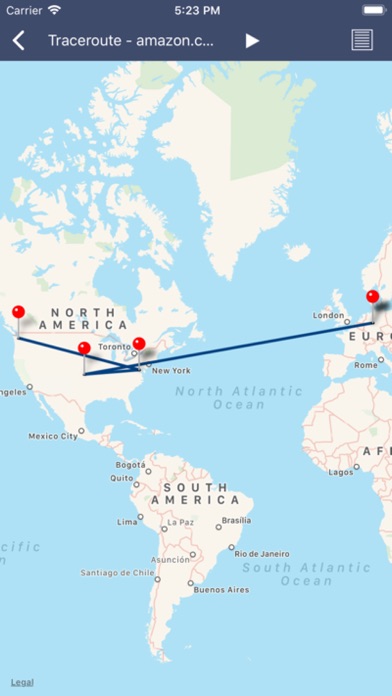
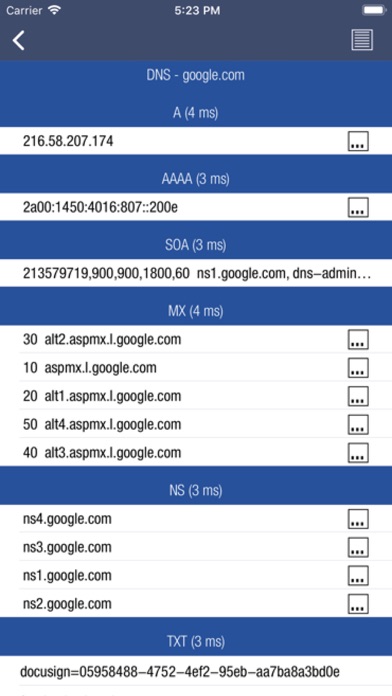
*** THE ORIGINAL - NetworkToolbox *** Read the Manual at: https://www.networktoolbox.de/ios-manual/ This App with its 50+ individual Tools helps to analyse local or public networks for security issues or wrong configurations. It provides various scanning options such as WiFi Network IP scanning, Port scanning and integrates the SHODAN scan engine, Security exploit tests and more. Feature summary: DEVICE INFORMATION ■ Device and public IP Address ■ Network interfaces (WiFi, 3G/4G) SHODAN AND MORPHEUS SEARCH ■ Expose online devices ■ Search by keyword, country, port, network, hostname MAP SEARCH ■ Search and expose online devices for on a given location NS-LOOKUP with DOMAIN INFORMATION ■ Provides information for a certain domain or ip ■ Provide information about the number of attacks (ISC) ■ Location of IP or Host display on a map ■ DNS records such as MX, A, TXT etc. WIFI NETWORK SCAN ■ Discover all devices on your network ■ Including IP, MAC, Vendor, Network Name PING ■ Ping IP or domain ■ Show Errors and RTT ■ Display results graphically WHOIS ■ Find out who is behind a certain domain DNS ■ Query ANY! DNS Server ■ See DNS record information such as A,TXT,CNAME,MX,SOA etc. ■ See and compare DNS Server response times VISUAL TRACEROUTE ■ Analyze how packets get to their destination SOCKETS ■ Socket analysis and terminal tool ■ Predefined protocols for Telnet, FTP, HTTP, POP3 and IMAP ■ Inspect server responses ■ Send arbitrarily data to the server FTP and SFTP CLIENT ■ Browse remote directory tree ■ Direct file viewing ■ File and directory operations ■ Upload and download of multiple files to device ■ Default password list check of FTP server ■ Public / Private Key support (New!) SSH CLIENT ■ Terminal client for SSL ■ Default password list check of server SFTP CLIENT ■ Same functionality as FTP MAC ADDRESS DB ■ Find out which vendor is responsible for which MAC address and v/v IP CALCULATION ■ Calculate net-masks, first-,last- addresses etc. HTTP BROWSER ■ Site Default password check ■ Possibility to select user agents from Blackberry over Firefox, IE, Safari and iOS ■ Display source code, plain text or hirachically browse XML SPIDER ■ Crawl website and collect all contained links ■ Analyze robots.txt ■ Both, websites and disallows robots content can be further analyzed BLUETOOTH ■ Scan and reveal Bluetooth LE devices CERTIFICATES ■ Inspect Server (e.g. HTTPS) certificates in a readable format BONJOUR and UPnP ■ Scan and discover Bonjour or UPnP services MAIL SERVER CHECK ■ Analyze issues with your mail settings LOCAL FILES ■ Handle files downloaded via FTP or SFTP or HTTP (New!) ■ File and directory operations ■ File viewer (PDF, Text, Image, HTML) ■ Open files in other apps, installed on your device ■ Send file via E-Mail HELP TEXTS ■ Each tool has a detailed description of their purpose and how to use Subscribe to access to premium app features; subscription details are the following: • Length: weekly, monthly, yearly • Your payment will be charged to your iTunes Account as soon as you confirm your purchase • You can manage your subscriptions and turn off auto-renewal from your Account Settings after the purchase • Your subscription will renew automatically, unless you turn off auto-renew at least 24 hours before the end of the current period • The cost of renewal will be charged to your account in the 24 hours prior to the end of the current period • When cancelling a subscription, your subscription will stay active until the end of the period. Auto-renewal will be disabled, but the current subscription will not be refunded • Any unused portion of a free trial period, if offered, will be forfeited when purchasing a subscription Terms of Use: https://www.apple.com/legal/internet-services/itunes/dev/stdeula/
Installs, last 30 days
Apple does not publish download counts. Estimates are in testing.
Estimated store revenue Estimated Beta
App Store, worldwide, monthly rate from the last 12 chart days to 19 Nov 2026
Below the top 100 grossing apps in the markets we calibrate. In the United States that usually means under about $6.4M a month. App Store purchases and subscriptions only, before Apple's 15 to 30% fee. Ads and web payments are not included.
Ratings
3,418 ratings, 3,418 reviews
- 5 ★81%
- 4 ★8.1%
- 3 ★3.6%
- 2 ★1.1%
- 1 ★5.7%
Recent reviews
Latest public reviews from the store
- 2 Jun 2024
Noob friendly
Just downloaded the app and started the free, 7-day trial. As a noob, this app has just about all the cyber security tools needed to scan for, locate, and identify problems within the networks and devices to help pin-point maladaptive processes, broken-connections, and illegal hacking. Just being able to play around with the tools available and looking into their results is a real-time learning exercise, even for noobs like me. (And boy oh, boy...do I really detest narcisstic little b*s who think they can invade/hack someone else's networks and devices, stealing personal information and copyrighted/intellectual properties from hardworking/innovative/morally-sound people regardless if it's the police/government/or your local thugs/theives/b*s - Weak kneed, Sissies!)
- 20 Apr 2024
“An Essential Network Companion!”
2013 Winner in PC Magazine 📱 Review: I can’t help but sing praises for Net Toolbox! As an IT enthusiast, I’ve explored countless network apps, but this one stands head and shoulders above the rest. Here’s why: Robust Toolset: Net Toolbox isn’t just a toolbox; it’s a treasure chest of networking gems. From ping and traceroute to DNS lookup and port scanning, it covers all the essentials. No more juggling multiple apps—this one has it all. User-Friendly Design: The sleek interface seamlessly integrates with my iOS device. It’s like having a Swiss Army knife for networks right in my pocket. Kudos to the developers for nailing the aesthetics! Developer Love: Speaking of developers, they deserve a standing ovation. Their commitment to excellence shines through every feature. They’ve created an app that’s both powerful and intuitive—a rare combination. Troll-Proof: Now, let’s address the trolls. If anyone complains about Net Toolbox, they’re either misinformed or expecting magic. This app isn’t Hogwarts; it’s a practical, real-world solution. And if you crave more features, explore other avenues—don’t blame the app! Five Stars? Not Enough!: I wholehear
- 14 Nov 2023
Appreciation for Prompt Resolution of Pricing Issue
Dear Network Toolbox Net Team, I want to express my sincere gratitude for the prompt and effective resolution of the recent pricing issue with your app. After my previous correspondence expressing concern about the shift to a subscription model, it was both surprising and highly commendable to see how quickly you addressed and rectified the situation. Your swift response in resolving this issue not only demonstrates your commitment to customer satisfaction but also restores my faith in your company’s values and ethics. It's refreshing to see a company take customer feedback seriously and act on it in such a timely manner. This positive outcome has reinforced my loyalty to Network Toolbox Net. I am pleased to continue using an app that not only serves my professional needs effectively but is also backed by a team that genuinely cares about its user base. Thank you once again for your understanding and quick action. It's a relief to know that there are still companies that prioritize their customers and are willing to make necessary changes based on their feedback. Best regards,
- 19 Oct 2023
👍🏼😎
Net Tools is an exceptional application that has truly revolutionized the way we interact with the internet. It offers a wide range of features and functionalities that make it an indispensable tool for both professionals and casual users alike. One of the standout features of Net Tools is its comprehensive network analysis capabilities. It provides detailed information about network connections, IP addresses, and even allows users to perform advanced network diagnostics. This has proven to be invaluable for troubleshooting network issues and optimizing performance. Furthermore, Net Tools offers a robust set of security features that ensure a safe and secure online experience. With its built-in firewall and anti-malware protection, users can browse the internet with peace of mind, knowing that their personal information is safeguarded. Another aspect that sets Net Tools apart from other similar apps is its user-friendly interface. The developers have done an excellent job of creating an intuitive and visually appealing design, making it easy for users of all technical backgrounds to navigate and utilize the app's functionalities effectively. Moreover, Net Tools constantly updates
What reviewers bring up
Topics mentioned in the latest 8 reviews, by how many reviews mention them
Liked in good reviews (8 reviews)
- network 6
- tools 5
- developers 4
- devices 4
- toolbox 4
- other 4
- address 3
- both 3
Raised in bad reviews (0 reviews)
No topic comes up twice.
Top chart positions
Latest App Store chart ranks by country, last 10 days
Not in any tracked top chart in the last 10 days.
Network Toolbox Net security history
Release, install milestones, listing and store changes
- First released on the store 12 Jun 2013
Update frequency
How often Network Toolbox Net security ships a new version, month by month
0 updates in the last 12 months. Less often than most similar apps: they shipped a median of 3 updates in the same year.
Recent versions
Current version 16.7
- Version 16.716 Dec 2024
Stability improvements and bug fixes
Listing keywords
Words and phrases Network Toolbox Net security repeats most in its store listing
Top phrases: default password (3), default password list (2), expose online devices (2), file and directory (2), password list check (2).
Highlighted words also appear in the title. Counts cover the title, short description and description.
Compliance
What the listing and the app package show
- Store status
- Live
- Upkeep
- Updated 16 Dec 2024
- Age rating
- 17+
Apps like Network Toolbox Net security
 ShineDay: Habit Tracker俊航 何★ 4.72
 Volunteer ConnectionDigital Cheetah Solutions, Inc.★ 4.66
 ESET HOMEESET, spol. s r.o.★ 4.74
 Reminder & Countdown ProSergey Astakhov★ 4.79
 To Do List - Reminders & TasksMonelyze Inc.★ 4.69
 My Measures + AR MeasureTOP APP d.o.o.★ 4.35
 Epson iProjectionSeiko Epson Corporation★ 4.33
 Goal Tracker & Daily PlannerSuccess Wizard, Inc.★ 4.72
 Notes Writer Pro 2026Kairoos Solutions SL★ 4.6
Network Toolbox Net security: questions and answers
Who makes Network Toolbox Net security?
Network Toolbox Net security is published by WHATSTICKER APPS SRL.
When was Network Toolbox Net security last updated?
The latest version (16.7) was released on 16 Dec 2024.
Is Network Toolbox Net security free?
No. Network Toolbox Net security is a paid app.
Is Network Toolbox Net security still available?
Yes. Network Toolbox Net security is live on App Store as of 19 Nov 2026.
Track Network Toolbox Net security and its competitors
Watch any app for new versions, rating drops, chart moves and removals. Free plan, no card.