- Installs
- —
- Apple does not publish download counts
- Rating
- —
- Ratings
- —
- Version
- 1.1.8
- Updated 23 May 2023
- Released
- 3 May 2011
- Tracked since 11 May 2026
- Size
- 4 MB
- Needs 10.13
Also on Google Play: NoSleep
Screenshots


About NoSleep
The description on the store listing
NoSleep is an application that you use to prevent your Mac from going to sleep.
In 'no sleep' mode there is an option to also disable the screen saver.
Note:
1) The purpose of NoSleep is to keep the Mac awake so you can read the screen while not otherwise actively using the Mac.
2) It is not a menubar app. It is a regular app that appears in the Dock.
3) Will not prevent a laptop from going to sleep if the cover is closed to prevent overheating issues.
Visit our website for other information and a demo.
This app was conceived for musicians who use their Macs to read music as they play their instrument and consequently do not want their Mac to go to sleep.
What can NoSleep do for …
Read the full description
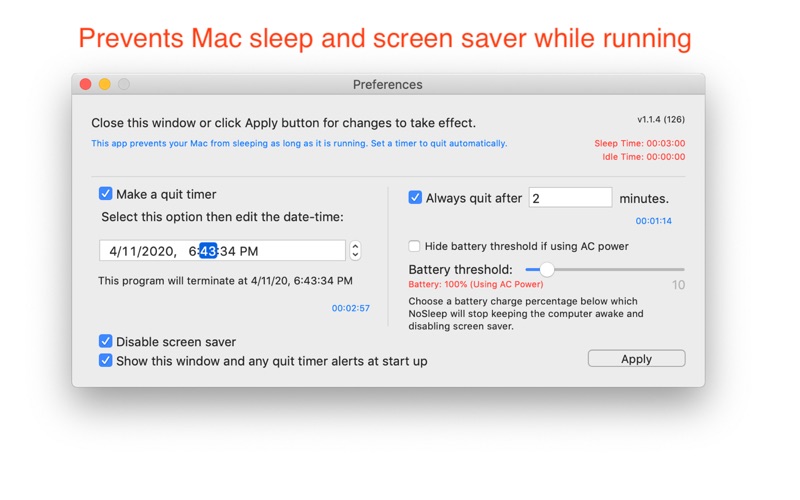
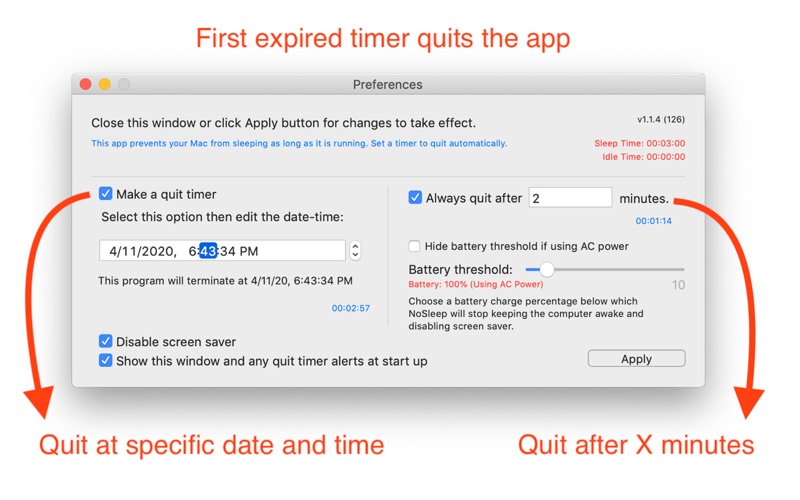
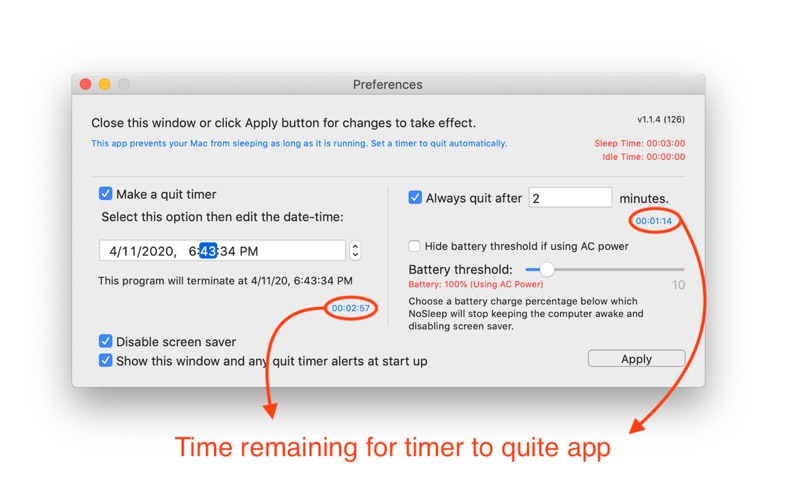
NoSleep is an application that you use to prevent your Mac from going to sleep. In 'no sleep' mode there is an option to also disable the screen saver. Note: 1) The purpose of NoSleep is to keep the Mac awake so you can read the screen while not otherwise actively using the Mac. 2) It is not a menubar app. It is a regular app that appears in the Dock. 3) Will not prevent a laptop from going to sleep if the cover is closed to prevent overheating issues. Visit our website for other information and a demo. This app was conceived for musicians who use their Macs to read music as they play their instrument and consequently do not want their Mac to go to sleep. What can NoSleep do for me? It keeps your Mac awake for a given period of time. NoSleep updates system activity periodically as soon as it launches, until it is quit, or, for laptops, the battery charge level drops below a specified amount (which defaults to 10%) As soon as you launch NoSleep it prevents your Mac from sleeping until quit, or the battery charge level drops below a specified amount . You can schedule the time it quits so that you can leave it unattended. Do this in Preferences. Preferences Window: Use the Preference pane to specify quit time. Also use the text field on the preferences window for creating a timer to quit the app at a time you can specify as a (fractional) number of minutes. The timer is created as soon as editing stops in the text field, say by tabbing out of it, and each edit resets the timer. If the value of the text field is zero no such timer is created, and any previous such timer will be removed. Finally, in preferences you can specify a battery threshold so that NoSleep stops keeping the Mac awake at a certain level. This helps prevent the Mac from running out of energy when unplugged.
Installs
Apple does not publish download counts. Estimates are in testing.
We publish iOS estimates only after they pass a back-test against real numbers. Chart history below is measured.
Estimated store revenue Estimated Beta
App Store, worldwide, monthly rate from the last 13 chart days to 20 Nov 2026
Below the top 100 grossing apps in the markets we calibrate. In the United States that usually means under about $6.4M a month. App Store purchases and subscriptions only, before Apple's 15 to 30% fee. Ads and web payments are not included.
Ratings
No rating breakdown published for this app.
Recent reviews
Latest public reviews from the store
No reviews in our sample for this app yet.
Top chart positions
Latest App Store chart ranks by country, last 10 days
Not in any tracked top chart in the last 10 days.
NoSleep history
Release, install milestones, listing and store changes
- First released on the store 3 May 2011
Update frequency
How often NoSleep ships a new version, month by month
0 updates in the last 12 months. Less often than most similar apps: they shipped a median of 1 updates in the same year.
Recent versions
Current version 1.1.8
- Version 1.1.823 May 2023
Maintenance update.
Listing keywords
Words and phrases NoSleep repeats most in its store listing
Top phrases: mac awake (3), text field (3), battery charge level (2), below specified amount (2), charge level drops (2).
Highlighted words also appear in the title. Counts cover the title, short description and description.
Compliance
What the listing and the app package show
- Store status
- Live
- Upkeep
- No update since 23 May 2023
- Age rating
- 4+
Apps like NoSleep
 Pyware 3D ViewerPygraphics, Inc.★ 2.86
 WNGC Your Georgia CountryCox Media Group★ 4.54
 Rhythm Necklace - Geometric SequencerSam Tarakajian★ 4.64
 DigiStix 2 AUv3 Plugin4Pockets.com★ 4.54
 JPLAYMarcin Ostapowicz★ 4.3
 MS Vinyl - Music WidgetDinh Dong Nguyen★ 4.26
 Radio TEDDYIR MediaAd GmbH★ 4.56
 Arpeggionome Pro | matrix arpeggiatorAlexandernaut★ 4.56
 Guitar & Ukulele Tuner 2025Aleksandr Kulaga★ 4.44
NoSleep: questions and answers
Who makes NoSleep?
NoSleep is published by Limit Point Software.
When was NoSleep last updated?
The latest version (1.1.8) was released on 23 May 2023.
Is NoSleep free?
Yes. NoSleep is free to download.
Is NoSleep still available?
Yes. NoSleep is live on App Store as of 11 May 2026.
Track NoSleep and its competitors
Watch any app for new versions, rating drops, chart moves and removals. Free plan, no card.