- Installs
- —
- Apple does not publish download counts
- Rating
- 2.92
- Ratings
- 12
- 12 reviews
- Version
- 1.4.3
- Updated 11 Mar 2016
- Released
- 15 Feb 2011
- Tracked since 10 May 2026
- Size
- 4 MB
- Needs 8.0
Screenshots


About Omni TR
The description on the store listing
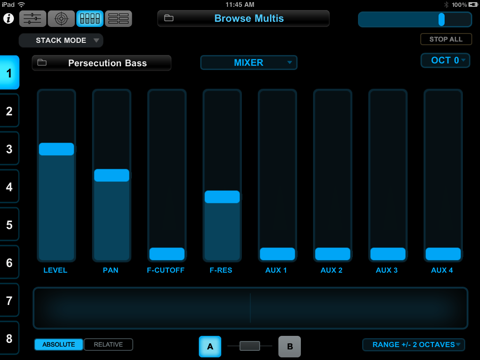
Omni TR (Touch Remote) is designed to turn an iPad into a performance-oriented, remote control surface for Spectrasonics Omnisphere software synthesizer running on a Mac or Windows PC. Omni TR offers wireless two-way communication, multi-touch patch selection, remote browsing and editing of Patches and Multis, and an innovative feature called the Orb.
Omni TR brings Omnisphere’s interactive features closer to the music creation process with the ability to create setups and sound modifications very quickly. The user’s fingers can activate patches, tweak filters, re-mix, bend and spin amazing performance possibilities from the innovative new ‘Orb’ circular controller.
Omni TR is perfect …
Read the full description
Omni TR (Touch Remote) is designed to turn an iPad into a performance-oriented, remote control surface for Spectrasonics Omnisphere software synthesizer running on a Mac or Windows PC. Omni TR offers wireless two-way communication, multi-touch patch selection, remote browsing and editing of Patches and Multis, and an innovative feature called the Orb. Omni TR brings Omnisphere’s interactive features closer to the music creation process with the ability to create setups and sound modifications very quickly. The user’s fingers can activate patches, tweak filters, re-mix, bend and spin amazing performance possibilities from the innovative new ‘Orb’ circular controller. Omni TR is perfect onstage for live performance or even in the studio where the iPad sits at the controller keyboard located away from the studio computer. Best of all, the Omni TR app is extremely easy to use, offering full two-way communication with Omnisphere with just a simple wireless connection to the computer running the plug-in. TROUBLESHOOTING: if you are encountering network errors when connecting, try turning off Bluetooth on your iPad. See General->Bluetooth in the Settings app. Omni TR has 4 pages for different types of real-time control: Main Page The Main page mirrors Omnisphere’s unique Live Mode offering 8 patch slots with latching and trigger modes, individual mute and solo, and mixer faders. Browse and select Multis and Patches directly from the iPad to instantly change sounds for a new song or live set. The Orb Page Omni TR was designed to make the iPad the ideal control surface for Omnisphere’s innovative new ‘Orb’ feature. The ‘Orb’ is both a remarkable sound manipulation tool and an intuitive performance interface — it can be thought of as a ‘circular controller.’ Now with a single gesture, the user can instantly customize the sound in Omnisphere. Best of all, the Orb automatically works with every patch a user has, there’s no setup necessary. As the Orb moves and orbits around the concentric circles, it morphs between automatically generated parameter scenes in Omnisphere’s STEAM engine in a highly intelligent and musical manner, all patch dependent — manipulating the sound in subtle or radical ways appropriate to that particular patch. If the user doesn’t like what the Orb has created, a complete new set of manipulations can be chosen by simply rolling the “Dice” button, which instantly creates a brand new group of intelligent sonic modifications and effects to try. There’s no limit to how many serendipitous sonic variations the Orb can create – opening up the vast power of the STEAM engine to every user, regardless of synthesis knowledge. The tactile experience of moving the cursor around the Orb space on the iPad with a finger to create variations in the sound is remarkably musical. Where standard controllers might change one or two simple parameters in a linear manner, The Orb morphs a host of parameters that are patch specific, and easily changed on-the-fly. Users can also Record their performance movements directly into the Orb and play the performance back in sync with their controller or host. The Orb’s movements and sonic results are saved within the patch, multi or the host’s session for later recall. The movement of the Orb can also be automated in the user’s host. Controls Page The Controls page features a touch-based pitch ribbon performance controller and 8 touch sliders assigned to groups of the most useful performance/editing parameters for each Omnisphere layer. Jumbo View The Jumbo page shows large patch names on all 8 parts, easily seen in a live stage performance situation. REQUIREMENTS: The Omni TR iPad app requires iOS 4.2 and works with Omnisphere 1.5.1 or newer on Mac OSX or Windows systems. Windows users must install Bonjour from Apple.
Installs
Apple does not publish download counts. Estimates are in testing.
We publish iOS estimates only after they pass a back-test against real numbers. Chart history below is measured.
Estimated store revenue Estimated Beta
App Store, worldwide, monthly rate from the last 13 chart days to 20 Nov 2026
Below the top 100 grossing apps in the markets we calibrate. In the United States that usually means under about $6.4M a month. App Store purchases and subscriptions only, before Apple's 15 to 30% fee. Ads and web payments are not included.
Ratings
12 ratings, 12 reviews
No rating breakdown published for this app.
Recent reviews
Latest public reviews from the store
No reviews in our sample for this app yet.
Top chart positions
Latest App Store chart ranks by country, last 10 days
Not in any tracked top chart in the last 10 days.
Omni TR history
Release, install milestones, listing and store changes
- First released on the store 15 Feb 2011
Update frequency
How often Omni TR ships a new version, month by month
0 updates in the last 12 months. Less often than most similar apps: they shipped a median of 1 updates in the same year.
Recent versions
Current version 1.4.3
- Version 1.4.311 Mar 2016
This update from Apple will improve the functionality of this app. No new features are included. Fix issue related to loading parts: Omni TR could crash in some situations. Please do not report problems in reviews. We cannot reply to help you solve the problem when you do that. If you encounter problems, use the "i" button to find troubleshooting help and see the Omnisphere FAQs at support.spectrasonics.net. If you're still having problems, contact Spectrasonics tech support and we'll be happy to help.
Listing keywords
Words and phrases Omni TR repeats most in its store listing
Top phrases: omni tr (9), innovative new orb (2), circular controller (2), control surface (2), controls page (2).
Highlighted words also appear in the title. Counts cover the title, short description and description.
Compliance
What the listing and the app package show
- Store status
- Live
- Upkeep
- No update since 11 Mar 2016
- Age rating
- 4+
Apps like Omni TR
 Pyware 3D ViewerPygraphics, Inc.★ 2.86
 WNGC Your Georgia CountryCox Media Group★ 4.54
 Rhythm Necklace - Geometric SequencerSam Tarakajian★ 4.64
 DigiStix 2 AUv3 Plugin4Pockets.com★ 4.54
 JPLAYMarcin Ostapowicz★ 4.3
 MS Vinyl - Music WidgetDinh Dong Nguyen★ 4.26
 Radio TEDDYIR MediaAd GmbH★ 4.56
 Arpeggionome Pro | matrix arpeggiatorAlexandernaut★ 4.56
 Guitar & Ukulele Tuner 2025Aleksandr Kulaga★ 4.44
Omni TR: questions and answers
Who makes Omni TR?
Omni TR is published by Spectrasonics.
When was Omni TR last updated?
The latest version (1.4.3) was released on 11 Mar 2016.
Is Omni TR free?
Yes. Omni TR is free to download.
Is Omni TR still available?
Yes. Omni TR is live on App Store as of 1 Jul 2026.
Track Omni TR and its competitors
Watch any app for new versions, rating drops, chart moves and removals. Free plan, no card.