
- Installs
- —
- Apple does not publish download counts
- Rating
- 3.59
- Ratings
- 216
- 216 reviews
- Version
- 3.7.1
- Updated 18 Feb 2026
- Released
- 18 Sep 2014
- Tracked since 10 May 2026
- Size
- 177 MB
- Needs 13.0
Also on Google Play: OneStep Reader (829 ratings)
Screenshots





About OneStep Reader
The description on the store listing
OneStep Reader gives you instant access to print anytime and anywhere.
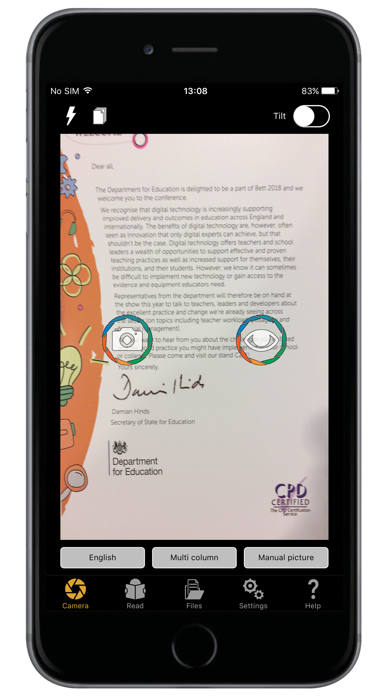
OneStep Reader 3.0 is a rapid and efficient text recognition app. Its text-to-speech, text-to-Braille, and text highlighting tools make it valuable for blind, low-vision, dyslexic, and others with reading differences.
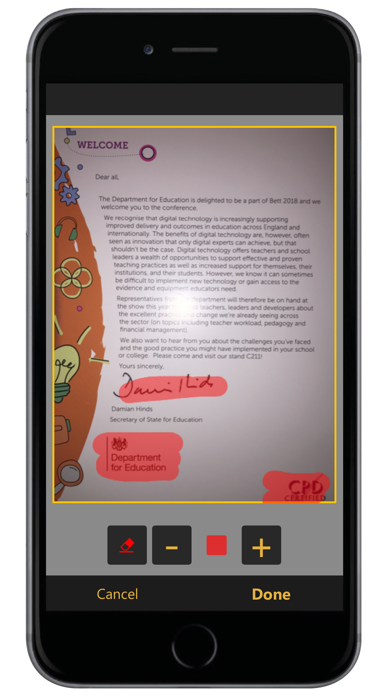
Use it to import or take a photo of anything containing text. Take a photo and the app reads text out loud or displays it on a connected refreshable Braille display. Read with more ease thanks to the simultaneous highlighting of the sentence and word that is being read on the picture or in the plain text document. The app helps you get a good photo with special alignment tools, including spoken and …
Read the full description
OneStep Reader gives you instant access to print anytime and anywhere. OneStep Reader 3.0 is a rapid and efficient text recognition app. Its text-to-speech, text-to-Braille, and text highlighting tools make it valuable for blind, low-vision, dyslexic, and others with reading differences. Use it to import or take a photo of anything containing text. Take a photo and the app reads text out loud or displays it on a connected refreshable Braille display. Read with more ease thanks to the simultaneous highlighting of the sentence and word that is being read on the picture or in the plain text document. The app helps you get a good photo with special alignment tools, including spoken and vibration guidance. Snap multiple pages, such as a book, for later reading. Winner of the 2014, 2015, and 2016 AppleVis Golden Apple Award for Best Assistive Technology App. • Reads image-based PDF and JPEG files, and now tagged PDF and ePub files too! • Exports OneStep reader files as HTML or TXT files. • Navigates by line, sentence, word, or character. • Crop, rotate and edit the pictures you take before performing text recognition. • View documents in PDF presentation mode with double highlighting while reading. • View reading order and language-tagged PDF documents. • Add and remove bookmarks in PDF documents. • Switch between PDF view and reflowable text view. • Read documents in the increasingly popular ePub format. The app also has synchronized text highlighting to help you read along with the spoken text, a benefit for people with dyslexia and other reading difficulties. Need nutritional information from your breakfast cereal? OneStep reader can read labels. Out shopping and need a price? OneStep Reader can read price tags. Want to know what came in the mail? OneStep Reader captures it all. OneStep Reader captures print from your computer or tablet screen. Photograph the screen and know exactly what that error message says. Little details abound. We got rid of the fifty-page limit for batch recognition. Everything gets turned on its side with landscape support. Add subfolders to the local folder structure. Use Microsoft OneDrive, Dropbox, or Google Drive to store and retrieve your documents. You can now make calls, send emails, and open hyperlinks directly from documents; call or email your new contact directly from the text of her business card! Fully localized versions (user interface, recognition and speech) are available in: English, German, Italian, French, Spanish, Norwegian (Bokmål), Swedish, Portuguese, Dutch, Turkish, Danish, Polish, Russian, Japanese, and Czech. Other languages available for speech and recognition only: Afrikaans, Albanian, Bulgarian, Chinese (Simplified), Chinese (Traditional), Croatian, Estonian, Finnish, Greek, Hungarian, Icelandic, Indonesian, Romanian, Serbian (Cyrillic), Serbian (Latin), Slovak, Ukrainian. Supported devices: iPhone X, iPhone 8 Plus, iPhone 8, iPhone 7, iPhone 7 Plus, iPhone SE, iPhone 6s, iPhone 6s Plus, iPhone 6, iPhone 6 Plus, iPhone 5s, iPhone 5c, iPadPro, iPad Pro 12.9-inch, iPad Pro 9.7-inch, iPad Air 2, iPad Air, iPod touch 6th Generation, iPod 5th Generation. Visit our website at: www.OneStepreader.com
Installs since 29 Aug 2026
Apple does not publish download counts. Estimates are in testing.
Estimated store revenue Estimated Beta
App Store, worldwide, monthly rate from the last 13 chart days to 20 Nov 2026
Below the top 100 grossing apps in the markets we calibrate. In the United States that usually means under about $6.4M a month. App Store purchases and subscriptions only, before Apple's 15 to 30% fee. Ads and web payments are not included.
Ratings
216 ratings, 216 reviews
- 5 ★42%
- 4 ★13%
- 3 ★22%
- 2 ★8.3%
- 1 ★15%
Recent reviews
Latest public reviews from the store
- 7 Mar 2019
A podcast or tutorial
I Purchased this app when it was half-price because I figured it doesn’t go at half price very often. that was like, a year or two ago, and I’ve still yet to understand how to use this app? back then I used zoom and magnification mostly, now I use voiceover, so using this app is going to be even more challenging for me now that I’m using voice over. I wish there was a podcast on demonstrating or how to use this app. I think people would agree to pay the high cost if they could see or hear a demonstration of its use. That would even help me since I have purchased the app and still don’t know how to use it. that would drive up your sales, and help me at the same time. for example, instructions on how to use it, what you can use it to do, etc.
- 10 Jan 2019
Was great until version 3.0
I’d had this app for more than three years, and have really liked it overall, even though I am a bit of a klutz. However, with Version 3.0, it has become much more difficult to use, at least for this user. For one thing, the new user manual isn’t very helpful; it tells us what the app can do, but doesn’t really tell us _how to do things. With this significant an update, giving us the how-to is extremely important. For instance, importing text from other sources used to be very straightforward—and it worked well. Now, when I try to import something, I first have to find where the material _went. At first, in this version, it went into a folder called “Inbox” (not even mentioned in the user manual). With the latest update, however, “Inbox” is gone, and I have to search for it among the saved files, even though it technically hasn’t been saved yet. Then, I have to go through all kinds of hoops to save the document in a form that will recognize the text. Sometimes, the field of view report doesn’t work now. The whole thing is just harder to use, especially if I am saving documents. If the user manual were written from the viewpoint of a _new user, it woul
- 14 Apr 2018
I expect a lot more for the money I spent
The fact that such an app exists at all to help those of us who can’t see well enough to read print is worthy of three stars, so I am grateful we have this tool. That said, this behaves more like a free app than one I spent $100 on. First of all, where are the updates??? We are coughing up the money, so you should be providing frequent updates. My biggest issue with the app is trying to line up the shot when scanning a document. The phone vibrates wildly, which I gather is supposed to indicate whether or not it is being held at a level angle over the page, but I find this almost impossible to get just right and more annoying than helpful. Can’t alignment of the page be done electronically during image processing? Secondly, I wish it behaved like banking apps when you are taking a picture of a check for an electronic deposit. You simply hold the phone over the document and move it around a bit until it is lined up. Once it is aligned, the app automatically takes the picture for you and processing begins. For $100, why isn’t this app doing the same? The technology obviously exists. Instead, it is a tedious game of guess-and-check where I have to continuously press one of the vo
What reviewers bring up
Topics mentioned in the latest 8 reviews, by how many reviews mention them
Liked in good reviews (0 reviews)
No topic comes up twice.
Raised in bad reviews (5 reviews)
- text 5
- close 4
- able 3
- application 2
- frustrating 2
- difficult 2
- process 2
- becomes 2
Top chart positions
Latest App Store chart ranks by country, last 10 days
- Countries ranked
- 6 of 50
- Best rank
- #66
- Top 10 placements
- 0
- of 6 chart placements
- Average rank
- #85
Best countries on App Store
- 🇧🇪 Belgium · Top paid, Productivity#66
- 🇦🇷 Argentina · Top paid, Productivity#77
- 🇵🇱 Poland · Top paid, Productivity#85
- 🇮🇪 Ireland · Top paid, Productivity#86
- 🇳🇿 New Zealand · Top paid, Productivity#96
- 🇨🇿 Czechia · Top paid, Productivity#100
| Country | Chart | Category | Rank | Best (10 days) | Date |
|---|---|---|---|---|---|
| 🇧🇪 Belgium | Top paid | Productivity | #66 | #59 | 20 Nov 2026 |
| 🇦🇷 Argentina | Top paid | Productivity | #77 | #77 | 20 Nov 2026 |
| 🇵🇱 Poland | Top paid | Productivity | #85 | #80 | 20 Nov 2026 |
| 🇮🇪 Ireland | Top paid | Productivity | #86 | #86 | 20 Nov 2026 |
| 🇳🇿 New Zealand | Top paid | Productivity | #96 | #92 | 20 Nov 2026 |
| 🇨🇿 Czechia | Top paid | Productivity | #100 | #99 | 19 Nov 2026 |
OneStep Reader history
Release, install milestones, listing and store changes
- First released on the store 18 Sep 2014
Update frequency
How often OneStep Reader ships a new version, month by month
1 updates in the last 12 months. More often than most similar apps: they shipped a median of 0 updates in the same year.
Recent versions
Current version 3.7.1
- Version 3.7.118 Feb 2026
Minor bug fixes
Listing keywords
Words and phrases OneStep Reader repeats most in its store listing
Top phrases: onestep reader (8), iphone iphone (4), plus iphone (4), iphone iphone plus (3), iphone plus iphone (3).
Highlighted words also appear in the title. Counts cover the title, short description and description.
Compliance
What the listing and the app package show
- Store status
- Live
- Upkeep
- Updated 18 Feb 2026
- Age rating
- 4+
Apps like OneStep Reader
 小阅 - TXT/EPUB/PDF 电子书阅读器项羽 冀★ 4.68
 Scrib - APA Citation Generatortarik el ammouri baydi★ 4.79
 Calcly: Free Universal Calculator for iPadAlexander Deplov★ 4.27
 Long Day – Day PlannerYoeyo, Ltd.★ 4.44
 Bible ReadManuel De Freitas★ 4.54
 FastClip - Snippets Editor寅 沈★ 4.31
 ProDefence - Secure VPNDL FACTORY SP ZOO★ 4.71
 MinistryDaniele De Rosa★ 4.42
 NAS ProEZV, spol. s r.o.★ 4.3
OneStep Reader: questions and answers
Who makes OneStep Reader?
OneStep Reader is published by Sensotec nv.
When was OneStep Reader last updated?
The latest version (3.7.1) was released on 18 Feb 2026.
Is OneStep Reader free?
No. OneStep Reader is a paid app priced at $99.99.
Is OneStep Reader still available?
Yes. OneStep Reader is live on App Store as of 14 Nov 2026.
Track OneStep Reader and its competitors
Watch any app for new versions, rating drops, chart moves and removals. Free plan, no card.