
OneStep Reader
OneStep Reader reads any printed text aloud to you.
- Installs
- 88.16K
- Measured
- Rating
- 1.62
- Ratings
- 829
- 125 reviews
- Version
- 3.2
- Updated 16 Dec 2024
- Released
- 9 Oct 2015
- Tracked since 13 May 2026
- Size
- 180 MB
- Needs 5.0
Also on App Store: OneStep Reader (216 ratings)
Screenshots
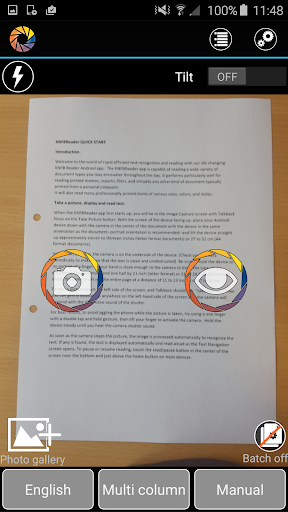

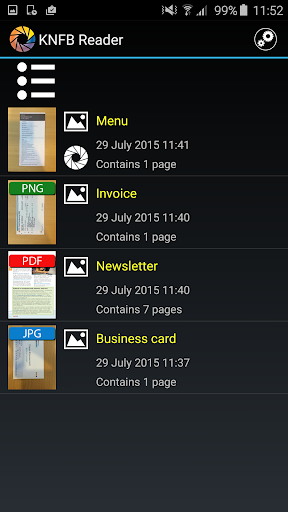


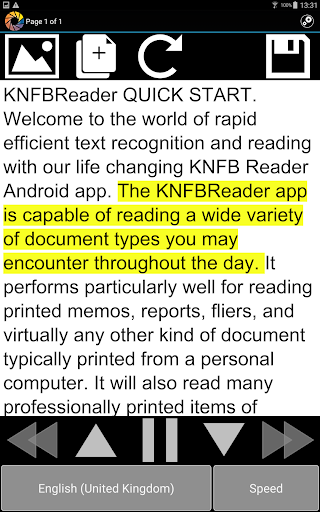

About OneStep Reader
The description on the store listing
The OneStep Reader app is an essential tool for anyone with low vision, visual impairments, difficulty reading, reading disabilities such as dyslexia, as well as blind individuals.
It reads anything from menus, bills, documents, signs, mail, PDFs and JPEG files and more for immediate and easy access!
How It Works:
Simply take a picture of any text with your device and the app reads it aloud or displays it with a connected Braille display. The app uses high-quality speech to text and OCR for accuracy.
The app helps you get a good photo with viewfinder assist, tilt assist, and automatic text detection. It navigates by line, sentence, word, or character and has synchronized text …
Read the full description
The OneStep Reader app is an essential tool for anyone with low vision, visual impairments, difficulty reading, reading disabilities such as dyslexia, as well as blind individuals. It reads anything from menus, bills, documents, signs, mail, PDFs and JPEG files and more for immediate and easy access! How It Works: Simply take a picture of any text with your device and the app reads it aloud or displays it with a connected Braille display. The app uses high-quality speech to text and OCR for accuracy. The app helps you get a good photo with viewfinder assist, tilt assist, and automatic text detection. It navigates by line, sentence, word, or character and has synchronized text highlighting. It can read multiple pages and is fully accessible using Google TalkBack. It works in multiple languages, including, but to limited to English, Norwegian (Bokmål), Dutch, French, German, Italian, Portuguese, Spanish, Swedish, Danish, Turkish, Russian and Polish. More details below. KNFB Reader is the winner of the 2016 AFB Access Award. Users love it! How else can OneStep Reader make your life easier? It can read receipts. Never worry about being overcharged again. You will know what has been put on your card at restaurants, stores, or in taxis. OneStep reader can read package labels. Wonder who sent you that package? Want to know what came in the mail? Can’t remember when you bought that lunchmeat in the fridge? Need nutritional information from your breakfast cereal? OneStep Reader captures it all quickly and easily. OneStep Reader can read price tags, clothing labels, and tags on shelves. OneStep Reader can capture print from your computer or tablet screen. If your screen reader is not cooperating, just photograph the screen and know exactly what those error messages say. OneStep Reader can read lengthy user manuals. By scanning multiple pages at a time in the batch mode you can easily learn how to operate any new device or appliance. OneStep Reader helps you read books. Batch mode scans multiple pages and saves them so you can read them at your leisure. OneStep Reader has various options to adapt the font type, size and color, background color and the use of double highlighting. Visually impaired people or those with other print disabilities (such as dyslexia) can easily follow what is being read aloud on the screen by watching the cursor move across the document. Fully localized versions (user interface, recognition and speech) are available for: English, Norwegian (Bokmål), Dutch, French, German, Italian, Portuguese, Spanish, Swedish, Danish, Turkish, Russian and Polish. Other languages available for only speech and recognition: Finnish, Czech, Bulgarian, Ukrainian, Estonian and Greek Compatibility: • Optimal experience: Android device with a hexa or octa core CPU, an eight megapixel camera Visit our website at: www.onestepreader.com Please send feedback and suggestions to: [email protected]
Installs since 29 Aug 2026 Measured
Exact Google Play install counts, collected daily
Ratings
829 ratings, 125 reviews
- 5 ★7.8%
- 4 ★6.9%
- 3 ★2.6%
- 2 ★3.7%
- 1 ★79%
Recent reviews
Latest public reviews from the store
- 19 Nov 2020
Suppppppper
Top chart positions
Latest Google Play chart ranks by country, last 10 days
Not in any tracked top chart in the last 10 days.
OneStep Reader history
Release, install milestones, listing and store changes
- Reached 50,000+ installs 22 Feb 2019
- Reached 10,000+ installs 14 Aug 2016
- Reached 5,000+ installs 22 Mar 2016
- Reached 1,000+ installs 6 Nov 2015
- Reached 500+ installs 24 Oct 2015
- First released on the store 9 Oct 2015
Recent versions
Current version 3.2
- Version 3.213 Dec 2024
- Improved OCR quality - Added an option to add external files
- Version 3.15 Jul 2023
- Version 3.01 Feb 2022
- Version 2.9.15 Nov 2020
Listing keywords
Words and phrases OneStep Reader repeats most in its store listing
Top phrases: onestep reader (11), reader can read (3), multiple pages (3), bokmål dutch french (2), danish turkish russian (2).
Highlighted words also appear in the title. Counts cover the title, short description and description.
Business model and tech
From the store listing, the SDKs in the app package and its declared permissions
- Business model
- Free to downloadIn-app purchases
- Built with
- No cross-platform framework or game engine detected
- Ad networks (0)
- None detected
- Subscriptions and payments
- Google Play billing
- Analytics and crash reports
- FirebaseFlurry Analytics
- Sensitive access
- CameraPhotos, videos and files
2 ad, attribution and analytics SDKs detected. SDKs are read from the app package and permissions from the store listing, so code that loads later is not seen.
Technology
30 SDKs found in the app package
14 permissions
1 special access, 4 sensitive, 9 standard
- Read privileged phone stateREAD_PRIVILEGED_PHONE_STATESpecial access
- Take photos and videosSensitive
- Change or delete shared storageSensitive
- Read shared storageSensitive
- Show notificationsPOST_NOTIFICATIONSSensitive
- Control vibrationStandard
- Keep the phone awakeStandard
- See running appsStandard
- Full internet accessStandard
- See network connectionsStandard
- See Wi-Fi connectionsStandard
- Internal app permissionDYNAMIC_RECEIVER_NOT_EXPORTED_PERMISSIONStandard
Compliance
What the listing and the app package show
- Store status
- Live
- Upkeep
- Updated 16 Dec 2024
- Registered in
- Belgium
- Privacy policy
- Linked on the listing
- Advertising
- No ads declared
- In-app purchases
- Offered
- Age rating
- Everyone
- Sensitive permissions
- 4 sensitive, 1 special access of 14
- Location access
- No
- Camera and microphone
- Camera
Apps like OneStep Reader
Sonic SenderBravura33.1K installs★ 4.3
Listen Docs: Text to SpeechMatlub Yazılım A.Ş.34.2K installs★ 4.34
Sharpdesk MobileSHARP CORPORATION453K installs★ 2.79
DNS Checker - Network ToolsSoftrix Technologies97.4K installs★ 4.37
1Hub MobileMovista, Inc.68.2K installs★ 2.91
Clearspaceclearspace technologies, inc.247K installs★ 4.53
Clear: To-Dos & Remindernedkaboo19.7K installs★ 4.61
BS Patro - Nepali BsCalendarK Kafle411K installs★ 4.4
English Voice typing KeyboardAppsCaps318K installs★ 4.1
OneStep Reader: questions and answers
How many downloads does OneStep Reader have?
OneStep Reader has 88,161 installs on Google Play, measured from the store's own count on 14 Nov 2026.
Who makes OneStep Reader?
OneStep Reader is published by Sensotec, a developer based in BE.
When was OneStep Reader last updated?
The latest version (3.2) was released on 16 Dec 2024.
Is OneStep Reader free?
Yes. OneStep Reader is free to download and offers in-app purchases.
Is OneStep Reader still available?
Yes. OneStep Reader is live on Google Play as of 14 Nov 2026.
Track OneStep Reader and its competitors
Watch any app for new versions, rating drops, chart moves and removals. Free plan, no card.