
- Installs
- —
- Apple does not publish download counts
- Rating
- 4.26
- Ratings
- 35
- 35 reviews
- Version
- 3.0
- Updated 26 Jan 2026
- Released
- 20 Jan 2017
- Tracked since 10 May 2026
- Size
- 12 MB
- Needs 15.6
Screenshots
About PDFGenius
The description on the store listing
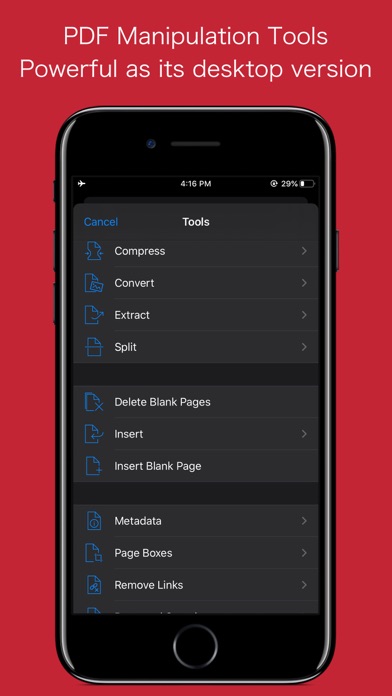
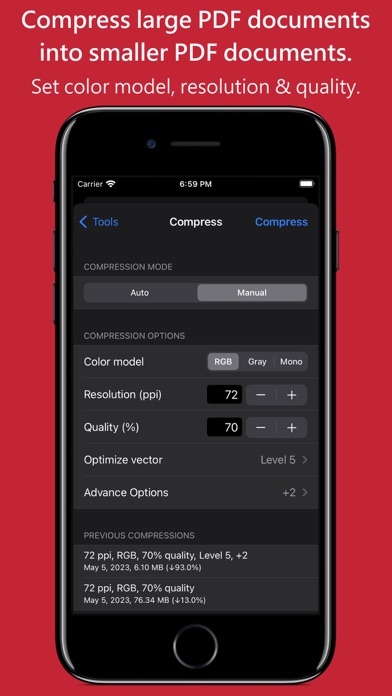
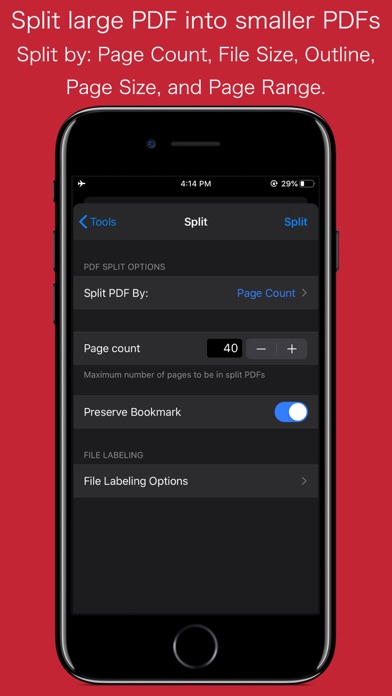
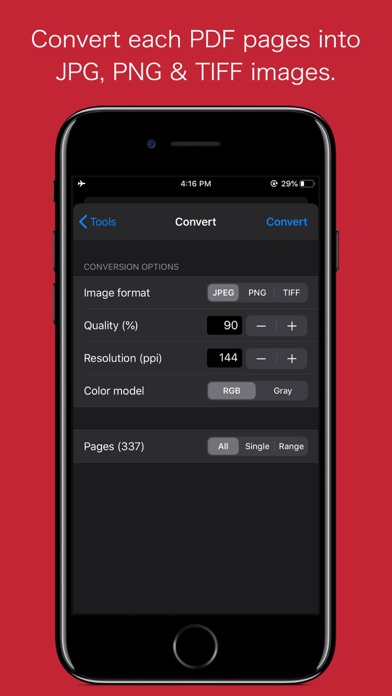
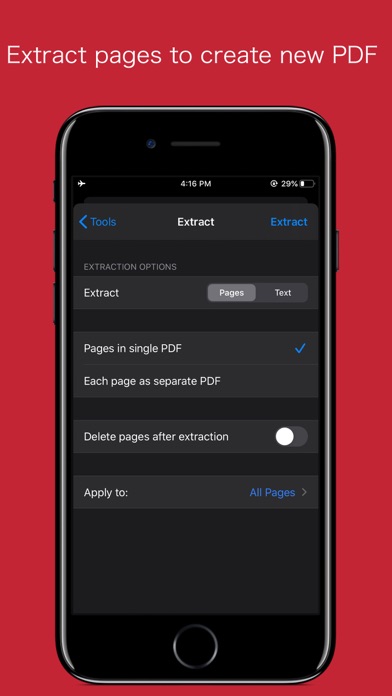
PDFGenius is an easy-to-use, intuitive and powerful PDF manipulation utility app that you will ever need. PDFGenius offer features like combining PDFs, splitting PDFs into multiple files, PDF compression to reduce file size, convert PDF into images, extract pages from a PDF to create another PDF and extract text from PDF document.
* * * PDFGenius for Mac is also available on the Mac App Store. * * *
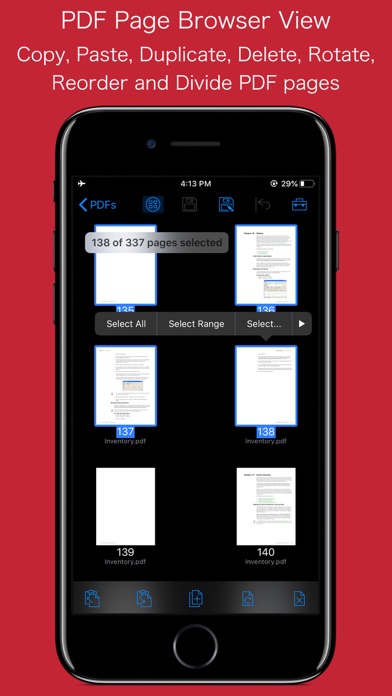
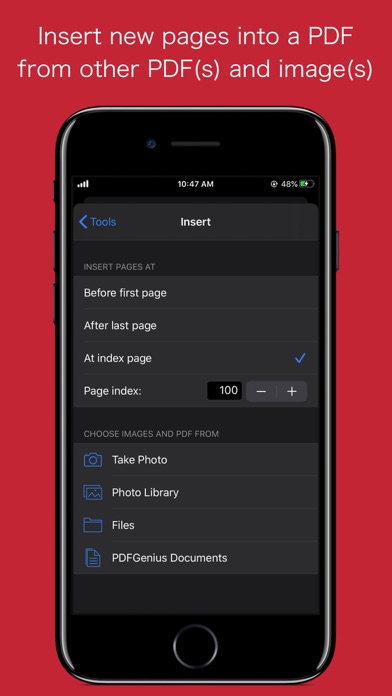
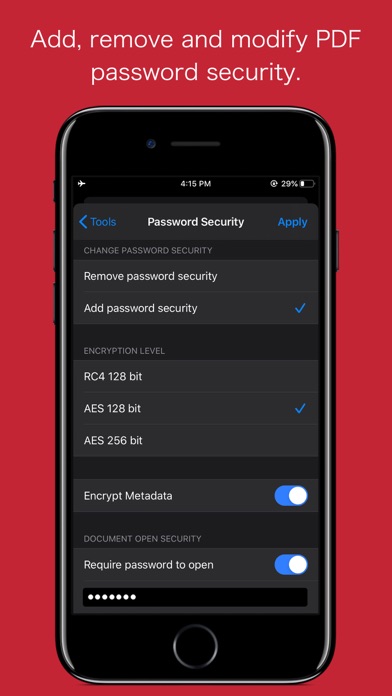
PDF editing features that allows you to insert new pages from images and PDF files, delete, rotate and reorder pages within PDF. In addition, you can crop and divide PDF pages, remove links, modify metadata, add/remove password security.
PDFGenius performs all manipulating operations on PDF …
Read the full description
PDFGenius is an easy-to-use, intuitive and powerful PDF manipulation utility app that you will ever need. PDFGenius offer features like combining PDFs, splitting PDFs into multiple files, PDF compression to reduce file size, convert PDF into images, extract pages from a PDF to create another PDF and extract text from PDF document. * * * PDFGenius for Mac is also available on the Mac App Store. * * * PDF editing features that allows you to insert new pages from images and PDF files, delete, rotate and reorder pages within PDF. In addition, you can crop and divide PDF pages, remove links, modify metadata, add/remove password security. PDFGenius performs all manipulating operations on PDF by preserving contents (i.e. structure of the file, color profiles, fonts, links, bookmarks) without losing document’s integrity and does it very fast. ◆ MERGE : Combine multiple files into single PDF document. Alternate page merge supported. ◆ SPLIT : Split PDF into multiple PDF files. Five divide criteria along with file labelling options 1) Split by number of pages per file. 2) Split by file size. 3) Split by outline level. Use outline titles as PDF filenames. 4) Split by page size. 5) Split by comma separated page range. ◆ CONVERT: - Convert PDF into each page as images (JPG, PNG, TIFF). - Specify JPEG image quality, resolution and color model. - You can save converted images into Photos Album. - Include annotations control to enable display annotations into converted images. ◆ COMPRESSION: - Compress large image and graphics heavy PDF using extensive set of options. - Controls to change JPEG quality, color model, image resolution and Optimise graphics level to decrease the file size dramatically. New Optimize graphics option removes superfluous information to reduce vector graphics heavy PDF. - Inbuilt side-by-side preview to compare original and compressed PDF for iPad. ◆ COPY/PASTE PDF pages between PDF documents. You can duplicate selected pages within PDF. ◆ EXTRACT PAGES: Reuse selected pages from one PDF document to create new PDF document. - Open to extract each PDF page as separate PDF document. ◆ INSERT: Insert new pages into existing PDF by inserting images and pages from another PDF. - Tool to insert blank page. ◆ DELETE: Delete pages from PDF file. Tool to delete blank pages. ◆ PASSWORD SECURITY: - Add or remove password security with file restriction controls. ◆ PAGE BOXES: Set CropBox and other display box margins of the PDF pages. - Options to remove white margins. - Option to divide(cut) PDF pages horizontally and vertically. ◆ REMOVE LINKS: Remove annotations, internal links, external hyperlinks. ◆ PAGE SELECTION: Most helpful page selection variations to speed up page manipulations. ◆ ARRANGE, SHUFFLE, REORDER and ROTATE PAGES ◆ Modify PDF document METADATA. ◆ Extract plain text. Much more… PDF VIEWER: - Very powerful and fast PDF reader with fully selectable and searchable text contents. - Pinch out and Pinch in to ZoomIn and ZoomOut view. - Navigate within PDF using slide over thumbnail view, outlines and Go to page feature. ◆ TRANSFER AND SHARE FILES - You can share new generated files or archive multiple files into zip. You can send file(s) as Mail attachment, Open In… another app and Send to cloud storage. - Use Copy to iTunes to save and share files with your computer. - Fully supports iPad Drag & Drop feature across the app to transfer files and images between apps. Note: PDFGenius is standalone application running natively to manipulate PDF documents securely on your iOS device. *The free version allow you to open, view and work with PDF using various operations and manipulating tools. Get Premium to enable sharing of resultant PDFs, Images and text documents without any restrictions. Privacy Policy: http://rootrisetech.com/app-privacy-policy Terms of Use(EULA): https://www.apple.com/legal/internet-services/itunes/dev/stdeula/
Installs
Apple does not publish download counts. Estimates are in testing.
We publish iOS estimates only after they pass a back-test against real numbers. Chart history below is measured.
Estimated store revenue Estimated Beta
App Store, worldwide, monthly rate from the last 12 chart days to 19 Nov 2026
Below the top 100 grossing apps in the markets we calibrate. In the United States that usually means under about $6.4M a month. App Store purchases and subscriptions only, before Apple's 15 to 30% fee. Ads and web payments are not included.
Ratings
35 ratings, 35 reviews
No rating breakdown published for this app.
Recent reviews
Latest public reviews from the store
- 19 Jan 2024
File browser outdated
I wish the file browser feature of the app would look like (or integrate with) the native Files app, a la Pixelmator. Aside from the looks, the custom implementation leads to some bugs, such as lists not getting updated in real time. For example: I remove password security from a PDF, and I tap save (not Save As), which overwrites the original, after going back to the file browser, I notice there are two entries of the PDF I just unlocked. One blacked out and one with a thumbnail. So I delete the blacked out. I attempt to view the one with a thumbnail. It’s blank. So I close and relaunch the app. Both are gone. It turns out, because the list isn’t updated, the blacked out one I deleted was the one that already has password security removed.
- 14 Aug 2023
It’s a great app for compressing PDFs but it can crash often.
It’s a great app for compressing PDFs but it can crash often. I do many many crashes where app just disappears after doing a 3 -5 compressed of 30 -65mb files…. Doesn’t seem consistent.
- 16 Oct 2021
Good
Does what it says.
- 26 Nov 2020
Excellent, thanks
Perfect emergency PDF editor. I use it when have no access to desktop version, works for all the things I may need on the fly
What reviewers bring up
Topics mentioned in the latest 12 reviews, by how many reviews mention them
Liked in good reviews (7 reviews)
- pdf 4
- highly recommend 2
- surprised 2
- actually 2
- merging 2
- reviews 2
- found 2
- truly 2
Raised in bad reviews (4 reviews)
- edit text 2
- cannot 2
- nor 2
- ios 2
Top chart positions
Latest App Store chart ranks by country, last 10 days
Not in any tracked top chart in the last 10 days.
PDFGenius history
Release, install milestones, listing and store changes
- First released on the store 20 Jan 2017
Update frequency
How often PDFGenius ships a new version, month by month
1 updates in the last 12 months. More often than most similar apps: they shipped a median of 0 updates in the same year.
Recent versions
Current version 3.0
- Version 3.026 Jan 2026
- Bug fixes and UI improvements to streamline with latest iOS. We are thankful to all users for their valuable feedback :)
Listing keywords
Words and phrases PDFGenius repeats most in its store listing
Top phrases: pdf document (6), pdf pages (4), file size (3), multiple files (3), password security (3).
Highlighted words also appear in the title. Counts cover the title, short description and description.
Compliance
What the listing and the app package show
- Store status
- Live
- Upkeep
- Updated 26 Jan 2026
- Age rating
- 4+
Apps like PDFGenius
 Super VPN: Fast Private ProxyGeek Incorporated★ 4.4
 Hubtel RetailerHubtel Limited★ 4.32
 Monthly Calendar 2022 - CalistOmoboto LLC★ 4.38
 Firstly: To-Do List & PlannerfocusCove LLC★ 4.7
 CBUS 311City of Columbus, Ohio★ 1.8
 Themes for Powerpoint - DesiGNGraphic Node★ 4.22
 iSiloDC & Co.★ 3.82
 Flashlight Pro [Multipurpose LED light]KAVAPOINT★ 3.88
 WiPryOscium LLC★ 2.68
PDFGenius: questions and answers
Who makes PDFGenius?
PDFGenius is published by RootRise Technologies Pvt. Ltd..
When was PDFGenius last updated?
The latest version (3.0) was released on 26 Jan 2026.
Is PDFGenius free?
No. PDFGenius is a paid app.
Is PDFGenius still available?
Yes. PDFGenius is live on App Store as of 1 Jul 2026.
Track PDFGenius and its competitors
Watch any app for new versions, rating drops, chart moves and removals. Free plan, no card.