- Installs
- —
- Apple does not publish download counts
- Rating
- —
- Ratings
- —
- Version
- 4.0
- Updated 9 Jan 2026
- Released
- 6 Jan 2012
- Tracked since 10 May 2026
- Size
- 3 MB
- Needs 11.5
Screenshots
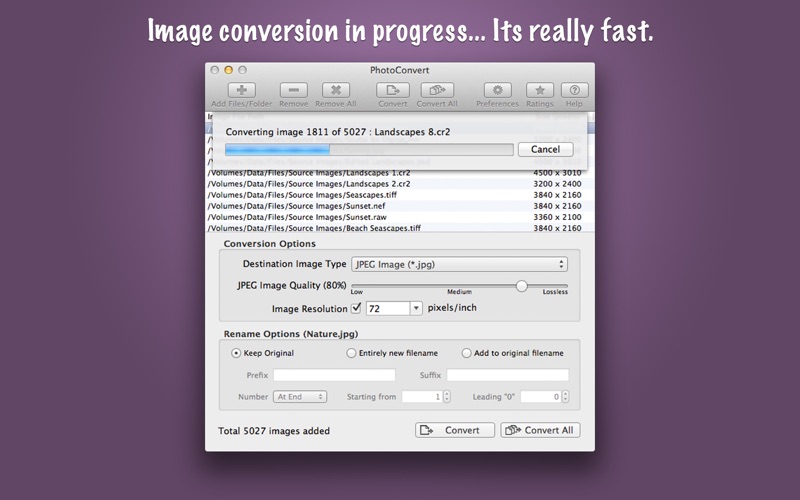
About PhotoConvert
The description on the store listing
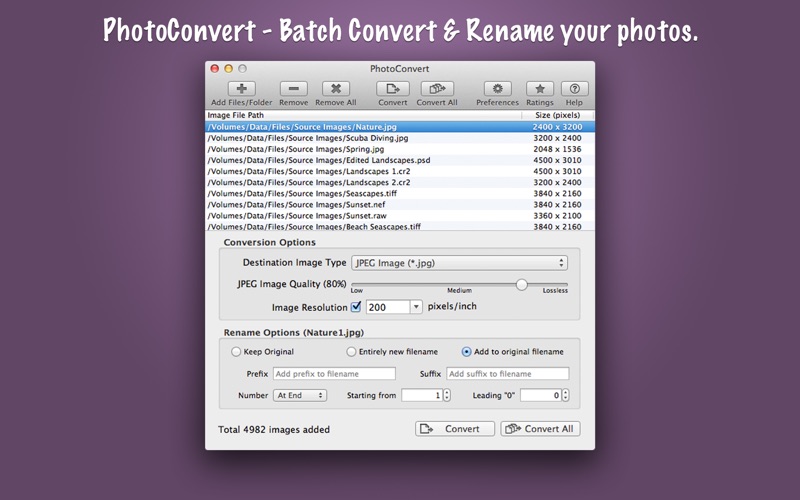
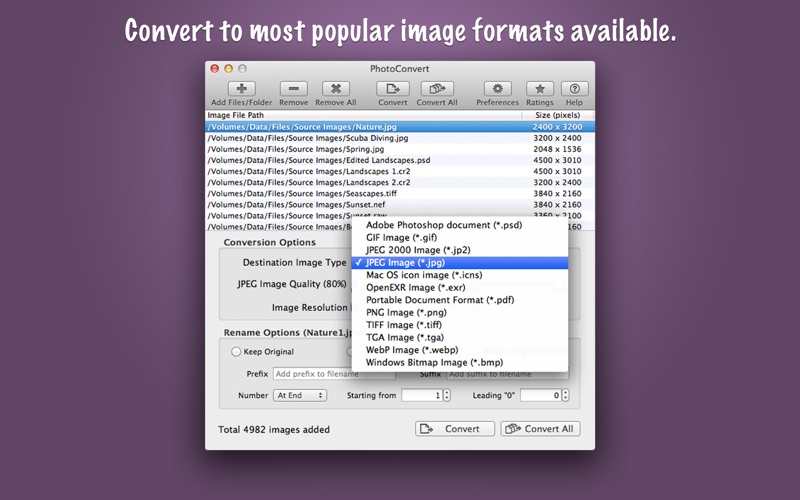
PhotoConvert is fantastic tool to convert and rename thousands of images and photos at lightning fast speed. It offers features like image format conversion between JPEG, JPEG2000, TIFF, PNG, GIF, BMP, WebP and more formats. Supports conversion for RAW images types of all DSLR cameras. Rename set of images by adding prefix, suffix and number sequence. In addition PhotoConvert preserves metadata properties (EXIF, RAW, TIFF, etc.), Creation and modification date and time. It also maintains file-folder structural hierarchy in target folder.
KEY FEATURES:
◆ Simple and easy-to-use user interface.
◆ BATCH PROCESSING: Easy steps to resize hundreds & thousands of images/photos at lightning fast …
Read the full description
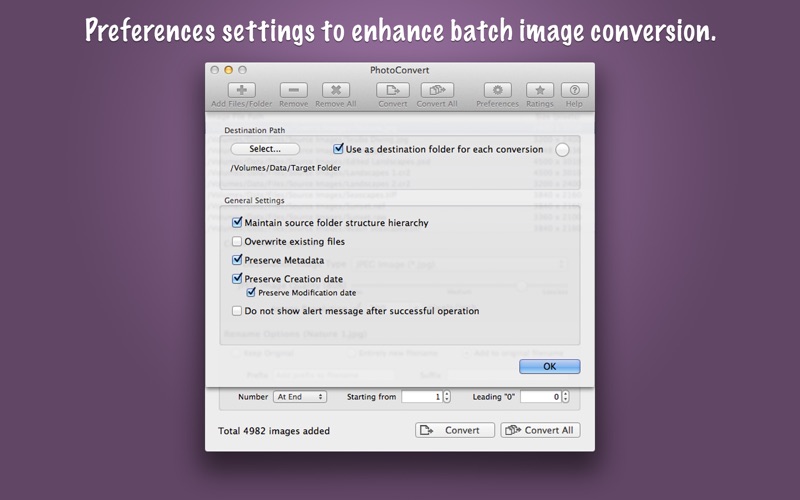
PhotoConvert is fantastic tool to convert and rename thousands of images and photos at lightning fast speed. It offers features like image format conversion between JPEG, JPEG2000, TIFF, PNG, GIF, BMP, WebP and more formats. Supports conversion for RAW images types of all DSLR cameras. Rename set of images by adding prefix, suffix and number sequence. In addition PhotoConvert preserves metadata properties (EXIF, RAW, TIFF, etc.), Creation and modification date and time. It also maintains file-folder structural hierarchy in target folder. KEY FEATURES: ◆ Simple and easy-to-use user interface. ◆ BATCH PROCESSING: Easy steps to resize hundreds & thousands of images/photos at lightning fast speed 1) Add or Drop images/folders. 2) Select desire options. 3) Choose target folder and Convert/Convert All. ◆ CONVERSION: Image format conversion from most of all supported source image types into JPEG, JPEG2000, PNG, TIFF, WebP, PDF, PSD, GIF, TGA, EXR, WebP and BMP. You can adjust quality for JPEG and JPEG2000 images. Lower the quality for higher image compression to get smaller file size. ◆ RENAME: Give new names to your photos. Rename by giving entire new filename or add prefix-suffix to the original filenames. Flexible choice allows adding number sequence at start or end of the filename, varying starting digit and number of leading zeros. ◆ Finder like sorting of images into the list. Click on Image File Path or Size(Pixel) column header to sort respectively. ◆ Direct drag and drop out selected items from file list into target folder in Finder to get your resized images. ◆ Preferences option to maintain source folder structure hierarchy at destination. ◆ Preserves source image metadata properties like, EXIF, TIFF, GPS, RAW etc. ◆ Preferences option preserve source image Creation and Modification date. ◆ Preferences option to set destination folder. It set forever.. even after relaunch. ◆ Source image formats supported are JPEG, PNG, TIFF, WebP, BMP, JP2, GIF, PSD, ICNS, TGA, EXR, ICO, XBM, SGI, PNTG, and RAW image types (like .raw, .nef, .cr2 etc.) from most of all DSLR cameras are also supported. You can refer User Manual from menu "Help -> PhotoConvert Help" for any assistance, Contact Support.
Installs
Apple does not publish download counts. Estimates are in testing.
We publish iOS estimates only after they pass a back-test against real numbers. Chart history below is measured.
Estimated store revenue Estimated Beta
App Store, worldwide, monthly rate from the last 12 chart days to 19 Nov 2026
Below the top 100 grossing apps in the markets we calibrate. In the United States that usually means under about $6.4M a month. App Store purchases and subscriptions only, before Apple's 15 to 30% fee. Ads and web payments are not included.
Ratings
No rating breakdown published for this app.
Recent reviews
Latest public reviews from the store
No reviews in our sample for this app yet.
Top chart positions
Latest App Store chart ranks by country, last 10 days
Not in any tracked top chart in the last 10 days.
PhotoConvert history
Release, install milestones, listing and store changes
- First released on the store 6 Jan 2012
Update frequency
How often PhotoConvert ships a new version, month by month
1 updates in the last 12 months. More often than most similar apps: they shipped a median of 0 updates in the same year.
Recent versions
Current version 4.0
- Version 4.09 Jan 2026
- Updated user interface to streamline with latest macOS. - Other minor bug fixes and improvements. If PhotoConvert useful to you, we would appreciate an App Store review. It will help other people find the app and make them delighted. Thank you all users for your feedback :)
Listing keywords
Words and phrases PhotoConvert repeats most in its store listing
Top phrases: source image (4), preferences option (3), target folder (3), creation and modification (2), image format conversion (2).
Highlighted words also appear in the title. Counts cover the title, short description and description.
Compliance
What the listing and the app package show
- Store status
- Live
- Upkeep
- Updated 9 Jan 2026
- Age rating
- 4+
Apps like PhotoConvert
 Video CollageaZeR DiLLs★ 4.08
 Vee for VideoMedious★ 2.98
 Beauty Camera -Selfie, StickerBhuvan Gupta★ 4.5
 FinalCamXShenzhen Xiaozhen Technology Co.,Ltd.★ 4.44
 Magic Studio - AI Photo EditorMagicStudio.com★ 4.62
 Foto Impresiones: 1 Hr PhotoSoftwareX★ 4.98
 SnapGeo - AI Location FinderRECEP ASLAN★ 4.24
 Family Photo Maker - AIRick-y Media★ 4.12
 BeautifAI: AI Try OnJAI UYGULAMA VE YAPAY ZEKA TEKNOLOJILERI ANONIM SIRKETI★ 4.36
PhotoConvert: questions and answers
Who makes PhotoConvert?
PhotoConvert is published by RootRise Technologies Pvt. Ltd..
When was PhotoConvert last updated?
The latest version (4.0) was released on 9 Jan 2026.
Is PhotoConvert free?
No. PhotoConvert is a paid app priced at $7.99.
Is PhotoConvert still available?
Yes. PhotoConvert is live on App Store as of 10 May 2026.
Track PhotoConvert and its competitors
Watch any app for new versions, rating drops, chart moves and removals. Free plan, no card.