
- Installs
- —
- Apple does not publish download counts
- Rating
- 4.63
- Ratings
- 1.5K
- 1.5K reviews
- Version
- 2.16.3
- Updated 21 Jul 2023
- Released
- 4 Jan 2015
- Tracked since 10 May 2026
- Size
- 9 MB
- Needs 14.0
Screenshots

About Pixel art editor - Dottable -
The description on the store listing
BE CREATIVE in your spare time!!
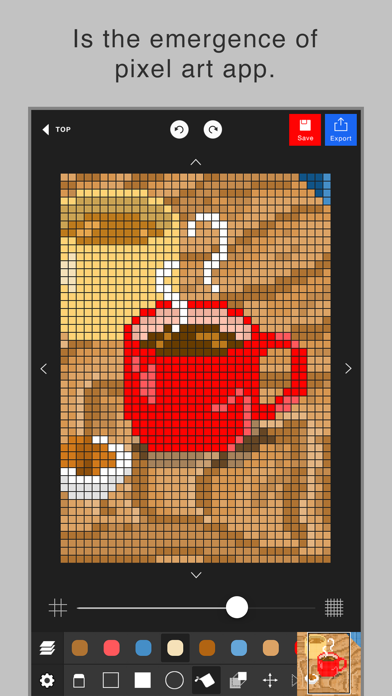
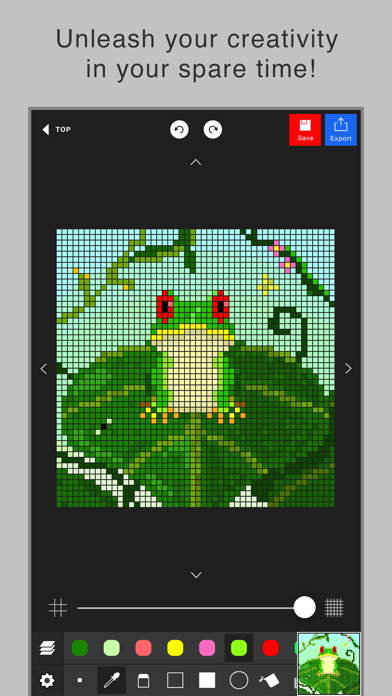
This app enables you to make a pixel art easily.
Although the operation is simple, it has layer editing, color making and other professional tools.
Wanna make your original work during your spare time or before going to bed?
To prevent a crash, creating a new project needs more than 300MB free space of your device.
Sorry for the inconvenience.
The app’s main functions are below.
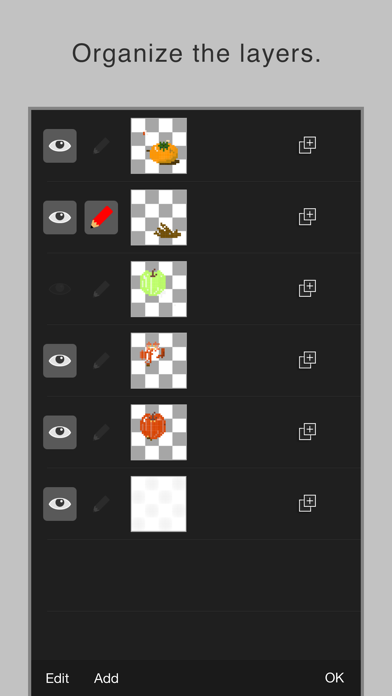
- Layer editing
You can add, delete and copy layers.
You can also choose the layer display or non-display and change the order of layers.
- Various tools
The app has basic tools to paint.
(Pen, Syringe, blotting out, rectangle, circle, transfer... etc)
- Animated GIF export …
Read the full description
BE CREATIVE in your spare time!! This app enables you to make a pixel art easily. Although the operation is simple, it has layer editing, color making and other professional tools. Wanna make your original work during your spare time or before going to bed? To prevent a crash, creating a new project needs more than 300MB free space of your device. Sorry for the inconvenience. The app’s main functions are below. - Layer editing You can add, delete and copy layers. You can also choose the layer display or non-display and change the order of layers. - Various tools The app has basic tools to paint. (Pen, Syringe, blotting out, rectangle, circle, transfer... etc) - Animated GIF export Each layer is going to be one frame. - Undo, Redo You can cancel the line you draw. - Color making You can make your favorite color easily. It is also able to choose a color you would like to change to transparent. You can save 20 colors in maximum by a work. - Zoom-in, Zoom-out You can paint details by the Zoom-in, Zoom-out function. - Saving several works You can save several project files of your favorite works, so you can edit you work other day. - Setting canvas size You can set any canvas size from 5*5〜120*120. - Setting the dot size of exportation You can choose the dot size of exportation. The work will be saved as a png file in you r camera roll. - Rotate function You can rotate a work horizontally and vertically. - Selection area You can edit, transfer and copy only the area you selected. - Loading a picture for trace You can load a picture in forefront or back. You can set a rate of transparency, a position and a rate of magnification. - Conversion function of a picture to pixel art. It is able to convert a picture in camera roll to pixel art. After conversion, the pixel art will be loaded in new layer, so you can edit it.
Installs, last 30 days
Apple does not publish download counts. Estimates are in testing.
Estimated store revenue Estimated Beta
App Store, worldwide, monthly rate from the last 12 chart days to 19 Nov 2026
Below the top 100 grossing apps in the markets we calibrate. In the United States that usually means under about $6.4M a month. App Store purchases and subscriptions only, before Apple's 15 to 30% fee. Ads and web payments are not included.
Ratings
1,507 ratings, 1,507 reviews
- 5 ★79%
- 4 ★13%
- 3 ★3.6%
- 2 ★1.3%
- 1 ★2.9%
Recent reviews
Latest public reviews from the store
- 2 Oct 2022
Absolute Garbage
I’m rating this 5 stars so you can see my review. This app barely gives you decent canvas sizes and the pen function is awful, if you swipe fast, the dots spread out and the only way to stop it is to draw very slowly. The app doesn’t even give you customizable colors, or even palates! The other reviews you see are fake, I guarantee! Nobody could possibly think this app is as awesome as the revues say it is. Devs, either make the app DECENT, or get rid of it. Nobody wants a storage wasting, stupid, useless app.
- 30 May 2022
Great game but one thing
I wish you were able to post to Minecraft so you can make blocks or at least you could draw 3-D and I’m still giving it a five how about the game it is so fun I’ve already made texture packs or what would be one this was the only one I could get because I have to sign in to get an app and since I’m able to put my fingerprint I was able to do it so thank you so much for A great game
- 14 Jan 2019
Pretty Good, but Room for Improvement
I was in need of a pixel art app, and found this. I haven’t really looked at other apps that much so I might be a bit critical, but the fact that so much is limited is kinda annoying. It’s especially annoying with the whole pay-to-get-more thing (premium) which I find to be pretty useless. Either give us more options and make the app paid, or just not even bother. That’s just an opinion though. The fact is, it’s pretty mediocre. There are limited tools which can be confusing, colors which, while they may not appear to be so limited, are very hard to select on a mobile device (which is the intention), and limited spaces for art pieces which is pretty ridiculous (especially since it’s not a lot at all). Lastly, the ads. They’re the most annoying thing. Forget saving just in case every time you leave. Every time you save and you have connection, an ad plays and it usually doesn’t even fit that well on phones. All in all, I think it’s ok at what it’s doing, but could be improved heavily. Like I said though; I haven’t seen too many other pixel-art apps so I’m not sure where it lands in the whole spectrum.
- 3 Aug 2018
Great Pixel Art App!
I don’t believe I would’ve expected there to be a good free pixel art app, but I was pleasantly surprised when I found this. Dottable is that app. In fact, I enjoyed this app so much, I recommended it to my friend, as we make little sprites for games we’ll eventually make. But that’s off topic. The reason I enjoy dottable is the fact that it’s easy to use, and the canvas size can be adjusted up to 120 pixels. Every other free pixel art app has limited size. I once encountered an app that had a max canvas of 7 pixels. SEVEN PIXELS. I also like that the color selection is simple enough where it’s easy but nice. Again, it deserves five stars, but there are slight errors. I would like it if you can rename arts, and I would also suggest that this app never used ads. Oh, and please add a line tool. Thanks for reading this. - Bash
What reviewers bring up
Topics mentioned in the latest 8 reviews, by how many reviews mention them
Liked in good reviews (6 reviews)
- little 3
- recommend 2
- reading 2
- canvas 2
- other 2
- where 2
- draw 2
- able 2
Raised in bad reviews (1 reviews)
No topic comes up twice.
Top chart positions
Latest App Store chart ranks by country, last 10 days
Not in any tracked top chart in the last 10 days.
Pixel art editor - Dottable - history
Release, install milestones, listing and store changes
- First released on the store 4 Jan 2015
Update frequency
How often Pixel art editor - Dottable - ships a new version, month by month
0 updates in the last 12 months. Less often than most similar apps: they shipped a median of 2 updates in the same year.
Recent versions
Current version 2.16.3
- Version 2.16.321 Jul 2023
- Bug fixes.
Listing keywords
Words and phrases Pixel art editor - Dottable - repeats most in its store listing
Top phrases: pixel art (5), size of exportation (2), zoom in zoom (2), camera roll (2), canvas size (2).
Highlighted words also appear in the title. Counts cover the title, short description and description.
Compliance
What the listing and the app package show
- Store status
- Live
- Upkeep
- No update since 21 Jul 2023
- Registered in
- Japan
- Age rating
- 4+
Apps like Pixel art editor - Dottable -
 Space Rocket Launch & LandingRenzo Macedo★ 3.99
 Talk.AI - Personalized AI Chat柏炜 王★ 4.38
 KidsBeeTV: Kids Videos & GamesMagikbee, Lda.★ 4.18
 Italian Brainrot SoundboardCAIO FARIA PEDROSO★ 4.7
 Minno - Kids Bible VideosWinsome Truth INC★ 4.51
 ORI TVOri Media LLC★ 4.56
 Brick by Brick for LEGO setsLimun Apps★ 4.55
 IPTV Player Live: M3U & XtreamZanApps★ 4.86
 SixthShort - Stream Drama & TVHongKong Liutuo Limited★ 4.33
Pixel art editor - Dottable -: questions and answers
Who makes Pixel art editor - Dottable -?
Pixel art editor - Dottable - is published by Yosuke Seki, a developer based in JP.
When was Pixel art editor - Dottable - last updated?
The latest version (2.16.3) was released on 21 Jul 2023.
Is Pixel art editor - Dottable - free?
Yes. Pixel art editor - Dottable - is free to download.
Is Pixel art editor - Dottable - still available?
Yes. Pixel art editor - Dottable - is live on App Store as of 19 Nov 2026.
Track Pixel art editor - Dottable - and its competitors
Watch any app for new versions, rating drops, chart moves and removals. Free plan, no card.