
- Installs
- —
- Apple does not publish download counts
- Rating
- 4.56
- Ratings
- 187
- 187 reviews
- Version
- 6.0.6
- Updated 3 Nov 2026
- Released
- 30 Mar 2011
- Tracked since 10 May 2026
- Size
- 60 MB
- Needs 12.0
Screenshots

About PrintCentral Pro
The description on the store listing
The Ultimate File Management, Transfer and Print solution for the iPad. Print to ALL printers (Not just AirPrint Printers). View, store & print email, documents & PDFs, all major cloud servers, attachments, photos, contacts & web pages. Convert documents and images to PDF files. Also print from inside other app e.g. Safari, Photos & more
MDM Support - Support for Mobile Device Management multiple app configuration
- Chosen by Apple for "What's Hot" on the App Store
- Featured on the Discovery Channel
MacWorld: "PrintCentral is much more than a printing utility-it is a veritable office center"
AppCraver: "This app will let you print basically anything from basically anywhere."
► Print …
Read the full description
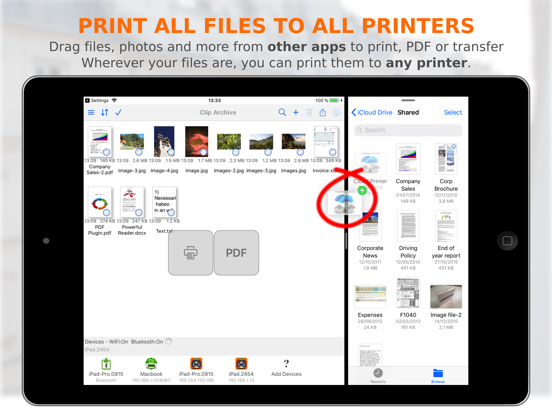
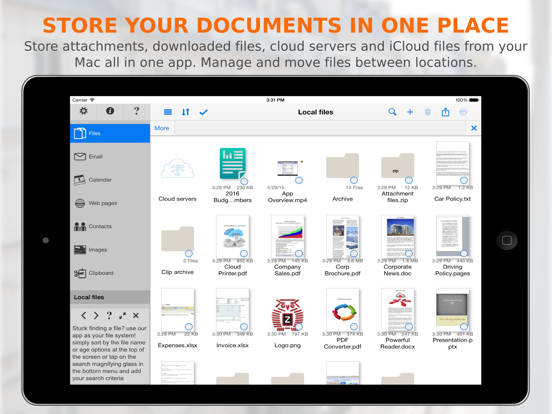
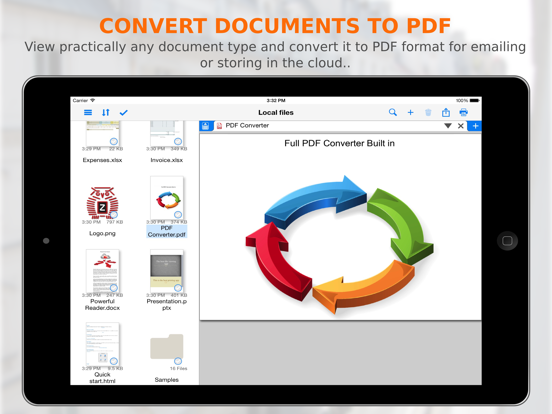
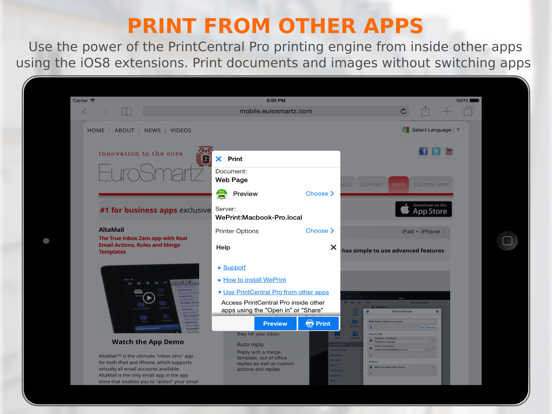
The Ultimate File Management, Transfer and Print solution for the iPad. Print to ALL printers (Not just AirPrint Printers). View, store & print email, documents & PDFs, all major cloud servers, attachments, photos, contacts & web pages. Convert documents and images to PDF files. Also print from inside other app e.g. Safari, Photos & more MDM Support - Support for Mobile Device Management multiple app configuration - Chosen by Apple for "What's Hot" on the App Store - Featured on the Discovery Channel MacWorld: "PrintCentral is much more than a printing utility-it is a veritable office center" AppCraver: "This app will let you print basically anything from basically anywhere." ► Print ALL content to ALL Printers • Print direct to most existing WiFi or shared printers, or use our free printer/file sharing Mac/PC WePrint software for ALL printers. • Print to all AirPrint, non-AirPrint & network shared printers • Print files & other content from other apps • Print almost anything from your Mac to your iPad as a PDF file • Print Preview and print page selection • Print remotely via mobile data or WiFi • Choose from a large range of printing options. Copies, Duplex, Grayscale, Image sizes, Page Range, Paper Size, Margins ... • Save web pages, documents etc. as PDF files • Bluetooth and Mobile printing using many Brother & Zebra mobile printers. e.g. Brother PJ-673, Zebra iMZ 220 ... • USB and other printers can be used via free print server software on your Mac/PC ► Complete File & Cloud Server Management/Transfer/Conversion • The most advanced File Management app available for the iPad • Drag and drop files from other apps on compatible iPads for printing, exporting and importing as well as PDF conversion • Combine all of your Cloud Servers together to Transfer Files between them and other devices • iCloud, Dropbox, Evernote, Box, FTP, OneDrive, ShareFile, SugarSync, Transporter, WebDAV & More • Print, Send or fetch files from Other Apps to store centrally • Secure with an App Password or Finger Touch ID • Advanced search to find files on local and cloud servers • Integration with the global device Spotlight Search • Zip email and save or email ► Apple Watch • Print Images and Photos straight from your Apple Watch • Print from all of your Cloud Servers ► WiFi Hard Drive • Mount your iPad as a network server on your Mac or PC for quick file transfer • Send and fetch files from your iPad to your Mac or PC or Network server • Drag and drop documents & files between devices ► Transfer Files and Content to computers and other devices • Send content from other apps to other devices • Use the built in Bluetooth or WiFi transfer features to quickly and simply send files to another iPad, iPhone, Mac or PC • Copy text or an image from a Web Page and send to another device with a single tap • Send a phone number, address, photo or other content quickly to friends • Drag and drop to move files to other devices ► Emails - Print, Attach files, Save and PDF Convert • Print emails and attachments • Attach multiple files and images to new emails • Supports virtually all email accounts • Send Cloud and other files as attachments • Save attachments for archiving or emailing ► Complete Calendar/Reminder Printing • View and Print by Day/Week/Month • Email your calendar views as PDFs • Print event maps and directions • Print and filter reminder lists ► Print and Save Web Pages • Print from Safari • Drag Web addresses from Safari for viewing and printing • Copy web and email content from apps to print or convert to PDF • Save downloaded files from web pages for archiving or emailing • Send web pages as PDF email attachments ► Photos and Image File Sharing and Transfer • Move Image/Video Files to your Photo Album • Move Photos & Image Files to and from your Cloud servers, Mac/PC or another iPad/iPhone • Print Photos in multiple sizes ► Contacts • Search & select multiple contacts to print • View all emails for each contact
Installs since 29 Aug 2026
Apple does not publish download counts. Estimates are in testing.
Estimated store revenue Estimated Beta
App Store, worldwide, monthly rate from the last 12 chart days to 19 Nov 2026
Below the top 100 grossing apps in the markets we calibrate. In the United States that usually means under about $6.4M a month. App Store purchases and subscriptions only, before Apple's 15 to 30% fee. Ads and web payments are not included.
Ratings
187 ratings, 187 reviews
No rating breakdown published for this app.
Recent reviews
Latest public reviews from the store
- 20 Dec 2019
Used to work great
I used to use this to move ForScore music files between iPads, and it worked great, but latest updates have altered my opinion. Between iOS changes and ForScore changes, I am now only able to move one file at a time, which is a major nuisance. Support has been trying to help, but they think it is a ForScore problem because they say multiple files can be moved to other apps just fine. Maybe it is a ForScore problem, but unfortunately, the app no longer meets my needs for this particular task.
- 30 Oct 2019
Good solution to iPad printing
I was looking for a solution that enabled me to print email, from my new IPad, wirelessly to an HP printer that was not AirPrint capable. Looked at a number of others and found them clunky or didn't work as advertised. Purchased PrintCentralPro and it worked well. Had a question about adding my Outlook Calendar so I could print events and got hung up. Contacted their Support and received a very timely and clear advice on how to resolve my problem. Now I'm up and running. So far, so good with this app.
- 15 Nov 2018
An absolute lifesaver
I have a loaded HP LaserJet 8000. Although there are two other very nice and more modern printers I use, the HP is my baby for final print. The app is amazing, lets me print on ledger from iOS or computer using the free program WePrint. Even modern OS that no longer support the HP, it opens advanced features that no other driver would find. Walkthroughs provided were personalized to my needs. The customer service is just beyond excellent and I would normally not take the time to review an app unless it was very good or drove me to the brink of extinction.
- 8 Mar 2018
Piece of Cake
I’m in IT and was ready to set up any complicated solution if I had to in order to print from my iPAD Pro to my Windows PC. I normally don’t even bother writing reviews as a lot of apps aren’t even worth it. This one is! If you’re looking for an app that will let you print to any old printer shared from your PC, this is it! The only caveat is you must have your PC on that has the printer installed / shared, and be running their Weprint app in the background of your PC (free download - simple install). I have an old HP Laserjet 1200 (USB printer) that isn’t network ready but shared through my PC with Windows 10. I downloaded their app in the App Store on my iPad, then I downloaded and installed their Weprint app from their website on my PC at home. The Weprint software detected all printers listed on my PC, and my Canon networked inkjet. You can hide (exclude) printers or “printers” listed (like Microsoft one note, FAX, etc.) to select from the app on your iOS device. It’s not always straight forward like a windows app to print from iOS, but easy enough to use a “copy to” or “open in” from an app menu or save the file and open and print from Print Central ap
What reviewers bring up
Topics mentioned in the latest 8 reviews, by how many reviews mention them
Liked in good reviews (5 reviews)
- print 4
- ipad 4
- solution 3
- support 3
- problem 3
- laserjet 2
- normally 2
- looking 2
Raised in bad reviews (2 reviews)
- options 2
Top chart positions
Latest App Store chart ranks by country, last 10 days
Not in any tracked top chart in the last 10 days.
PrintCentral Pro history
Release, install milestones, listing and store changes
- First released on the store 30 Mar 2011
Update frequency
How often PrintCentral Pro ships a new version, month by month
2 updates in the last 12 months. More often than most similar apps: they shipped a median of 0 updates in the same year.
Recent versions
Current version 6.0.6
- Version 6.0.63 Nov 2026
• Fixed an issue converting PDF files • Adding images to an email now uses the image name from the Photos App Support our hard working team - support regular updates and new features with a quick review on the App Store, thanks!
- Version 6.0.329 Apr 2026
Fixed an occasional problem with full screen web pages Support our hard working team - support regular updates and new features with a quick review on the App Store, thanks!
Listing keywords
Words and phrases PrintCentral Pro repeats most in its store listing
Top phrases: cloud servers (5), web pages (5), drag and drop (3), mac or pc (3), mac pc (3).
Highlighted words also appear in the title. Counts cover the title, short description and description.
Compliance
What the listing and the app package show
- Store status
- Live
- Upkeep
- Updated 3 Nov 2026
- Age rating
- 17+
Apps like PrintCentral Pro
 Tradify - Quote & Invoice ToolTradify Limited★ 4.83
 PrismHR Employee PortalPrismHR★ 1.83
 Shemagh Albassam - شماغ البسامMOHAMED AL SAAD AL AJLAN AND SONS TRADING COMPANY★ 4.26
 Super Collage for Hmp,Voyeur,ShazamWilson Tjoa★ 4.57
 Chatee AI: Intelligent DefenseADVERA LTD★ 4.56
 AVM MAG (Aviation Maintenance)Gregory Lampa★ 4.73
 PingboardPingboard Inc.★ 4.74
 Desert Sun TanningRevetize★ 4.88
 Cookin: Business ManagerCookin Inc★ 4.81
PrintCentral Pro: questions and answers
Who makes PrintCentral Pro?
PrintCentral Pro is published by EuroSmartz Ltd.
When was PrintCentral Pro last updated?
The latest version (6.0.6) was released on 3 Nov 2026.
Is PrintCentral Pro free?
No. PrintCentral Pro is a paid app priced at $4.99.
Is PrintCentral Pro still available?
Yes. PrintCentral Pro is live on App Store as of 14 Nov 2026.
Track PrintCentral Pro and its competitors
Watch any app for new versions, rating drops, chart moves and removals. Free plan, no card.