
- Installs
- —
- Apple does not publish download counts
- Rating
- 4.44
- Ratings
- 308
- 308 reviews
- Version
- 6.0.6
- Updated 3 Nov 2026
- Released
- 14 Apr 2011
- Tracked since 10 May 2026
- Size
- 61 MB
- Needs 12.0
Screenshots


About PrintCentral Pro for iPhone
The description on the store listing
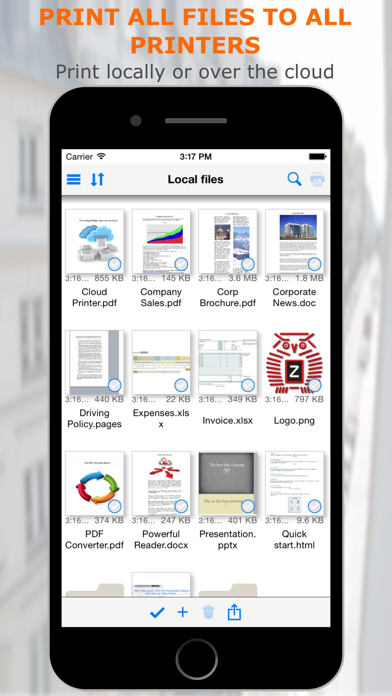
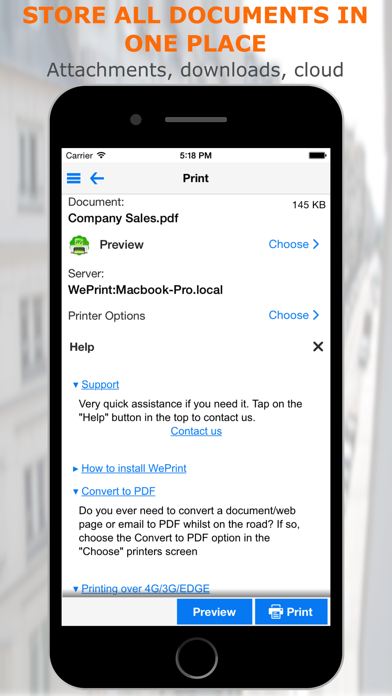
The Ultimate File Management, Transfer and Print solution for the iPhone. Print to ALL printers (Not just AirPrint Printers). View, store & print email, documents & PDFs, all major cloud servers, attachments, photos, contacts & web pages. Convert documents and images to PDF files. Also print from inside other app e.g. Safari, Photos & more
MDM Support - Support for Mobile Device Management multiple app configuration
- Chosen by Apple for "What's Hot" on the App Store
- Featured on the Discovery Channel
MacWorld: "PrintCentral is much more than a printing utility-it is a veritable office center"
AppCraver: "This app will let you print basically anything from basically anywhere."
► Print …
Read the full description
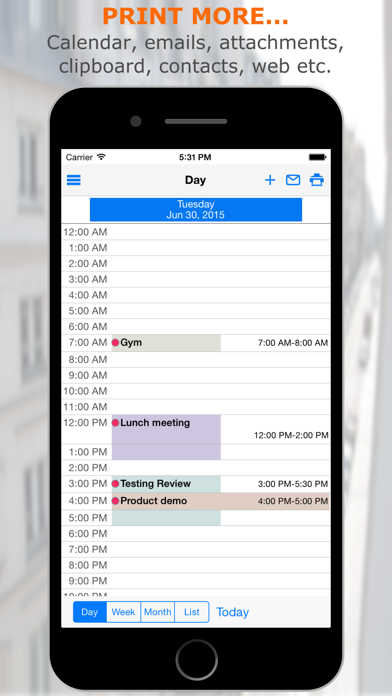
The Ultimate File Management, Transfer and Print solution for the iPhone. Print to ALL printers (Not just AirPrint Printers). View, store & print email, documents & PDFs, all major cloud servers, attachments, photos, contacts & web pages. Convert documents and images to PDF files. Also print from inside other app e.g. Safari, Photos & more MDM Support - Support for Mobile Device Management multiple app configuration - Chosen by Apple for "What's Hot" on the App Store - Featured on the Discovery Channel MacWorld: "PrintCentral is much more than a printing utility-it is a veritable office center" AppCraver: "This app will let you print basically anything from basically anywhere." ► Print ALL content to ALL Printers • Print direct to most existing WiFi or shared printers, or use our free printer/file sharing Mac/PC WePrint software for ALL printers. • Print to all AirPrint, non-AirPrint & network shared printers • Print files & other content from other apps • Print almost anything from your Mac to your iPhone as a PDF file • Print Preview and print page selection • Print remotely via mobile data or WiFi • Choose from a large range of printing options. Copies, Duplex, Grayscale, Image sizes, Page Range, Paper Size, Margins ... • Save web pages, documents etc. as PDF files • Bluetooth & Mobile printing using many Brother & Zebra mobile printers. e.g. Brother PJ-673, Zebra iMZ 220 ... • USB and other printers can be used via free print server software on your Mac/PC ► Complete File & Cloud Server Management/Transfer/Conversion • The most advanced File Management app available for the iPhone • Combine all of your Cloud Servers together to Transfer Files between them and other devices • iCloud, Dropbox, Evernote, Box, FTP, OneDrive, ShareFile, SugarSync, Transporter, WebDAV & More • Print, Send or fetch files from Other Apps to store centrally • Secure with an App Password or Finger Touch ID • Advanced search to find files on local and cloud servers • Integration with the global device Spotlight Search • Zip multiple files to send via email or save to a Cloud Server ► Apple Watch • Print Images and Photos straight from your Apple Watch • Print from all of your Cloud Servers • Browse all of your photo albums without syncing beforehand ► WiFi Hard Drive • Mount your iPhone as a network server on your Mac or PC for quick file transfer • Send and fetch files from your iPhone to your Mac or PC or Network server • Drag and drop documents & files between devices ► Transfer Files and Content to computers and other devices • Send content from other apps to other devices • Use the built in Bluetooth or WiFi transfer features to quickly and simply send files to another iPad, iPhone, Mac or PC • Transfer files via WiFi if available, or instantly with Bluetooth • Copy text or an image from a Web Page and send to another device with a single tap • Send a phone number, address, photo or other content quickly to a friend • Drag and drop to move files to other devices ► Emails - Print, Attach files, Save and PDF Convert • Print emails and attachments • Attach multiple files and images to new emails • Supports virtually all email accounts • Send Cloud and other files as attachments • Save attachments for archiving or emailing ► Complete Calendar Printing • View and Print by Day/Week/Month • Choose which calendars to display and print • Email your calendar views as PDFs • Print event maps and directions ► Print and Save Web Pages • Print from Safari • Copy web and email content from apps to print or convert to PDF • Save downloaded files from web pages for archiving or emailing • Send web pages as PDF email attachments ► Photos and Image File Sharing and Transfer • Move Image/Video Files to your Photo Album • Move Photos & Image Files to and from your Cloud servers, Mac/PC or another iPad/iPhone • Print Photos in multiple sizes ► Contacts • Search & select multiple contacts to print • View all emails for each contact
Installs since 29 Aug 2026
Apple does not publish download counts. Estimates are in testing.
Estimated store revenue Estimated Beta
App Store, worldwide, monthly rate from the last 15 chart days to 22 Nov 2026
Below the top 100 grossing apps in the markets we calibrate. In the United States that usually means under about $6.4M a month. App Store purchases and subscriptions only, before Apple's 15 to 30% fee. Ads and web payments are not included.
Ratings
308 ratings, 308 reviews
No rating breakdown published for this app.
Recent reviews
Latest public reviews from the store
- 2 Mar 2024
Cannot find a Print button
I have not been able to use this App because I cannot find a Print button! Trying to solve this issue through the Help option is very difficult, there’s are hundreds of options to choose from..! None solved my issue. My wireless printer is not connecting to the App so I downloaded WePrint to my MacBook Air. This did not help because as I said I don’t find a Print Button!
- 15 Jan 2023
It really works!
I have an older iPhone X and a Brother MFC-9970CDW laser printer (purchased about 2010, so 13 year old now). I needed to print an image someone sent me by text. So I saved image to my photos. THIS NEXT BIT IS IMPORTANT. Open up the PCL Pro app in iPhone Settings and make sure to selected either All or specify selected photos. THIS NEXT BIT IS IMPORTANT TOO. Then go to the PCL Pro app and select the Brother laser printer which MUST be on the SAME WiFi network as the iPhone. I used the “PS” option because that printed the rainbow 🌈 test page correctly. Select the image you want to print then click the printer icon. It printed beautifully!! I know the UX / UX is clunky, but it does really allow printing from an iOS device without AirPrint
- 17 Apr 2022
It Works!
One of the problems of using an iPhone to research things on the web is once you have the perfect item, if you need to print it, or for me, create a PDF and save it, few good options exist. If Apple calls up the Adobe app as an option, that works well, but more often than not, Adobe’s offerings for iPhone are not given. This was my motivation to try Print Central Pro. I first used the original app, PCL Pro, and recently migrated to the updated version. Both are excellent conversations to PDFs, with the upgrade ( so far) having no glitches that would occasionally occur with the previous version. I have not tried printing directly from this app. I simply convert everything I Wand to PDF, save to the cloud, then print these from my desktop when convenient. In short, converting web pages to PDFs works beautifully, but I don’t need the other options.
- 11 May 2017
Reliable and Intuitive
PCL Pro delivers a solid solution for printing on the go. I mostly print images of documents with the app. There isn't always an option to print an attachment of an email to PCL Pro. But I may have an earlier version of the app on my iPad. Nonetheless, the printer options are extensive, and the preview feature quite helpful. Highly recommend this app!
What reviewers bring up
Topics mentioned in the latest 8 reviews, by how many reviews mention them
Liked in good reviews (3 reviews)
- printing 3
- pcl pro 3
- option 3
- beautifully 2
- printer 2
Raised in bad reviews (4 reviews)
- print 4
- purchased 2
- apple 2
- try 2
Top chart positions
Latest App Store chart ranks by country, last 10 days
- Countries ranked
- 50 of 50
- Best rank
- #6
- Top 10 placements
- 2
- of 53 chart placements
- Average rank
- #31.8
Best countries on App Store
- 🇿🇦 South Africa · Top paid, Business#6
- 🇩🇪 Germany · Top paid, Business#8
- 🇻🇳 Vietnam · Top paid, Business#17
- 🇫🇮 Finland · Top paid, Business#21
- 🇳🇿 New Zealand · Top paid, Business#21
- 🇵🇱 Poland · Top paid, Business#21
| Country | Chart | Category | Rank | Best (10 days) | Date |
|---|---|---|---|---|---|
| 🇿🇦 South Africa | Top paid | Business | #6 | #3 | 22 Nov 2026 |
| 🇩🇪 Germany | Top paid | Business | #8 | #7 | 22 Nov 2026 |
| 🇻🇳 Vietnam | Top paid | Business | #17 | #17 | 22 Nov 2026 |
| 🇫🇮 Finland | Top paid | Business | #21 | #21 | 22 Nov 2026 |
| 🇳🇿 New Zealand | Top paid | Business | #21 | #1 | 22 Nov 2026 |
| 🇵🇱 Poland | Top paid | Business | #21 | #21 | 22 Nov 2026 |
| 🇧🇪 Belgium | Top paid | Business | #22 | #21 | 22 Nov 2026 |
| 🇹🇭 Thailand | Top paid | Business | #22 | #22 | 22 Nov 2026 |
| 🇸🇪 Sweden | Top paid | Business | #23 | #23 | 22 Nov 2026 |
| 🇬🇷 Greece | Top paid | Business | #23 | #22 | 22 Nov 2026 |
PrintCentral Pro for iPhone history
Release, install milestones, listing and store changes
- First released on the store 14 Apr 2011
Update frequency
How often PrintCentral Pro for iPhone ships a new version, month by month
2 updates in the last 12 months. About as often as similar apps, which shipped a median of 2 updates in the same year.
Recent versions
Current version 6.0.6
- Version 6.0.63 Nov 2026
• Fixed an issue converting PDF files • Adding images to an email now uses the image name from the Photos App Support our hard working team - support regular updates and new features with a quick review on the App Store, thanks!
- Version 6.0.329 Apr 2026
Fixed an occasional problem with full screen web pages Support our hard working team - support regular updates and new features with a quick review on the App Store, thanks!
Listing keywords
Words and phrases PrintCentral Pro for iPhone repeats most in its store listing
Top phrases: cloud servers (5), web pages (5), mac or pc (3), mac pc (3), printers print (3).
Highlighted words also appear in the title. Counts cover the title, short description and description.
Compliance
What the listing and the app package show
- Store status
- Live
- Upkeep
- Updated 3 Nov 2026
- Age rating
- 17+
Apps like PrintCentral Pro for iPhone
 JBDev MobileJB Developers, Inc.★ 4.51
 Brother Pro Label ToolBrother Industries, LTD.★ 4.54
 Tecoloco.comTecoloco.com S.A.★ 4.69
 АЗС ЛУКОЙЛ - топливо, бензинООО "ЛУКОЙЛ-Интер-Кард"★ 4.53
 Bonsai - Track Time & Get PaidBonsai Technologies Inc.★ 4.3
 CDK Modern Retail CRMElead1One★ 2.16
 Baltimore Business JournalAmerican City Business Journals★ 4.76
 Bolt Food CourierBOLT TECHNOLOGY OU★ 4.5
 Photo Translator - Scanner AppMilan Unjiya★ 4.28
PrintCentral Pro for iPhone: questions and answers
Who makes PrintCentral Pro for iPhone?
PrintCentral Pro for iPhone is published by EuroSmartz Ltd.
When was PrintCentral Pro for iPhone last updated?
The latest version (6.0.6) was released on 3 Nov 2026.
Is PrintCentral Pro for iPhone free?
No. PrintCentral Pro for iPhone is a paid app priced at $4.99.
Is PrintCentral Pro for iPhone still available?
Yes. PrintCentral Pro for iPhone is live on App Store as of 21 Nov 2026.
Track PrintCentral Pro for iPhone and its competitors
Watch any app for new versions, rating drops, chart moves and removals. Free plan, no card.