
- Installs
- —
- Apple does not publish download counts
- Rating
- 2.82
- Ratings
- 11
- 11 reviews
- Version
- 5.2.3
- Updated 24 Mar 2023
- Released
- 12 Dec 2013
- Tracked since 10 May 2026
- Size
- 32 MB
- Needs 15.0
Screenshots



About Receipts - Expense Tracker
The description on the store listing
*** Featured by Apple in Taxes & Receipts collection ***
Track your personal and business income/expenses (including mileage) with Receipts. Receipts is the most customizable and powerful expense tracking app available. Create budgets, accounts, categories, filters, and nine different types of custom receipt fields. Receipts helps you save time when submitting expense reports and during tax season.
Add new receipts quickly using the autofill feature. Capture photos, add drawings, record voice memos, and attach files from other apps. Receipt totals may be entered in any currency and are instantly converted to your home currency. Create sophisticated filters based on multiple receipt fields …
Read the full description
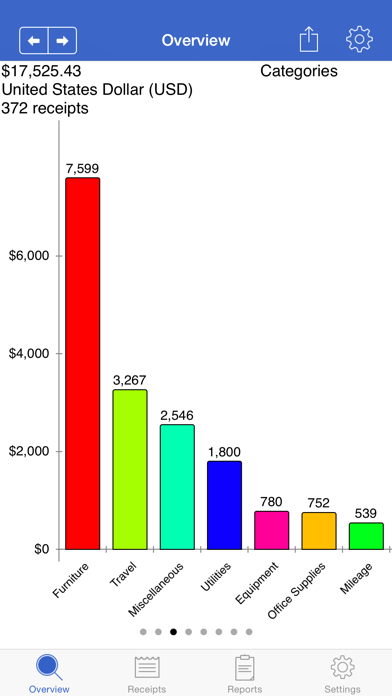
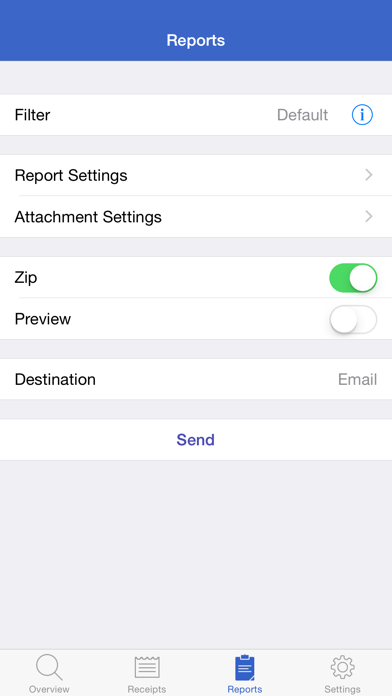
*** Featured by Apple in Taxes & Receipts collection *** Track your personal and business income/expenses (including mileage) with Receipts. Receipts is the most customizable and powerful expense tracking app available. Create budgets, accounts, categories, filters, and nine different types of custom receipt fields. Receipts helps you save time when submitting expense reports and during tax season. Add new receipts quickly using the autofill feature. Capture photos, add drawings, record voice memos, and attach files from other apps. Receipt totals may be entered in any currency and are instantly converted to your home currency. Create sophisticated filters based on multiple receipt fields to quickly find your receipts. Browse through graphs to keep track of income and spending. See how much money is spent over time and by account, category, and currency. Generate Excel, PDF, HTML, and CSV reports with attachments. Optionally embed photos and drawings in PDF reports. Specify report names and add custom headers. Select which receipt fields to include and sort/group receipts by any field. Share reports using a variety of options including Box, CloudApp, Dropbox, Evernote, and Google Drive. Keep track of business, family, or group income/expenses by syncing to the cloud. Enable automatic sync support to keep multiple devices up to date. Import and export receipts (CSV) with attachments to multiple destinations. Overview: - pie and bar graphs for accounts, categories, units, spending over time, custom currency fields, and income/expenses - email, print, and open graphs in other apps Receipts: - add income, expense, or mileage receipts - add receipts in any currency and set account/home currency totals - use autofill to populate new receipts based on previous receipts - add repeating receipts with interval and end date - attach photos, drawings, voice memos, and other files to receipts - rotate, scale, crop, and adjust brightness, contrast, and saturation for receipt photos Reports: - generate Excel, PDF, CSV, and HTML reports with attachments - add custom report headers - select report file names and report names - sort and group report receipts by any field - specify which fields to include and their order - option to embed photos and drawings in PDF reports (1, 2, or 4 per page) - overlay receipt fields on photos and drawings - include links to file attachments (Excel and HTML) - zip report and attachment files - preview report before sending - send reports via email, iTunes File Sharing, WiFi, another app, print, iCloud, Box, CloudApp, Dropbox, Evernote, and Google Drive Settings: - add accounts to manage groups of receipts - use budgets to keep track of spending - create categories and subcategories - select account and category icons (over 450 included) and a tint colour - custom receipt fields including currency, date, list, number, percent, percent total, switch, tags, and text types - create receipt filters using any combination of fields - notifications remind you to add receipts, save backups, and create reports - passcode for keeping financial data secure Data: - keep multiple devices in sync (requires Box, Dropbox, or Google Drive account) - import and export receipts (CSV) with attachments - backup/restore data and settings Note: Receipts is free but limited to 10 receipts. Purchase an in-app upgrade to Pro for unlimited receipts.
Installs
Apple does not publish download counts. Estimates are in testing.
We publish iOS estimates only after they pass a back-test against real numbers. Chart history below is measured.
Estimated store revenue Estimated Beta
App Store, worldwide, monthly rate from the last 13 chart days to 20 Nov 2026
Below the top 100 grossing apps in the markets we calibrate. In the United States that usually means under about $6.4M a month. App Store purchases and subscriptions only, before Apple's 15 to 30% fee. Ads and web payments are not included.
Ratings
11 ratings, 11 reviews
No rating breakdown published for this app.
Recent reviews
Latest public reviews from the store
No reviews in our sample for this app yet.
Top chart positions
Latest App Store chart ranks by country, last 10 days
Not in any tracked top chart in the last 10 days.
Receipts - Expense Tracker history
Release, install milestones, listing and store changes
- First released on the store 12 Dec 2013
Update frequency
How often Receipts - Expense Tracker ships a new version, month by month
0 updates in the last 12 months. Less often than most similar apps: they shipped a median of 2 updates in the same year.
Recent versions
Current version 5.2.3
- Version 5.2.324 Mar 2023
- update currency exchange rate API - update default currency exchange rates
Listing keywords
Words and phrases Receipts - Expense Tracker repeats most in its store listing
Top phrases: receipt fields (5), photos and drawings (3), google drive (3), income expenses (3), receipts add (3).
Highlighted words also appear in the title. Counts cover the title, short description and description.
Compliance
What the listing and the app package show
- Store status
- Live
- Upkeep
- No update since 24 Mar 2023
- Age rating
- 4+
Apps like Receipts - Expense Tracker
 BofA Point of Sale - MobileBank of America★ 3.88
 Purpl Digital WalletPurpl SAL★ 4.54
 Expedier: Send Money GloballyEXPEDIER INC★ 4.52
 Cenoa: Get Paid GloballyCENOA PTE. LTD.★ 4.62
 Texas Traditions MobileTexas Traditions Bank★ 4.74
 Minhas Finanças | PessoaisNimtech Tecnologia da Informacao LTDA★ 4.94
 SkyCashSkyCash★ 2.78
 FactSet 2.0 (legacy)FactSet Research Systems, Inc.★ 3.96
 My Funds - Portfolio TrackerQTech Solutions Pty Ltd★ 3.78
Receipts - Expense Tracker: questions and answers
Who makes Receipts - Expense Tracker?
Receipts - Expense Tracker is published by Tidal Pool Software.
When was Receipts - Expense Tracker last updated?
The latest version (5.2.3) was released on 24 Mar 2023.
Is Receipts - Expense Tracker free?
Yes. Receipts - Expense Tracker is free to download.
Is Receipts - Expense Tracker still available?
Yes. Receipts - Expense Tracker is live on App Store as of 1 Jul 2026.
Track Receipts - Expense Tracker and its competitors
Watch any app for new versions, rating drops, chart moves and removals. Free plan, no card.