
- Installs
- —
- Apple does not publish download counts
- Rating
- —
- Ratings
- —
- Version
- 1.7.7
- Updated 12 Jun 2023
- Released
- 9 Feb 2018
- Tracked since 10 May 2026
- Size
- 8 MB
- Needs 10.13
Also on App Store: Record it! :: Screen Recorder (458K ratings), Record It: Screen Recorder
Screenshots


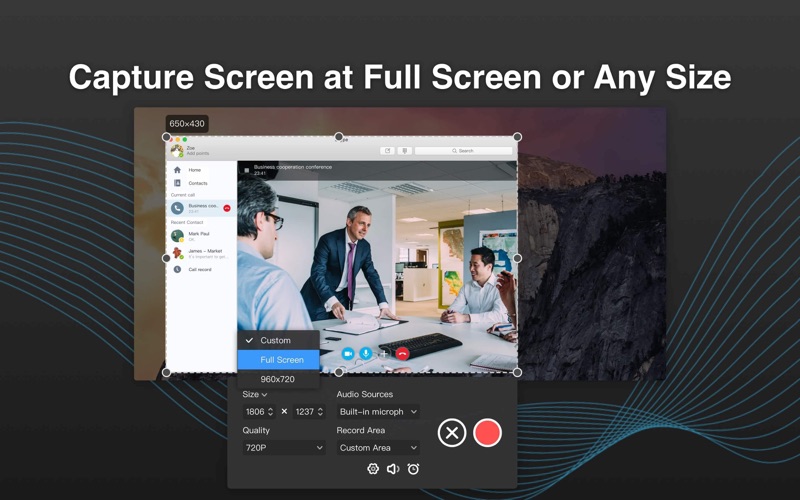


About Record It - Screen Recorder
The description on the store listing
Record It is a light, practical and professional application that performs well in recording screen and sound activity. The tool enables you to capture everything that happens on your screen as video with great quality. It provides all the elements needed to create professional-looking product demonstrations of software applications, record online video, capture amazing game tricks, ppt and your images slideshows, create vivid tutorials, iPhone simulator and etc. Meanwhile, it records your desktop and cursor movements along with sound from your system or microphone. Record It HD is very useful to demo. It mirrors and records your iphone and ipad screen. it also supports Touchbar to ease …
Read the full description
Record It is a light, practical and professional application that performs well in recording screen and sound activity. The tool enables you to capture everything that happens on your screen as video with great quality. It provides all the elements needed to create professional-looking product demonstrations of software applications, record online video, capture amazing game tricks, ppt and your images slideshows, create vivid tutorials, iPhone simulator and etc. Meanwhile, it records your desktop and cursor movements along with sound from your system or microphone. Record It HD is very useful to demo. It mirrors and records your iphone and ipad screen. it also supports Touchbar to ease your operation. With Record It, you can: - Create demonstration videos for any software program - Record the reproduced step of problem with your computer so you can show it to technical support people - Record iphone/ipad screen and mirror iOS video via WiFi - Create video tutorials for school or college class - Record new tricks and techniques you discover before you forget them - Make YouTube Videos with Logitech Webcam - Record important business meetings. - Record game commentary videos. Features: - Record your video at full screen or custom area(partial screen or a specific window) - Record the audio with computer audio, online audio, system build-in microphone, or audio input device - Record a single window with mouse movements whether it moves or being covered (Pro). - Rich & Easy-to-use Annotation Tools: Rectangle,Oval,Text Box,Highlight,Pen,Line,Arrow, etc. Create visual guides or product presentations Easily! - Schedule Recording: Set the start time and recording length in advance and the recording will start/stop automatically.(Pro) - Trim video: One-click to trim Unwanted clip.(Pro) - Shortcut Setting: ⌘1: quick start and stop recording, ⌘2: pause and resume recording,⌘3: show or hide annotation effects, and more. - Record the screen as high quality video(720P, 1080P and 4k), and choose the size of the recording video (High,Medium,Low)(Pro) - Support customizing default audio/video storage path - One click to complete recording - Record the screen, record by build-in Camera and system audio (to record system audio please download the audio driver RecordItAudioDevice first) - Export video at a very fast speed as GIF or MP4 - It enables you to record iPhone and iPad screen and mirror iPhone and iPad video via WIFI.Say goodbye to USB wires(Pro) - You can always record certain window; Set video quality and choose audio device by your request - With no watermarks - No recording time limiting restrictions (Pro).if you use the free version,there will be a 5-min limit in recording time after the first unlimited recording. - Support to choose cursor effect for a better presentation - Upgrade to remove ads If there is any feedback, problems or suggestions, please feel free to contact us via [email protected].
Installs
Apple does not publish download counts. Estimates are in testing.
We publish iOS estimates only after they pass a back-test against real numbers. Chart history below is measured.
Estimated store revenue Estimated Beta
App Store, worldwide, monthly rate from the last 13 chart days to 20 Nov 2026
Below the top 100 grossing apps in the markets we calibrate. In the United States that usually means under about $6.4M a month. App Store purchases and subscriptions only, before Apple's 15 to 30% fee. Ads and web payments are not included.
Ratings
No rating breakdown published for this app.
Recent reviews
Latest public reviews from the store
No reviews in our sample for this app yet.
Top chart positions
Latest App Store chart ranks by country, last 10 days
Not in any tracked top chart in the last 10 days.
Record It - Screen Recorder history
Release, install milestones, listing and store changes
- First released on the store 9 Feb 2018
Recent versions
Current version 1.7.7
- Version 1.7.712 Jun 2023
New update! - Record It helps you to capture any activities on your Mac screen with just one click. Light but Powerful! - Bug fixes to improve stability and optimize performance. Need any help? Please drop a line at [email protected].
Listing keywords
Words and phrases Record It - Screen Recorder repeats most in its store listing
Top phrases: iphone and ipad (3), ipad screen (3), record the screen (2), screen and mirror (2), video via wifi (2).
Highlighted words also appear in the title. Counts cover the title, short description and description.
Compliance
What the listing and the app package show
- Store status
- Live
- Upkeep
- No update since 12 Jun 2023
- Age rating
- 4+
Apps like Record It - Screen Recorder
 Super VPN: Fast Private ProxyGeek Incorporated★ 4.4
 Hubtel RetailerHubtel Limited★ 4.32
 Monthly Calendar 2022 - CalistOmoboto LLC★ 4.38
 Firstly: To-Do List & PlannerfocusCove LLC★ 4.7
 CBUS 311City of Columbus, Ohio★ 1.8
 Themes for Powerpoint - DesiGNGraphic Node★ 4.22
 iSiloDC & Co.★ 3.82
 Flashlight Pro [Multipurpose LED light]KAVAPOINT★ 3.88
 WiPryOscium LLC★ 2.68
Record It - Screen Recorder: questions and answers
Who makes Record It - Screen Recorder?
Record It - Screen Recorder is published by Build to Connect, Inc..
When was Record It - Screen Recorder last updated?
The latest version (1.7.7) was released on 12 Jun 2023.
Is Record It - Screen Recorder free?
Yes. Record It - Screen Recorder is free to download.
Is Record It - Screen Recorder still available?
Yes. Record It - Screen Recorder is live on App Store as of 10 May 2026.
Track Record It - Screen Recorder and its competitors
Watch any app for new versions, rating drops, chart moves and removals. Free plan, no card.