
- Installs
- —
- Apple does not publish download counts
- Rating
- 4.25
- Ratings
- 4
- 4 reviews
- Version
- 1.5
- Updated 18 Jun 2026
- Released
- 10 Sep 2024
- Tracked since 10 May 2026
- Size
- 102 MB
- Needs 16.1
Also on Google Play: Remote PLC
Screenshots



About Remote PLC
The description on the store listing
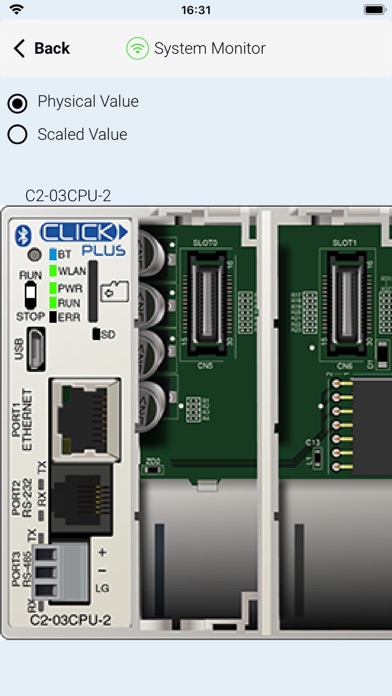
Remote PLC is an application for real time monitoring and control for the CLICK and CLICK PLUS Programmable Control product lines offered by Automationdirect.com. For this app to function as designed, a CLICK PLC with ethernet or Bluetooth support is required.
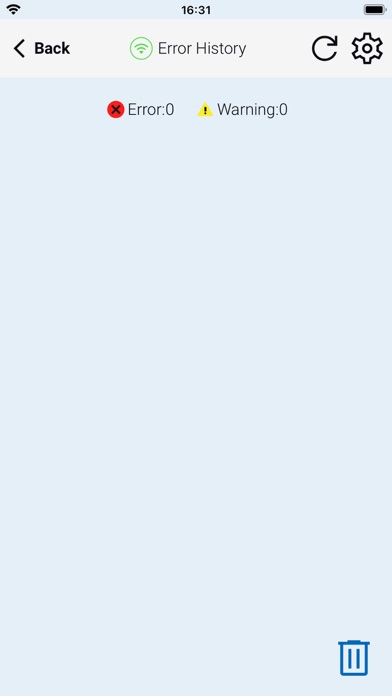
The Remote PLC app offers a quick method of connecting to a PLC to view and edit values in the PLC registers, as well as check the PLC project information, including the Error logs.
Main Features:
-Multiple Level User Accounts. Once connected, the authorized users can view and edit Monitor Windows based on their permission levels setup in the project file.
-Custom Monitor windows can be created and stored to the PLC using the CLICK …
Read the full description
Remote PLC is an application for real time monitoring and control for the CLICK and CLICK PLUS Programmable Control product lines offered by Automationdirect.com. For this app to function as designed, a CLICK PLC with ethernet or Bluetooth support is required. The Remote PLC app offers a quick method of connecting to a PLC to view and edit values in the PLC registers, as well as check the PLC project information, including the Error logs. Main Features: -Multiple Level User Accounts. Once connected, the authorized users can view and edit Monitor Windows based on their permission levels setup in the project file. -Custom Monitor windows can be created and stored to the PLC using the CLICK Programming software version 3.60 or later. Monitor Window access can be based on the user permissions. - Monitor and edit designated discrete and integer values within the PLC. Timer / Counter values can easily be viewed and edited. - PLC type and status, such as PLC Error Logs, scan times (Min and Max), as well as Project file information. Requirements: • All current CLICK and CLICK PLUS PLCs with ethernet/Bluetooth support the Remote PLC app. • The PLC must be using firmware Version 3.60 or later. • CLICK Programming Software Version 3.60 or later is required to program and configure the PLC to support the Remote PLC App. • The CPU must have compatible network settings with the device running the Remote PLC App.
Installs
Apple does not publish download counts. Estimates are in testing.
We publish iOS estimates only after they pass a back-test against real numbers. Chart history below is measured.
Estimated store revenue Estimated Beta
App Store, worldwide, monthly rate from the last 13 chart days to 20 Nov 2026
Below the top 100 grossing apps in the markets we calibrate. In the United States that usually means under about $6.4M a month. App Store purchases and subscriptions only, before Apple's 15 to 30% fee. Ads and web payments are not included.
Ratings
4 ratings, 4 reviews
No rating breakdown published for this app.
Recent reviews
Latest public reviews from the store
No reviews in our sample for this app yet.
Top chart positions
Latest App Store chart ranks by country, last 10 days
Not in any tracked top chart in the last 10 days.
Remote PLC history
Release, install milestones, listing and store changes
- First released on the store 10 Sep 2024
Update frequency
How often Remote PLC ships a new version, month by month
2 updates in the last 12 months. More often than most similar apps: they shipped a median of 0 updates in the same year.
Recent versions
Current version 1.5
- Version 1.518 Jun 2026
-Added support for Biometric Authentication sign-in. -Updated app to run on iOS 26. -Fixed garbled values displayed when typing in TXT1–TXT128. -Fixed entered value disappearing after writing in Edit Mode (BLE/Wi-Fi). -Fixed app getting stuck on "Reconnecting" when minimized and resumed repeatedly. -Fixed app crash when pressing Refresh repeatedly on Browse with BLE screen.
- Version V1.3.123 Jan 2026
Updated app’s age rating in accordance with Apple App Store guidelines
Listing keywords
Words and phrases Remote PLC repeats most in its store listing
Top phrases: remote plc (6), version or later (3), click and click (2), click programming software (2), programming software version (2).
Highlighted words also appear in the title. Counts cover the title, short description and description.
Compliance
What the listing and the app package show
- Store status
- Live
- Upkeep
- Updated 18 Jun 2026
- Age rating
- 4+
Apps like Remote PLC
 Super VPN: Fast Private ProxyGeek Incorporated★ 4.4
 Hubtel RetailerHubtel Limited★ 4.32
 Monthly Calendar 2022 - CalistOmoboto LLC★ 4.38
 Firstly: To-Do List & PlannerfocusCove LLC★ 4.7
 CBUS 311City of Columbus, Ohio★ 1.8
 Themes for Powerpoint - DesiGNGraphic Node★ 4.22
 iSiloDC & Co.★ 3.82
 Flashlight Pro [Multipurpose LED light]KAVAPOINT★ 3.88
 WiPryOscium LLC★ 2.68
Remote PLC: questions and answers
Who makes Remote PLC?
Remote PLC is published by Automationdirect.com.
When was Remote PLC last updated?
The latest version (1.5) was released on 18 Jun 2026.
Is Remote PLC free?
Yes. Remote PLC is free to download.
Is Remote PLC still available?
Yes. Remote PLC is live on App Store as of 1 Jul 2026.
Track Remote PLC and its competitors
Watch any app for new versions, rating drops, chart moves and removals. Free plan, no card.