
Remote PLC
Monitor and edit designated registers in the CLICK PLC.
- Installs
- 5.76K
- Measured
- Rating
- —
- Ratings
- —
- Version
- Varies with device
- Updated 15 Oct 2025
- Released
- 3 Sep 2024
- Tracked since 12 May 2026
- Size
- —
Also on App Store: Remote PLC (4 ratings)
Screenshots


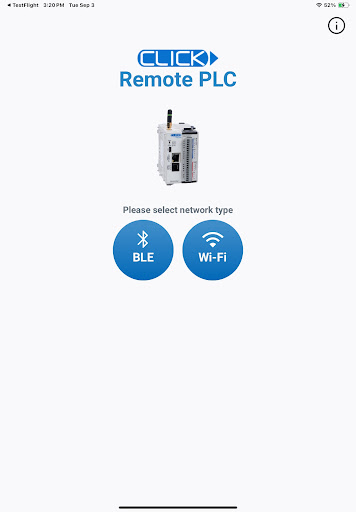

About Remote PLC
The description on the store listing
Remote PLC is an application for real time monitoring and control for the CLICK and CLICK PLUS Programmable Control product lines offered by Automationdirect.com. For this app to function as designed, a CLICK PLC with ethernet or Bluetooth support is required.
The Remote PLC app offers a quick method of connecting to a PLC to view and edit values in the PLC registers, as well as check the PLC project information, including the Error logs.
Main Features:
-Multiple Level User Accounts. Once connected, the authorized users can view and edit Monitor Windows based on their permission levels setup in the project file.
-Custom Monitor windows can be created and stored to the PLC using the …
Read the full description
Remote PLC is an application for real time monitoring and control for the CLICK and CLICK PLUS Programmable Control product lines offered by Automationdirect.com. For this app to function as designed, a CLICK PLC with ethernet or Bluetooth support is required. The Remote PLC app offers a quick method of connecting to a PLC to view and edit values in the PLC registers, as well as check the PLC project information, including the Error logs. Main Features: -Multiple Level User Accounts. Once connected, the authorized users can view and edit Monitor Windows based on their permission levels setup in the project file. -Custom Monitor windows can be created and stored to the PLC using the CLICK Programming software version 3.60 or later. Monitor Window access can be based on the user permissions. - Monitor and edit designated discrete and integer values within the PLC. Timer / Counter values can easily be viewed and edited. - PLC type and status, such as PLC Error Logs, scan times (Min and Max), as well as Project file information. Requirements: • All current CLICK and CLICK PLUS PLCs with ethernet/Bluetooth support the Remote PLC app. • The PLC must be using firmware Version 3.60 or later. • CLICK Programming Software Version 3.60 or later is required to program and configure the PLC to support the Remote PLC App. • The CPU must have compatible network settings with the device running the Remote PLC App.
Installs since 8 Nov 2026 Measured
Exact Google Play install counts, collected daily
Daily history starts once this app is in our daily install sample.
Ratings
- 5 ★0.0%
- 4 ★0.0%
- 3 ★0.0%
- 2 ★0.0%
- 1 ★0.0%
Recent reviews
Latest public reviews from the store
No reviews in our sample for this app yet.
Top chart positions
Latest Google Play chart ranks by country, last 10 days
Not in any tracked top chart in the last 10 days.
Remote PLC history
Release, install milestones, listing and store changes
- Reached 1,000+ installs 23 Dec 2024
- Reached 500+ installs 11 Nov 2024
- Reached 100+ installs 30 Sep 2024
- Reached 50+ installs 15 Sep 2024
- First released on the store 3 Sep 2024
Recent versions
Current version Varies with device
- Version 1.415 Oct 2025
- Version 1.331 Aug 2025
- Version 1.214 Jan 2025
Listing keywords
Words and phrases Remote PLC repeats most in its store listing
Top phrases: remote plc (6), version or later (3), click and click (2), click programming software (2), monitor and edit (2).
Highlighted words also appear in the title. Counts cover the title, short description and description.
Business model and tech
From the store listing and declared permissions
- Business model
- Free to download
- Sensitive access
- LocationNearby devices
18 permissions
0 special access, 5 sensitive, 13 standard
- Approximate locationSensitive
- Precise locationSensitive
- Connect to paired Bluetooth devicesBLUETOOTH_CONNECTSensitive
- Find nearby Bluetooth devicesBLUETOOTH_SCANSensitive
- Show notificationsPOST_NOTIFICATIONSSensitive
- Control the flashlightStandard
- Control vibrationStandard
- Use fingerprint or face unlockUSE_BIOMETRICStandard
- Use the fingerprint readerUSE_FINGERPRINTStandard
- Access Bluetooth settingsStandard
- Pair with Bluetooth devicesStandard
- Change network connectivityStandard
Compliance
What the listing and the app package show
- Store status
- Live
- Upkeep
- Updated 15 Oct 2025
- Registered in
- United States
- Privacy policy
- Linked on the listing
- Advertising
- No ads declared
- In-app purchases
- None declared
- Age rating
- Everyone
- Sensitive permissions
- 5 sensitive of 18
- Location access
- Yes, while in use
- Camera and microphone
- Neither
Apps like Remote PLC
영산강 안심 알림eICT융합소프트 & 스마트오더18.3K installs★ 4.0
JBLETRADOC Mobile10.3K installs★ 4.5
Two Point HeightOmega Centauri Software15.3K installs★ 2.22
Sheridan RecyclesCity of Sheridan634 installs★ 4.67
NAFNorges Automobil-Forbund200K installs★ 3.9
Ipsos Adria CAPIIpsos Serbia7.4K installs★ 3.9
Clock: Alarm Clock & TimerIntratech so36.1K installs★ 3.79
Süzme Sayaç HesaplamaNotsup30.3K installs★ 3.6
Cattle & Goat Record KeepingVetzKin10.3K installs★ 2.5
Remote PLC: questions and answers
How many downloads does Remote PLC have?
Remote PLC has 5,759 installs on Google Play, measured from the store's own count on 8 Nov 2026.
Who makes Remote PLC?
Remote PLC is published by Automationdirect.com, a developer based in US.
When was Remote PLC last updated?
The latest version (Varies with device) was released on 15 Oct 2025.
Is Remote PLC free?
Yes. Remote PLC is free to download.
Is Remote PLC still available?
Yes. Remote PLC is live on Google Play as of 8 Nov 2026.
Track Remote PLC and its competitors
Watch any app for new versions, rating drops, chart moves and removals. Free plan, no card.