
- Installs
- —
- Apple does not publish download counts
- Rating
- 4.27
- Ratings
- 5K
- 5K reviews
- Version
- 2.2
- Updated 12 May 2024
- Released
- 28 Nov 2013
- Tracked since 10 May 2026
- Size
- 3 MB
- Needs 12.0
Screenshots
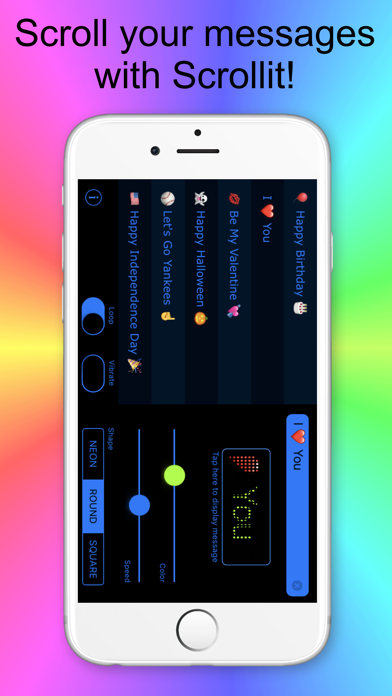


About Scrollit: display scrolling
The description on the store listing
We support Ukraine
ScrollIt turns your iPhone or iPod Touch into an L.E.D. message display board. ScrollIt will help you tell your friends, colleagues, or anyone something - when they can’t hear you: at a club, concert, class, meeting, lecture, or even a restaurant.
Just type your message and hit Display, and ScrollIt will scroll the message large enough for everyone around to see.
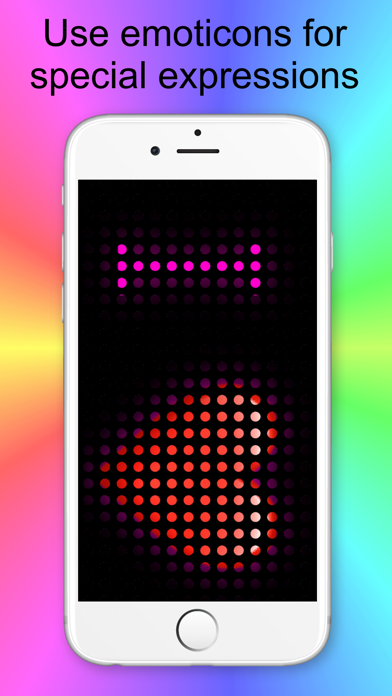
What adds to the fun is that ScrollIt offers easy-to-type emoticons right from the same keyboard. Make your text even more fun to watch!
The phone vibrates quietly to let you know when the message has finished. (Replaced with a short beep on iPod Touch and iPad.) The endless-loop option lets ScrollIt repeat …
Read the full description
We support Ukraine ScrollIt turns your iPhone or iPod Touch into an L.E.D. message display board. ScrollIt will help you tell your friends, colleagues, or anyone something - when they can’t hear you: at a club, concert, class, meeting, lecture, or even a restaurant. Just type your message and hit Display, and ScrollIt will scroll the message large enough for everyone around to see. What adds to the fun is that ScrollIt offers easy-to-type emoticons right from the same keyboard. Make your text even more fun to watch! The phone vibrates quietly to let you know when the message has finished. (Replaced with a short beep on iPod Touch and iPad.) The endless-loop option lets ScrollIt repeat your message indefinitely. Some of the reviews by ScrollIt customers: Great app 5-STARS by Benji897765 - Version 1.2 - Jun 6, 2014 Works well, easy to use interface. If you want an app for scroll texts, this is the one you want. Happy 5-STARS by SpaceSkunk - Version 1.2 - Jun 5, 2014 This app does everything I expected and my kids love it when I'm cheering for them. ScrollIt features: • Simple yet powerful design with no confusing buttons or switches • Emoticons from the same keyboard • Unlimited message length • Mini live preview for easy color and speed selection • Short vibration at the end of scrolling • Endless-loop option • Right-to-left display for Arabic or Hebrew • Three L.E.D. shapes: neon, round, and square • Recently-used message list with one-tap access Want to use hundreds more emoticons in ScrollIt? From your iPhone Settings App, choose General -> Keyboard -> Keyboards -> Add New Keyboard, and select Emoji from the list. In ScrollIt, tap the globe button at the bottom left of the keyboard to switch to Emoji and back. Use ScrollIt for: • Flirting: display messages to people at the disco, bar, or other crowded places. • Talk to your friends at school or college: send your visual message up to 50 feet across a classroom. • Cheer at a concert or sports event: that rock star or your favorite player deserves to know how you feel! • In the office: get rid of unwanted visitors without even talking to them. • If you can't or don't want to talk: you’re sick or in a bad mood. • Just to be cool: we guarantee you’ll be popular anywhere with ScrollIt! If this is not enough for you, you can try our ScrollIt 2X. ScrollIt 2X has more features and capabilities. We’re constantly improving ScrollIt, and we value our users’ opinions. If you have a problem with the app, please contact us via Support in the Info screen. Thank you.
Installs, last 30 days
Apple does not publish download counts. Estimates are in testing.
Estimated store revenue Estimated Beta
App Store, worldwide, monthly rate from the last 12 chart days to 19 Nov 2026
Below the top 100 grossing apps in the markets we calibrate. In the United States that usually means under about $6.4M a month. App Store purchases and subscriptions only, before Apple's 15 to 30% fee. Ads and web payments are not included.
Ratings
5,022 ratings, 5,022 reviews
No rating breakdown published for this app.
Recent reviews
Latest public reviews from the store
- 24 Sep 2020
Needs a few additional features to get 5 ⭐️
The app needs the following additional features for a 5 ⭐️ rating: 1. The ability to adjust the scrolling font size 2. Use the full width of the screen, not a narrow section of it. 3. Hide the devices clock, wifi, cellular, battery, etc. area and hide the swipe up bar at the bottom. All you should see is the scrolling text. The rest is distracting.
- 4 Aug 2018
Could Have Updated Instead Of a New App
I really think it's kind of messed up that the developer didn't just update this app with two lines of text space available. But, they instead released this new function, as a new app, for another $5. Gone are the days it seems where developers improved their programs by updating them with new features and not just patches. Now, they just release those new features a new app or as an in-app purchase to make double the money, woohoo! I get that adding new features takes time and resources. But, seriously, adding a second line really didn't deserve a new app except for getting people to pay you again for the same app with one new feature. Making money is great. I love capitalism. But, doing things this way is just sort distasteful in my opinion. I'm sure that developer would have all that reasons in the world to justify this action, they always do to defend new moneymaking ploys. But, as I said, I just find it distasteful. Yes, that's somewhat of a straw-man argument. I find it to be accurate, though. So, I cannot really articulate my feelings in any other way about this matter. I can afford to buy this new 2X version of ScrollIt if I wanted to do so. Yet, that in my mind, would
- 15 Aug 2015
More functions than other scrolling apps
I've tried a few other scrolling apps and deleted them after finding this one. I like the variety of fonts, colors, and speeds. Wish there were more "shapes" of text besides round, neon, and square. I use this app to post learning targets in school and I think the neon and square are not as easy for children to read. Good app overall.
- 25 Jul 2015
Cute & Easy
Update - added to my phone and once more a forced review. I guess if the keep wasting my time I have two more stars to pull. Does what is says it can do. Limited output style but makes a simple electronic signboard out of your device. It is as useful as you are creative in its use. A plus is its seems to work with other emoji keyboards if you have them running. A negative is this "required" review if you want to have a repeating scroll.
What reviewers bring up
Topics mentioned in the latest 8 reviews, by how many reviews mention them
Liked in good reviews (3 reviews)
- message 2
- screen 2
- color 2
- speed 2
- font 2
- text 2
- few 2
Raised in bad reviews (1 reviews)
No topic comes up twice.
Top chart positions
Latest App Store chart ranks by country, last 10 days
Not in any tracked top chart in the last 10 days.
Scrollit: display scrolling history
Release, install milestones, listing and store changes
- First released on the store 28 Nov 2013
Update frequency
How often Scrollit: display scrolling ships a new version, month by month
0 updates in the last 12 months. Less often than most similar apps: they shipped a median of 3 updates in the same year.
Recent versions
Current version 2.2
- Version 2.212 May 2024
Bug fixes
Listing keywords
Words and phrases Scrollit: display scrolling repeats most in its store listing
Top phrases: endless loop option (2), endless loop (2), ipod touch (2), loop option (2), scrollit 2x (2).
Highlighted words also appear in the title. Counts cover the title, short description and description.
Compliance
What the listing and the app package show
- Store status
- Live
- Upkeep
- No update since 12 May 2024
- Age rating
- 4+
Apps like Scrollit: display scrolling
 Power AutomateMicrosoft Corporation★ 4.73
 Central Maine PowerAVANGRID INC.★ 4.52
 Google AnalyticsGoogle★ 4.63
 Stessa: Smart Rental ManagerStessa, Inc.★ 4.8
 DC DMVGovernment of the District of Columbia★ 4.63
 AWS EventsAMZN Mobile LLC★ 4.59
 JustworksJustworks★ 4.85
 Business Card Maker, CreatorNirav Alagiya★ 4.72
 UniFi AccessUbiquiti Inc.★ 4.92
Scrollit: display scrolling: questions and answers
Who makes Scrollit: display scrolling?
Scrollit: display scrolling is published by AMAXIM APPS, INC.
When was Scrollit: display scrolling last updated?
The latest version (2.2) was released on 12 May 2024.
Is Scrollit: display scrolling free?
No. Scrollit: display scrolling is a paid app priced at $4.99.
Is Scrollit: display scrolling still available?
Yes. Scrollit: display scrolling is live on App Store as of 19 Nov 2026.
Track Scrollit: display scrolling and its competitors
Watch any app for new versions, rating drops, chart moves and removals. Free plan, no card.